Leaderboard
-

-

MarcelWRLD
MembersPoints246Posts -

SuperPyroManiac
Community TeamPoints1,071Posts -





Popular Content
Showing content with the highest reputation since 06/17/2025 in all areas
-
Policing Redefined
Lepoisson and 110 others reacted to MarcelWRLD for a file
111 points The new era of LSPDFR is here. After two years of development, it's here. Policing Redefined is a LSPDFR plugin similar to popular plugins such as Stop The Ped, Ultimate Backup by Bejoijo, LSPDFR+, or Arrest-Manager by Albo1125. It aims to provide an even more feature-rich and immersive experience to your LSPDFR Patrol, advancing ped and traffic stops as well as adding additional vehicle stops and on-foot traffic stops. And that is just a small portion of what PR (Policing Redefined) has to offer! Installation: Extract the contents of the downloaded Policing Redefined v[VERSION].zip archive. Drag-and-drop the contents of the "GTAV MAIN DIRECTORY" folder into your GTA 5 root directory. Read the "Get Started" guide on our site After installing your Settings/ folder will be empty, which is normal! Go on duty at least once: PR will generate them then. If you don't already have them, download and install these Requirements: RageNativeUI Damage Tracker Framework: For Developers: If you are a developer, you can read about PR and it's APIs here. Features: Policing Redefined has a ton of features which all cannot be listed here. However here is a rundown of the biggest: Ped Interaction: Custom questioning menu, field sobriety tests, Front/Back cuffing, citations, and more. Inventory Management: Store and bag evidence, test substances, replenish ammo, and more. Backup: Call police, fire, and EMS with a full RTS style management menu to assign tasks to each unit. Disclaimer, Please Read. First, this will be completely incompatible with Stop The Ped, Ultimate Backup, and Compulite, it is recommended you remove them for the smoothest experience. Second! This is a BETA. This means that you may encounter bugs, crashes, weird behaviors, etc. The mod itself works as intended. Any major breakages (e.g. the mod crashing on load), are likely due to user error. PR has been rigorously tested for the past year by various testers and content creators, with no major issues that have yet to be patched. Should you encounter any issues: Join our Discord, where we can help you solve any problems. Support will NOT be given via the comments. Showcases:111 points
 -
LSPDFR for GTA Enhanced now available for Insiders: a short update
killercopz and 85 others reacted to Cyan for a post in a topic
86 pointsStatus Updates LSPDFR for Enhanced We're very excited to announce that LSPDFR Enhanced, after months of development and testing, is now entering the next phase of the development process and is now available to our Insiders. We are deeply grateful to everyone in our staff team and closed testing community for their feedback and support that have brought us to this point. The current build is largely stable, though a handful of bugs remain and we are not yet feature complete with Legacy. Development is advancing quickly, and each new revision brings us closer to a fully polished release. Several community members have asked whether the Legacy edition will continue to receive attention. Both RAGEPluginHook and LSPDFR have been engineered to accommodate the Legacy and Enhanced branches side‑by‑side. With most of the heavy lifting complete, our goal is to roll out updates to both editions in parallel. As soon as we’ve smoothed out the last few wrinkles and made sure everything runs flawlessly, we can’t wait to roll out LSPDFR Enhanced to everyone. The new LCPDFR.com Work on the redesigned LCPDFR.com is progressing steadily. The site and its companion, RDR2Mods.com, run on the same underlying codebase. An early version of the community upgrade is already live on RDR2Mods.com, allowing us to gather real‑world feedback, refine new concepts, and further stabilize the platform before bringing the enhancements to LCPDFR.com. We thank you all for your patience and continued enthusiasm, and hope to share even more with you soon.86 points -
(ELS) Blaine County Sheriff's Office MEGA Pack (Addon)(R/B/W)
sajjadzainbh and 54 others reacted to Midwest Mods for a file
55 points BCSO Mega Pack Vehicle List 2010 Challenger (Traffic Unit) 2011 CVPI 2011 CVPI (Liberty) 2014 Charger 2014 FPIU 2016 Impala 2018 FPIU 2018 Charger 2018 Charger (K9 Unit) 2020 Tahoe 2020 FPIU 2020 Durango 2022 Mustang Mach-E 2023 RAM 1500 2023 F150 Police Responder 2024 Mustang GT Police Spec (Marked Traffic Unit) 2025 Tahoe 2025 Durango 2025 Durango (K9 Unit) 2025 F150 Police Responder 2025 RAM SSV Classic 2026 Tahoe Fully loaded interiors/ trunk equipment Working takedowns and alley lights This pack was in beta in my Discord for about 3 months and went through a ton of changes and ultimately this is what it's turned into. A melting pot of cars with similar but varying light setups. If that's your jam, here you go. UPDATE A slick top version of this pack is in production. Release date TBD. Stay tuned and join the Discord to track progress and get the inside scoop on all new things coming in 2026. That is also where you can find my Patreon. Have suggestions, ideas, or need to report a bug? https://discord.gg/VfEsXF5Qfe55 points
 -
SuperCallouts
Ghost376 and 48 others reacted to SuperPyroManiac for a file
49 points Any Issues, suggestions, or want to chat? Join my Discord server! Click Me! SuperCallouts is a plugin for LSPDFR to add more callouts. Currently adds 36 new callouts! With SuperCallouts I aim to add more unique callouts to LSPDFR with a uniform feel. I add both realistic and crazy new calls that will be played randomly. You are also able to disable and enable any features you choose. I recommend pairing this plugin with my other plugins DeadlyWeapons and SuperEvents to completely change how the game feels. *SWAT Related Callouts* (Dangerous!) FIB Reports known armed mafia members spotted at the casino. FIB Reports known armed mafia members spotted in Sandy Shores. FIB Raid mafia drug smugglers found at the harbor. Police Reports mafia planted large bomb in Los Santos. FIB Raid, wanted gang members spotted involved in a police officer murder. Sheriff under attack by a biker gang. *Realistic Callouts* Traffic report, stolen super car spotted. Traffic report, vehicle belonging to a possible kidnapper spotted. 911 call of someone being held at gunpoint. 911 call of a car accident. 911 call of someone being attacked by an animal. 911 call of a hit and run. 911 call of an alien sighting. 911 call of a suspicious car. 911 call of a vehicle fire. 911 call of a police impersonator. 911 call of someone walking around with a gun. 911 call of a car blocking traffic! 911 call of an illegally parked car! 911 call of a knife attack at the subway! 911 call of a drunk driver. 911 call of someone not breathing. 911 call hang-up with no details. 911 call of someone trespassing. 911 call of a stolen construction vehicle. 911 call of someone vandalizing property. 911 call of someone wandering outside naked. 911 call of a fight in the street. Correction Department Backup, multiple prisoners escaping. Correction Department Backup, prisoner escaping transport. Police Backup, officer under fire. Police Backup, manhunt for a fugitive. Police Backup, medical supplies theft. Police Backup, stolen police vehicle. Police Backup, officer not responding. EMS requests police escort. Many of the callouts have multiple outcomes! I try to make sure they are not too repetitive! Any Issues, suggestions, or want to chat? Join my Discord server! Click Me! Policing Redefined is recommended for this plugin! Superior StopThePed and UltimateBackup replacement. Some callouts or features may be disabled without it.49 points
 -
Emergency Lighting System
JeffreyK23 and 43 others reacted to Lt.Caine for a file
44 points Emergency Lighting System V brings one of the most popular modifications ever created for a GTA title (ELS-IV) to Grand Theft Auto V. ELS-V will add a whole new dimension to your patrols. With a fresh look and many more features than its predecessor, it's also sure to brighten up your game and satisfy the emergency lighting enthusiast in anyone. DESCRIPTION − ELS provides an alternate and incredibly in-depth way of controlling emergency vehicle lights and sounds. − ELS requires vehicle models specifically designed to make use of its features. − ELS includes over 200 unique lighting patterns scattered across 4 light groups and lighting formats. NOTES − Please consult the ELS USER GUIDE and other provided documentation prior to using ELS. − As of V1.00 ELS is not compatible with any form of multiplayer. − A visual enhancement mod is recommended to improve the appearance of ELS lights in game. BASIC INSTALLATION − A GTAV ScriptHook must be installed for any .asi modification to work. The original may be found HERE. − Using script modifications in GTA Online can result in a temporary or permanent ban from the service. − 1. Place ELS.asi, ELS.ini, the ELS folder, and AdvancedHookV.dll inside your main GTA V game directory. − 2. Download and install (a) pro-ELS vehicle model(s). − 3. Start your game. CREDITS − ELS is coded by Lt.Caine. − AdvancedHookV and vehicle damage feature coded by LMS. − ELS-V testing team (alphabetical order): Albo1125, BxBugs123, GravelRoadCop, PoliceWag, and Prophet.44 points
 -
37 points
 Welcome to Grammar Police! This plugin began as a replacement for VocalDispatch but has grown into much more! Speech Recognition Issue commands to the dispatcher using your microphone Includes a "hold to talk" feature that simulates a real radio Supports StopThePed and UltimateBackup out of the box Contains multiple sets of "10 codes" or customize yourself Request backup, run plate checks, accept callouts and more! Non-Verbal Interactions Use an on-screen radio to interact with the dispatcher Also includes a Officer Plugin Status style menu system Both systems are fully customizable! Language Support English French German Spanish Technical Support Discord Server: https://discord.gg/AuJCUag Unofficial LSPDFR Support Server: https://discord.gg/mJMKAd5 Tutorial Videos Installation and Configuration: https://www.youtube.com/watch?v=dogzftjB3ZE Creating/Modifying XML Files: https://www.youtube.com/watch?v=H1_wwvzK9hc37 points
 -
686 Callouts
JeffreyK23 and 33 others reacted to Charlie686 for a file
34 points 11/01/26 - 686 Callouts has updated to introduce Custom Pursuits! You can now create your own pursuit callouts (customising pursuit speeds, vehicles, weapons & more). Read the Custom Pursuit section of the file description for more information. 686 Callouts v2.1.2.0 Designed with stability, replayability, and configurability in mind. 686 Callouts is compatible with Stop The Ped, Callout Interface & ExternalPoliceComputer. Join 10,000+ people in LSPDFR-TS, the home of 686 Callouts. Receive support, provide suggestions & use our automatic log reader. 686 Callouts with AI Voices & 8 exclusive callouts (including SWAT RAID) is now available on Ko-Fi for £2.99! Standout Features 23 Callouts. Offensive Weapon Reported | You are given a precise description of the suspect, and you need to track them down. Photography of a Police Station | Inspired by the videos online. Large Vehicle Pursuit | For those who prefer pursuits that don't exceed 100 MPH. Stolen Pedal Bike | A stolen bike has been spotted, and you need to apprehend the rider. Vehicle on Sidewalk | You need to get the sidewalk cleared, but maybe this isn't just an innocent mistake. Disorientated Individual | Camera operators have raised concerns over an individual. Suspected Stalker | First, establish the situation with the victim, then speak to the suspect. Stolen Item | After conversing with the victim, you'll be given access to a GPS tracker to track down the suspect. Fare Dodger | Station staff have contacted you about a fare dodger, you need to question them. Vehicle Fire | You've received a call from an informant, and need to prevent someone innocent coming in harms way. Kidnapping | A taxi slant at a Kidnapping call. With 4 outcomes, it will keep you on your toes. Solicitation | Inspired by Assorted Callouts, there are 5 outcomes where you might need to go incognito. Subway Disturbance | A witness reports some concerning information, keep the subway violence-free! Car Bomb | Defuse the bomb & hope that it doesn't attempt an explosive getaway. Protest | Face off an angry crowd of both protestors & members of the public. Aircraft In Distress | An aircraft needs to make an emergency landing - meet it at the runway. With 8 outcomes, who knows why? Alleyway Robbery | Inspired by More Robberies, this is a simple callout taking advantage of hidden locations across Los Santos. High Risk Escort | Inspired by Protection Squad, lead a convoy between Mission Row and Bolingbroke Penitentiary. Attempted Break-In | A difficult callout - locate the suspicious items around a property to see if you can crack the case. Terrorist Attack | Experience a shootout like never before! Can you stop the danger to the public before they're all dead? Lane Closure | Close a lane of traffic to allow the mechanic to attempt repairing a vehicle. VIP Evacuation | Attackers have taken a VIP hostage! Infiltrate the area and lead an extraction. Area Surveillance | Head to an area and provide a police presence. Keep an eye on your surroundings! Translation System. 686 Callouts features the most in-depth and advanced translation system found in any callout pack, ever. Play 686 Callouts in any of the included 17 languages, to experience callouts in the most immersive way for you. Everything can be translated - even the notifications when a call becomes available. Languages include 🇬🇧 🇯🇵🇷🇺🇵🇱🇪🇸🇩🇪🇹🇷🇨🇿🇸🇰🇨🇳 and more! Outcomes. 686 Callouts tries to achieve a level of replayability not found elsewhere. Most callouts don't just feature 1/2 outcomes, but 5 or 6. There's a real sense that no callout is the same, and you have to approach each call with a level of uncertainty. Career Statistics. Featuring an in-built statistics system, 686 Callouts will hold you accountable with an accurate reflection of your actions as an officer. Naturally, configurability for this can be found in your included .ini file. Custom Pursuits V2 (NEW) Within 686 Callouts, you can create your own pursuit callout and create an unlimited number of pursuits, with the ability to share your pursuit files with your friends and customise them with options such as: Minimum & maximum speeds Pursuit difficulty Vehicle & Ped models Weapon probabilities & models And so much more.... Get started at Plugins/LSPDFR/686Callouts/Data/Pursuits. Crash Prevention. 686 Callouts includes extensive crash prevention. Inevitably, you may run into a problem. To provide the stability needed for a smooth patrol, there are several systems in place to ensure 686 Callouts runs without causing any issues. What to expect in the future I am actively working on the early access version of 686 Callouts, which brings new callouts, new mechanisms & AI Voices for my members. It is available here. FAQ & more details How do I install 686 Callouts? Drag & drop the 'Plugins' folder, the 'lspdfr' folder and the 'CalloutInterfaceAPI' file into your GTAV folder. Someone told me to remove 686 Callouts, should I? No. Do not fall victim to poor advice. Get in touch with me directly. What configurability is offered? A lot. Just check the .ini file! Can I translate your plugin? Yes - please contribute via the GitHub repository. 686 Callouts is great, but don't take my word for it -- take theirs! Officer Benzo. Double Doppler. Geoffery_Gamer. SSTGaming. SteveTheGamer55. unitedOrange66. ___ © 2021 Charlie686. 686 Callouts is copyrighted; you may not modify or redistribute it in any capacity without my express approval.34 points
 -
MTFO: Move The F*** Over
Jed Cooper and 32 others reacted to ApparentlyRohan for a file
33 points MTFO Enhance traffic control and AI behavior when you are responding to a call with your lights and siren active. MTFO aims to create a more realistic and immersive experience by making the AI drivers react in a more intelligent and 'human-like' way to your sirens, rather than swerving all over the place. Disclaimer: GTA AI is extremely temperamental, and you may encounter some edge cases and odd AI behavior; these issues will be addressed in later updates. Please report any problems 😁 The best place to get support or suggest changes would be on Discord. Features: Extensive customization of AI actions via the MTFO.ini file. Configuration is reloaded when going on/off duty. Opticom Intersection Control: As you approach intersections with traffic lights, this feature will automatically turn the light green in your direction. This can be disabled via the EnableOpticom setting in the configuration file. Intelligent Yielding: On highways, vehicles traveling in the same direction as you will switch lanes if they are blocking your path, if no lane is available they will attempt to come to a smooth stop on the wide of the road. They will attempt to find a safe space to pull over if you are in the furthermost right lane. Oncoming Traffic Braking: Vehicles in the oncoming lane will slow down or come to a stop as you pass them on highways, rather than aggressively swerving. This is controlled by the EnableOncomingBraking setting. Dynamic Intersection Clearing: When you are approaching a major intersection (with traffic lights or stop signs), cross-traffic will be instructed to stop, clearing the way for you without having to navigate around other vehicles. Toggled via EnableIntersectionControl. Around Player Overtaking: When you are stopped, vehicles behind you will attempt to safely overtake your vehicle rather than getting stuck behind you. This is particularly useful during traffic stops or when you are stationary on a roadway for any reason. This is managed by the EnableAroundPlayerLogic setting. With the update to v4, the custom yielding now primarily functions on freeways/highways to make yielding more realistic in these scenarios. Please do not use your old ini; replace it with the new one; it will not function properly with v4, as I have rewritten the majority of the codebase. UPDATED SHOWCASE: Thanks to @BlueLine Vibes https://youtu.be/yYFjruw2yeQ?si=l1x4acViG_rKxI_9 LEGACY VERSION: Showcase, thanks to @amenbrother LEGACY VERSION: Showcase of the vehicles stopping for you thanks to @Scorpionfam33 points
 -
32 points
 If you are installing LSPDFR 0.4 for the first time, we strongly recommend that you do so on a clean copy of Grand Theft Auto V without any other mods or plugins. LSPDFR 0.4 brings sweeping changes which have been implemented over a number of years and is the latest major version of LSPDFR, released in December 2018. LSPDFR turns the world of GTA V upside down, giving you the power to enforce the law as you see fit. Please see the following resources for more information about LSPDFR and its features: LSPDFR 0.4 Page: https://www.lcpdfr.com/lspdfr LSPDFR 0.4 Wiki: https://www.lcpdfr.com/wiki/lspdfr/04 LSPDFR 0.4 Getting Started: https://www.lcpdfr.com/wiki/lspdfr/04/getting-started/ Installation Guides: https://www.lcpdfr.com/lspdfr/how-to-install/ Part of the First Response Mods family.32 points
 -
LSPDFR for GTA Enhanced now available for Insiders: a short update
Ramzi Solo and 30 others reacted to BUGMANFR for a post in a topic
31 pointsThat is a fantastic news! Thank you very much for this long awaited progress update, I am (really) looking forward to see what the team has been cooking under the hood! On a small side note, I am simply amazed to see everyone (the devs and community) so involved in making LSPDFR bigger and greater every day, and I am so happy when I see how far this mod came from... A big thank you to everyone involved reading this, your passion is amazing to see and follow!31 points -
Welcome to the new LCPDFR.com (LCPDFR.com 9!)
Joe C Wilson and 29 others reacted to Cyan for a post in a topic
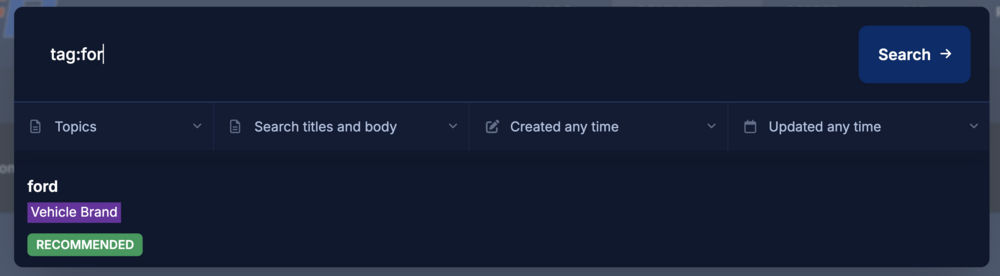
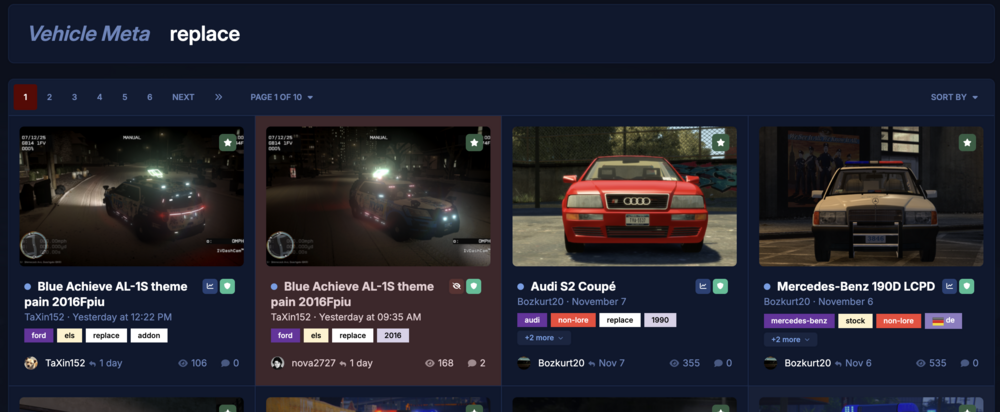
30 pointsSince October of last year, we’ve been hard at work on a modern, refreshed redesign of LCPDFR.com. Today, we’re excited to finally share it with you. This new version of the site isn’t just a visual upgrade. Behind the scenes, we’ve rebuilt a lot of the core systems that power LCPDFR.com – from the way pages load, to how content is organised, to the tools we’ll be able to build on top of this platform going into 2026 and beyond. We’ve also migrated our custom downloads system and several other bespoke features onto this new foundation. This launch marks the ninth design update LCPDFR.com has had, and it’s the biggest change since our last major overhaul in 2015 – almost a decade ago. A Fresh Look, Built for Today The new site introduces a clean, modern interface designed to be faster, clearer and more intuitive to navigate. Light & Dark Mode The site now supports a fully integrated light and dark mode that follows your operating system’s preference. If you’d rather choose manually, you can toggle between themes using the control at the bottom of the site. Redesigned Editor Our content editor has been completely rebuilt. It’s more powerful, more responsive, and much easier to use than the previous version. Whether you’re writing mod descriptions, making posts, or writing private messages, the editing experience should feel significantly smoother. Mods: Front and Center Mods are at the heart of LCPDFR.com, so we’ve made sure they’re easier than ever to find and browse. Mods First in Navigation You’ll now see the Mods portal prominently placed as the first item in the navigation, reflecting what most visitors come here for. New Grid-Based Layout Mods are now presented in an expansive grid view, making it easier to scan through content, compare options at a glance, and discover new creations. Improved Tag Browsing Tags now play a much bigger role in helping you discover content. Clicking any tag will take you to a dedicated tag results page, where you can explore all related content in one place. Smarter Search Finding exactly what you’re looking for should feel quicker and more flexible. Quicksearch with Filters The quicksearch has been upgraded with built-in filters, including the ability to search directly by tags. This makes it easier to narrow down results and jump straight to the content you care about. A full search overhaul is in progress, and what you see in quicksearch today is just a small preview of what’s coming. Known Issues As with any major platform change, there are a few rough edges we’re already aware of: Some content pages under LSPDFR, LML, and RESOURCES may currently appear broken or incorrectly formatted. We’re actively working on fixing these layouts. The GTA V Native Database is currently not displaying. Some profiles are showing an error 500. There are some issues with LSPDFR Sync, we have paused our Pateron until fully resolved. A small amount of users may be experiencing issues with notifications. Multiple issues reported by community members (thank you) in this thread. Some of these have now been fixed. Please continue to report any issues you see. Thank you for your patience while we work through these issues. Your feedback here is especially helpful, so if you spot anything else that looks off, please let us know. What's Next and Fixes This redesign is just the foundation for what’s coming next. With the new platform in place, we’ll be able to iterate more quickly and deliver new features faster than before. Over the next days and weeks, our main focus will be on tightening up the rough edges from this migration and fixing the issues that you might find. Here are some of the things at the top of our list: New API for the Mods Center We've almost finished work on a new API for our mod center - we just have a few changes to make and we hope to share updates on this in the coming days. Full Search Overhaul Beyond the improvements you can already see in quicksearch, we’re planning a complete search upgrade to make finding content more accurate, more powerful, and more pleasant overall. Visual and UX Polish You may notice small visual quirks, spacing issues, or inconsistent elements across the site. We’re tracking these and will be rolling out incremental polish updates as we go. This is a big milestone for LCPDFR.com, and we’re really excited to finally share it with you. Take a look around, try out the new features, and let us know what you think – your feedback will help us shape the next round of improvements. We also hope to have some LSPDFR Enhanced news to share with you in the coming days. Cyan.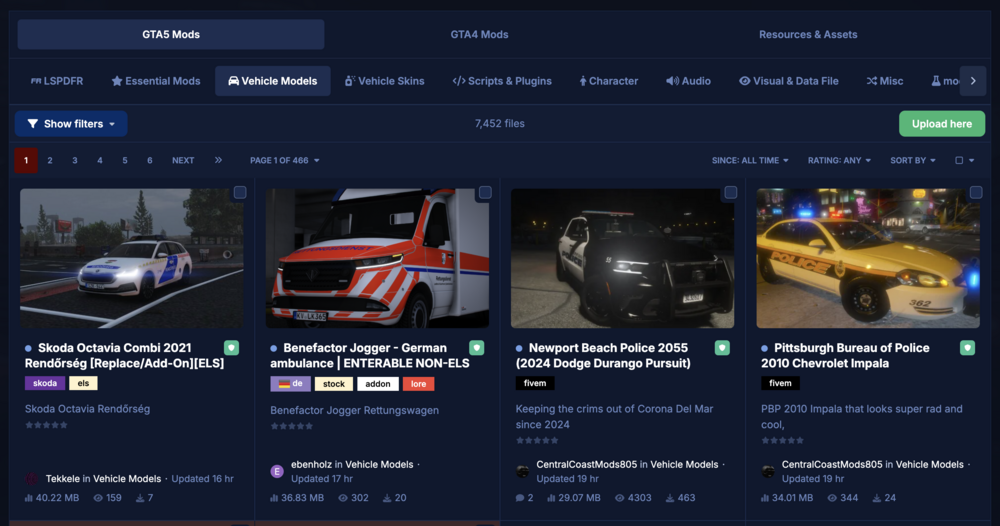
 30 points
 -
LSPDFR Policer Advanced - Modern Policing Plugin for LSPDFR
Silent Death53 and 28 others reacted to Sparky81 for a file
29 points A modern, modular overhaul for traffic and street policing. Built from scratch for stability and current GTA V + LSPDFR versions. Discord (support & updates): https://discord.gg/3E5JyujUXw THIS MOD IS STILL IN WIP (WORK IN PROGRESS)Please read full Description🔑 Key Features (v2.0.1)🚦 Traffic StopsSmart stop detection with clean “Approach & press E” prompts. Modular interaction menu for ID checks, citations, warnings, arrests, and more. 💬 Dialog System (New/Expanded)Two layers: General Dialog (always available) loaded from GeneralDialog.xml. Symptom Dialog (conditional) loaded from SymptomDialog.xml. Symptom questions render in red to clearly distinguish them from general lines. Users can add unlimited questions and multiple <Symptom key="..."> entries per symptom; the system picks a random pool and response for variety. Loaded automatically when going on duty and integrated into the Traffic Stop dialog menu. Added dedicated Dialog Questions submenu to On-Foot Interaction. 📋 Full Citation SystemTwo dedicated UIs: Traffic Citation Form (with vehicle data). Ped Citation Form (on-foot only). Supports multiple offenses, automatic fine calculation, summons toggle, and notes. Penalty Points system (UK only). Records stored in: Plugins/LSPDFR/PolicerAdvanced/data/citations.xml. ⚖️ Court SystemCitations and Arrest Reports generate real court cases. Features TXD mugshots, case numbers, addresses, and verdicts (US/UK logic). UK support includes penalty points & driving bans. Cases stored in: Plugins/LSPDFR/PolicerAdvanced/data/courtcases.xml. 🚶 On-Foot Ped InteractionContext menu: ID check, warnings, on-foot citations, Follow/Stop Following, Grab/Dismiss. Persona data stays consistent with vehicle stops. 🚔 Felony Stop SystemTactical control of driver/passengers at gunpoint: Orders: Turn off engine, Exit vehicle, Hands up, Drop weapon. Movement: Walk back, Step left/right, Kneel, Face directions. Actions: Detain suspect or Abort stop. Requires pulling over a vehicle first (press F5). 👮 Partner & K9 SystemManage a human partner or K9 via Partner Menu (F9). Commands: Follow, Stay, Dismiss, Move to Location, Search Vehicle. K9s automatically use rear seats; partner model configurable in PolicerAdvanced.ini. 🚘 Vehicle Seizure SystemSeize/impound vehicles during citations. Occupants removed, vehicle logged in SeizedVehicles.xml. Tow trucks dispatched, attach, drive away, and auto-cleanup. Includes H override if tow takes too long. 🧑 Persona & Flag DetectionUnified persona shared across MDT, Radio, ANPR, and alerts. Detects suspended license, expired insurance/registration, stolen vehicles, wanted suspects. 📻 Police Radio (Motorola-style)Plate and Ped checks, Code 3 backup, tow, coroner, Panic and more. Full sound + visual feedback system. 🖥️ MDT / Police ComputerGwen-based UI with multiple tabs: Person Lookup (with TXD mugshot). Vehicle Lookup. Citation Records. Arrest Reports. Integrated with ANPR, court results, and all record databases. 📡 ANPR (Automatic Number Plate Recognition)Live scanning for: owner wanted, invalid license, stolen vehicles, expired/none insurance/registration. Triggers in-game alerts and dispatch radio playback. ⚠️ Warnings SystemTrack verbal warnings. Stored in: Plugins/LSPDFR/PolicerAdvanced/data/warnings.xml. 📦 Contraband & SymptomsSymptom-driven contraband injection (odor, jittery, bloodshot eyes, sweating, delayed responses, etc). Fully expandable via ContrabandItems.xml. Integrated drug & alcohol testing. Symptom-driven dialog with randomized responses for immersive roleplay. 🌍 Ambient EventsDrunk Driver (swerving), Known Gang Vehicle, Bad State Vehicle. Independent cooldowns and pursuit/stop logic. 🛠️ Vehicle ManagerOptions: Search Vehicle, Open Trunk, Tint Reader, Tyre Tread. Police-only options: Repair Vehicle, Restock Vehicle. Future integration with the Evidence System. 📑 Arrest ReportsFull MDT form: charges, officer details, auto-filled location/time. Records stored in: Plugins/LSPDFR/PolicerAdvanced/data/arrestreports.xml. Can automatically generate a court case. ⚰️ Coroner System (New)Request a coroner unit through the Police Radio. Coroner van responds to nearby deceased persons. Two coroners arrive, examine each body, and report an apparent cause of death. Bodies are removed and replaced with a configurable body bag prop. Coroner vehicle and staff clear the scene automatically after recovery. Vehicle, ped model, body bag prop, search radius, spawn distance, arrival distance, and drive speed are configurable in PolicerAdvanced.ini. Optional: Install the Body Bags replacement mod for realistic body bag/stretcher visuals. 🧰 Loadout SystemFully integrated into the Policer Main Menu. Apply custom or vanilla police loadouts instantly in-game. Supports: Weapons with chance percentages. Attachments/components (flashlights, scopes, grips, etc). Stun weapons and armor levels. Custom loadouts file: Plugins/LSPDFR/PolicerAdvanced/data/loadouts.xml Compatible fallback with LSPDFR\data\inventory.xml. 🧭 Policer Main Menu Central hub for all Policer Advanced systems (currently loadouts, Road Management & Vehicle Manager). Designed to unify access for future systems like Partner, Vehicle, and Evidence management. Open using the key defined under [Global] MainMenuKey in PolicerAdvanced.ini. 🚧 Road Management System Deploy and manage roadside control tools directly in-game. Place cones using a realistic placement animation and ground marker. Deploy police barriers via cursor trace placement with automatic rotation. Create interactive speed zones to slow nearby AI traffic temporarily. Full cleanup options to remove individual or all placed objects. Ideal for managing crash scenes, checkpoints, and investigations. 🚨 BOLO System – Basic Mission PackTen fully integrated BOLO missions using the new BoloMissionManager: New Feature Request by @New York Modz Stolen Vehicle Wanted Gang Member Drug Courier High-Risk Felon Missing Person Gang Vehicle Sighted Serial Burglar Stolen Construction Van Human Trafficking Transport Aggressive Driver All BOLOs support: Configurable pursuit chance via [BOLO] PursuitChancePercent Clean shutdown of Policer Advanced traffic stop logic before LSPDFR pursuits Vehicle & persona flag integration Full MDT & Radio compatibility Unified mission resolution (resolved only if the suspect is arrested or dead) Vehicle-based BOLOs now support dynamic AI behaviour: cruising → stop → flee → LSPDFR pursuit. ⚙️ Built on CommonLibSparky81x for INI configs, key input handling, popups, logging, helpers, and zone detection. InstallationDrag & Drop the contents of the included GTA5 folder into your GTA V root. Important: To avoid conflicts with Policer Advanced, disable the default LSPDFR traffic stop interaction keys. Open: Grand Theft Auto V\lspdfr\keys.ini TRAFFICSTOP_INTERACT_Key=None TRAFFICSTOP_INTERACT_ModifierKey=None TRAFFICSTOP_INTERACT_ControllerKey=None TRAFFICSTOP_INTERACT_ControllerModifierKey=None Remember, if you want the K9 model I used, you can grab it here: German Shepherd / Malinois K9 Dog – LSPDFR As of 9/12/2025 DO NOT USE Stop The Ped (STP), Policing Redefined (PR) with Policer Advanced. It will conflict with custom stop and ped management logic. RequirementsGTA V Legacy or Enhanced LSPDFR 0.4.9 RAGEPluginHook 1.102+ (Read Known Issues Below) CommonLibSparky81x 1.0.3 - UPDATED 17/05/2026 Recommended Setup Ensure your GTA V and LSPDFR installations are fully updated. Use a clean plugin environment before testing new Policer Advanced versions. Optional Addons Ultimate Backup – for enhanced unit variety (optional, not required). Vehicle mods – compatible with the ANPR and Seizure systems. Controls & AccessOn-Foot Ped Interaction Menu: L (near a stopped ped). Traffic Stop Prompt: Approach vehicle → on-screen E prompt (when fully stopped). (Other actions appear in menus; your existing LSPDFR keys still apply. See ini for key settings) All ini keys are in Plugins\LSPDFR\PolicerAdvanced.ini How It All Ties TogetherStart a traffic stop, use the menu to ID / cite / warn / arrest. Summonsed citations create court cases with realistic verdict logic and mugshots. Use ANPR while patrolling to surface wanted owners, invalid licensing, or stolen/expired vehicles — triggers radio checks and UI alerts automatically. On foot, use L-menu to manage peds consistently with vehicle stops (persona + flags unify all systems). Development Status (Completed Phases)All core systems through Phase 28 are base complete and are subject to change before release: Traffic Stop Interaction, Citation + XML, Persona/Flags, Radio, MDT, ANPR, Warnings, Drug & Alcohol Tests, Logging, Symptoms, Dialog, Court, Citation UI, On-Foot, Persona Overrides, Contraband, Ambient Events, Mugshots, Vehicle Manager, Arrest Core, Arrest Reports UI, Felony Stop System, Partner & K9 System, Vehicle Seizure System, Loadout System, Road Management System, BOLO Mission System, Coroner System. Planned / UpcomingEvidence System — Collect, catalog, and store items during searches. Evidence will tie into the MDT for reports and may influence court verdicts. XP & Rank Progression — Earn experience for traffic stops, arrests, and completed events. Unlock higher ranks and see your progression in a dedicated pause-menu tab. Expanded Radio SFX — More authentic dispatch chatter with randomized audio categories. Existing radio already supports custom .wav playback, and this phase will flesh out a full library. AI Backup System — Call in Code 2 and Code 3 backup units during high-risk or combative stops. System will expand into tactical responses and unit variety. Community & SupportDiscord: https://discord.gg/3E5JyujUXw Get help, report bugs, share showcases, and see sneak peeks. CreditsAuthor: Sparky — github.com/Sparky81x Thanks to the LSPDFR, RAGE Plugin Hook, and community resources used to build & test the systems. Thanks to T13Ollie for the Addon Police Vehicle tutorial for use with the ANPR system. https://discord.com/channels/1366265407882657834/1420726024077053962/1420726024077053962 DisclaimerThis mod is a community project and is not affiliated with Rockstar Games, Take-Two, or LCPDFR. Designed for realism, performance, and flexibility. Known IssuesMDT Flicker: Some users may experience flickering of MDT forms when the game is not paused. This occurs because GTA V and Gwen both require fibers at the same time. Fix: Set `PauseGameOnOpen = true` in the `[MDT]` section of `PolicerAdvanced.ini`. High-end PCs may not need this setting. Tow Trucks Getting Stuck: Tow trucks may sometimes get stuck or fail to navigate correctly. This is a limitation of GTA V AI driving. Use the `H` respawn feature to force a tow truck to respawn closer if it cannot reach the target. AI Behaviour: Cones and barriers currently do not affect AI navigation. Vehicle avoidance will be introduced in a future update. Speed Zone Visuals: Zones are functional but have no visible ground ring once placed (for performance reasons). Known limitation: PA v2.1.0 Native MDT and current RAGENativeUI-based menus require a modern supported GTA V / RagePluginHook / RAGENativeUI setup. Older legacy builds may not display the native mouse cursor correctly. Recommended PluginsWest Coast Callouts West Coast Callouts - Script Modifications & Plugins - LCPDFR.com29 points
 -
SirenSetting Limit Adjuster
Arrestedset6782 and 28 others reacted to Aaron's Workshop for a comment on a file
29 points @RM Designs I'm trying to update it along with 4 other people.29 points
 -
.thumb.png.656f907bc2febc81911b0b821cb502c8.png) EARLY DEVELOPMENT This is an early release of a very in-depth application with a lot of features, there WILL be bugs. Please, before leaving a bad review, leave a comment here or preferably on the ReportsPlus Discord with the issue and I will work to fix it ASAP. Please also let me know any features you would like to see added and I can work to implement them Consider joining the ReportsPlus Discord for helping with testing, support, requesting features, and development updates. Description: - ReportsPlus was designed to act as an external MDT that can be used from another device (Windows/Mac OS) to create reports, receive actual game data, and make the LSPDFR experience much more immersive. - ReportsPlus really shines when used from a separate system you have next to you, as it mimics an actual MDT, however, you can use it from the same system if you don't have access to another laptop you can use. - ReportsPlus is not just typing reports like the name may suggest, as ReportsPlus has a fully functioning court system, lookup system for peds and vehicles, callout popups, ID popups when asking for them, tons of customization, and report types, full language translation, and SO MUCH more than I can list here. - This is not a window that opens in-game such as something like CompuLite, it is an external application that connects to your game to be able to receive actual game data. Key Features: Court System- When creating a Citation or Arrest report, a court case will be created. These court cases will reveal their outcomes over a customizable amount of time, with charge/citation outcomes being taken from your Charges.xml and Citations.xml (Compatible with Compulite Charges/Citations) Ped/Veh Lookup- Peds and Vehicles can be looked up in their respective lookup apps. You can see tons of data for each such as license information, previous charges/citations, times stopped, vehicle registration/insurance information, and much more. Callout Popups- If you have Callout Interface installed, when receiving a callout in-game they will pop up on the Application where you can see their data. They then get put in the Callouts app to be viewed or closed with a Callout report created. ID Popups- If you have STP, when asking a ped for their ID or patting them down, you will have an ID popup in the Application with the suspect's ID and their information. Advanced Notes- Notes can be written in the Notes app, and data can be pulled directly from the notes into report windows when using tags Log Browser- View and edit previously created reports, arrests, and citations. Tons of Customization- You can customize almost everything in the Application. All of the colors can be changed as well as the desktop background color or setting it as an image of your choice. RP supports localization via the locale file to translate almost every piece of text in the entire Application. All dropdown options, Charges/Citations, Agencies/Divisions/Ranks, notifications, and so much more. {NEW} Custom Reports- Create custom reports with completely customizable custom dropdowns which can be shared. For more information consult the User Guide included in the installation. Usage / Installation / Troubleshooting: - Make sure you consult the comprehensive USER GUIDE included in the download and other accompanying materials before attempting to use ReportsPlus. ReportsPlus does have Requirements (Java/JDK), which are explained in-depth in the USER GUIDE Make sure Java is installed FIRST It seems a recent JDK 25 update is causing some people issues, you can download jdk24 here Java Archive Downloads - Java SE 24 If you have an issue please make a Support post in the ReportsPlus Discord * Currently undergoing a complete rewrite into a web-based system, any suggestions will likely go toward this new version *28 points
EARLY DEVELOPMENT This is an early release of a very in-depth application with a lot of features, there WILL be bugs. Please, before leaving a bad review, leave a comment here or preferably on the ReportsPlus Discord with the issue and I will work to fix it ASAP. Please also let me know any features you would like to see added and I can work to implement them Consider joining the ReportsPlus Discord for helping with testing, support, requesting features, and development updates. Description: - ReportsPlus was designed to act as an external MDT that can be used from another device (Windows/Mac OS) to create reports, receive actual game data, and make the LSPDFR experience much more immersive. - ReportsPlus really shines when used from a separate system you have next to you, as it mimics an actual MDT, however, you can use it from the same system if you don't have access to another laptop you can use. - ReportsPlus is not just typing reports like the name may suggest, as ReportsPlus has a fully functioning court system, lookup system for peds and vehicles, callout popups, ID popups when asking for them, tons of customization, and report types, full language translation, and SO MUCH more than I can list here. - This is not a window that opens in-game such as something like CompuLite, it is an external application that connects to your game to be able to receive actual game data. Key Features: Court System- When creating a Citation or Arrest report, a court case will be created. These court cases will reveal their outcomes over a customizable amount of time, with charge/citation outcomes being taken from your Charges.xml and Citations.xml (Compatible with Compulite Charges/Citations) Ped/Veh Lookup- Peds and Vehicles can be looked up in their respective lookup apps. You can see tons of data for each such as license information, previous charges/citations, times stopped, vehicle registration/insurance information, and much more. Callout Popups- If you have Callout Interface installed, when receiving a callout in-game they will pop up on the Application where you can see their data. They then get put in the Callouts app to be viewed or closed with a Callout report created. ID Popups- If you have STP, when asking a ped for their ID or patting them down, you will have an ID popup in the Application with the suspect's ID and their information. Advanced Notes- Notes can be written in the Notes app, and data can be pulled directly from the notes into report windows when using tags Log Browser- View and edit previously created reports, arrests, and citations. Tons of Customization- You can customize almost everything in the Application. All of the colors can be changed as well as the desktop background color or setting it as an image of your choice. RP supports localization via the locale file to translate almost every piece of text in the entire Application. All dropdown options, Charges/Citations, Agencies/Divisions/Ranks, notifications, and so much more. {NEW} Custom Reports- Create custom reports with completely customizable custom dropdowns which can be shared. For more information consult the User Guide included in the installation. Usage / Installation / Troubleshooting: - Make sure you consult the comprehensive USER GUIDE included in the download and other accompanying materials before attempting to use ReportsPlus. ReportsPlus does have Requirements (Java/JDK), which are explained in-depth in the USER GUIDE Make sure Java is installed FIRST It seems a recent JDK 25 update is causing some people issues, you can download jdk24 here Java Archive Downloads - Java SE 24 If you have an issue please make a Support post in the ReportsPlus Discord * Currently undergoing a complete rewrite into a web-based system, any suggestions will likely go toward this new version *28 points -
Spring 2026 Site Update - New Features, Improvements & More
BlueLine Vibes and 27 others reacted to Cyan for a post in a topic
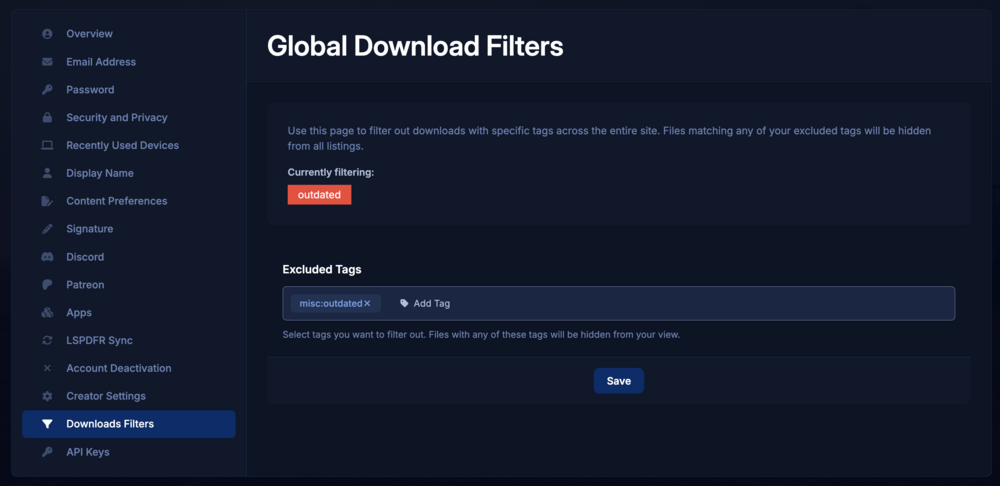
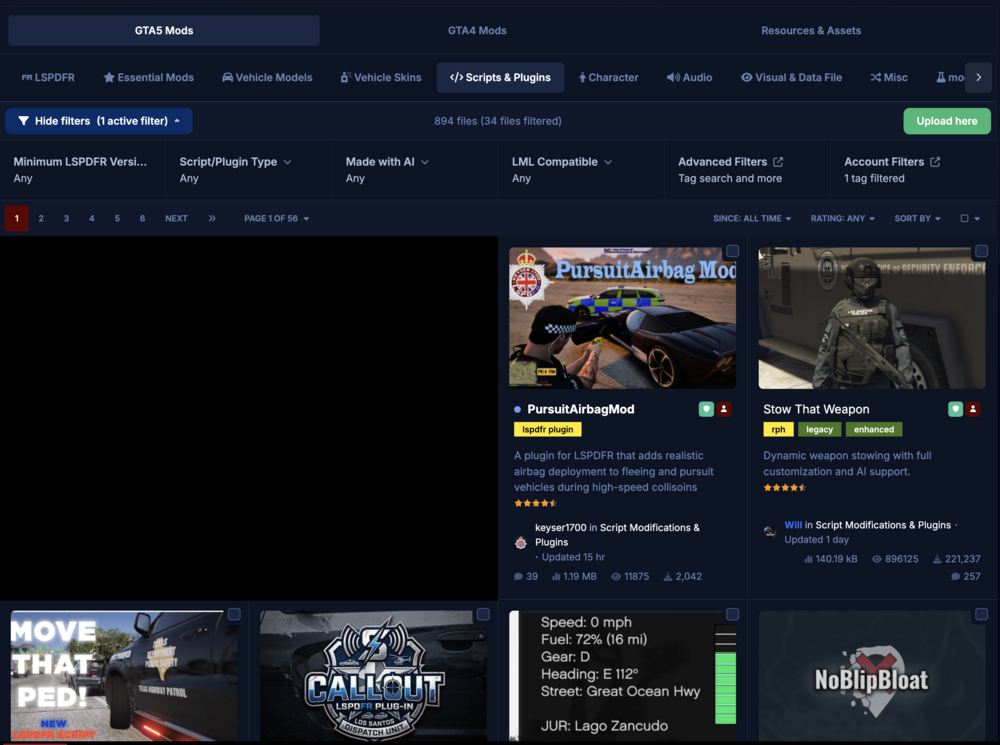
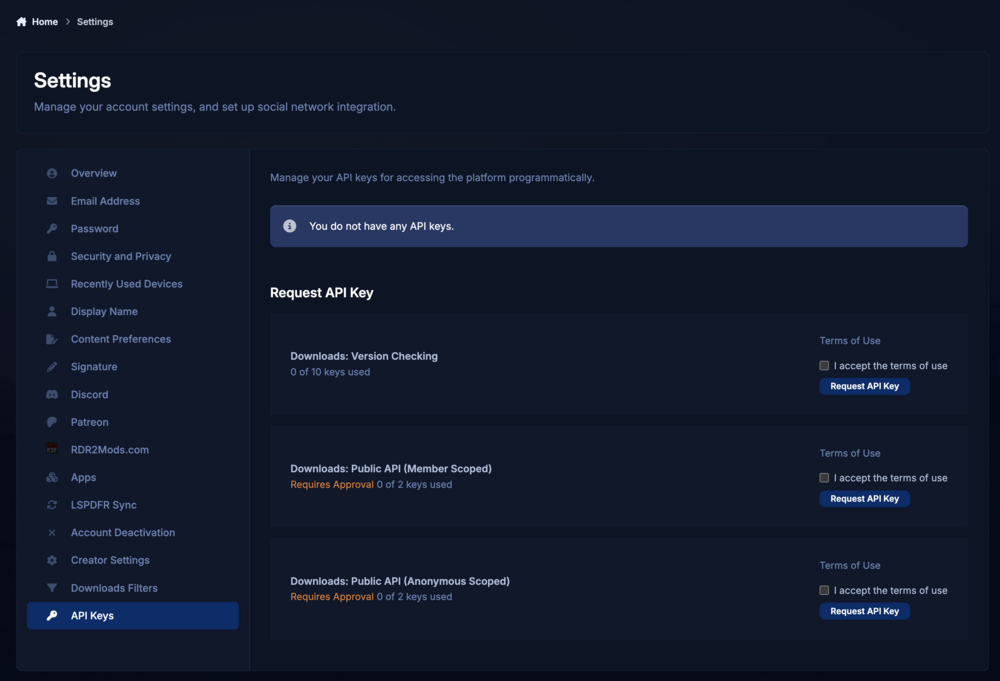
28 pointsHello everyone, I just want to say thank you for sticking with us through the biggest site update we’ve ever rolled out. Last year’s launch didn’t go as smoothly as we’d hoped and we know there have been some issues along the way, so we really appreciate your patience and feedback. It’s helped us get to a much stronger place moving forward. Now that things have stabilised a bit, today we’re launching a bunch of new features and changes that we think you’re going to love. Discovery: Tag FiltersThe whole point of our tag system has always been discovery. You’ve been able to click into tags and explore everything connected to them, but proper filtering on category pages was missing. That’s now changed. You can now explore and filter by tags directly on category pages, with the system built to expand much further over time. To start, we’ve added brand, country, and year filters to vehicle pages, along with a “Made with AI” filter on script pages. You can now filter by Brand, Country and Year on Vehicle pages. A small change on the surface, but a big step toward making discovery faster, cleaner, and far more useful across the platform. Discovery: Site Wide Tag ExclusionsTo give you even more control over what you see on LCPDFR.com, we’re introducing account-level, site-wide tag exclusions. Any files matching the tags you choose to exclude will be hidden across the site — including the downloads portal, download feeds, trending and featured sections, and search results. The tag filtering controls, now available in Account Settings. In this example, files tagged as outdated are being hidden. The downloads category page, showing 1 active account tag filter and 34 files hidden as a result of excluding the outdated tag. Whether you want to hide AI-generated work, certain vehicle types, specific countries, or even particular vehicle years, we hope this system helps you fully customize how you browse content on LCPDFR.com. Note: We're aware of an issue of going to Account Settings, then navigating to Downloads Filters will not load the tag box correctly and we're working to fix it. Refreshing the page if the tag box doesn't load will workaround this for now. Site Experience: Thanking CreatorsAs a thank you to our creators and contributors, we’ll be removing external advertisements for community members who are actively engaging with the community. The exact criteria may evolve over time, as our community contributes in many different ways. Whether you're helping new members with questions, uploading mods, or simply being an active part of the site, we want to recognize and reward those contributions. For creators who share their mods with the LCPDFR.com community, ads will be removed once you reach 1,000 verified unique downloads. For all other members, ads will be removed once you achieve the Sergeant rank (1,000 community points). Our rank system awards points for a variety of community activity, including forum posts, gallery uploads, comments and reviews (+1), giving or receiving reputation (+1), gaining followers (+2), and more. This change is going live today, though it may take some time after reaching the requirements for the benefit to be applied to your account. Logging in and out if you meet the criteria may help this apply sooner. We also plan to add a way for members to track their progress toward these thresholds in the future. This is one small way we can give back to the creators and community members who help make the site what it is. Developer: APIOur old API has started to show its age and wasn’t really built with the growth of the website in mind. Historically, we’ve had to handle security on LCPDFR.com in some fairly unique ways. While we want to discourage automated traffic, serving an API directly from our main website domain meant we also had to keep certain protections less aggressive than we would’ve liked. The API has been moved onto its own dedicated infrastructure, allowing us to properly monitor usage, apply separate security procedures, and relax some of the harsher caching behaviour that existed previously. We’ve also adopted the more standard approach of enforcing API keys across the new API. This allows us to better track usage, apply limits where necessary, and manage access more effectively. API keys are issued in line with our new API Guidelines, which outline acceptable usage and restrictions around commercial use. There are currently two key types available: Version Check Keys — designed for embedding into your own plugins, primarily for update and version checking. Full API Keys — provide broader access to the API, including mass file listings, extended file metadata (such as tags), .NET assembly data, and more. Full API keys require approval. We may contact you with questions about your intended usage. Both full and limited API keys require an active LCPDFR.com account that has been active for at least one week. You can request API keys in your Account Settings. You can see usage limits, documentation and regenerate your key from Account Settings. With the new downloads listing API, you can list up to 10,000 files at once. Full documentation available in Account Settings with an issued key. Overall, this new API infrastructure gives us a far more scalable and maintainable foundation moving forward. Separating the API from the main website allows us to improve security, reliability, and performance without impacting the experience of regular community members on LCPDFR.com. We’ll be deprecating the old API in stages. Effective today, the old version check API endpoint (checkForUpdates) will no longer be available for newly submitted files. All remaining endpoints, apart from checkForUpdates, will be turned off on 1 June. We understand that deprecating checkForUpdates may cause issues for some plugins. We plan to phase this out later this year in stages and with planned brownouts and will share more details in the API forum closer to the time. We’re not stopping there, either. While these updates are a big step forward for discovery, customization, and the overall site experience, we already know where we want to focus next, on search. The truth is, we’ve largely outgrown the search system our current software provides. It was never really built for our mod heavy platform with this much content, this many tags, and the kind of discovery features we now want to support properly. Because of that, search is probably going to involve a lot more custom work from us moving forward. Better relevance, smarter filtering with the new options announced above, and a generally cleaner experience are all things we want to improve over time. As always, we do appreciate your feedback. We try to guide LCPDFR.com based on what the community wants, alongside the areas where we feel we can improve and do better ourselves. We’re looking forward to seeing everyone use these new features, and we’re excited to keep improving the platform alongside the community that makes it what it is. Cyan.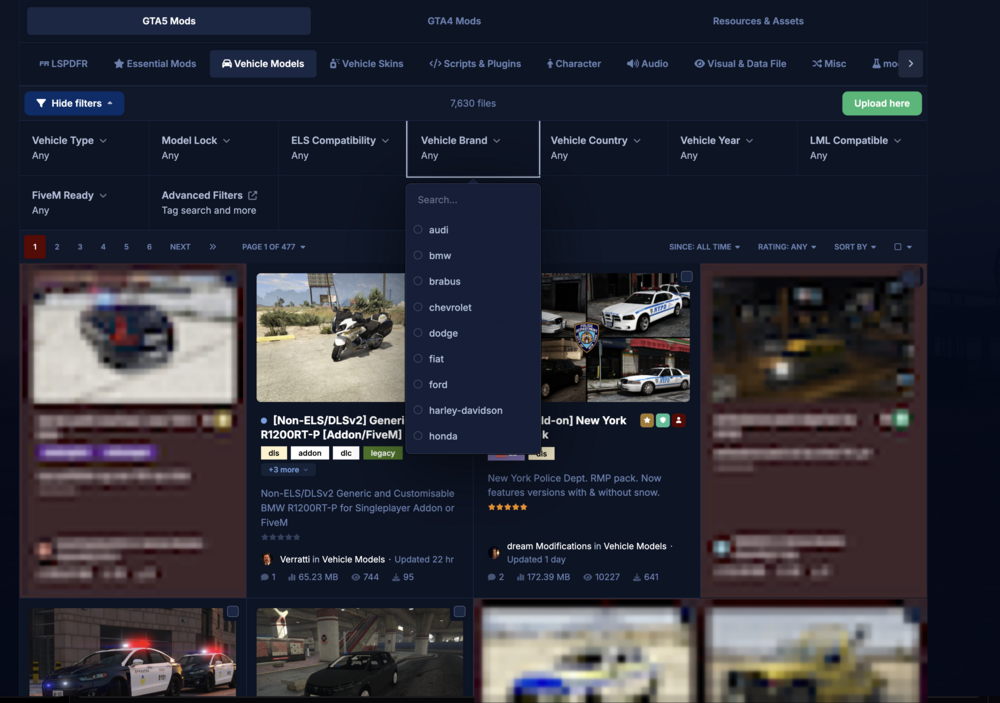
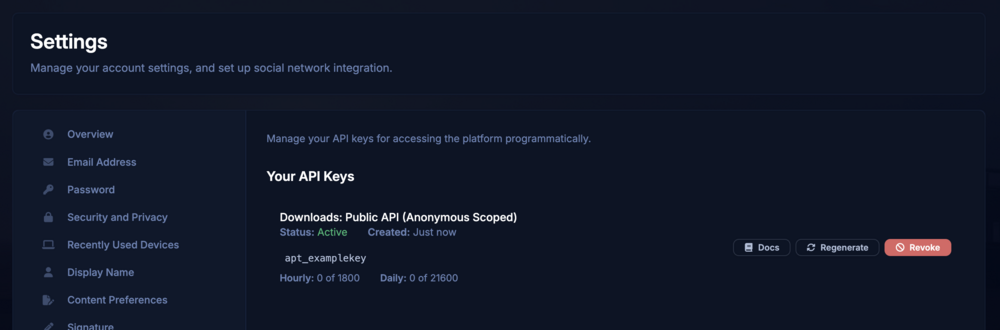
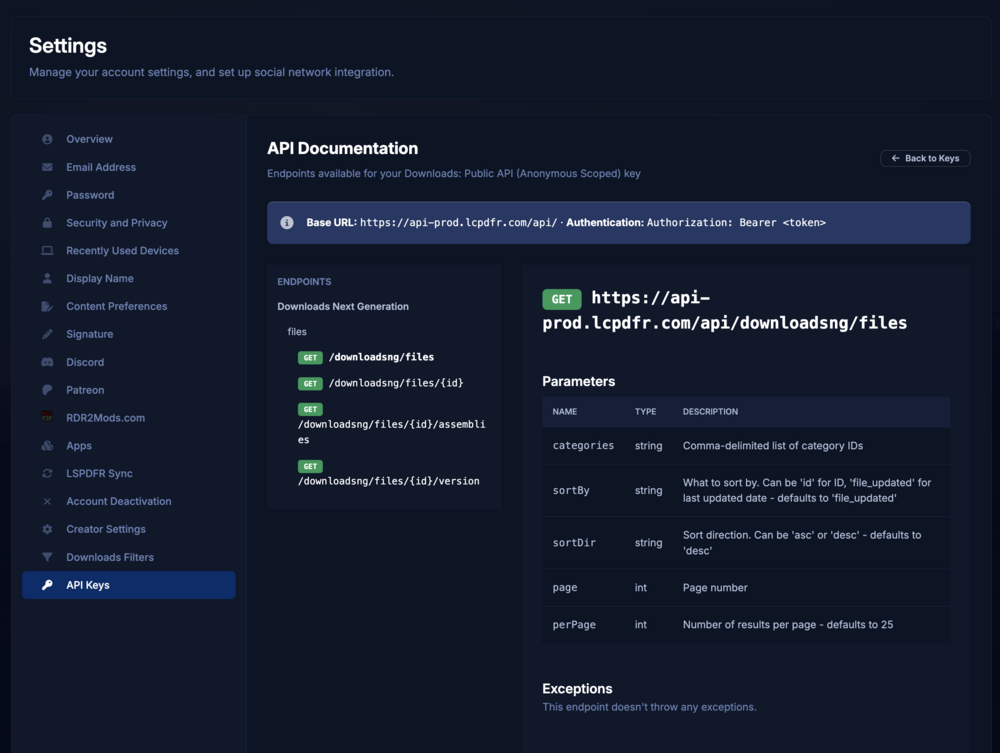 28 points
 -
Realistic Traffic AI
bravo six seven and 27 others reacted to Aaron's Workshop for a file
28 points ⭐ BEFORE LEAVING A BAD REVIEW OR LOW STARSPlease report any bugs or issues in my Discord first so I can fix them quickly 🙂 I actively maintain and update this plugin. 🚓 Realistic Traffic AI – LSPDFR🔥 Advanced Traffic Intelligence 🚦 New Advanced Traffic Intelligence features 🟡 Yellow light hesitation 🛣 Lane merge system 🧱 Obstacle raycast braking 🚨 Improved emergency yielding 🛣 Advanced freeway behavior 🧠 Multi-lane AI intelligence 🛠 Performance & stability improvements Hello everyone 👋 This is Realistic Traffic AI, my custom traffic overhaul plugin for LSPDFR designed to significantly improve civilian driving behavior and create a more immersive patrol experience. As we all know, default GTA V traffic can feel robotic, unpredictable, and unrealistic — especially during intersections, pursuits, and freeway driving. This plugin rebuilds civilian behavior logic to create: Smarter intersections Better freeway reactions Realistic emergency yielding Intelligent lane behavior More believable violations The goal is simple: 👉 Make traffic feel human — not scripted. 🚦 Plugin Features🚥 Advanced Traffic Light System 🔴 Red Light BehaviorConfigurable violation percentage (TrafficLightRunPercent) Drivers are assigned their behavior once per vehicle No random frame-by-frame flipping Realistic stopping patterns Example: 95% stop normally 5% may run the red light 🟡 NEW – Yellow Light Hesitation LogicDrivers now intelligently decide whether to: Stop safely Continue through the intersection Hesitate briefly Behavior depends on: Speed Distance to intersection This removes unrealistic last-second brake slams. 🛣 NEW – Intelligent Lane Merge SystemVehicles now: Detect blocked lanes Merge smoothly Avoid zig-zag behavior Respect cooldown timers React differently at freeway speeds Traffic flow feels significantly more natural. 🧱 NEW – Obstacle Raycast BrakingAI vehicles now scan ahead for obstacles: Cones Barriers Roadblocks Traffic disruptions Drivers gradually slow down instead of ramming into objects. Scan distance automatically increases at higher speeds. 🛣 NEW – Advanced Freeway BehaviorHigh-speed traffic now: Reacts earlier to hazards Merges more smoothly Maintains consistent cruising speeds Reduces sudden braking chains Freeway driving feels dramatically improved. 🧠 NEW – Multi-Lane AI IntelligenceDrivers now evaluate: Lane availability Blocked paths Traffic density Environment type (city vs freeway) This creates more believable, less robotic traffic patterns. 🚨 Improved Emergency Vehicle YieldingWhen you activate lights and sirens: Civilians detect you from behind Pull safely toward the shoulder Slow naturally Re-enter traffic smoothly Realistic unpredictability still exists: Some drivers hesitate Some partially block Some react late Just like real life. ⚙ Customizable SettingsAn automatic .ini file is created on first launch. You can configure: TrafficLightRunPercent EnableLaneChanges EnableTrafficLaw EnableEmergencyMoveOver LaneChangeDistance LaneChangeSpeed LaneChangeCooldown MoveOverDistance MoveOverOffset This allows you to fine-tune realism vs performance. 🛠 Performance & Stability Improvements✔ Reduced native call spam ✔ Merge cooldown protection ✔ Improved vehicle cleanup ✔ Removed stop sign prop scanning ✔ Removed logging overhead ✔ Stable under high traffic density ❌ Removed From Previous VersionsStop sign prop detection system Debug logging system Task spam that caused brake locks Erratic lane shift behavior Stop Sign Logic 🎯 ResultTraffic now feels: More human More reactive More immersive More believable More dynamic during patrols More realistic on highways More intelligent at intersections 🎥 Video Demo (Updated video coming soon.) 🟨 Compatibility✔ Works with 5Real / LaRevo 2.0 ❌ Does not Work with Move The F*** Over & Clear The Way V ✔ Designed for RPH (And you can use it while playing LSPDFR) ⚠ I do not currently support GTA Enhanced. 📢 Support & CommunityJoin my Discord to: Report bugs Suggest features Request updates Share feedback 👉 https://discord.gg/KBARG5yK3j 🎉 Special ThanksHuge shoutout to Gaming4Life for using my plugin! Thanks to all my Beta Testers that you can find in the Credits and shoutout to Maminka for helping me get started with creating LSPDFR Plugins & Callouts. GO CHECK HIM OUT!28 points
 -
LSPD First Response (Enhanced Preview)
Xplorer4x4 and 27 others reacted to LMS for a file
28 points If you are installing LSPDFR 0.4 for the first time, we strongly recommend that you do so on a clean copy of Grand Theft Auto V Enhanced without any other mods or plugins. Welcome to the public preview of LSPDFR for GTA 5 Enhanced. We are very exciting to finally make this available to a wider audience! Please note that this is a preview version and as such not all features and functionality from the Legacy version are available. We will be continuously updating this version to achieve feature parity. If you are wondering whether your favorite callouts and plugins work, the answer is most likely yes. There will be a few exceptions to mods that directly interface with the game's memory, but the vast majority should work just fine. If you are playing GTA 5 Enhanced on an NVME, you may get a warning from RAGE Plugin Hook that DirectStorage is enabled. Please install the following fix (link also provided by RPH): https://www.gta5-mods.com/scripts/directstoragefix Please note that you need to use the xinput1_4.dll from SHV and replace the one included by default with RPH in this case. LSPDFR 0.4 brings sweeping changes which have been implemented over a number of years and is the latest major version of LSPDFR, released in December 2018. LSPDFR turns the world of GTA V upside down, giving you the power to enforce the law as you see fit. Please see the following resources for more information about LSPDFR and its features: LSPDFR 0.4 Page: https://www.lcpdfr.com/lspdfr LSPDFR 0.4 Wiki: https://www.lcpdfr.com/wiki/lspdfr/04 LSPDFR 0.4 Getting Started: https://www.lcpdfr.com/wiki/lspdfr/04/getting-started/ Installation Guides: https://www.lcpdfr.com/lspdfr/how-to-install/ Part of the First Response Mods family. Community CalloutsOur community has made over 100 extra downloadable callouts for LSPDFR. Browse Community Callouts28 points
 -
Emergency uniforms pack - Law & Order
Trendsetter.D and 27 others reacted to Alex_Ashfold for a file
28 points EUP is an all-in-one modification that gives us the free range to create your own law enforcement officer as you patrol the streets and roads of San Andreas. U mad Ronson? This time, play different - be different. Adapt your style to the situation. Get your gear on - use a High-Vis vest to direct traffic, a waterproof jacket on a rainy day or a tactical outfit when the situation gets hot. Choose from various lore-friendly departments base of real life. Customize various components of your outfits. The mod that started as a holster and a vest retexture, now so expansive, most Australians finish downloading it right when an update comes out. Emergency Uniforms Pack Law & Order 8.2 offers an unrivaled catalog of lore-friendly California-inspired law enforcement uniforms for both male and female multiplayer characters. From tasteful evolutions of the classic LSPD outfits, you see AI cops wearing, to dozens of uniforms for entirely new lore-friendly law enforcement departments based on real-world California departments. Emergency Uniforms Pack has it all, and when tied with partner mods such as EUP Serve and Rescue, EUP Menu, and EUP LSPDFR Configs, you can totally transform your LSPDFR experience. This work is licensed under a Creative Commons Attribution-NonCommercial-ShareAlike 4.0 International License. If you were you were looking for the latest version of EUP and wish to support our work click the button down below: This mod is a free mod, the beta versions of EUP accessible only through our patreon page, is a tool for us to support the development of the mod and create a platform to interact with the community, 5 years later this mod became my main ''job'' and source of income, thanks to all the fans and supporters. Which means more quality and enhancements, since I can allow all my time to it and invest money into assets and programs. The public version is still important to us and will receive updates, which is only made possible through our membership system. For General discussions, beta registration, support, images contest and more follow join our Discord Server: Add-Ons In order to select and customize outfits, you NEED to get the menu here: Need help? Something went wrong? Not sure how to proceed? Leave the comments and reviews alone, we don't really monitor them. Follow the link to EUP Discord for help or comments28 points
 -
28 pointsGenerative AI is being used more and more in mod creation, and we believe transparency around its use is important. While AI offers exciting new possibilities, we understand that not everyone wants to engage with AI-made content. We hope that clear disclosure helps everyone make an informed choice before downloading a mod, and makes it easy to filter out AI-made content. Starting today, we’re rolling out a new AI disclosure system. It allows authors to disclose the extent of their AI usage, and to be specific about which parts of a mod were AI-made or AI-assisted. The following AI disclosure options are available: Description Tick this if your description was generated or rewritten/refined using AI. We would also like to note: if you use AI to help write your description in any way, please make sure you verify all claims about your mod. We’re seeing an increase in AI-written descriptions that mention features the mod doesn’t actually include, so this is now enforced under our File Guidelines. Images Tick this if any images on your mod page were generated or edited/refined using AI. Mod & Mod Content Minor: AI helped with small refinements to the mod or its content (for example: using a chatbot/agent for assistance, or generating assets used in the mod). Moderate: AI contributed more than 50% of the mod’s content (code, images, data, etc.). Significant: AI created most or all of the mod (for example: full generation). Tick this as well if you wouldn’t have been able to make the mod without AI. Some light use doesn’t need disclosure — for example, basic autocomplete or bouncing ideas off an AI. Disclosures will appear below the file description. If you've ticked Mod & Mod Content, you will be asked for a 'Reason'. You should enter more information (why and how AI is being used) in here. If you select Mod & Mod Content at Moderate or Significant, your file will also be tagged with the “ai” tag. This makes it easier for the community to filter AI-involved mods if they want to, and makes AI usage clear at a glance. This is now required for new submissions, and we ask that creators also start updating their submissions if they have an AI disclosure to make. We'd like to request that all disclosures are made by the end of February. We are hoping we do not have to enforce this too broadly, and creators will come forward and be honest about their work. There are ways of detecting AI work in images, description and content and our moderation team will kindly remind you to make a disclosure if they receive a report of AI work that looks valid. If our staff feel that the AI disclosure is inaccurate or incomplete, files may be hidden until we believe they are in compliance. Making inaccurate AI disclosures may also lead to negative reputation by our automated approval systems. This is a first step toward balancing the new possibilities AI brings with individual preferences and a changing modding landscape. Thanks for helping us keep things clear and transparent for everyone. And to support that same goal of clarity and choice, we’ll be sharing more soon about global filtering options for mod discovery. Separately, we’ll also have some news to share shortly regarding the new LCPDFR.com website API.28 points
-
Prowler Radar
JeffreyK23 and 26 others reacted to opus49 for a file
27 points Discord: https://discord.gg/AuJCUag Features: A realistic radar system based on the real-world Stalker Dual DSR Four different modes including stationary and moving A "fast" tracker to differentiate between strongest and fastest signal An "auto lock" feature that allows you to set a maximum speed Prowler-Dual-DSR.pdf27 points
 -
[ELS][Addon/Replace] San Andreas County Sheriff's Department
Moee and 26 others reacted to OfficerArk for a file
27 points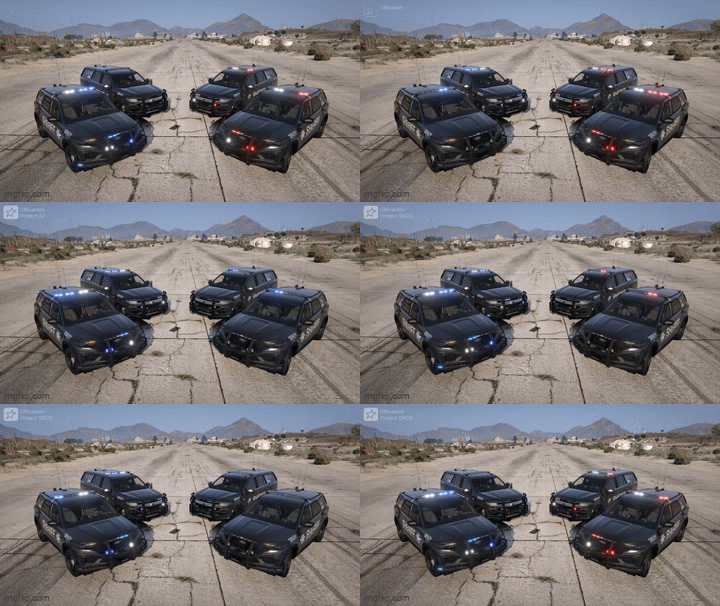 Introducing the 2025 San Andreas Sheriff's Department! (04/09/2026) Update coming soon to fix some issues Includes: 2025 Ford Explorer -Options- - Red-Blue and Blue-Blue - ALPR's - Working Lights on Overhead Siren Controller 2024 Chevrolet Tahoe -Options- - Red-Blue and Blue-Blue - ALPR's - Working Lights on Overhead Siren Controller More vehicles will be added soon! As Always Please Enjoy!27 points
 -
Real Traffic AI
Dangrizzly8511 and 25 others reacted to Chris's Modding for a file
26 points 𝙄𝙈𝙋𝙊𝙍𝙏𝘼𝙉𝙏 𝙐𝙋𝘿𝘼𝙏𝙀Real Traffic AI development is being paused. The V2.0.1 hotfix will remain available as the latest version, focused on stability and disabling the reported SHVDN siren-check crash path. There will be no further Real Traffic AI updates before December at the earliest. 🚫 𝙉𝙊 𝙎𝙐𝙋𝙋𝙊𝙍𝙏While the project is paused, no support will be provided for Real Traffic AI. This includes installation help, crash reports, ScriptHookVDotNet errors, mod conflicts, GTA V build issues, or individual setup troubleshooting. The mod will remain available, but users install and use it at their own discretion. ❤️ 𝙏𝙃𝘼𝙉𝙆 𝙔𝙊𝙐Thank you to everyone who downloaded, tested, supported, and played Real Traffic AI. I may return to the project in the future, but until then my main focus will be my other mods. 🚦 𝙍𝙀𝘼𝙇 𝙏𝙍𝘼𝙁𝙁𝙄𝘾 𝘼𝙄 𝙑𝟮.𝟬𝘼 𝙈𝘼𝙎𝙎𝙄𝙑𝙀 𝙋𝙐𝘽𝙇𝙄𝘾 𝙍𝙀𝙒𝙍𝙄𝙏𝙀 𝙁𝙊𝙍 𝙂𝙏𝘼 𝙑Real Traffic AI V2.0 is a major civilian traffic behaviour enhancement for GTA V, rebuilt to make the world feel smoother, calmer, more believable, and far more immersive during everyday driving, patrol, pursuits, emergency response, and free roam. This version is not just a small update. V2.0 is a full rewrite of Real Traffic AI. The entire project has been rebuilt with a cleaner internal structure, improved traffic logic, safer update handling, better performance control, stronger stability protection, and a much more believable driving flow across Los Santos and Blaine County. The goal remains simple: Make GTA V traffic feel less chaotic, less robotic, less brake-happy, and more like a living world. 🔥 𝙒𝙃𝘼𝙏’𝙎 𝙉𝙀𝙒 𝙄𝙉 𝙑𝟮.𝟬𝙏𝙃𝙀 𝘽𝙄𝙂𝙂𝙀𝙎𝙏 𝙍𝙀𝘼𝙇 𝙏𝙍𝘼𝙁𝙁𝙄𝘾 𝘼𝙄 𝙐𝙋𝘿𝘼𝙏𝙀 𝙎𝙊 𝙁𝘼𝙍Real Traffic AI V2.0 introduces a completely rebuilt traffic behaviour system designed around smoother movement, safer AI decision-making, better road awareness, and improved compatibility with LSPDFR-style gameplay. This update focuses on making civilian traffic feel more natural without turning the game into chaos. Main V2.0 highlights include:Full internal rewrite from the ground up New traffic management structure Smoother acceleration and braking behaviour Improved low-speed traffic movement Reduced panic braking and stop-start bouncing Better car-following and spacing logic More believable traffic flow in city areas Improved freeway/high-speed following behaviour Better road-speed awareness across different road types Smarter response to stopped or blocked vehicles Early road obstruction response behaviour Courtesy merge-style traffic cooperation Improved emergency vehicle yielding Safer siren/pull-over behaviour Better stability in dense city traffic Reduced crash pressure from heavy traffic updates New safer startup grace period More controlled update timing for performance Cleaner INI configuration layout Fully script-based design with no game file edits 🧠 𝙎𝙈𝘼𝙍𝙏𝙀𝙍 𝘾𝙄𝙑𝙄𝙇𝙄𝘼𝙉 𝘿𝙍𝙄𝙑𝙄𝙉𝙂𝙉𝙊𝙏 𝙁𝘼𝙎𝙏𝙀𝙍. 𝙉𝙊𝙏 𝘾𝙍𝘼𝙕𝙄𝙀𝙍. 𝙅𝙐𝙎𝙏 𝘽𝙀𝙏𝙏𝙀𝙍.Real Traffic AI V2.0 focuses on improving how normal civilian drivers behave in everyday traffic. NPC drivers now feel more composed when moving through traffic, approaching queues, following other vehicles, reacting to hazards, and dealing with changing road conditions. Instead of constantly slamming brakes, surging forward, or reacting too aggressively, traffic now behaves with more patience, smoother movement, and better spacing. This creates a calmer and more believable driving experience whether you are: Patrolling with LSPDFR Driving normally across the city Responding to incidents Moving through heavy traffic Driving on highways Watching AI traffic around emergency scenes Free roaming across Los Santos 🚗 𝙎𝙈𝙊𝙊𝙏𝙃𝙀𝙍 𝙏𝙍𝘼𝙁𝙁𝙄𝘾 𝙁𝙇𝙊𝙒𝙇𝙀𝙎𝙎 𝘽𝙍𝘼𝙆𝙀-𝙃𝘼𝙋𝙋𝙔. 𝙇𝙀𝙎𝙎 𝘽𝙊𝙐𝙉𝘾𝙔. 𝙈𝙊𝙍𝙀 𝙉𝘼𝙏𝙐𝙍𝘼𝙇.One of the biggest goals of V2.0 was to reduce the weird stop-start behaviour that GTA V traffic can suffer from. Real Traffic AI V2.0 improves: Vehicle spacing Low-speed rollout Queue behaviour Acceleration smoothing Defensive following Hazard braking Freeway following discipline Stopped-traffic approach behaviour Traffic should now feel less twitchy, less impatient, and much more believable during normal driving. 🚨 𝙀𝙈𝙀𝙍𝙂𝙀𝙉𝘾𝙔 𝙑𝙀𝙃𝙄𝘾𝙇𝙀 𝘼𝙒𝘼𝙍𝙀𝙉𝙀𝙎𝙎𝘽𝙀𝙏𝙏𝙀𝙍 𝙔𝙄𝙀𝙇𝘿𝙄𝙉𝙂 𝙁𝙊𝙍 𝙋𝙊𝙇𝙄𝘾𝙀, 𝙁𝙄𝙍𝙀, 𝘼𝙉𝘿 𝙀𝙈𝙎V2.0 includes improved emergency vehicle reaction behaviour. Civilian traffic can now respond more believably to nearby emergency vehicles with active sirens, including safer yielding and pull-over behaviour where appropriate. This system has been tuned to feel more natural without forcing traffic into constant panic or creating unnecessary crashes around emergency scenes. Emergency yielding is designed to support LSPDFR-style gameplay by helping traffic react more realistically when police, fire, or EMS vehicles need room to move. 🚧 𝙍𝙊𝘼𝘿 𝙊𝘽𝙎𝙏𝙍𝙐𝘾𝙏𝙄𝙊𝙉 𝙍𝙀𝙎𝙋𝙊𝙉𝙎𝙀𝙎𝙈𝘼𝙍𝙏𝙀𝙍 𝘽𝙀𝙃𝘼𝙑𝙄𝙊𝙐𝙍 𝘼𝙍𝙊𝙐𝙉𝘿 𝘽𝙇𝙊𝘾𝙆𝙀𝘿 𝙊𝙍 𝙎𝙇𝙊𝙒 𝙏𝙍𝘼𝙁𝙁𝙄𝘾Real Traffic AI V2.0 introduces early road obstruction handling. Traffic can now behave more intelligently around slow, stopped, or blocked vehicles instead of simply freezing, stacking up forever, or reacting in overly aggressive ways. This helps improve traffic behaviour during: Stopped vehicle situations Blocked lanes Pursuit aftermath scenes Escort-style traffic interruptions Emergency scenes Dense city driving This system is designed to improve flow while still respecting normal traffic situations such as queues, junctions, and traffic light stops. 🛣️ 𝙍𝙊𝘼𝘿 𝙎𝙋𝙀𝙀𝘿 𝘼𝙒𝘼𝙍𝙀𝙉𝙀𝙎𝙎𝘾𝙄𝙏𝙔 𝙍𝙊𝘼𝘿𝙎, 𝙍𝙀𝙎𝙄𝘿𝙀𝙉𝙏𝙄𝘼𝙇 𝙎𝙏𝙍𝙀𝙀𝙏𝙎, 𝘼𝙉𝘿 𝙁𝙍𝙀𝙀𝙒𝘼𝙔𝙎 𝙉𝙊𝙒 𝙁𝙀𝙀𝙇 𝘿𝙄𝙁𝙁𝙀𝙍𝙀𝙉𝙏V2.0 includes improved road-speed classification so traffic can behave more appropriately depending on the type of road. Drivers should now feel more controlled in slower city areas while remaining more confident on larger roads and freeways. This helps reduce the feeling that all GTA V roads behave the same and gives traffic a more grounded, location-aware flow. ⚙️ 𝙋𝙀𝙍𝙁𝙊𝙍𝙈𝘼𝙉𝘾𝙀 𝘼𝙉𝘿 𝙎𝙏𝘼𝘽𝙄𝙇𝙄𝙏𝙔𝘽𝙐𝙄𝙇𝙏 𝙁𝙊𝙍 𝙇𝙊𝙉𝙂𝙀𝙍, 𝙎𝘼𝙁𝙀𝙍 𝙋𝙇𝘼𝙔 𝙎𝙀𝙎𝙎𝙄𝙊𝙉𝙎Real Traffic AI V2.0 includes several stability and performance-focused improvements. The update system has been made more controlled to reduce unnecessary traffic processing, especially in dense city areas where GTA V can already be under heavy load. V2.0 also includes safer startup handling, including a grace period after loading into the world, helping reduce crash pressure during the first moments of gameplay. The mod is designed to be lighter, safer, and more stable than earlier builds while still improving traffic behaviour in noticeable ways. 🧩 𝙏𝙀𝘾𝙃𝙉𝙄𝘾𝘼𝙇 𝘿𝙀𝙏𝘼𝙄𝙇𝙎𝙎𝘾𝙍𝙄𝙋𝙏-𝘽𝘼𝙎𝙀𝘿, 𝘾𝙊𝙉𝙁𝙄𝙂𝙐𝙍𝘼𝘽𝙇𝙀, 𝘼𝙉𝘿 𝙇𝙎𝙋𝘿𝙁𝙍-𝙁𝙍𝙄𝙀𝙉𝘿𝙇𝙔Real Traffic AI V2.0 is fully script-based. It does not replace game files, edit traffic files, or permanently modify your GTA V installation. Technical overview:ScriptHookVDotNet-based GTA V script No game files modified No traffic meta edits required Safe to remove if needed Configurable through INI Designed with LSPDFR in mind Built around controlled update logic Includes logging support Designed for long play sessions Focused on compatibility and stability 📦 𝙄𝙉𝙎𝙏𝘼𝙇𝙇𝘼𝙏𝙄𝙊𝙉𝙎𝙄𝙈𝙋𝙇𝙀 𝘿𝙍𝘼𝙂-𝘼𝙉𝘿-𝘿𝙍𝙊𝙋 𝙎𝙀𝙏𝙐𝙋Install Real Traffic AI V2.0 into your GTA V scripts folder. Basic install steps:Make sure ScriptHookV is installed. Make sure ScriptHookVDotNet is installed. Place the Real Traffic AI files into your GTA V scripts folder. Launch GTA V. The mod will create or use its INI configuration file. Adjust settings if needed. Main files:Real Traffic AI.dll Real Traffic AI.ini Real Traffic AI.log 🛠️ 𝙄𝙉𝙄 𝘼𝙉𝘿 𝘾𝙊𝙉𝙁𝙄𝙂 𝙉𝙊𝙏𝙀𝙎𝙏𝙐𝙉𝙀 𝙏𝙍𝘼𝙁𝙁𝙄𝘾 𝙏𝙊 𝙁𝙄𝙏 𝙔𝙊𝙐𝙍 𝙂𝘼𝙈𝙀Real Traffic AI V2.0 includes a cleaner configuration layout than older versions. The INI allows traffic behaviour, performance, and feature settings to be adjusted depending on your setup and preference. Default settings are designed to provide a stable and balanced experience for most users. If you are running a heavily modded LSPDFR setup, it is recommended to start with the default settings first before making major changes. 🚓 𝙇𝙎𝙋𝘿𝙁𝙍 𝘼𝙉𝘿 𝙈𝙊𝘿 𝘾𝙊𝙈𝙋𝘼𝙏𝙄𝘽𝙄𝙇𝙄𝙏𝙔𝘿𝙀𝙎𝙄𝙂𝙉𝙀𝘿 𝙁𝙊𝙍 𝙍𝙀𝘼𝙇𝙄𝙎𝙈-𝙁𝙊𝘾𝙐𝙎𝙀𝘿 𝙂𝘼𝙈𝙀𝙋𝙇𝘼𝙔Real Traffic AI V2.0 is designed to work alongside LSPDFR and most common script-based realism setups. Because GTA V traffic is controlled by many different systems at once, compatibility can vary depending on your full mod list. For best results: Avoid using multiple mods that aggressively control the exact same civilian traffic behaviour Test with default Real Traffic AI settings first Keep ScriptHookV and ScriptHookVDotNet updated Use stable versions of LSPDFR and related plugins Check your log file if something behaves unexpectedly ⚠️ 𝙆𝙉𝙊𝙒𝙉 𝙉𝙊𝙏𝙀𝙎𝙂𝙏𝘼 𝙑 𝙏𝙍𝘼𝙁𝙁𝙄𝘾 𝙄𝙎 𝙎𝙏𝙄𝙇𝙇 𝙂𝙏𝘼 𝙑 𝙏𝙍𝘼𝙁𝙁𝙄𝘾Real Traffic AI improves civilian behaviour, but it does not replace the entire GTA V traffic engine. Some odd behaviour may still happen due to: Vanilla GTA V AI limitations Heavy traffic density Complex junctions Other traffic or pursuit mods Emergency scenes with many vehicles Script-heavy LSPDFR setups V2.0 has been built to reduce these issues as much as possible while staying safe, lightweight, and compatible. 📦 𝘾𝙐𝙍𝙍𝙀𝙉𝙏 𝙋𝙐𝘽𝙇𝙄𝘾 𝘽𝙐𝙄𝙇𝘿𝙎𝙇𝘼𝙏𝙀𝙎𝙏 𝙎𝙏𝘼𝘽𝙇𝙀 𝙍𝙀𝙇𝙀𝘼𝙎𝙀𝙎Real Traffic AI — V2.0 Public Release Current public version available now. Real Pursuit AI — V1.3 Public Release Stable public version currently available now. Real Duty Callouts — V1.1.1 Public Release Stable public version currently available now. 🧪 𝘾𝙐𝙍𝙍𝙀𝙉𝙏 𝘽𝙀𝙏𝘼 / 𝙄𝙉-𝘿𝙀𝙑 𝘽𝙐𝙄𝙇𝘿𝙎𝙁𝙐𝙏𝙐𝙍𝙀 𝙋𝙍𝙊𝙅𝙀𝘾𝙏𝙎 𝘼𝙉𝘿 𝙐𝙋𝘾𝙊𝙈𝙄𝙉𝙂 𝙐𝙋𝘿𝘼𝙏𝙀𝙎Real Pursuit AI V1.4 In development. - beta 1 releasing on over on my Patreon Real Duty Callouts V1.2 Experimental Beta 1 - Available on my Patreon Now Real Backup AI V1.0 Planned future project. 🎯 𝘿𝙀𝙎𝙄𝙂𝙉 𝙋𝙃𝙄𝙇𝙊𝙎𝙊𝙋𝙃𝙔𝙍𝙀𝘼𝙇𝙄𝙎𝙈 𝙊𝙑𝙀𝙍 𝘾𝙃𝘼𝙊𝙎Real Traffic AI follows a realism-first design philosophy. The goal is not to make traffic dramatic for the sake of it. The goal is to make traffic feel believable. Core design rules:Stability first Realism over chaos Flow over aggression Smoothness over panic Compatibility over forced behaviour LSPDFR-friendly design Natural GTA V-style behaviour, but better Real Traffic AI is built to feel like GTA V traffic has become smarter, not like the entire game has been replaced. ❤️ 𝙎𝙐𝙋𝙋𝙊𝙍𝙏 𝘿𝙀𝙑𝙀𝙇𝙊𝙋𝙈𝙀𝙉𝙏𝙃𝙀𝙇𝙋 𝙆𝙀𝙀𝙋 𝙍𝙀𝘼𝙇𝙄𝙎𝙈 𝙈𝙊𝘿𝙎 𝙈𝙊𝙑𝙄𝙉𝙂 𝙁𝙊𝙍𝙒𝘼𝙍𝘿Developing, testing, balancing, fixing, and maintaining these projects takes a huge amount of time behind the scenes. Supporting the project on Patreon helps keep development active and allows more time to be spent improving behaviour, maintaining compatibility, creating new systems, and building future updates. Patreon supporters receive:Early Access to major updates Exclusive beta testing Behind-the-scenes development updates Direct support for future realism projects Early access to upcoming Real AI mods 👉 Patreon: https://www.patreon.com/cw/ChristianLineham If you choose not to subscribe, I still hope you enjoy the public releases. Drive safe, enjoy the smoother roads, and welcome to Real Traffic AI V2.0. 🚦26 points
 -
Los Santos PD (WBPD Inspired) [ELS,NONELS HYBRID, ADDON] ver2.0
jjdaonly and 25 others reacted to JankModding for a file
26 points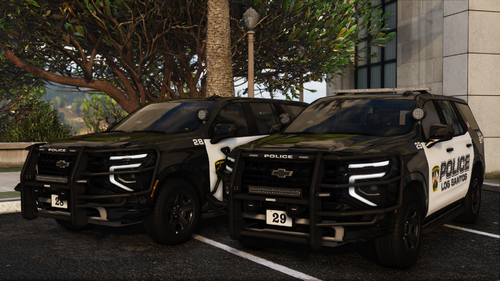 Hello world! Its been a long long time! Heres a pack ive been working on for a longgg time, I love it so I hope you do as well! If you find any issues please let me know via discord Any issues please report to my discord - https://discord.gg/52Nv87Ktvh Includesssss - 2025 Tahoe - Slicktop & Hardtop 2023 Tahoe - Slicktop & Hardtop 2025 F150 - Slicktop & Hardtop 2023 F150 - Slicktop & Hardtop 2023 Charger - Slicktop & Hardtop - Do not reupload this pack - Do not unlock this pack - Do not rip parts of this pack !!YOU WILL NEED SSLA TO USE THIS VEHICLE PACK, DOWNLOAD IT HERE!! SirenSetting Limit Adjuster - Script Modifications & Plugins - LCPDFR.com Light Showcase - lspd pack 1 - YouTube26 points
 -
26 points
.thumb.png.b9e18d9931090871b064059f2c315cf8.png) Welcome to LSPDFR Expanded! A plugin to enhance off- and on duty realism and roleplay. LSPDFR Expanded aims to offer a great addition to your every day patrol by adding lots of realism and roleplaying features both for your on-duty and off-duty activities. You'll start as a Rookie who barely makes enough money to keep his fridge filled. With every day on duty you will slowly gain experience and rise up the ranks of the LSPD. After your shift is done, grab your vehicle you bought at the store to the nearest supermarket and grab some food before you starve. Maybe get a new tattoo or haircut along the way? With LSPDFR Expanded you can do it all. Your created character really becomes YOUR character Disclaimer I develop mods in my freetime and playtest them to the best of my abilities before I release them. Of course some bugs might slip through but I will do my best to fix them. Please report any bugs or issues you find and leave an honest review based on the current version. I would love if you might consider supporting me via PayPal. You can find the respective link under the Download button. I’d also love to hear your thoughts - feel free to leave a review or comment, it helps me improve and make my plugins even better! If you like my work, feel free to check out my other plugins For support, questions or discussions, feel free to visit my Discord server: https://discord.gg/AjGyy4cN6G Overall: Custom money system that increases with your paycheck and decreases with every purchase you make Accesible phone to call for various services Basic Needs system that will give you Debuffs if your character becomes thirsty or hungry Custom savefile per character that keeps track of everything you do On Duty: Fully functional custom Police Interior with decorations on special holidays Work at either the frontdesk or the officedesk Write reports on your completed callouts and pullovers for extra XP Wardrobe synced with your EUP to change into your patrol outfits Colleagues that are based on the jurisdiction of that area (Ultimate Backup required) Clock-In system to start going off and on duty to collect your paycheck and gain XP Garage System that lets you spawn a patrol vehicle taken from your agency.xml Specialized departments that each offer various gameplay elements and specific callouts Off Duty: Apartment where you can sleep and head out with your vehicle Custom wardrobe that lets you wear any clothing items that you own Clothingstores where you can buy cloth Fridge system that lets you store, eat, drink and cook to replenish your Thirst and Hunger Grocerystores to buy food, alcoholic drinks and cigarretes Fastfood restaurants and DriveThru to quickly replenish your Thirst and Hunger Vehiclestore where you can buy all sorts of vehicles LS Customs to tune your bought vehicles Gas stations with working hose to give your vehicle a time-based performance boost Barbershops to get a new hair/beardstyle Tattooparlors to get your character a fresh new look [Requirements: RageNativeUI (included in the download), Bottom Dollar Bounty DLC (mp2024_01) needs to be installed and enabled Money Fonts DLC (mp2025_01) needs to be installed and enabled for the Housing Functions introduced in 1.1.1 Main.DisableMultiplayerMap inside the lspdfr.ini needs to be set to false for the PD Interior to work] Copy the contents of the Grand Theft Auto V folder into your main Grand Theft Auto directory (ex: .../steamapps/common/Grand Theft Auto V/) -> (If installed correctly it should look like this: Grand Theft Auto V/plugins/LSPDFR/LSPDFRExpanded.dll) These are the default keybinds which can be changed anytime by editing the LSPDFRExpanded.ini Y — Interaction key CTRL + I — Open Inventory CTRL + H — Display Wellbeing menu CTRL + P — Open Mobile Phone After loading ingame, open the Rage Console (standard F4) and type "ForceDuty" to fully load the plugin. To go on duty, enter any police department via the Red Circle. This will take you inside the custom PD. There, you can stamp in to start working. To go off duty, just stamp out at the same location. DO NOT press the vanilla "Go off duty" button, as this will unload the plugin.26 points
Welcome to LSPDFR Expanded! A plugin to enhance off- and on duty realism and roleplay. LSPDFR Expanded aims to offer a great addition to your every day patrol by adding lots of realism and roleplaying features both for your on-duty and off-duty activities. You'll start as a Rookie who barely makes enough money to keep his fridge filled. With every day on duty you will slowly gain experience and rise up the ranks of the LSPD. After your shift is done, grab your vehicle you bought at the store to the nearest supermarket and grab some food before you starve. Maybe get a new tattoo or haircut along the way? With LSPDFR Expanded you can do it all. Your created character really becomes YOUR character Disclaimer I develop mods in my freetime and playtest them to the best of my abilities before I release them. Of course some bugs might slip through but I will do my best to fix them. Please report any bugs or issues you find and leave an honest review based on the current version. I would love if you might consider supporting me via PayPal. You can find the respective link under the Download button. I’d also love to hear your thoughts - feel free to leave a review or comment, it helps me improve and make my plugins even better! If you like my work, feel free to check out my other plugins For support, questions or discussions, feel free to visit my Discord server: https://discord.gg/AjGyy4cN6G Overall: Custom money system that increases with your paycheck and decreases with every purchase you make Accesible phone to call for various services Basic Needs system that will give you Debuffs if your character becomes thirsty or hungry Custom savefile per character that keeps track of everything you do On Duty: Fully functional custom Police Interior with decorations on special holidays Work at either the frontdesk or the officedesk Write reports on your completed callouts and pullovers for extra XP Wardrobe synced with your EUP to change into your patrol outfits Colleagues that are based on the jurisdiction of that area (Ultimate Backup required) Clock-In system to start going off and on duty to collect your paycheck and gain XP Garage System that lets you spawn a patrol vehicle taken from your agency.xml Specialized departments that each offer various gameplay elements and specific callouts Off Duty: Apartment where you can sleep and head out with your vehicle Custom wardrobe that lets you wear any clothing items that you own Clothingstores where you can buy cloth Fridge system that lets you store, eat, drink and cook to replenish your Thirst and Hunger Grocerystores to buy food, alcoholic drinks and cigarretes Fastfood restaurants and DriveThru to quickly replenish your Thirst and Hunger Vehiclestore where you can buy all sorts of vehicles LS Customs to tune your bought vehicles Gas stations with working hose to give your vehicle a time-based performance boost Barbershops to get a new hair/beardstyle Tattooparlors to get your character a fresh new look [Requirements: RageNativeUI (included in the download), Bottom Dollar Bounty DLC (mp2024_01) needs to be installed and enabled Money Fonts DLC (mp2025_01) needs to be installed and enabled for the Housing Functions introduced in 1.1.1 Main.DisableMultiplayerMap inside the lspdfr.ini needs to be set to false for the PD Interior to work] Copy the contents of the Grand Theft Auto V folder into your main Grand Theft Auto directory (ex: .../steamapps/common/Grand Theft Auto V/) -> (If installed correctly it should look like this: Grand Theft Auto V/plugins/LSPDFR/LSPDFRExpanded.dll) These are the default keybinds which can be changed anytime by editing the LSPDFRExpanded.ini Y — Interaction key CTRL + I — Open Inventory CTRL + H — Display Wellbeing menu CTRL + P — Open Mobile Phone After loading ingame, open the Rage Console (standard F4) and type "ForceDuty" to fully load the plugin. To go on duty, enter any police department via the Red Circle. This will take you inside the custom PD. There, you can stamp in to start working. To go off duty, just stamp out at the same location. DO NOT press the vanilla "Go off duty" button, as this will unload the plugin.26 points -
pdComp - Police Computer
orange.12 and 22 others reacted to CossackGames for a file
23 points Join the Discord Community for tech support and updates Plugin Showcase Video(0.3.0): https://www.youtube.com/watch?v=D0O9lvwryw4pdComp — Police Computer for LSPDFR A modern, immersive police computer for LSPDFR with deep records-framework integration. pdComp transforms police roleplay in GTA V with a fully interactive MDT/CAD system featuring a simulated police-computer desktop, draggable applications, persistent records, evidence-aware court systems, and integrated records support. It now works with either Policing Redefined (via CDF) or Stop The Ped as its records backend. Built from the ground up for immersion, pdComp replaces outdated menu-driven police computers with a realistic in-game operating system complete with: Rugged police laptop interface Draggable and resizable windows Desktop wallpaper and app icons Window snapping On-foot patrol tablet ALPR/BOLO notifications Standalone ALPR plate reader and speed radar Persistent criminal justice records Persistent dark mode Deep Records-Framework IntegrationA records integration is required — pdComp has no standalone vanilla mode. Choose your backend with `[Integration] Mode`: When used with Policing Redefined + CDF, pdComp becomes part of a connected policing ecosystem: Pulls synchronized suspect and vehicle records directly from PR Supports evidence-linked arrest reports Integrates with PR citation workflows Tracks warrants, suspended licenses, insurance status, registrations, permits, and more Uses tested evidence and relevance checks in court outcomes When used with Stop The Ped, pdComp combines LSPDFR persona/vehicle data with STP's: Document-status API (license, registration, insurance) Alcohol-over-limit and drug-influence advisories Contraband/evidence search results, importable as current-call evidence Core FeaturesPedestrian & vehicle lookup Citation issuing Arrest reports Court docket & hearings Evidence-aware case outcomes Prior stop and citation history Persistent case database Standalone ALPR & speed radar Persistent vehicle BOLOs with ALPR-style hit alerts Report Center for incident, use-of-force, and vehicle damage reports Mouse, keyboard, and controller support Full-screen immersive UI Current Versionv0.3.4 Install Guide Charge Conversion Tool23 points
 -
Campus Callouts
JeffreyK23 and 22 others reacted to SeerFC for a file
23 points About This Mod Campus Callouts is a fully scripted LSPDFR callout pack focused on ULSA located near Rockford Hills. You’ll respond to realistic campus incidents like fights, stalking, protests, trespassers, and even a school shooter scenario. As someone who loves the niche part of police calls, I decided to expand on Abel Gaming's University Callouts to introduce a fresh new scene to the university we all know and love! Each callout was scripted with immersion and replayability in mind. Whether you're calming a protest or chasing down a clown, there's always something new happening on campus. The Origin This pack was built with full permission from @Abel Gaming, who originally created University Callouts. Six callouts from his original mod were adapted, edited, and expanded for this project: Fight Noise Complaint Stalking Student Escort Underage Drinking Weapon Violation AbelGaming was kind enough to allow the reuse and rework of his original scenarios, and this mod would not exist without his incredible foundation. Check out his work here: University Callouts by AbelGaming Features 15 fully integrated callouts Full support for CalloutInterface Randomized outcomes in multiple scenarios Realistic school-based environment and scenario logic Optional Blueline Dispatch audio compatibility 1.0.0 Callouts Included Drone Use Fight Hit and Run Noise Complaint Stalking Student Escort Trespasser Underage Drinking Vandalism Weapon Violation Intoxicated Student Protest on Campus Killer Clown 911 Call Missing Person School Shooter Installation Instructions Download and extract the ZIP archive Drag and drop the lspdfr and plugins folders, as well as the included .dll files into your GTA V directory Overwrite if prompted Launch the game via RagePluginHook and go on duty The .ini file allows you to adjust keybinds and toggle features. Located at: Plugins/LSPDFR/CampusCallouts.ini IMPORTANT: If you’re not using Blueline Dispatch, make sure this setting is set to False to avoid missing audio Updating Campus Callouts IMPORTANT: If you're updating from a previous version, delete the old CampusCallouts - Audio folder inside LSPDFR/Audio/Scanner/. Several unused audio files have been removed and replaced with smaller NAudio-compatible ones. Backup your CampusCallouts.ini If you've customized keybinds Delete the old audio folder Install the new version as described above Replace files if prompted Launch the game via RagePluginHook Requirements GTA V (latest legal version) LSPDFR 0.4.9+ RagePluginHook (latest) CalloutInterfaceAPI.dll (included) StopThePed (strongly recommended) Support & Community Got ideas, questions, or just want to connect? Discord Server – Join for updates and feedback GitHub – View or fork the open-source project My Nexus Mods – View my VR modding roots Credits AbelGaming – Original University Callouts and full permission to build from his work Jon Jon Games – Scripting support Opus and Charlie 686 – CalloutInterface help Everyone who replied to my DMs – Thank you! Audio credits – See README inside the Audio folder Videos! ====================================================================23 points
 -
 SimpleHUD is script modification for your game displaying player's current location, as well as a compass and the time. ✨ Features Postal System Speed Limit Advisory Signs Time Zulu Time County Cardinal Direction Customize Menu Custom INI Road Name Integration with Future Mods 👀 ⚙ Requirements ScriptHookV | Please make sure ScriptHookV is installed and up to date. Packfile Limit Adjuster | Please make sure Packfile Limit Adjuster is installed and up to date. 📥 Installation Navigate to your GTA V directory (e.g. C:\Program Files (x86)\SteamLibrary\steamapps\common\Grand Theft Auto V\) Place the provided .asi and .ini files inside your main Grand Theft Auto V game directory. Launch GTA V! 🛠 Support & Feedback Need help or want to share your thoughts? We’d love to hear from you! Join our Discord: Venoxity Network | Create a support ticket and someone from our team will assist you. Found a bug or have suggestions? | Let us know in Discord, your feedback helps us make SimpleHUD even better! ⚖️ Legal © 2026 Venoxity Development. All rights reserved. SimpleHUD is protected by copyright law. Redistribution or modification is prohibited without written consent from Venoxity Development.22 points
 -
22 points
 About the Pack: This pack was originally created for my personal use in LSPDFR. I really liked the vehicles and began to expand the pack. I wanted to try and keep the pack realistic with just the Charger and the Durango. A lot of departments do not have 30 different vehicle makes, but do have different purposes for a few different makes. I like that about this pack. This pack is not based on anywhere in particular, just a little bit of creativity. This pack does come with all blue lighting installed (Red & Blue is included). I know its not perfect, but I did spend a lot of time on this pack. The Marked Durango does not have the pillar mounted ions like the slicktop, traffic, and unmarked version do. I wanted to keep the lighting somewhat consistent between both of the marked vehicles. If you guys would like, I will add the pillar mounted ions to the Marked Durango too. For the traffic units, I know some will wonder why I left the flag on. I figured that it's quite obvious that it's a police car, so why not. I'm also aware that the material order for the dashcam is messed up in the screenshots, but it has been fixed in the download. All marked models come with corner lightbar cruise lights. All unmarked models come with visor cruise lights. Anyways, I hope you all enjoy! Pack Includes: Marked Charger Marked Durango Slicktop Charger Slicktop Durango Traffic Enforcement Charger Traffic Enforcement Durango Unmarked Charger Unmarked Durango K-9 Unit Charger Optionals include: All blue lights Red & Blue Lights Installation: *Note* Please use the included ELS files so the lights will function the way they were designed to. Feel free to leave your thoughts in the comments. DM me if you find any bugs, so I can get them fixed as quick as possible. CONSTRUCTIVE CRITISIM is always appreciated. PLEASE READ THE FAQ'S IN THE "READ ME" BEFORE GOING TO THE COMMENTS OR MY DM'S! I WILL NO LONGER RESPOND TO QUESTIONS THAT HAVE ALREADY BEEN ANSWERED!!!! Disclaimer: I'm not responsible for any damages caused by this modification. All files should be backed up prior to installation. Do not distribute this file outside of this platform. The files may be used in FiveM servers if you chose to do so. These files were not made to be specifically compatible with FiveM , so there could be issues. The sale of any part of the modification is strictly prohibited. Permission is required for any editing and redistribution of this modification itself. Downloading the file is similar to a license to use the file. IT DOES NOT MEAN YOU OWN THE RESOURCE ITESELF. No access to the locked files will be granted.22 points
 -
[ELS]-[ADDON] Chevrolet Tahoe Unmarked Mini-Pack
Timmy Denver and 21 others reacted to HermHNKM for a file
22 points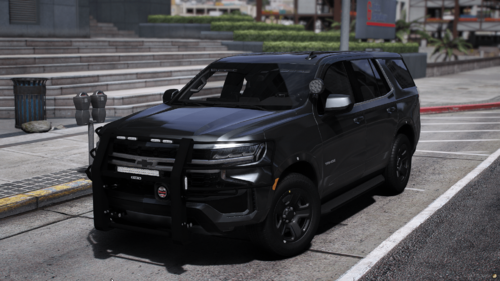 Chevrolet Tahoe Unmarked Mini-Pack-HNKM ------------------------------------- The pack will be released soon as NON-ELS Fivem Ready ---------------------------------------------------------------------- The vehicle's include's different extra options like: Spotlight facing down Spotlight facing front Antenna's ARLP The vehicle's are installed with TakeDown's ---------------------------------------------------------------------- Spawn codes: tahoefbi1: Without Pusbar tahoefbi2: With Pushbar --------------------------------------- ------------------------------- Install - Lspdfr: -------------------- 1. Drag and drop the addon file's into -\mods\update\x64\dlcpacks in openIV 2. Go into DLCLIST.XML and paste the text under - in path-\mods\update\update.rpf\common\data <Item>dlcpacks:/tahoefbi1/</Item> <Item>dlcpacks:/tahoefbi2/</Item> 3. Drag and drop the ELS FILE'S into path -\ELS\pack_default If you have any problem's or question's, please join my discord: https://discord.gg/97B2BGnMWu22 points
 -
22 points
 This was my first mega pack in years and it's all thanks to Django, EFox and gandalfvevo for the liveries, support and testing. TEMPLATES FOUND ON MY DISCORD BELOW It’s only stage 3 lighting. FILE: LSPD-Fleet [REFLECTIVE] UPLOADED: 02/11/25 (Discord Release) AUTHOR: torrent LIGHTING TYPE: ELS ======================== Simple questions with simple answers. Can you make this Non-ELS? No. Can you make this addon/DLC instead of replace? No. Can you make this FiveM ready? No. Want to check out more skin packs that I use for my releases or commission a pack? Reach out to Django today on Discord! Discord Username: djangop054 (He is found on my Discord and has his own section also with information) https://discord.com/channels/1186998157998039142/1331400259699474462 This pack is done. I am calling it for now. - Pranger will not have reflective liveries due to issues, maybe fixed at a later date. ======================== Information regarding vehicle modeling and replacement https://www.lcpdfr.com/forums/topic/62579-guide-police-car-mods-the-whys-and-hows-and-troubleshooting/ I install to PatchDay28 for my REPLACEMENT slots. ======================== Put the xml(s) into your ELS folder! Join my Discord. I don't charge for anything. https://discord.gg/kjaGhMP7sk Started a Patreon! Feel free to support me 😄 (everything here will be released publicly every 6 months) https://www.patreon.com/c/torrentsmodifications22 points
 -
[DLC][ELS HYBRID] Overland Park, Kansas Police Mega Pack
googleplex2010 and 20 others reacted to c13 for a file
21 points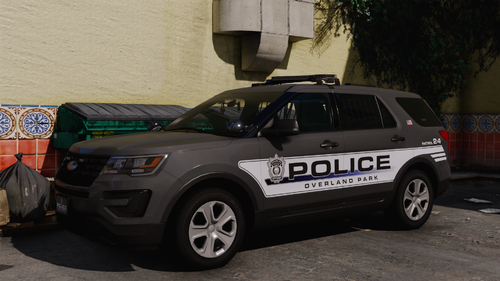 YOU MUST INSTALL THE LATEST VERSION OF SIRENSETTING LIMIT ADJUSTER FOR ALL LIGHTS TO WORK!!!!! I WILL NOT SUPPORT YOU IF YOU DON'T!!!!!! Lighting Setups Please join my discord to stay up to date on projects and potentially get early access. There's currently discord exclusive releases of updates to JOCO, KHP and Lenexa, as well as future projects. https://discord.gg/g4EwR4MyPW What is likely the magnum opus of my work in GTA, this has been a long time coming for my hometown, delayed due to a lack of suitable base models until recently. This is a pack containing 54 vehicle models and 88 liveries, all featuring animated spotlights (hold H to toggle up/down, use high beams to activate them), reflective liveries, HQ interiors and as close to accurate as possible lighting setups. Years of research went into this pack to make it as accurate as possible down to the unit and license plate number when info was available. Overland Park is a quiet well off suburb of Kansas City that is the 2nd largest city in Kansas, with nearly 200,000 residents and sitting at 75 square miles. The agency has nearly 300 officers assigned to it and the vast majority of vehicles are 21+ dodge durangos, but older vehicles are still in the pool. Major highways include I-435, US-69 and a small section of I-35, as well as multiple major shopping districts that attract crime from Kansas City. Vehicles included- INSTALL (YOU WILL NEED TO USE THE DLC!!!! THERE IS NO REPLACEMENT WITHOUT EDITING A SHIT TON OF META FILES) USE MY DISCORD FOR SUPPORT! FAQs: My lights are dim- You need to install a light enhancing mod Change it to ELS only! No. I'm not going to spend days of my time making the patterns worse and adding bugs like floating lights when doors are open because you're too lazy to drag and drop the DLC into a folder and add 1 line to dlclist. Make it replace instead of DLC- No. These vehicles require special metas the average person won't know how to add in order to have the headlights, handling and most importantly the lights to work. This is the easiest way. Change something for my personal taste- No. These vehicles are designed to be as realistic as possible and with my taste. If you don't like it, make something yourself. Change it to Los Santos instead of the real life name- No. I've split Los Santos into multiple different agencies, and have no intention of having half a dozen "Los Santos PDs" in my game. XYZ is wrong- I've done countless days of research on these vehicles, and unless you have direct access to these vehicles, I probably know better. If anything is wrong, it is due to a lack of information or GTA limitations, such as parts or ELS limitations. Making them respond as backup- Watch one of these videos depending on what backup you use:21 points
 -
Patrol Suite
Julian Tillman and 19 others reacted to DeSepticOasis for a file
20 points Patrol Suite is an all-in-one LSPDFR patrol enhancement plugin built to bring together the everyday tools a patrol officer would actually use during a shift. It focuses on clean UI, practical gameplay systems, configurable controls, and immersive police workflow without forcing the player into one rigid playstyle. Whether you want a lightweight patrol HUD, a detailed CAD/MDT-style workspace, RoadWatch radar and plate-reader tools, smarter vehicle control, or practical equipment features, Patrol Suite is designed to make your patrol feel more complete. FEATURES Showcase/Install Videos EXTRAS20 points
 -
Callout Interface
bravo six seven and 19 others reacted to opus49 for a file
20 points Callout Interface A new way to interact with callouts. Features: RAGENativeUI menu front-end to start a callout Force a random callout via keybind Advanced MDT with multiple status buttons and tabs Callouts can be sent to the MDT while you're on another callout A fully functioning ALPR system with advanced camera layouts External license plate display Support: Discord Server | https://discord.gg/AuJCUag Developer API | https://github.com/Immersive-Plugins-Team/CalloutInterfaceAPI Recommended Callout Packs: 686 Callouts | link Chaos Callouts | link Super Callouts | link New in Version 1.4.120 points
 -
Los Santos Police Department Mega-pack [ELS]
Juan rubio and 19 others reacted to Jedahdiah for a file
20 points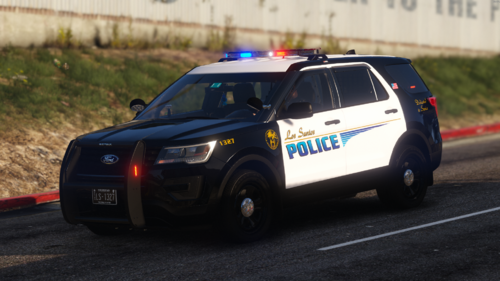 [ELS] Los Santos Police Department Mega-pack [Replace & Add-on] Release date: December 2025 Updated: February 2026 Credits last updated: February 2026 ---------------------------------------------------------------- Information: Merry Christmas and festive greetings! Thought I'd drop something before Christmas itself occurs. This is a massive vehicle pack based off TheGreatHah's and Getinmybelly's police pack back in 2017, which I absolutely loved, and so I decided to design my own pack based off their designs but with my own flare and design to them. This pack covers both Los Santos Police Department and the sub-division of the Los Santos Port Police division. THIS PACK IS OPTIMISED FOR GRAND THEFT AUTO V - LEGACY EDITION Before reporting issues, make sure everything is up to date! Most issues with this pack have been to do with outdated RPH, SHV, PackfileLimit Adjuster, HeapAdjuster or gameconfig! This pack includes over 43 vehicles. They are listed in the spoiler below: Vehicles included in this pack and spawn names: This pack is solely an addon pack, but replaces POLICE, POLICE2, POLICE3, and POLICE4 slots. The vehicles names and spawn names can also be found in the ReadMe. You can spawn these using a simple trainer in-game. Features: Flashing lights with gorgeous environmentals Detailed interiors Each vehicle has 4 liveries, changeable in using a trainer. A massive thanks to everyone of my Patreon's who BETA tested some of these vehicles and the state wide pack when in early access! If you'd like to find out more about this, please join my discord with the link below. These vehicles are not made to the specification of any specific department. Please don't comment on it being inaccurate or whatever. It's not meant to be accurate. I will not be providing support in installing these files. All the info is in the ReadMe. DO NOT USE the review system for reporting installation issues, issues already reported, or for anything other than review. Please use the comments and see if your solution to the issue is there, and if not, leave a comment. Fancy hanging out in a hell hole? Discord: https://discord.gg/XjZvS35kgD (This is also where you'll find the bigger free Northern San Andreas MA styled pack) ---------------------------------------------------------------- FAQ: - An FAQ area is set up and can be updated with anything else people need to know. - This area will try and cover as much as possible for you. - As said before, I will not be providing support in installing these files. - DO NOT USE the review system on the sites for reporting installation issues, issues already reported, or for anything other than review. - Please use the comments section on the sites and see if your solution to the issue is there, and if not, leave a comment or join my discord and open a support ticket ---------------------------------------------------------------- Credits: - For credits, please see the credits documentation in the main file, or the credit's section on this download page. ---------------------------------------------------------------- Known Bugs: None yet If there are bugs or whatever, just PM me or leave a comment. ---------------------------------------------------------------- Terms of use: DO NOT distribute my content without my express permission! This includes the file itself, liveries, models or the screenshots. Do not modify the carcols codes without my permission. That includes taking the custom codes and using it for your own personal packs, public packs or FiveM server. DO NOT use the vehicles in a FiveM server, group or clan without my express permission. Just ask me. Please do not upload this file or a part of it to any other website without explicit permission from me This file is freeware. Do not sell or distribute the content. The author accepts no responsibility for any damage caused to your PC, game, or anything else. DO NOT rip, dismantle or change the vehicle in any way (except for texture files). Vehicles are LOCKED for a reason.20 points
 -
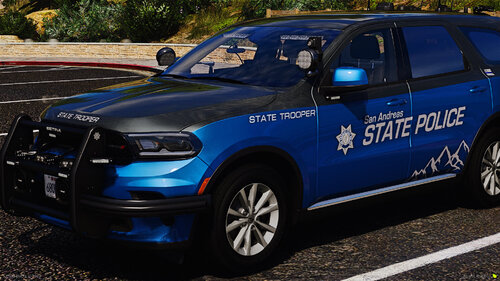 [2.0][ELS-HYBRID][DLC][Fivem-Ready] San Andreas State Trooper Pack More cars will be added soon to this pack, Join my Discord to see the progress! ---------------------------------------------------------------------------------------------------------------- CREDIT: Livery's by Fluovestje64//// Link to his profile: https://www.lcpdfr.com/profile/644435-fluovestje64/ ---------------------------------------------------------------------------------------------------------------- THIS CAR REQUIRED 32 SIRENSETTING LIMIT ADJUSTER TO WORK PROBABLY INGAME -------------------------------------- The car will not work in Gta V/LSPDFR if you dont use the ELS.xml file in the folder -------------------------------------- Spawn code names: SAST1 = 2023 Dodge Charger SAST2 = 2018-19 Ford Explorer SAST3 = 2020 Ford Explorer SAST7 = 2024 Ford Mustang GT Over 10 Extra Option's: 1 Marked Livery & 1 Unmarked Livery is included in all 4 cars!: Extra Option's list: - DS: The Mustang have some parts on different extra numbers then listed below! Extra 1: Lightbar Extra 2: Grill Lights Extra 3: RST Extra 4: Side Runners/Side Lights Extra 5: Rear Plate/Rear Trunk Lights Extra 6: FST Extra 7: Side wings of Pushbar Extra 8: Main Pushbar Extra 9: Antenna Roof/Boot Extra 10: Antenna Roof/Boot Extra 11: ALRP Extra 12: Takedowns - DS: Need to be toggled from the Extra Menu in trainer ------------------------------------- SAST Pack by-HNKM 1.0 - BY HNKM SIREN 32 SCRIPT REQUIERD ------------------------------------- Install - Lspdfr ADDON: -------------------- 1. Drag and drop the addon file's into -\mods\update\x64\dlcpacks in openIV 2. Go into DLCLIST.XML and paste the text under - in path-\mods\update\update.rpf\common\data <Item>dlcpacks:/sast1/</Item> <Item>dlcpacks:/sast2/</Item> <Item>dlcpacks:/sast3/</Item> <Item>dlcpacks:/sast7/</Item> 3. Drag and drop the ELS FILE'S into path -\ELS\pack_defaulT PLEASE USE THE XML FILE IN THE FOLDER ------------------------------------- ------------------------------------- Install - Fivem: -------------------- you should know this. ---------------------------------------------------------------------- If you have any problem's or question's, please join my https://discord.gg/97B2BGnMWu20 points
 -
Glock 17 | Animated | Replace
Majorkangz and 19 others reacted to FluffyMods for a file
20 points Glock 17 Gen 3 - High Quality Textures & Models - Animated - Lined up Iron Sights (requires weapons.meta editing, values included in download / pistol replace does not have this) - Lined up Vanilla Attachments - Replaces Combat Pistol & Pistol SP Install [mods] > Update > x64 > dlcpacks > patchday8ng > dlc.rpf > x64 > models > cdimages > weapons.rpf Turn on edit mode and drag the files into openiv/codewalker Join My Discord | Exclusive Mods, and Giveaways Credit: Battlestate Games20 points
 -
Ford Transit + Chevrolet Tahoe - ICE Vehicle Pack - [8SEATS] [ELS] [ADDON]
Sergeant Johnson and 19 others reacted to SuperPyroManiac for a comment on a file
20 points Please keep comments and reviews on topic. Keep them related to the vehicle model and texture, this little computer file has nothing to do with real world politics. Do not report this file unless you have proof that it violates our file guidelines. IRL drama does not mean I will take it down. LSPDFR is a mod for people to RP as a cop, so it's only fair that both local and federal vehicle designs will be uploaded. Let's be clear, there are hundreds of other ICE vehicle packs that are not blowing up my reports. This is not real life, please be kind to each other. I live in the US and I fully understand the huge incidents going on right now, but this is not related to the real deal at all.20 points
 -
EUP Menu
JeffreyK23 and 18 others reacted to PieRGud for a file
19 points EUP Menu is a carefully-built menu for the popular Emergency Uniforms Pack modification. EUP Menu allows you to easily apply EUP clothing to your MP peds. It also includes a character creator exactly like GTA Online's character creation system. You can edit, save and even share your favourite characters. Making your own awesome police officer has never been easier. Don't like the predefined clothing options? The wardrobe feature has got your back. You can create and save your own outfits with ease. Sunny day? Why not put on some shades. Hate your face? A mask solves everything. Sarge not giving you that promotion? Screw the system. Stick that patch on and promote yourself. Want to relive Die Hard? Throw on a vest and a helmet. It's time to kill some terrorists. What happened to the Accessories menu?: As EUP grew, the Accessories menu became more and more outdated, and wasn't able to fully encapsulate all EUP has to offer. It will be completely revamped and brought back in a future menu update. Requirements: 1) RAGE Plugin Hook 0.37+ 2) RAGENativeUI 1.8.1+ 3) EUP Law & Order 8.3 4) (Optional but highly recommended) EUP Serve & Rescue 1.5 Installation: 1) Place RAGENativeUI.dll into your root GTAV folder (if you don't already have it). 2) Extract the contents of Plugins in the archive into your GTAV Plugins folder. 3) Open the RPH console in-game (default F4) and type "LoadPlugin EUPMenu.dll" (without quotations). Note: If you are upgrading from a previous version of EUP, please make sure to delete presetoutfits.ini in the Plugins/EUP folder before running the menu. This will allow it to generate the latest presetoutfits.ini file. Your custom outfits may need some adjusting for EUP 8.3, but your saved characters will work fine. Credits: - @AlexBraun for the EUP character creation system - @alexguirre for RAGENativeUI and contributing code related to fetching all loaded RPF archives Want to see the full FAQ? Have a question? Need help? https://discord.gg/aTQfepT Join our EUP Discord above and take a look at #faq channel. If it doesn't have the answer you're looking for, you can ask for help in the #eup-support channel.19 points
 -
19 points
 Title created by me, not generated by AI. This pack includes custom YCD ClipMotion movement reanimations. - Choose Your Style:Position SUL / Temple Index / Low Ready / High Ready More CQB & Police Tactical. The folder included in the pack allow you to choose different animation styles, including Move/Stealth/Cover. Preview screenshots are included in each folder to help you choose your animation style. All animations style are safe to use, it's recommend to test all the animations before playing game. Be careful when using mods that replace weapon animation YCD files. Follow Installation on README.txt Making Off / Reference - Special Thanks:ThugPlays DehMods Pedro NsLziin Beatriz (for testing the animations and helping identify crash and bug ❤️)19 points
 -
Immersive Effects
Jed Cooper and 18 others reacted to Faya for a file
19 points Immersive Effects by Faya Discord Server (Fixed link) / Installation / Progress Board (Revamped) Personally, this is my best and favorite plugin. If you fire your weapon, there will be a small camera shake each time you fire, simulating a recoil effect. A heartbeat will play when you're in a firefight, aiming at an armed person, if you've been injured, or even when you're being chased by a dog. The camera shake is also used for other features, such as a big car collision, loss of health, and more. Below is a list showing all features. If there is a feature you do not want, each one can be disabled individually in the settings. Click here to watch a preview of some of the v1.3.0 features. ⚠️ The changelog is pretty big. I recommend you read it. Visual Effect Triggers - Firefight - Vehicle Collisions - Loss of health - Reloading - High-speed emergency braking - Handbrake - Jumping - Falling Audio Effect Triggers (So far, only hearbeat effect) - Firefight - Aiming at an armed person - Hand-to-hand combat - Severe injury Menu - Camera shake intensity setting - Weapon recoil intensity setting - Audio effect toggling - Save, revert, and reset feature Use X + 3 to open the menu, where you can change the intensity of the camera shakes or disable any audio effects.19 points
 -
 Vehicle Accidents CalloutsExperience the ultimate realism on the streets of San Andreas! Respond to complex, high-stakes collisions where every second counts and your scene management skills make the difference. This callout pack moves beyond simple car chases, challenging you to master the art of accident investigation and public safety.From the quiet parking lots of Paleto Bay to the high-speed intersections of Blaine County, you will encounter diverse scenarios that require more than just a siren. Interview witnesses, hunt for hit-and-run suspects at their residences, and coordinate with Fire & EMS to stabilize volatile scenes. Main Features:Dynamic Scenarios: Experience everything from minor fender-benders at local markets to catastrophic fuel tanker rollovers. Immersive Dialogues: Engage in professional, multi-stage interactions with Fire Lieutenants and emotionally charged conversations with involved drivers. Hit-and-Run Investigations: Use CCTV footage and witness descriptions to track down suspects at their homes and bring them to justice. Scene Management: Partner with Fire & EMS to secure areas. Use cones, flares, and strategic positioning to manage traffic flow and protect first responders. Unpredictable Outcomes: Every callout features randomized causes-was it a rookie driver, a reckless speeder, or a mechanical failure? Config.ini (important):Please, check VehAccidentsCallouts.ini and configure it for yourself. You can disable callouts, change keys or use your (multiple) vehicle models to spawn in callouts! Callouts list (0.4beta):Joshua Road Collision Senora Freeway Animal Hit Animal Hit on Intersection 1 (NEW) Animal Hit on Marlowe Drive (NEW) Great Ocean Highway Truck Accident Paleto Bay Vehicle Collision Paleto Bay Highway Truck Fire Abandoned Vehicle Crash at Catfish View Abandoned Vehicle Crash at Palomino Fwy (NEW) Abandoned Vehicle Crash at Grape Seed (NEW) Hit And Run on a Gas Station Hit And Run on a 247 Market Hit And Run on a Paleto Bay (Fuel Station) Hit And Run on a Los Santos Airport Parking Hit And Run on a Xero Gas Station (NEW) Hit And Run on a Maze Bank Arena (NEW) Hit And Run on a Chumash 247 (NEW) Hit And Run on a Fleeca Bank (NEW) Hit And Run on a San Andreas Ave (NEW) Rolled Out Semi Fuel Transport Crash (Paleto Bay) Vehicle in Ditch 1 Coach, Truck, Car MVA SenoraFwy Tow Truck Assistance at Palomino Fwy Tow Truck Assistance at US Route 13 Tow Truck Assistance at Interstate2 (NEW) Three Vehicle Crash at US Route 13 Truck and Car at Elysian Fields Fwy Rolled Out Semi at Olympic Fwy Truck and Car at Interstate 2 (NEW) MVA Two Cars Collision Rockford Dr (NEW) MVA Three Cars Collision Interstate 2 (NEW) MVA Three Cars Collision Olympic Fwy (NEW) MVA Three Cars Collision Baytree Canion (NEW) Two Cars Collision Davis Avenue (NEW) Two Cars Collision Vinewood Blvd (NEW) == Total of 36 callouts (for now, more in progress) Technical Requirements:Please select one of the two versions: Police Redefined or Stop The Ped (depends what do you use). Compatibility: Highly Recommended: INSTALLATION:Drag and drop the Plugins folder into your main GTA V directory. Ensure all dependencies are up to date. Head out on patrol and wait for dispatch! Get ready to secure the scene-the citizens of San Andreas are counting on you! ⚠️ Technical Warning: Traffic Control & Towing PhysicsIf you are playing Vehicle in Ditch callouts or any scenario involving a Tow Truck, please read the following: Avoid using the "Stop Traffic" feature from the Police Redefined menu. The Issue: When you use the PR menu to stop traffic, it "freezes" the AI vehicles in place. Since the vehicle to be towed is part of the traffic pool, its physics also become frozen. The Result: The Tow Truck will struggle to interact with a frozen object. This often leads to the cable unhooking, the truck glitching out, or the vehicle refusing to move despite being hooked. Recommended Solution: Please manage traffic manually using your police cruiser. Using your vehicle to block the road keeps the game’s physics engine active, ensuring the Tow Truck can hook and pull the target vehicle smoothly. Thanks to: @YobB1n - for making his Yobbin Callouts open-source. These callouts wouldn't be here without you. PLEASE REPORT BUGS TO IMPROVE YOUR GAMEPLAY Discord contact: xlargo1118 points
 -
EmsPlus
Babylon and 17 others reacted to TheMagentaButterfly for a file
18 points EmsPlus is currently in Beta. Many features are missing/incomplete! EmsPlus lets you work as an EMT or Paramedic (depending on your preference) but unlike other projects this one aims to not only make you click buttons but to be interactive. I want to make EmsPlus as realistic and close to real life as possible. I myself am an EMT at the German Red Cross which is why many procedures / products will be based on my knowledge and equipment. For Help, Bug Reports, Suggestions or to just hangout, join the discord! https://discord.gg/RwYgBVVZqQ =========================================================== [Install] Dependencies: RageNativeUI (Included), RagePluginHook, IPT.Common (Included) Drag and Drop the contents into your main game directory. For custom Ambulances/other vehicles please make sure you add them as allowed Vehicles! This Mod is only "Plug and Play" with a unmodded GTA5 installation. Additional setup may be required for custom props, vehicles, etc.! =========================================================== [Showcase] =========================================================== I recommend installing this EMS prop pack: https://www.gta5-mods.com/maps/medical-prop-pack =========================================================== [Features] -Support for custom props -Support for custom vehicles -Support for custom Animations -Support for custom Loadouts/Tools -Support for custom Languages -Support for custom Medicine -Support for custom EMS/Fire Stations -Support for custom Hospitals -Support for custom Callouts (Join the discord or download the template here) -Custom UI -In depth customization to tailor EmsPlus to your needs -Live settings menu to edit your settings in game [Open Source] EmsPlus is fully open source: https://github.com/TheMagentaButterfly/EmsPlus18 points
 -
Blaine County/Los Santos County Mega Livery Pack
andreacw and 17 others reacted to snailvirus for a file
18 points Hello and thank you for checking out my Blaine County/Los Santos County Mega Livery Pack! This pack currently consists of the following departments: BLAINE COUNTY/LOS SANTOS COUNTY SHERIFF'S OFFICE (INSPIRED BY ST. CHARLES PARISH) BLAINE COUNTY/LOS SANTOS COUNTY SHERIFF'S OFFICE (INSPIRED BY ST. MARY PARISH) BLAINE/LOS SANTOS COUNTY/SAN ANDREAS REGIONAL EMS BLAINE/LOS SANTOS COUNTY/SAN ANDREAS CORONER SAN ANDREAS DEPARTMENT OF TRANSPORTATION Recommended vehicle packs INSTALLATION INSTRUCTIONS Reflective liveries are also included. Feel free to use these liveries anywhere, but please credit me! Thank you LSPDFR247 on TikTok for using my liveries on stream! If you don't want to use those packs, the following bases are compatible with these liveries: 1998-2011 CVPI (OfficerUnderwood) 2013-2014 Tahoe (OfficerUnderwood) 2016 Impala (OfficerUnderwood) 2013-2019 FPIU (GeorgieMoon) 2016-2018 FPIS (GeorgieMoon) 2018-2020 Tahoe (GeorgieMoon) 2014-2024 Charger (GeorgieMoon) 2014-2023 Durango (GeorgieMoon) 2020-2024 FPIU (GeorgieMoon) 2010 Challenger (RAZ3R) 2005-2010 Charger (RAZ3R) 2021 Durango (RAZ3R) 2021-2025 F150 (RAZ3R) 2022 Silverado (RAZ3R) 2023 RAM 1500 (RAZ3R) 2024 Mustang GT/Darkhorse (RAZ3R) 2022 Chevy Express (RAZ3R) 2021 Tahoe (RAZ3R) 2021 Tahoe (RAZ3R w/Massman edits) 2022-2024 Tahoe (RAZ3R) 2025 Tahoe (RAZ3R) 2016-2025 FPIU (Kane104) 2020-2025 FPIU (NYModz) 2025-2026 Tahoe (NYModz) 2018 Charger (Matt) 2014 BMW R 1200RT (CodeZeroGaming) Harley Davidson (0taku) 2016 Chevy Express (0taku) Police Maverick (Yard1/RockstarGames) 2009 LENCO Bearcat (OfficerTej) Redneck Mod's Bearcat Ford F350 Ambulance (Thehurk) MedEvac Helo EC-135 (Candice) 2019-2020 Tahoe PPV (Dan with da Van) Ford E350 (OfficerWade) 2020-2022 F450 (GeorgieMoon) 2020-2022 F250-F350 (GeorgieMoon) 2022 F450 (RAZ3R) 2024 RAM 4500-5500 (RAZ3R) 2023-2025 Silverado (RAZ3R) 2023 Camaro (RAZ3R) Enjoy!18 points
 -
[ELS][Addon/Replace] Los Santos County Sheriff's Department
bravo six seven and 17 others reacted to OfficerArk for a file
18 points Introducing the Los Santos County Sheriff's Department Vehicle Pack (04/09/2026) Update coming soon to fix some issues Includes: -------------------- 2020 Ford Explorer -Options- -Marked -Togglable ALPR's -Unmarked -Togglable ALPR's -------------------- 2022 Ford F150 -Options- -Marked -Unmarked -------------------- 2014 Dodge Charger -Options- -Unmarked -Togglable ALPR's -------------------- 2018 Dodge Charger -Options- -Marked -Togglable ALPR's -Unmarked -Togglable ALPR's -------------------- 2021 Dodge Durango -Options- -Marked -Togglable ALPR's -Optional Side Antenna -------------------- 2021 Chevrolet Tahoe -Options- -Marked -Togglable ALPR's -Unmarked -Optional Side Antenna -------------------- 2011 CVPI -Options- -Marked -Togglable ALPR's -------------------- 2022 F250 -Options- -Unmarked -------------------- 2023 Ram 1500 -Options- -Marked -------------------- Every Model Comes with Red-Blue & Blue-Blue Lighting As Always Please Enjoy! Showcase Video by @AstroBurgers18 points
 -
[Non-ELS/DLSv2] 2020 California Highway Patrol FPIU [Add-On/FiveM]
Grandmaster and 17 others reacted to NuK3 for a file
18 points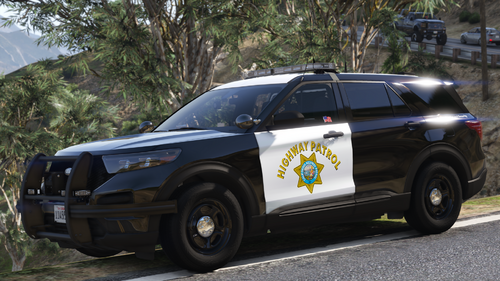 Important: You will need the SirenSetting Limit Adjuster if you are going to use this model. Some lights will not work unless you have it. This model also uses DLS for the red spotlight and lightbar takedowns, so if you use this model in FiveM they may not be able to work properly. I'm finally back! Here's the CHP 2020 FPIU with GM's new base. This model is using some new and/or improved parts that will eventually be added to my other CHP stuff in updates, so this is what you can expect in the future. I hope you guys enjoy! I also want to thank Scorpionfam and Alex for their help with this project, Scorpionfam helped me with issues I had and Alex supplied some of his own CHP parts and knowledge for this model. If you want CHP vehicles specifically intended for FiveM, you should check him out. If you want to check out my progress on future models or see what I'm up to, join my server: https://discord.gg/8NEperQawm Spawncodes hp20fpiu1 - Black and White (Setina Rambar) hp20fpiu2 - SMPV (Setina Rambar, Without Trunk "Highway Patrol" Text) hp20fpiu3 - SMPV (Setina Rambar, With Trunk "Highway Patrol" Text) hp20fpiu4 - Black and White (GoRhino Rambar) Extras (PLEASE READ THE EXTRAS GUIDE IN THE FILE) Setina Rambar FPIUs Only Extra 1: Rambar Stickers Extra 2: Thin Rubber Extra 3: Regular Rubber Extra 4: Thick Rubber Extra 5: PB-5 Wrap Around All FPIUs Extra 6: Partition Extra 7: CHP Cupholder Extra 8: Generic/SAHP Cupholder Extra 9: Regular Antenna Extra 10: Folded Antenna Extra 11: Spotlight Up (Clear or Red If SMPV) Extra 12: Spotlight Down (Clear or Red If SMPV) Light Stages Stages 1-3 (Default Key: J) Traffic Advisors (Warn, Left, Diverge, Right) (Default Key: T) Takedowns (Default Key: 9) Stage 3 Yelp (Activates automatically with Stage 3 enabled and the Yelp siren enabled) Horn (Activates automatically when you use the horn with Stage 3 enabled) Park (Activates automatically when the vehicle is parked with Stage 3 enabled) Left/Right Door Light Kills (Automatically activates when a door is opened) Liveries - CHP and SAHP Options Available Black and White Liveries (3 Liveries Included, Different Roof Numbers) SMPV (Polar Bear) Liveries (3 Liveries Included, Different Roof Numbers) - Do not upload to other sites or claim this mod as your own - Do not unlock or rip anything in this mod - Do not attempt to profit off this mod18 points
 -
Border Patrol mini pack [ELS-Hybrid][DLC]
lspdfrgoatee and 17 others reacted to Skys Development for a file
18 points You need to have SSLA(32 sirens mod) for all the lights to work correctly. This is also a hybrid ELS pack so you have to leave it in a DLC format. This pack uses all NON ELS emergency lighting controlled by the ELS script. DO NOT change the preset patterns in the ELS VCF or else the lights wont work as intended. This is a 4 car mini pack but will be updated as more bases come out. Lighting pattern on the pinnacle LB is not 100% accurate but pretty close. wanted this to more of an off road pack with the exception of the FPIU they use that for city patrolling. Huge thanks to @TheBeaner for making the liveries. Features 23 Tahoe- Full stage lighting. Extra_10 is the lightbar mounted spotlight. It rotates 360 degrees 18 Tahoe- Full stage lighting. Extra_2 is the bottom part of the bumper and Extra_3 are the mudflaps 20 F150- Full stage Lighting. Extra_2 is the front bumper bottom curtain and Extra_3 are the side steps. 21 FPIU- Full stage lighting suited for road patrol. No extras on this one. If you encounter any issues relating to the vehicles themselves go ahead and join my discord and let me know i have a dedicated channel for bugs. https://discord.gg/TNX44vtRhk18 points
 -
18 points
 Major Update 1.2.0 Now Live! New Levels Added! Showcase Video ABOUT Interior Callouts is a unique callouts pack that utilizes Enable All Interiors to create intense, realistic police/SWAT scenarios. Each callout is meticulously crafted to provide a sense of real-life police interactions, where people are inherently unpredictable. This callout uses randomized probability to decide on the behavior of every single AI in each call, ensuring multiple different outcomes and maximum replayablility. While there are only two callouts in the pack at the moment, each provides a unique experience. Trespassing – A police scenario, with multiple different locations and 25 different outcomes. Barricaded Suspects – A police or SWAT scenario, with 3 locations and an almost infinite number of outcomes, no playthrough will be exactly the same. There will be certain objectives to achieve during every scenario, which will be scored at the end of the mission. With over 20,000 lines of code, this callout pack is an ambitious project. If you appreciate my work, feel free to show your support here. Please leave a review! https://buymeacoffee.com/vixloi REQUIREMENTS Enable All Interiors (Version 33.0 or Above)(NOT Included) https://www.gta5-mods.com/scripts/enable-all-interiors-wip ScriptHookV (Latest Version)(NOT Included) http://www.dev-c.com/gtav/scripthookv/ ScriptHookVDotNet-Nightly (Latest Version)((NOT Included) https://github.com/scripthookvdotnet/scripthookvdotnet-nightly/releases RECOMMENDATIONS StopThePed (So suspects don’t despawn after the callouts ends) https://www.bejoijo.com/post/stop-the-ped Immersive Effects (For realistic effects from firearms) https://www.lcpdfr.com/downloads/gta5mods/scripts/39799-immersive-effects/ Weapon Control (For single, burst, or full auto fire) https://www.lcpdfr.com/downloads/gta5mods/scripts/47141-weaponcontrol/ INSTALLATION 1. Download Enable All Interiors and unzip the file. 2. While in the “scripts” folder, open EnableAllInteriors.ini and change the following settings under [MISC]: a. ENABLEMARKERS_TELEPORT = True b. ENABLEBLIPS = True 3. Drag and drop the ENTIRE “scripts” folder from the “Enable All Interiors Mod Files” folder into the GTAV Root Directory Folder. The whole scripts folder is transferred. (EX: E:\SteamLibrary\steamapps\common\Grand Theft Auto V) 4. Download ScriptHookV and unzip the file. 5. Open the “bin” folder. You can safely delete the following files (optional): a. NativeTrainer.asi 6. Drag and drop EVERYTHING from the “bin” folder into the GTAV Root Directory Folder. (EX: E:\SteamLibrary\steamapps\common\Grand Theft Auto V) 7. Download the latest version of Script Hook V Dot Net Nightly from the GitHub page under “Assets”. Unzip the file. 8. Open the unzipped ScriptHookVDotNet-v folder. Drag and drop EVERYTHING from the “ScriptHookVDotNet-v” into the GTAV Root Directory Folder. (EX: E:\SteamLibrary\steamapps\common\Grand Theft Auto V) 9. Download the InteriorCallouts files from the LSPDFR page and unzip it. 10. Open the unzipped InteriorCallouts folder. Open the IC_INSTALL_FILES folder. 11. Drag and drop EVERYTHING from the IC_INSTALL_FILES folder into the GTAV Root Directory Folder (EX: E:\SteamLibrary\steamapps\common\Grand Theft Auto V) HOW TO PLAY Barricaded Suspects 1. Ensure LSPDFR is loaded, and you are on duty. You can either wait for the callout to spawn randomly or use a callout launcher. 2. Arrive on scene. Prepare equipment (armor, long guns, etc.). 3. The location of the entrance to the callout should be marked on your map with a white garage symbol. Once you are at that location, you may see a blue circle, which you can stand inside and press “E” to enter the interior. If there isn’t a blue circle, look for enterable doors. You can just walk through these doors to enter the interior. 4. To command a suspect, aim your weapon at them, and then press Y to command them. (A prompt should pop up in the top left corner of your screen) 5. Continue to interact with them until an outcome occurs. a. Some suspects may not respond to commands, this is intentional, and they may also walk away from you. b. If the use of deadly force is necessary, use it. c. If a suspect is compliant or has given up after the interaction has finished, arrest them (with StopMyPed or LSPDFR Vanilla Arrest) and move on. 6. Defend yourself if necessary. Some suspects may not want to talk. 7. Go slow, be careful. You can die easily. 8. Complete all objectives. Objectives will pop up as completed when they are fully finished. Your performance will be scored at the end. 9. Once all suspects, civilians and objectives have been completed, a prompt will show up to end the callout. Attend to the leftover suspects as you see fit. Trespassing 1. Ensure LSPDFR is loaded, and you are on duty. You can either wait for the callout to spawn randomly or use a callout launcher. 2. Arrive on scene. The location of the entrance to the callout should be marked on your map with a white garage symbol. Once you are at that location, you may see a blue circle, which you can stand inside and press “E” to enter the interior. If there isn’t a blue circle, look for enterable doors. You can just walk through these doors to enter the interior. (Common for gas stations, barber shops, etc.) 3. Press Y to interact and talk with the suspect 4. Continue to talk to the suspect until an outcome occurs BUG REPORTING & TROUBLESHOOTING Please report all bugs in the callout pack on the LSPDFR mod page or message me on Discord @ Vixloi If nothing is working, ensure all requirements are properly installed. If still not working, fully delete the callout and requirements, and do a fresh install. If Interiors are not enterable, confirm EnableAllInteriors is installed correctly, with the latest version of SCHVDN-Nightly. Note: If your computer is considered a “potato” it is highly likely that EAI and this callout will not run correctly. This callout is performance intensive. If EnableAllInteriors is not working, try installing InteriorsV https://www.gta5-mods.com/scripts/interiorsv-scripthookv ACKNOWLEDGEMENTS Thank you to everyone in the LSPDFR Developers Discord for help with all my code. Want to get started with your own callout pack? Feel free to message me. Scanner audio was pulled from (with permission): 686Callouts AttemptedCrimeCallouts GrammarPolice ImmersiveAmbientEvents TypicalCallouts UnitedCallouts LSPDFR Generic Audio BasicCallouts FUTURE PLANS Barricaded Suspects New High Difficulty Locations: City Smelter Ron’s Scrapyard Clucking Bell New Medium Difficulty Locations: Bank Jewelry Store High rise apartment New Low Difficult Locations Single family home Small garage Hostage Taking Traps Suicide Bomber Breaking and Entering Callout DA Callout Noise Disturbance Callout CHANGELOG Latest Version: v1.2.7 Removed ScriptHookVDotNet-Nightly Updated read me file for clearer installation instructions Small bug fixes Suspects now have a chance to shoot back when shot at first v1.2.6 Updated ScriptHookVDotNet-Nightly v1.2.5 Updated ScriptHookVDotNet-Nightly v1.2.4 Updated ScriptHookVDotNet-Nightly v1.2.3 Updated ScriptHookVDotNet-Nightly v1.2.2 Barricaded Suspects Fixed an issue where the peds would despawn on the Vespucci level if the player took too long to long to arrive on scene Updated ScriptHookVDotNet-Nightly v1.2.1 Barricaded Suspects Fixed an issue where you could always command a civilian on the Coroner level Fixed an issue where sometimes civilians would be invisible on the Burton level Added in a new INI file that can be used to turn on or off callouts and other various settings v1.2.0 Barricaded Suspects Added a new low difficulty location, Vespucci Apartments Added a new low difficulty location, Burton Apartments Fixed a bug that could cause a crash when a civilian pulled out their phone to record Added update checker Revamped dispatch voice lines when callouts spawn v1.1.1 Trespassing Added twice as many more random ped models that could be chosen Fixed a bug that caused a crash when trying to choose a random animation Fixed a bug that caused a crash when trying to choose a ped model Added more robust checks to prevent crashing Added more dialogue for attack speech The player will now automatically talk to dispatch at certain times during the callout v1.1.0 Updated ScriptHookVDotNet-Nightly v1.0.9 Updated ScriptHookVDotNet-Nightly v1.0.8 Updated the dispatch audio for when the callout spawns Barricaded Suspects Civilians now have a chance to quickdraw their phone and record ambiently or while they are resisting commands Suspects now have a chance to pull out a hidden smaller, secondary weapon and attack the player after they surrender but before they are cuffed Added a bunch of new closed caption dialogue lines for all NPCs. Added more robust checks to prevent crashing v1.0.7 Updated ScriptHookVDotNet-Nightly Updated the dispatch audio for when the callout spawns v1.0.6 Updated ScriptHookVDotNet-Nightly v1.0.5 Barricaded Suspects Fixed an issue where sometimes you couldn’t command a suspect with “Y” Civilians may now ignore your commands and walk away from you Fixed an issue where civilians would always wander, now sometimes they stay in place Civilians will now sometimes cower in place before you command them Civilians will now sometimes insult you while they are resisting commands The player will now automatically talk to dispatch at certain times during the callout Updated ScriptHookVDotNet-Nightly v1.0.4 Revamped the readme file to make installation clearer Removed some installation files v1.0.3 Revamped the readme file to make installation clearer Removed some installation files v1.0.2 Revamped the readme file to make installation clearer Included requirement files in the callout files to streamline installation Disabled a blip that was causing threads to crash v1.0.1: Fixed a bug that caused random crashes when scoring a player's performance. v1.0.0: Initial Release DISCLAIMER InteriorCallouts is in no way affiliated with any of the following: Rockstar Games and Subsidiaries (Like Rockstar Toronto, Rockstar New York, Rockstar LA, etc.) Grand Theft Auto V Take-Two Interactive Software, Inc. and Subsidiares Ready or Not, or VOID Interactive EnableAllInteriors ScriptHookV ScriptHookDotNet TERMS OF USE By downloading this callout, you agree to the terms of use. Interior Callouts will always be free to play and should not be restricted by any paywall or other payment services. Interior Callouts will only be officially distributed on LSPDFR.com. If there is an Interior Callouts download from another website, it is not legitimate and may contain malware. Interior Callouts may be used in recorded videos for entertainment purposes only, and not for any commercial purposes. Interior Callouts shall not to be redistributed, reverse engineered or modified in any way without explicit permission from the author. Attempting to violate the terms of service will result in legal action being taken through the proper channels.18 points
 -
[ELS] Mirror Park Police Mini Pack
bravo six seven and 17 others reacted to RangerZ for a file
18 points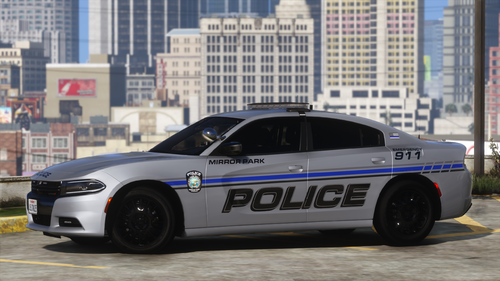 About the Pack: This mini pack was something that I just had in my head for a while. With the recent release of 2 excellent dev resources (nforce bar and fascia), I was able to create this. This livery is loosely based off of Aventura PD. With Mirror Park being such a small area, I did not feel that it was realistic to have multiple different types of vehicles. Though the ability to use other vehicles with the same design would have been nice, I wanted to keep it simple. There is no push bar, or a ton of lights, but I wanted to keep it sleek and clean. Unfortunately, I do not plan to add any vehicles to this pack in the future. I know I have been away for a while, but trust me, I am getting some future releases ready. Stay tunned! Pack Includes: Marked Charger Slicktop Charger Unmarked Charger (Change livery in-game. This is not a separate vehicle) Optionals include: All blue lights Red & Blue Lights Transparent Liveries Installation: Note Please use the included ELS files so the lights will function the way they were designed to. Feel free to leave your thoughts in the comments. DM me if you find any bugs, so I can get them fixed as quick as possible. CONSTRUCTIVE CRITISIM is always appreciated. PLEASE READ THE FAQ'S IN THE "READ ME" BEFORE GOING TO THE COMMENTS OR MY DM'S! I WILL NO LONGER RESPOND TO QUESTIONS THAT HAVE ALREADY BEEN ANSWERED!!!! Disclaimer: I'm not responsible for any damages caused by this modification. All files should be backed up prior to installation. Do not distribute this file outside of this platform. The files may be used in FiveM servers if you chose to do so. These files were not made to be specifically compatible with FiveM , so there could be issues. The sale of any part of the modification is strictly prohibited. Permission is required for any editing and redistribution of this modification itself. Downloading the file is similar to a license to use the file. IT DOES NOT MEAN YOU OWN THE RESOURCE ITESELF. No access to the locked files will be granted.18 points
 -
 [R&B][ELS][DLC] 24 Ford Mustang Unmarked TEMPLATE IN MY DISCORD! : https://discord.gg/97B2BGnMWu Usage Guidelines HNKM Development 23.07.2025 1. No Reuploading – Do not reupload or redistribute my models without permission. 2. Credit Required – Always give proper credit when using my models. 3. Non-Commercial Use Only – My models may not be used for profit or paid services - Open a ticket in my Discord 4. No Editing – Do not modify or rip this model - You are allowed to make livery's to my vehicle's, but remember to link the orginal vehicle 5. FiveM Servers Allowed – You may use the models on FiveM servers, but only with credit and under these rules. ------------------------------------- Two version: 24mustunmr2 = Without pushbar 24mustunmr3 = With pushbar ------------------------------------- Install - Lspdfr: -------------------- 1. Drag and drop the addon file's into -\mods\update\x64\dlcpacks in openIV 2. Go into DLCLIST.XML and paste the text under - in path-\mods\update\update.rpf\common\data <Item>dlcpacks:/24mustunmr2/</Item> <Item>dlcpacks:/24mustunmr3/</Item> 3. Drag and drop the ELS FILE'S into path -\ELS\pack_default ------------------------------------- Install - Fivem: -------------------- you should know this. ---------------------------------------------------------------------- If you have any problem's or question's, please join my discord: https://discord.gg/97B2BGnMWu18 points
 -
Qwaned Callouts
Michael21107 and 16 others reacted to qwaned for a file
17 points 🚔 QWANED CALLOUTS - ALPHA By qwaned 👋Introduction Qwaned Callouts is a plugin for LSPDFR which adds over 14 new high risk and realistic callouts with different locations, realistic dialogue and outcomes. It's still an alpha so I'd appreciate any feedback you can give me both in my discord server and comments ✅ Requirements LSPDFR 0.4.9 (Or Newer) Most Recent Version of RagePluginHook Most Recent Version of Callout Interface ⬇️Installation Instructions Unzip the file. Copy ALL of the Contents of the “GTAV” folder inside the unzipped folder into your MAIN Game Directory, which contains “GTAV.exe” in it. 📍Current Callouts (Alpha) Spoiler 🎥Videos Featuring Qwaned Callouts By Blueline Vibes:17 points






V2.jpg.ac7e9f812d959f4d4e1b9d10b0576719.thumb.jpg.f203aa93e88745f015ff5a76cc8bc3f7.jpg)




.thumb.png.656f907bc2febc81911b0b821cb502c8.png)





.thumb.png.02eacfc2f691c4fc29d82cedc8863159.png)


.thumb.png.b9e18d9931090871b064059f2c315cf8.png)













.thumb.png.f6ac323806974bae6b70677161884c73.png)