




Will
Management Team
-
Joined
-
Last visited
Everything posted by Will
-
OMSI 2 is an amazing game in terms of simulation, especially considering it was only made by 2 people. Everything in the bus is simulated, you can press all the buttons. It is actually very stable for me, so I'm not sure where that is coming from. It might crash after playing like 4 hours straight... When it first released it was very unstable, and OMSI 1 was always unstable, but OMSI 2 works fine for me. It does require a good system though, specifically CPU wise. The graphics are not the greatest, but the game makes up for that in the simulation. My G27 works fine - you just have to set it up properly in the settings. It won't be updated anymore since the two guys had a business dispute and disbanded the "company." NicolaiB loves it too. "OMSI 2 is the best simulator I've ever played. It oozes passion and commitment from the developers. It is amazing in every way. It has atmosphere and character like nothing else I've every played.It's so wonderful to just sit down and take it in." (the patch he said he had to apply shouldn't be needed anymore, the game was substantially updated shortly after the video to make it much more stable)
-
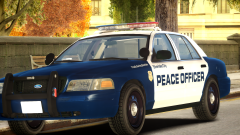 The thumbnail for this only shows "peace of" and I was worried what the rest was going to be (despite the spelling difference)...
 -
Savegame.fr is created and used only by LCPDFR, and is completely separate from the base game's saves.
-
Looking out the window it looks like it accumulated less than an inch so far...and it isn't even snowing anymore. I guess it's taking a little bit longer to reach me than expected...
-
For some reason I get the feeling this might be caused by ScriptHookDotNet.dll being in your folder, make sure it doesn't exist and only ScriptHookDotNet.asi does.
-
MODERATOR NOTICE Your thread has been moved to GTA IV Development Suggestions and Requests. Please read the "Showroom Style Forums" announcement before posting in the showroom forums: https://www.lcpdfr.com/forum-792/announcement-11-showroom-style-forums/
-
The only thing I can suggest is removing AdvancedHookInit.asi. It's the only reason your game might crash on startup with LCPDFR installed. From LMS's support PDF thingy:
-
Install the manual LCPDFR installation. If you install ELS, DO NOT copy AdvancedHook.dll from the ELS download. It is outdated.
-
Make sure you put AdvancedHook.dll in the main GTA IV directory, where GTAIV.exe is.
-
I spotted a police car! Hopefully there will be functioning police.
-
Classes were just suspended for tomorrow at my university, not too often they get suspended a day in advance.
-
The snow storm should be reaching Albany any minute now according to Accuweather. We really don't get too worried about it. New York has seem some pretty bad snow, and even a hurricane a couple years ago that knocked out power for a week or so in some areas. Now, Buffalo, NY...those guys really know snow... The New York State Thruway near Buffalo (major highway from NYC to Albany to Buffalo) during the snow storm in November: New York State Police is ready for this one, as well:
-
Part 4 and ATS gameplay added to OP.
-
Well there is this too:
-
This - the police will have to be a lot less lethal. They shoot on sight no matter what. I had a cop hit me in a car once and he immediately killed me.
-
They went to Las Vegas, so I'm guessing at least some of Nevada will be there. I think they are still working on getting licenses for the trucks. I am glad that they are going into a lot more detail with the cities this time, instead of a 3x3 block with a few buildings and maybe a landmark in the distance. I'd much rather have proper large cities than infinitely long roads to nowhere.
-
For those of you that enjoy Euro Truck Simulator 2, here's a few videos that show the behind the scenes aspects of its development, including previews of the upcoming Scandinavian DLC, American Truck Simulator, and a small look at Coach Simulator. Bonus ATS gameplay!
-
Download this, choose x86: http://www.microsoft.com/en-us/download/details.aspx?id=30679
-
You might want to return it for a new one.
-
I'm guessing this is your error after installing ELS: '?do=embed' frameborder='0' data-embedContent>> Redownload the manual LCPDFR installation and copy AdvancedHook.dll from it to your main GTA IV directory.
-
Make sure you disable anti-virus software before downloading as they falsely detect the installation as malicious and will stop the download.
-
Play the game and see if the mod works. If not, run the tool again and post the log.
-
All the numbers in the ini do is say that it's okay for a unit to detach from the pursuit when the number of units in pursuit reaches your specified number. LCPDFR 1.0d does actually address the issue of infinite police in pursuits by dynamically decreasing your vehicle density when you are in pursuit. When shots are fired, it lowers it even more to try to keep the streets clear of abandoned vehicles. LCPDFR itself does not control police vehicles that are spawned in traffic by the game, therefore it cannot despawn them.
-
This is the reason for your error: '?do=embed' frameborder='0' data-embedContent>> Though it shouldn't cause the game to not even start up. Try completely reinstalling LCPDFR with the manual installation, and make sure you are running the game as an administrator.
-
It's not saying a ped you have installed is invalid, it is just logging a script function. You can ignore this.


