



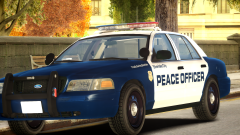


Silverlake Introduces Peace Officers

By DukSezQuak
- 974 views
- View DukSezQuak's images
To help relieve some of the load placed on the current police services, council has passed the motion to put Peace Officers in place around the City of Silverlake.
"They are not a replacement for our Police. They are a deterrent of crime and are a supplement to the system already in place" said the City Police Chief.
The Peace Officers are armed, however only have the duties to protect and serve Silverlakes Parks, Transit System, and Municipal Buildings. They can also perform traffic duties if the Silverlake Police Traffic Unit is overloaded for any reason.
"The reason they're in place, is because recently Silverlake has had an influx of residents coming into the city, and with a fast growing city, we need more hands"
"Response times from police became tied up, because our officers were in parks and transit systems and weren't able to respond, and all the officers already out on the street were already tied up handling complaints. Having these Peace Officers will help keep the parks protected and in order, and will allow the Police Officers to get back on the street where their services are better provided."
Silverlake already has 30 Peace Officers, who were in the training program since September of last year, when applications were being accepted for Peace Officers.
Peace Officers are put through the same program that the Police are, so that there is no conflicting issues when either agencies are carrying out their duties, and so that it is easier to work together.
Full album: http://imgur.com/a/gbDqs
Recommended Comments
Join the conversation
You can post now and register later. If you have an account, sign in now to post with your account.