




Will
Management Team
-
Joined
-
Last visited
Everything posted by Will
-
Hi
-
I'm not a huge fan of the light bars either, especially the patterns. As for reflections, I hate when people over exaggerate the environmental effects of police lights. If you actually look at a police car at night, the lights are not lighting up the 100ft radius around the car in a bright red/blue color. I do like the variety of components on the cars though. It seems they took some of the customization options from GTA Online. Some have ALPR (although IRL I feel like these are very rarely seen anymore or are built in to dashcams), some have different push bars or push bars with different lighting setups. Obviously the different liveries, although in the extended look you really only see Vice Beach and Vice Dale. But we know there should also be Port Gelhorn, Leonida Highway Patrol, whatever their version of FWC is (I think I heard Poach?), possibly Ambrosia Sheriff. Then there's the variety of models - buffalos, pickup trucks, stanier, explorer style (finally), Taurus style, durango style, airboats, etc. I really hope they get the jurisdictions right this time and it isn't just Vice Dale police patrolling every county like how Los Santos Sheriffs patrolled Blaine County.
-
 I wish. I'm not smart enough to do that, unfortunately. GTA VI might have it though.
- 266 comments
- 22 reviews
-
I'm pretty sure some of the songs in the preview were in GTA Vice City, which is awesome that they are bringing some of that vibe back. Vice City is still my favorite soundtrack.
-
At the same time as the extended look, IGN released a bunch of articles from a 30 minute behind closed doors look. This is the main article: https://www.ign.com/articles/gta-6-exclusive-preview This is a summary of gameplay points: https://www.ign.com/articles/gta-6-new-gameplay-details There are a few others that basically just rehash the same information in a different way, but here are my takeaways: The most interesting thing to me was the new wanted system that expands heavily on how RDR2 worked. Crimes are reported by NPCs along with any description of you that they have. Police will respond to the area and remain there for a while - basically, you will have a wanted level in that area until things cool down. The police can get your physical description, clothing description, vehicle description, if you were operating as a couple or single; they can get witnesses and surveillance video, probably some other things I'm forgetting. You can lose the heat by changing your hairstyle or putting on accessories, changing your clothes (you can have different outfits stored in your trunk similar to RDR2), changing cars, and splitting up. You have to do a combination of these things as just putting on a hat will not clear the clothing description, etc. The level of police response changes based on the crime you committed. If you just wave your gun around without shooting, they won't respond as heavily as if you start shooting. What was also very interesting is that cars are not as easily stolen as they used to be. Higher end cars will need key cloning technology that's unlocked through the story. They also may have advanced security features like gps tracking. There's an app to show you what security features a car has, how much it would cost to register it to make it yours, and how much it would be worth to sell to a fence. You can still carjack any car regardless of its security features, but this creates a witness/victim to report a crime. The world is so full of things to do and they said they are really blurring the lines between linear story and open world activities. It's not supposed to be just go to this mission icon, do the mission, then go to the next. You are living the lives of the two characters. The variety of NPCs is something I don't think any game has ever done or will ever be able to do. Normally every NPC looks basically the same because making different animations for different sized peds is difficult and expensive on hardware. Rockstar came up with a system that dynamically changes the animations to match the size of the ped, allowing there to be a variety in height and weight without it looking weird. The cars look so much better and the scale of everything feels much better. They said in GTA V the roads are super wide for gameplay reasons but in VI they made them more realistic, and it changes the look so much. Driving through traffic will actually be difficult. It looks like they probably cut the refueling feature that was shown in the leaks, which I'm not surprised by. I personally can't wait.
-
 Matthew 5:11-12 ESV [11] “Blessed are you when others revile you and persecute you and utter all kinds of evil against you falsely on my account. [12] Rejoice and be glad, for your reward is great in heaven, for so they persecuted the prophets who were before you. https://bible.com/bible/59/mat.5.11-12.ESV
- 27 comments
- 2 reviews
-
-

-

- 3
-
-
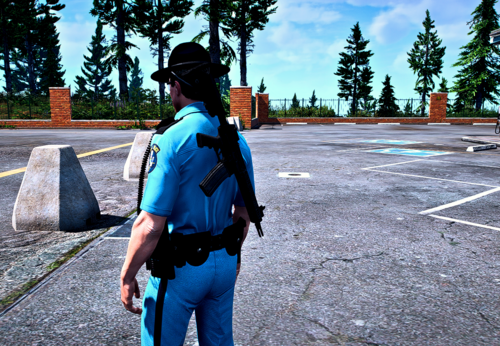 Hey guys appreciate the support for Stow That Weapon but the more mods the better! Everyone benefits when other free mods come out even if it seems that they do the same thing. Let's keep the comments here respectful and relevant to this file, thanks!
- 7 comments
- 1 review
-
-
- 1
-
-
It's never recommended to save the game with mods installed. If you didn't, you can just load the save without any mods. If you did, you can just restore it using a trainer or cheats.
-
For clarification, you generally cannot upload a model you had no part in creating. If you only created the livery then you can only upload the livery. The only exception to this is if the model is not available anywhere and you have permission from the author to upload it. This could happen, for instance, if the author is no longer active in the community and their models were only uploaded to a now defunct site. Generally, you would have a hard time getting permission to reupload purchased models unless they are development assets, in which case you would have also needed to edit the model. I've never seen someone who sells vehicle models allow someone to reupload their paid model for free.
-
@Armouredivision DMing you a test version if you could see if anything is still not working as it should.
- 266 comments
- 22 reviews
-
-

- 1
-
-
Ah, I see in the source why it works for theirs. They are using the native to create the weapon object and passing the current weapon model hash as the custom model hash. This is how I discovered I would need to do it. Currently I create the weapon object by creating a new Weapon via RPH but that does not support a custom model hash. Maybe I can convince LMS to add this...
- 266 comments
- 22 reviews
-
-
- 1
-
-
I think SHVDN has better weapon component methods than RPH. I imagine the issue with the attachments in that mod is the order in which they are applying them. That's the issue with the CAMO type finishes in my mod.
- 266 comments
- 22 reviews
-
The issue is much more complicated than I expected. I'm guessing at some point Rockstar changed how adding the luxury finishes to weapons works. I've spent the last few hours breaking things and confusing myself. This may be something that gets fixed or may not be. I will at least try to get the other forms of finishes working - I was able to do that before needing to ctrl-z all of my changes. Those are not as complicated as the luxury finishes. The components with VARMOD in the name are the luxury finishes and require changing the actual weapon model now (in a weird way), but the ones with CAMO are easy to include and get working (some may already be working).
- 266 comments
- 22 reviews
-
-
- 2
-
-
Thanks. It seems the component hashes have changed and additional ones have been added. I'll see if I can get this fixed.
- 266 comments
- 22 reviews
-
Sounds like a fancy way of describing a senior moderator for GTA Online.
-
Are you able to launch GTA V normally, without RPH?
-
There was no update to GTA yesterday. GTA Online has new events starting every Thursday that do not cause the game itself to be updated. Gemini does not know what it's talking about since 3788 came out like two months ago. I would guess it's assuming GTA V and RPH follow the same build number etiquette and is falsely guessing your version of RPH was built prior to your version of GTA. Crashing on load is usually related to a bad mods folder. Try renaming mods to _mods.
-
I don't log the version anywhere in the log file so I'm not sure how log reading bots would know whether it's up to date or not anyway. I updated the version number in any case.
- 266 comments
- 22 reviews
-
-
-
- 2
-
-
The 37707 is an automatic revision number that is calculated by the number of seconds since midnight divided by 2 at the time of build. I didn't think it necessary to include this on the file page.
- 266 comments
- 22 reviews
-
-
- 1
-
-
I think I figured it out. When swapping weapons while aiming, the game does not seem to always register the task for swapping weapons, or there's some timing issue between me checking for it and the game running it. My code does not execute while the character is actively swapping weapons in order to prevent timing issues with the weapon change. Because the task isn't being detected, the weapon swap is effectively taking place simultaneously with my checks, and things get wonky. It took me multiple iterations to figure out the best way to fix this, but ultimately I realized that when this happens, the current EquippedWeaponObject becomes invalid in the middle of one of my while loops, so just breaking that loop when it does seems to fix the issue. I'll release an update shortly. For now, thanks for reading, and thanks for reporting the issue.
- 266 comments
- 22 reviews
-
-
- 1
-
-
I wasn't aware of this issue. In my quick test, it seems to only happen if you quickly swap between an unaccepted weapon and an accepted weapon after aiming. If you aim for a few seconds, it seems to work as intended. It also seems fine if you swap between two accepted weapons. Can you confirm you have the same behavior? I'll try to find time to investigate further and see if I can narrow down the problem. Thanks for letting me know.
- 266 comments
- 22 reviews
-
There would be icons on the map showing the locations of the police stations if the plugin is loaded. Make sure you launch RagePluginHook.exe. If LSPDFR is set to load on startup, after the main loading screen, there will be a black screen with "Loading LSPDFR" in the bottom right. If not, you need to press F4 and type LoadPlugin "LSPD First Response.dll"
-
We probably would not promote paid mods or have any sort of partnership program. Not only does it go against our principals, it opens us up to legal trouble as most paid mods are making money off of the intellectual property of other parties (primary concern being Rockstar themselves, but even companies like Ford or Axon could be more likely to pursue legal action once money is involved).
-
 I think the most appropriate thing in that case may be to post a link to the fork (similar to how we have a link to ScriptHookV), but we would need to discuss internally.
- 342 comments
- 19 reviews
-
-
- 1
-
-
You can still edit the position via the ini file. I do not plan to make that possible at this time, sorry.
- 266 comments
- 22 reviews

