




Will
Management Team
-
Joined
-
Last visited
Everything posted by Will
-
Those are what are called "default characters" in 0.4. They use the default cop models instead of the multiplayer character. In character creation, click default characters to access them.
-
I do not believe 0.3.1 will be made available as that will cause support issues (people asking for support on an old version), however I will pass this on to the dev team. Please note that unauthorized sharing of the LSPDFR modification is prohibited. If you feel this topic has been closed in error, please report this post.
-
LSPDFR only ships with data intended to be used with a clean installation (ie, no EUP or RDE). There are only two outfits because that's all that's available in the game by default. If you want additional outfits, you need to set them up in your XML files. The LSPDFR Wiki has all the information you need to do that.
-
You need to set the suspect on the ground first by pressing Q near them (there are help boxes to indicate when you can use it). Configuring LSPDFR is done through xml files, you won't see your mods added with OpenIV automatically. The LSPDFR Wiki has information on how to customize the files - there is way too much to explain in a single post.
-
I think it's worth noting that LSPDFR only ships with data intended to be used with a clean installation (ie, no EUP or RDE). There's only one (actually two, the IAA has one as well) outfit because that's all that's available in the game by default. I believe people involved with EUP and RDE are working on compatible data files, but in the meantime, you're free to check the LSPDFR Wiki for information on customizing your LSPDFR experience.
-
The Interaction Menu LSPDFR replaces the default game interaction menu with its own. By default, press M or hold back on controller to access the menu. Quick GPS lets you quickly set a GPS waypoint to the nearest police station, jail drop-off, fire station, medical center, or your apartment. Police Radio is only available while on duty and brings you to the Police Radio sub menu. See Police Computer & Radio for more info. Vehicle brings you to a sub menu that gives you access to some of your vehicle's functions. More on that later. Inventory brings you to another sub menu with some options relating to your character's inventory. See below for more info. Settings is yet another sub menu with some options for LSPDFR. Again, more info below. Action lets you perform a few different quick actions, such as drinking coffee or eating donuts. Press Enter to perform the action. Dialogue lets you say various things like "Hi" or "Bye." Press Enter to say it. Player mood changes your character's facial expression. Walk style changes the animation your character uses for walking. The Illuminated Clothing option allows you to control the style of any illuminated (emissive) clothing on your character's outfit.New in Version 0.4.9 The Vehicle Menu The Vehicle sub menu gives you access to some of the functions of your current vehicle. It can even be used remotely! Engine lets you turn your engine on or off, or leave it always running. Lights lets you turn your lights on or off. Doors lets you open any of the doors. Emergency signals lets you toggle between lights, lights and sirens, or off. Police Car Radio enables or disables the ambient police radio in police vehicles. Radio lets you change the radio station (yes - the radio works in police cars now!) The Inventory Menu The inventory sub menu lets you equip a ballistic shield or drop evidence markers. Equip Ballistic Shield will give your character a shield to carry, for those high risk operations. See Ballistic Shield for more info. Remove Ballistic Shield will put your shield back away. Place Evidence Marker will drop an evidence marker at your current location. See Evidence Markers for more info. The Settings Menu The settings sub menu lets you change some of LSPDFR's settings. Spawn Character changes which character LSPDFR will start with. Spawn Location changes where you spawn when loading the mod on startup. Police Station will put you at a police station, apartment will put you in your apartment, random will randomly pick between those and a few different scenarios. Owned Apartment changes which apartment LSPDFR will consider your character to own. See Apartment for more info.
-
The Police Computer The Police Computer lets you search individuals by name or vehicles by license plate. You access it by pressing Q on keyboard or X on controller. Type in a name and press enter to get their police record, or type in a license plate number to get information on a vehicle. Use Tab to cycle through the IDs you have collected. The Police Radio The Police Radio gives you access to a small number of police related options. It is accessible from the Interaction Menu while you are on duty. Action changes the animation your character uses while using the radio. You can pick between using a shoulder mic, handheld radio, earpiece, or none. Available for Calls toggles your "busy status". Not available for calls means you will not receive callouts. Request call lets you force a callout. Request Records Check is similar to the police computer. It lets you search names and plates, and you can cycle through the IDs you have collected with Tab. Close Nearby Roads closes the roads around you to traffic.
-
You're really overestimating how much thought goes into our release dates, lol...
-
This topic has been moved to the appropriate forum. Please post in the correct location in the future.
-
LSPDFR and ScriptHook are completely unrelated. You do not need ScriptHook and having it changes absolutely nothing with LSPDFR. RagePluginHook does not need an update for the latest version of GTA.
-
No, you need the current update.rpf in there. The mods folder does not rely on ScriptHookV - only dinput.dll which does not need to be updated with game updates. There shouldn't be any reason that this doesn't work with the latest update.
-
Guys, RPH being updated isn't an issue for us as RPH is partially developed by LMS, who also develops LSPDFR 😛
-
LSPDFR 0.4 will enable the default game radio in police cars.
-
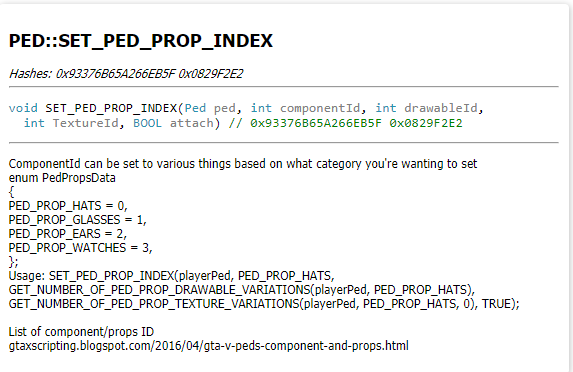
Instead of asking for handouts and complaining when you don't get them, why don't you try looking yourself? I don't code at all and it took me 5 minutes to find a native you can try for props. Most people who develop for GTA learn based on experimentation. Try something, if it doesn't work, try something else. Google is your friend. You won't learn anything new by asking for people to do the work for you.
-
You have a topic already. If you feel this topic has been closed in error, please report this post.
-
Hi everyone, it's your beloved Community Manager here. I'd like to quickly thank everyone who applied for Community Moderator in November - we got 4 times more applications this time than last time! There were a lot of good ones in there and it was tough to just pick out a few, but we managed to narrow it down. With that, please join me in welcoming @0taku and @WillUnderscore to the LSPDFR Community Team. They'll be starting out as Junior Community Moderators, which is considered their training phase. After that, they will be global Community Moderators like the rest of the team. We are also welcoming @c13 back into his old position as Community Moderator after a hiatus due to work. Again, thanks to all who applied, especially those who took the time to speak with us. We hope to bring additional staff in once everyone is settled into their new positions. -willpv23
-
Looks like @Sam forgot to set the permissions. I removed the button.
-
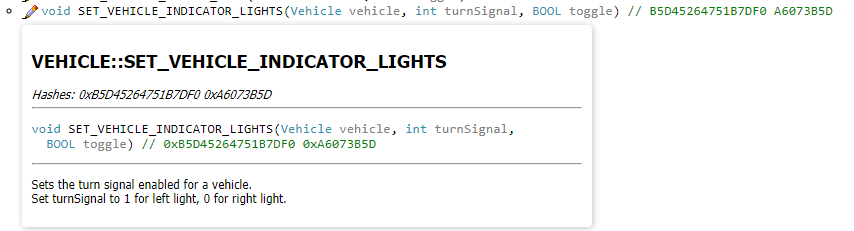
I imagine you would call this native:
-
The current version of LSPDFR does not have account linking. The things you see on our profiles are from closed testing of the next version.
-
This topic has been moved to the appropriate forum. Please post in the correct location in the future.
-
This topic has been moved to the appropriate forum. Please post in the correct location in the future.
-
Your topic has been moved to GTA V Support, this is not LSPDFR related. Please post in the correct location in the future.
-
How exactly would you define "first class ones" though? They can't exactly pick and choose developers based on their own personal preference as that wouldn't be fair to the ones they don't pick. Giving the mod to all developers early just isn't viable. You also do not need ScriptHookV for LSPDFR. ELS is a completely separate modification from LSPDFR. Plus there is an alternative while you're waiting for ScriptHookV to be updated.
-
ScriptHookV has been updated, you should use that instead as it will be more stable: http://www.dev-c.com/gtav/scripthookv/ Make sure not to load AsiSupport while using ScriptHook.
-
Yeah, my original link pointed directly to 0.2.0 instead of the latest build. I've since fixed it.



