




Will
Management Team
-
Joined
-
Last visited
Everything posted by Will
-
Rockstar's major (mod-breaking) updates are released generally in July and December, so not sure why you think they are releasing one soon. The developer of those plugins has decided (for whatever reason) to add code that completely disables them under a bunch of different conditions, one of which is if you don't have the version of LSPDFR he developed them for installed. There is no reason for this as minor updates like this one do not affect plugins, but there is nothing the LSPDFR devs can do about it and they are not going to stop releasing updates because of one stubborn plugin developer.
-
Just zoom & enhance like the all the tv shows!
-
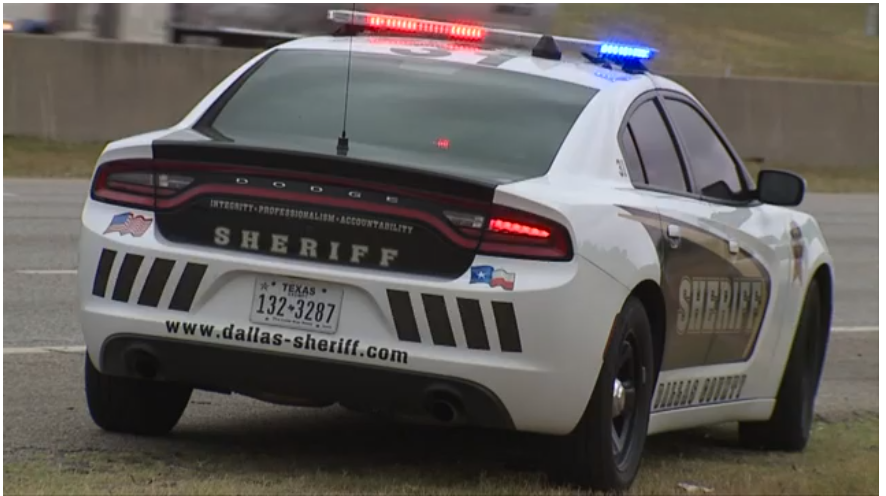
Hard to tell, but probably "INTEGRITY PROFESSIONALISM ACCOUNTABILITY" based on their values from their website https://www.dallascounty.org/department/sheriff/sheriff_index.php Actually, it's pretty clear in the video you linked:
-
Considering his previous scripts are for GTA IV, it would probably be a safer assumption that he actually wants help with GTA IV.
-
-
 The .pdb file is optional and helps with debugging crashes. It isn't necessary for the plugin to work.
- 264 comments
- 22 reviews
-
This topic has been moved to the appropriate forum. Please post in the correct location in the future.
-
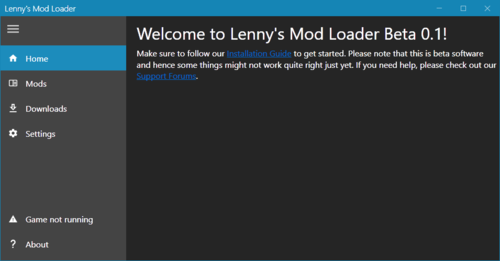 This isn't anything to do with LML, the game recognizes models based on their file names (police.yft is spawned with "police", mule.yft is spawned with "mule", 16tahoe.yft is spawned with "16tahoe"). It's the same way no matter how you install them.
- 338 comments
- 17 reviews
-
test ignore View File fuk of Submitter [[Template core/front/global/userLink is throwing an error. This theme may be out of date. Run the support tool in the AdminCP to restore the default theme.]] Submitted 02/21/20 Category Hidden
-
Your topic has been moved to LSPDFR 0.4 Support. Please post in the correct location in the future.
-
I think you failed tbh
-
To add to what LMS said, I think a lot of people don't understand what LML fundamentally is. It is a mod loader first and foremost (hence the name), the auto install stuff is all just extra. If you prefer to install things manually, then LML is literally the perfect thing for you. You don't need to mess with RPF files anymore, you just drop the files directly in subfolders within the LML directory and create a new install.xml for it.
- 338 comments
- 17 reviews
-
-

- 2
-
-
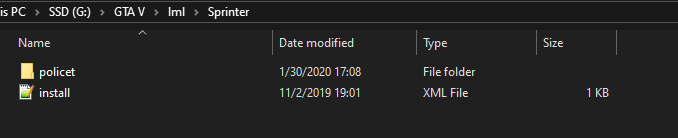
Then you need to have "replace" where you have "policet," that's meant to be the name of the subfolder when using the <FileReplacements> tag
-
-
Click your name on the top right -> Account Settings -> Display Name
-
Is policet the name of your subfolder? Your file structure, based on that install.xml, should be: Grand Theft Auto V/LML/[anything]/policet Your yft and ytd would then be in the "policet" subfolder, and the install.xml would be in the [anything] folder (the name of that folder doesn't matter). Similar to this with the vehicle model files in policet:
-
This was an issue with LML. Update to the latest version if you haven't done so already.
-
If you feel this topic has been closed in error, please report this post.
-
Again: You wouldn't be the one getting in trouble if they released it publicly, they would. If they shouldn't be releasing it, then you probably shouldn't be sharing it. Since you want to argue this, how about I say this again. You are breaking the Community Guidelines by including irrelevant information in a support request topic. Keep all posts related to the discussion at hand or your post will be removed with warnings issued for repeated violations. Either put it in your signature or not at all.
-
This part was added after I responded. There's nothing to prevent you from getting in trouble from that because you shouldn't be sharing that content in the first place. Adding your little legal disclaimer does absolutely nothing for you; we won't recognize that as a defense as we are not a court of law. Sharing anything through private means is done at your own risk, and if someone shares it publicly, they would be the ones answering for it anyway. You most likely wouldn't even be involved even if you were the one who sent it to them. And as I said, you can put that stuff in your signature instead. It is not at all related to the post or the topic at hand. See our guidelines: Only post things that contribute to the discussion at hand If that's the case (which I seriously doubt), then quoting out-of-date legal information isn't really helping anyone, is it? I never said you were able to hand out punishments, so you're the one making false statements. I said that you do not have knowledge of what punishments would be handed out, so you shouldn't be telling people their account may be terminated. I'm the Community Manager, meaning I'm in charge of the staff team and moderation procedures. I'm not entirely sure who else you'd like to respond.
-
No, you've had it in bold which is the exact opposite. It isn't your job to inform users of the rules. If you're worried about people sharing stuff you shouldn't be sharing in the first place, then don't share it. You're breaking the very rules you're informing them of if you're sharing anything without authorization. This isn't those other forums, so that's irrelevant. See above about getting in trouble for other's misdoings. Ok. "Mandatory" - Mandated by whom? No one here is requiring you to include that text. See above regarding sharing modified content (hint: you shouldn't be doing it in the first place.) Article 57 is related to medications, so not sure how that's relevant. Article 51 is the "Field of application" for the "EU Charter of Fundamental Rights" so again, not sure how that relates. To quote your actual disclaimer: This makes almost no sense in the area of modding. All you need to say is "don't share this without permission." This is backseat moderating. You have no control on what sanctions are applied and are not at all privy to the operating procedures of the LCPDFR.com staff team. TL;DR: Stop making a big deal out of this. Just help people without trying to sound like a know-it-all lawyer while simultaneously giving completely false information.
-
Honestly, all you're doing is confusing users with legal jargon that has nothing to do with what you're trying to help with. There's no need to have a disclaimer with every post. If you really want that information included, put it in your signature instead of in the post. Also, telling people about what sanctions may come from violating the rules borders on backseat moderation, and some of the info you're telling them is inaccurate. Leave it to the moderators to inform users of that.
-
Your topic has been moved to LSPDFR 0.4 Support. Please post in the correct location in the future.
-
What mod are you referring to?
-
I've checked about 30 times and it definitely isn't in the default ini from what I can see. What's it called so I can add it? (The "put person in boat/helicopter" key, since this response is weeks later).

