drdetroit
Members
-
Joined
-
Last visited
Everything posted by drdetroit
-
Ahhh...I see. Strange bug, never seen that issue before. Wish I had a clue how to help with that. Did you remove all your mods and see if the text is still like that? DrDetroit
-
You have to make sure you remove the registry entries (use a reg cleaner) and manually remove the root GTAIV folder as well, or you may have issue with the game. I would manually remove the R* folder located in My Documents as well. Make sure you run the LCPDFR installer as Administrator, and try unchecking the taser in the LCPDFR installer. I'm pretty sure you have to use the LaunchGTAIV.exe to run LCPDFR. I run EFLC, and have to use LaunchEFLC.exe to play. DrDetroit
-
Looks like a trainer menu..but looks like a non-english version (Polish?). Remove the trainer and run the game. DrDetroit
-
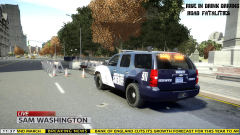 Lookin good! DrDetroit
 -
-
That is why we don't need morons posting IP and copywrite material on the IP holders websites (i.e cease/desisit from Colorado Police). Watch, next someone will post a neat new FORD Interceptor model on the official Ford website, in a GTAIV video, running a whole sidewalk of people down. Then they'll wonder why they are getting phone calls, emails and letters from Ford attorneys.. DrDetroit
-
Run the installer as admin, and if you still have issues, make sure the games root folder is not read-only, and untick the taser when prompted by the installer if you still have issues. DrDetroit
-
Looks like everything is in order. Use the LaunchGTAIV.exe and not the steam exe (GTAIV.exe I believe), which is located in your games main/root folder. If that don't work, try using xlive (xliveless) instead of Dsound, although you can't play online with the xlive asi loader. Also, you have to complete the first mission in order to play LCPDFR. So make sure you have completed the first mission, then try it. DrDetroit
-
All you have to do is drive the car off the save-spot, go back into the safehouse and save the game. Then exit the game entirely, restart and load the game you just saved. That will clear the lot of the modded car and you can play without issue. I do that all the time, as I'll forget that I saved a car at my safehouse, then I'll change that car to soemting else, and boom...game crashes after I drive a block or two. DrDetroit
-
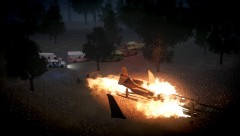 Very cool screen shots Tunes. Like the breifing as well. DrDetroit
 -
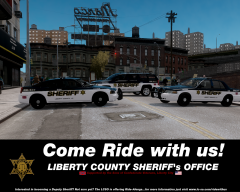 Nice skins. Nice screenshot as well. DrDetroit
 -
Wow, interesting stuff. Great strories fellas'. Good day, DrDetroit
-
-
Did the cop not want to bother searching the two he thought were probably trying to cover up the smell of drugs? I find it odd he'd say that, then let the two go. I figured cops were gung-ho to do that kind of thing. Anyhow, good stories. DrDetroit
-
It's been a long time, but I remember having to clean the old registry entries using one of my many registry cleaners, after uninstalling GTAIV/EFLC, and manually removing the root GTAIV folder as well as manually deleting the Rockstar folder located in My Documents. Once I did that the issues with re-installation went away. Good luck! DrDetroit
-
Are your AI cars modded with ELS vehicles? My ELS cars are just fine, but I have the same issue with the Vapid Cruisers I installed, and certain CVPI's (non-els cars), not being able to see the light bars at times...other times they show just fine. I thought it was the livery settings or placing +ext_strong in the livery line, but that don't help either. Never figured it out, so I ended up installing a strobe mod so if the light bar doesn't appear, at least the headlights and hazard lights are flashing on the non-els cars. BTW: As stressed by a few here, make sure you disable the default cars in the ELS.ini. Those non-els cars can't have the ELS config set to "on" in those slots where a non-els vehicle resides. That doesn't help my scenario, but it may help with yours. DrDetroit
-
-
Download the Diagnostic Tool, located on the main download section page. Run it and post the results. EDIT: Actually, after reading your computer's specs, I don't think you'll be able to actually run it. You're on Vista OS and only 3GB of RAM and your graphics card is very limiting. DrDetroit
-
Do you guys do scripts? DrDetroit EDIT: Whoops...somehow my post landed on the wrong thread! Sorry guys, DrDetroit
-
-
-
-
Happy 4th guys! DrDetroit
-
-