


drdetroit
Members
-
Joined
-
Last visited
Everything posted by drdetroit
-
Good one Strike! lol I believe that happens when a texture file (or several) are messed up, I think it has to do with old save games and legacy files in your root folder. I'd bet you re-installed a new game without removing/deleting the root game folder and save game folder, which you have to do manually. Also, you should scrub the registry as well before a re-installing the game. DrDetroit
-
What tazer fix? Was not aware of this, do you have a link for it? I have my tazer installed, and it use to work very well. But along the way, I must have added a mod or something that compromised the tazer setup, as I can't pull it out at all for some reason. It's still shows on my utility belt but can't do anything with it. DrDetroit
-
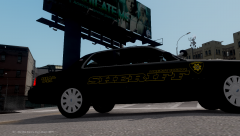 nice car/skin!
 -
Those are the mods you definitely want. I'd also add Braveheart Policing Script as well, as it adds a bunch of call-outs to keep you busy. I also really like the First Person mod, which allows you to go into 1st person mode, which is awesome! Some others you may want to try: ELSv7 Farnesworth Business Mod ALPR - Also a must have in my opinion. Ambient Wars v2.1 DashCamIV - has radar for traffic work SaveAnywhereMod - if you use Farnesworth BM this mod comes in very handy. That's my list. Just remember to add one mod at a time, then run the game to make sure there are no issues. It can be quite daunting to add 3-4 mods at once to find you have issues and no idea which mod is causing it. Good day, DrDetroit
-
Try using the latest scripthook, which the link is located in the readme file. Version 1.2.1b should work with the older scripthook, but give the newest version a try none-the-less. Good day, DrDetroit
-
Yup, I play in that mode sometimes, but the only problem is the peds health regenerates way too fast due to Bravehearts script. So it's kinda off balance as far as hits go. The upside is you really have to be on your feet during traffic stops. Same with the gunfights...cover, cover, cover..is key. DrDetroit
-
Not sure, but are there guys playing as civilians in that vid? Didn't know you could do that. DrDetroit
-
Nice! Laggy as hell, but nice! DrDetroit
-
Seen the TV ads, but after watching the vid...holy shite, that looks amazing! Thought I was watching a movie for a minute. I gotta get that game...which means I gotta buy a XboX or whatever. Thanks for posting DrDetroit
-
Absolutely 100%! I have all three, played all three numerous times and can tell you that EFLC is much more stable and optimized more efficiently than the forerunner...still not that great, but better than GTAIV. I think one thing that improves the FPS in EFLC is that most buildings you can enter in GTAIV, are not available in EFLC. Just an assumption though. DrDetroit
-
Yup, I run fairly smooth frames most times and can enjoy LCPDF with low/med settings (30fps would be my guess, not clocked or anything) all day long, not a smooth as I'd like but it's very playable, although I get wild fluctuations at times. My graphic card uses up to 4-gigs of virtual memory (vRam) if needed, so as you already probably know, that helps with performance. Picking up a new gaming box in about 2-weeks though and can't wait. If you use EFLC instead of GTAIV, you will get much better frames and smooth game play. To stabilize and squeeze every frame I can; I have shut down all services/processes possible, running 16-gig RAM, keep my draw distance under 20-25...sometimes 10-15, medium reflections, lowest water quality and no shadows. Those last two settings...shadows and water quality, has a huge effect of my games performance, really slows things down to a slide-show if I have those any higher than low/off, even more so than when I push texture quality to high. I do run my resolution at 16x9 as well, which is a must for all games I play (including Skyrim, and F4BMS4.3 hi-fi F-16c flight sim). Plus in the AMD Control Center, I have mip-mapping to performance+1 setting and pretty much disable everything else. The only software I use is MemTurbo4, which has done wonders with texture popping and loss. Works so well that I went and paid for it after the 30-day trial. My games modded up pretty good with Farnesworth Business Mod, Ambient Wars and a assassination mod (for those times when I need funds and I'm feelin' like playing a corrupt cop to get it). Only use 1-ELS (v7) car in my nStockade slot. Everything else is low-mid poly non-els. Other than that, not much more I can do, other than buying a gaming machine. Which will be in my hands in a few weeks. Good day, DrDetroit
-
-
You do know your stuff...you are truly "Unreal"! Thanks for the detailed explanation, which is very helpful. Interesting how GPUs can used for cracking security computers. Good day, DrDetroit
-
For the less sophisticated, how would one toggle on the GPU, as mentioned above? Is this in the Bios settings or in the AMD Engine Control Center? I believe my G7-1219wm has a similar issue, as I notice that sometimes my game runs so smooth and at 30-35+ FPS and suddenly it's like something turns on and starts eating up my CPU/GPU (not sure which) and my game dives to a 20-25FPS. I know it has nothing to do with in-game spawning or any processes/applications (yes, AVG is turned off, so is my Malware Bites...etc). I also manually shut off processes that aren't needed. I run my game at medium settings; no shadows and low water, med textures and medium reflections...etc. Anyhow, thanks for the breakdown. DrDetroit
-
-
I gotta get this game. Looks most excellent! DrDetroit
-
I have the same laptop, running at 25-30fps at 1600x1080 resolution at medium/low settings. Turn off shadows, turn water quality to low, textures to medium and keep all sliders under 20-25 (car density, view and detail distance). Use tri-linear filtering as well. Also, in your AMD Vision Control Center, go to game settings and turn down mip-mapping to low/medium, turn off vertical refresh and all other setting to "use application settings". I also go into Task Manager and kill all unncessary applications and services as well...this helps alot. I also use MemTurbo to alleviate the texture popping. Good luck, DrDetroit
-
Well, there is a difference in the words "Witch" and "Which"...meaning "Which is better?". Geezzz! Don't they teach spelling and grammar in school anymore? EFLC is better, more content (cars, peds, ect...). The only thing I don't like about it is you can't enter any of the locations that you can enter in GTAIV as Nico. EDIT: EFLC is also much more smooth running game (slightly better optimization) and more stable than GTAIV. Good day, DrDetroit
-
I had to manually kill applications in the service tab and application tab of Task Manager. In the service tab try ending the following: Diagnostic Service Host, Windows Font Cache Service, Diagnostic Policy Service, Windows Media Player Network Sharing Service, Windows Live-ID Sign In Service, Print Spooler....just to name a few. There are a slew of other program services I shut-off in msconfig as well, so many of the unnecessary services don't even start up. Anyhow, that helped add FPS and stability to my LCPDFR setup. Good luck, DrDetroit
-
Going to run a 420 scan. DrDetroit
-
Yup. You need at least 1gig card, preferably 2gig. DrDetroit
-
Turn down your in-game graphics settings; vehicle density, draw distance and detail distance. Lower water quality to low and shadows to off. DrDetroit
-
There was no warning a few days ago at GTA4mods...so I'm going to stay off that site until I don't see it any longer. Like Moonshine said, better safe than sorry. DrDetroit
-
Seems that when I go to the GTA4Mods site with IE the past few days, something on that site is trying to run. I just deny the app from running and everything seems fine. With Chrome I can't proceed at all. Something is fishy at that site for sure. DrDetroit
-
Reminds me of my over modded Oblivion setup. Had huge clocks all over the cities and castles. DrDetroit

