




CouthInk4
Members
-
Joined
-
Last visited
Everything posted by CouthInk4
-
Like i said, you might not have to. To me it seems like a problem with Windows 10, and not many people here are experienced with that OS. All LCPD:FR players use either Windows 7 or Windows 8/8.1. Wait until LMS leaves a reply (if he doesn't you could send him a friendly message and see if he can check it out) LMS would be the best person to talk to with this issue. If you do need to downgrade to Windows 8, just use Xlive.dll and use a 100% savegame =)
-
Your computer is decent. However your processor isn't that great for gaming honestly anything under 3.0ghz isn't great for gaming.. so you should consider upgrading your processor.
-
That might be a problem with Windows itself, Windows 10 isn't at full release, the version you're using is a public beta so there will be a few issues. THe only solution i can really give is to keep trying to install 4.5, if LMS or even Jay doesn't have a solution (They're both experienced with this type of stuff) you may need to revert back to a previous version of Windows (either 7 or 8.1) to get LCPD:FR to work.
-
I really don't think the US will deploy both the FBI and SWAT (especially SWAT since they cost the government a whole heap of money everytime they're deployed) over an Internet DDoS attack. The companies involved are all gaming (PSN,Microsoft, EA) so the chances of the government getting involved is pretty slim as this attack hasn't done anything that breaches anything to do with the government. Honestly, people shouldn't try and stop them.. they're all companies that have billions of dollars, they should have purchased top-notch DDoS protection ages ago.
-
Maybe removing the versions you already have installed of .NET Framework and install the one i linked? Your problem is .NET Framework, You need version 4.5 to work (or newer?) older versions of .NET Framework won't work with LCPD:FR 1.0 What OS are you using? (XP,Vista,7,8?)
-
Download and install this - http://www.microsoft.com/en-us/download/details.aspx?id=30653LCPD:FR should work after it's installed =)
-
I didn't get much because i didn't need anything.. All i got is a new futon (as my old one was horrible on my back), a new desk chair.. Which is a Hummingbird Le Mans Race Chair (got it mainlybecause i have loved this chair and wanted one for 2 years.. and the same reason for my futon, my old one was horrible on my back) and some money. Not much, but i'm happy with what i got. The only thing i really wanted was to spend time with the family.. and have a slice of pavlova since I haven't had one since Christmas 2013 =(
-
Download these and see if it makes a difference. http://www.microsoft.com/en-us/download/details.aspx?id=30653 http://www.microsoft.com/en-us/download/details.aspx?id=30679(only download the x86 one) http://www.microsoft.com/en-us/download/details.aspx?id=5555 http://www.microsoft.com/en-us/download/details.aspx?id=35 Also, can you attach a photo of your GTA 4 directory? it'll help out alot and tell us if you're missing any files.
-
Then completely uninstall GTA IV. and reinstall it, Upgrade it to 1.0.7.0 and use the Auto Installer for LCPD:FR 1.0c and choose Dsound.dll as your ASI loader. Xlive is only needed for people who use downloaded save games. if you load up your save and just play then dsound.dll is what you'll need. after you do that DON'T install any other mods (ELS or other script mods). if you still get the error, use the Diagnostic tool. if it tells you you're missing a file. just google the file and download/install it.
-
All my games are either from retail codes (games i have had on disc), bundles, specials or freebies. I rarely buy games at full price.. i either wait for then to be on sale or buy it from G2A.com.
-
Are you using a downloaded 100% savegame?
-
What version of LCPD:FR are you using? Judging by the your logs (specifically the part i have quoted) you're either using LCPD:FR 0.95 or you're using the Advancedhook.dll for 0.95.
-
Everything on my wishlist is on sale.. but i don't have the money to buy anything, plus i have about 100 games in my steam library i have yet to play and complete.. so not buying games would've been a good thing right now xD
-
Hmm, normally when you get the LCPDFR_loader.loader error it usually the ASI loader or the Advancedhook.dll. Can you upload your log files? reading those should say what's wrong with it.
-
Are you using GTA EFLC or just the regular GTA IV?
-
xlive.dll is still a ASI loader, so it's fine to use that. dsound.dll is used by most people. Anyways, try grabbing the AdvancedHook.dll out of the manual install download and see if that fixes the problem.
-
For Saints Row 4, yes it should do as it meets the reccommended system requirements. although it depends with GTA 4 on what you're using it for.. Like if you're using ENB, car mods etc.. you'll have to install the game and try it yourself. For a vanilla GTA 4 then yes it will run.. but Specs vary for people that use mods as different mods require different specs/resources =) but in general it should run both games (and other games) quite fine.
-
if you mean an italian version of the files i linked then you don't need to download a specific language since language isn't needed as it's compiled in code. If you mean if LCPD:FR comes in italian.. then i don't think so, if i recall correctly LCPD:FR is only available in English. If scripts aren't working then you might not have an ASI loader (dsound.dll) or your don't have AdvancedHook.dll. Just download the manual install and grab those two files from there and stick it into your GTA directory and it should work.
-
Judging by your LCPDFR.log, you don't have AdvancedHook.dll which is needed. Uninstall your LCPD:FR and download the Auto installer from here - '?do=embed' frameborder='0' data-embedContent>> The auto installer should install AdvancedHook.dll with it. If not, then grab it from the manual installer.
-
Download these http://www.microsoft.com/en-us/download/details.aspx?id=30653 http://www.microsoft.com/en-us/download/details.aspx?id=5555(please only download and install the x86 one) http://www.microsoft.com/en-us/download/details.aspx?id=35 http://www.microsoft.com/en-us/download/details.aspx?id=35 Also, are you running a legitimate copy of the game? If you have a torrent then LCPD:FR won't work.
-
I've seen you around the community and have used your models a few times. As we haven't met/talked to each other.. from what i have seen you're a great guy with a great attitude that will fit well into any Law Enforcement agency! It may suck that you're leaving but you gotta do what you gotta do. You'll be a mighty fine police officer, so goodbye and goodluck NickieB!
-
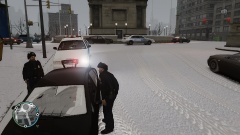
From the album: CouthInk4's LCPDFR Gallery
It's snowing, cold.. and this uniform isn't that warm.. i don't want to be on duty during the winter! -
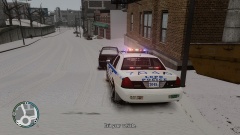
From the album: CouthInk4's LCPDFR Gallery
First traffic stop in the snow. -
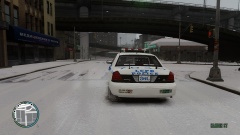
From the album: CouthInk4's LCPDFR Gallery
As the Christmas/Holiday season is here.. the snow starts to settle in. Liberty City is covered in snow and my job is to patrol in it. -
Try uninstalling LCPD:FR and use the Auto installer instead. If you press Alt P and it doesn't work, then you have installed it wrong, so the Auto installer will install it properly =) Saves time and effort to be honest.


