




Will
Management Team
-
Joined
-
Last visited
Everything posted by Will
-
This topic has been moved to the appropriate forum. Please post in the correct location in the future.
-
You only need to complete the introduction - as soon as you are in free mode you can play LSPDFR.
-
Your topic has been moved to GTA V Support, this is not LSPDFR related. Please post in the correct location in the future.
-
Your topic has been moved to GTA V Support, this is not LSPDFR related. Please post in the correct location in the future.
-
This topic has been moved to the appropriate forum. Please post in the correct location in the future.
-
If it is only specific NPCs, then it's GTA V taking control back and putting the ped back in the scenario they are supposed to be in.
-
Reminder: This is not a support topic - if you need support with LSPDFR 0.3 you may create your own topic in the Support & Information section.
-
I'm sure this will be adjusted, it wasn't meant to make the city a ghost town.
-
This topic has been moved to the appropriate forum. Please post in the correct location in the future.
-
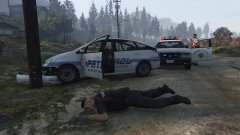
From the album: LSPDFR
Merryweather Security guard tried acting like the police, didn't end well for him. Code 3 Callouts by Stealth22 Vapid Stanier Mapped SAHP-Style by Yard1 -
Create a shortcut of the launcher, open the properties of it, and add -verify to the target line.
-
There already is a flashlight in the game. You can spawn it with a trainer or by using GiveWeapon WEAPON_FLASHLIGHT in the RPH console. (you can also autocomplete the flashlight part by just typing flashlight and pressing tab)
-
This topic has been moved to the appropriate forum. Please post in the correct location in the future.
-
Keep in mind that wasn't a feature of LCPDFR until version 1.0, LSPDFR is only at version 0.3
-
If you want to drag and drop, I think it will work if you don't run OpenIV as an administrator. Or maybe you have to run it as an administrator. One of the two.
-
This topic has been moved to the appropriate forum. Please post in the correct location in the future.
-
Your topic has been moved to GTA V Support, this is not LSPDFR related. Please post in the correct location in the future.
-
Your thread has been moved to LCPDFR Support Requests as it isn't a LSPDFR Support Request.
-
You need to use a mods folder: http://openiv.com/?p=1132
-
This topic has been moved to the appropriate forum. Please post in the correct location in the future.
-
Considering this video is from 2011 (and was one of the inspirations for LCPDFR, Sam wanted a mod that would allow him to make COPS episodes in GTA IV), I doubt he would remember where they came from...
-
0.3 will have ambulance backup: http://www.lcpdfr.com/forums/topic/55363-lspdfr-03-backup-customization/ "Oh yeah, it doesn't even end there either. With 0.3, an all-new unit type has been added which, for the first time, lets you call for emergency medical services." "Furthermore, unlike the regular medics in the game, medical units dispatched by LSPDFR will actually attempt to treat injured pedestrians."
-
This topic has been moved to the appropriate forum. Please post in the correct location in the future.
-
This topic has been moved to the appropriate forum. Please post in the correct location in the future.
-
This topic has been moved to the appropriate forum. Please post in the correct location in the future.

