




Will
Management Team
-
Joined
-
Last visited
Everything posted by Will
-
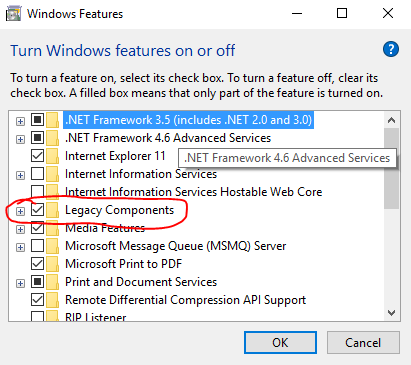
Click the little plus next to it and make sure DirectPlay is checked. Click ok, then try the mod again.
-
This is a long shot, but it won't hurt to try: Right click the start menu Open "Programs and Features" On the left, click "Turn Windows Features on or off" Click the check box next to "Legacy Components" Follow whatever else it tells you to do

-
This topic has been moved to the appropriate forum. Please post in the correct location in the future.
-
Your topic has been moved to LCPDFR Support Requests. Please post in the correct location in the future.
-
This topic has been moved to the appropriate forum. Please post in the correct location in the future.
-
Your topic has been moved to GTA V Support, this is not LSPDFR related. Please post in the correct location in the future.
-
This topic has been moved to the appropriate forum. Please post in the correct location in the future.
-
Your topic has been moved to GTA V Support, this is not LSPDFR related. Please post in the correct location in the future.
-
Here's a link to the 1.0.7.0 patch: https://support.rockstargames.com/hc/en-us/articles/200145406--May-28-2010-Grand-Theft-Auto-IV-Patch-7-Title-Update-v-1-0-7-0-English-1-0-6-1-Russian-1-0-5-2-Japanese-
-
-
This topic has been moved to the appropriate forum. Please post in the correct location in the future.
-
This topic has been moved to the appropriate forum. Please post in the correct location in the future.
-
-
Your thread has been moved to LCPDFR Support Requests as it isn't a LSPDFR Support Request.
-
This topic has been moved to the appropriate forum. Please post in the correct location in the future.
-
Your topic has been moved to GTA V Support, this is not LSPDFR related. Please post in the correct location in the future.
-
This topic has been closed by LCPDFR.com staff because it is a website, clan, or group ad. Our site isn't an advertising service - please do not use it as one. If you want to share your website, group, or clan, please keep that limited to your profile and signature. If you feel that this topic has been closed in error, please report this post.
-
This topic has been moved to the appropriate forum. Please post in the correct location in the future.
-
The only place to get support is the forum, and you can stick to your topic here: If you feel this topic has been closed in error, please report this post.
-
Your topic has been moved to LCPDFR Support Requests. Please post in the correct location in the future.
-
RPH should be updated within days, probably less. I think you'll be able to wait.
-
Your topic has been moved to GTA V Support, this is not LSPDFR related. Please post in the correct location in the future.
-
http://www.lcpdfr.com/profile/899-illusionyary/
-
 Brought to you by J.J. Abrams
 -
Grand Theft Auto V Development Suggestions & Requests




