




Will
Management Team
-
Joined
-
Last visited
Everything posted by Will
-
 I'll just add my +1 to this. I've never downloaded a plugin (aside from ones that are literally just a .dll) that is not already in the correct file structure. Makes it 1000x easier when you are installing/updating a ton of mods at once. It's kind of a general practice.
- 221 comments
- 63 reviews
-
Your topic has been moved to GTA V Support, this is not LSPDFR related. Please post in the correct location in the future.
-
Sorry about your PC being stolen, but I will have to lock this. You could probably find a 100% save somewhere, but someone providing the entire game with mods already installed would break various copyrights, so you will just have to download and install everything again. If you feel this topic has been closed in error, please report this post.
-
LivePD is my current favorite. I can't even watch Cops anymore because it's so predictable compared to LivePD. Plus I feel like you get to know the officers/deputies/troopers since they are the same every episode (Corporal Moschetto of Calvert County, MD is best deputy).
-
Your topic has been moved to GTA V Support, this is not LSPDFR related. Please post in the correct location in the future.
-
-
This topic has been moved to the appropriate forum. Please post in the correct location in the future.
-
Many of the keys are tied to default game controls. You could probably edit the menu controls by editing the default game controls for menu navigation in the game options.
-
No one said that. I suggest you stay on topic - this is about former Sheriff Joe Arpaio.
-
Your topic has been moved to GTA V Support, this is not LSPDFR related. Please post in the correct location in the future.
-
This topic has been moved to the appropriate forum. Please post in the correct location in the future.
-
Your topic has been moved to GTA V Support, this is not LSPDFR related. Please post in the correct location in the future.
-
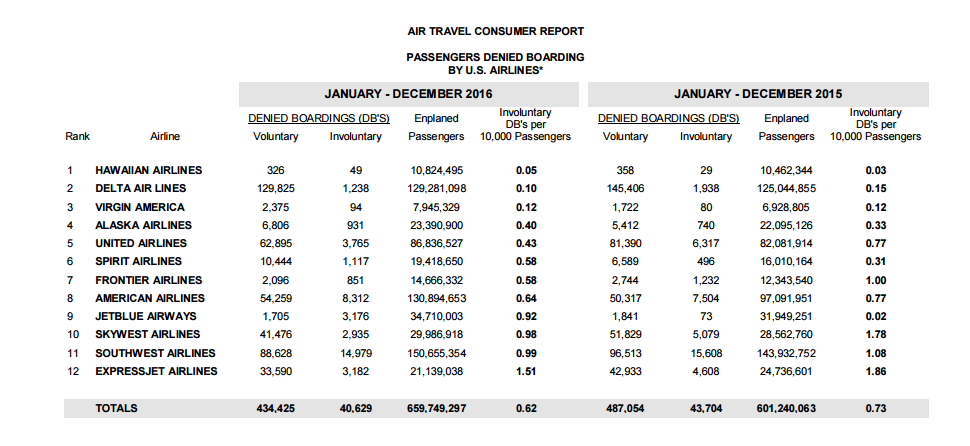
Using JetBlue as an example doesn't really work because they have a no-overbooking policy. Their "involuntary denial" numbers have increased since 2013 though, which they have attributed to growing their A321 fleet. If a scheduled A321 has some sort of maintenance problem, and they need to substitute it with a smaller A320, some people are going to get bumped because of the smaller plane. But generally if a plane has 150 seats, JetBlue only sells 150 tickets. Also, if you look at that chart, 359,376 people were denied boarding (whether voluntary or involuntary) in the first 9 months of 2016 with those 12 airlines. That is much larger than the 18 that was used earlier. You could probably find an annual report somewhere with updated numbers if you want to have an actual debate with actual facts. Research. There. I did it for you. https://www.transportation.gov/airconsumer/air-travel-consumer-reports-2016 I'll even do the math. ~.073% were denied boarding. .072% for the year: Please note I am not sharing an opinion here. Only facts.
-
With the amount they are promising I wouldn't be surprised. Games that promise to be 'the one' almost always end up being awful.
-
I've only flown Jet Blue and Delta (once). Only issue I had with Jet Blue was the flight being cancelled as I arrived at the airport due to a mechanical issue with the plane. The next available flight to my destination (Jacksonville) was the next day, which was unfortunate, but they compensated me for the trouble. I'd rather have to wait until the next day than fly on a broken plane. I believe they offered to check with other airlines but I didn't want to deal with that. They also compensated me for my plane sitting on the tarmac for about 2 hours after landing in Chicago last year. There were thunderstorms delaying all of the departures before we landed so it wasn't really their fault. There is no reason to have overbooking issues with them because you pick your seat when you buy the ticket. If you don't pick the seat when you buy it, then you can pick it online at any point before the flight. If you still didn't pick it before getting to the airport, you can pick it when you get your boarding pass. If, for whatever reason, you STILL did not pick your seat, one will get assigned to you at the gate.
-
Click your name on the top right -> Account settings -> Display name tab on the left
-
Disable any trainer options for "Police ignore player" or anything like that.
-
Please do not create multiple topics about the same thing. If you feel this topic has been closed in error, please report this post.
-
Please do not create multiple topics about the same thing. If you feel this topic has been closed in error, please report this post.
-
Your topic has been moved to GTA V Support, this is not LSPDFR related. Please post in the correct location in the future.
-
I'm pretty sure this is something that is only part of our forum software, therefore it would be up to them to fix any issues.
-
Your thread has been moved to LCPDFR Support Requests as it isn't a LSPDFR Support Request.
-
This topic has been moved to the appropriate forum. Please post in the correct location in the future.
-
This topic has been moved to the appropriate forum. Please post in the correct location in the future.
-
Related topics merged.


