Will
Management Team
-
Joined
-
Last visited
Everything posted by Will
-
Wait wait wait. Please PLEASE tell me I am misinterpreting this. Are you saying it’s the victims fault they are dead for not carrying weapons to defend themselves? If so that is just a ridiculous and outrageous statement and I can’t believe someone would think that.
-
I am in New York. The 'Canada' location is an inside joke within the staff team. As for the rest, you are probably right. There may not be a solution. Except for the fact that this epidemic is fairly unique to the US (not saying shootings are not happening elsewhere, but elsewhere is not getting a new "deadliest shooting" every month). Clearly something is wrong here. Clearly there is something we can do. What that solution is, I don't know, no one seems to know, but that doesn't mean we shouldn't at least try to do something about it.
-
And all this back and forth about guns is achieving what? Nothing. While everyone is arguing "hurdur it's my right" or "hurdur guns are bad" PEOPLE. ARE. DYING. It isn't my job to have a solution. What kind of country is this that we can't even protect us FROM OURSELVES? Also, the recent epidemic is mass SHOOTINGS. I'm not sure where murder by car or knife comes in to play. Sure, people will still die. But something needs to be done about guns. Frankly I find it concerning that many people don't seem to care about human life. Rights don't matter when you're 6 feet under.
-
I’m curious how many more “deadliest shootings in US history” need to happen before something is done. Liferally anything. JUST DO SOMETHING. PEOPLE ARE DYING.
-
I'm not against gun ownership, nor am I for it. There are arguments on either side that make sense to me. But the one that doesn't is the "there would be less shootings if everyone owned a gun." You're right, no one would agree it is a good idea to just start shooting, but put someone in a situation like that and they are no longer thinking. They are acting on full impulse and adrenaline. To someone without training, that impulse might be "don't die and shoot" and some might even panic. There's a reason the military and police go through extensive firearms training. Yes, owning a gun for self defense or defense of others against a single target with few other bystanders is fine, and I imagine your YouTube videos show that. But owning a gun with the expectation of killing a shooter in the midst of panic and chaos is just illogical.
-
I fail to see how someone with a firearm would ever help in these situations. Say everyone at the church had a gun - they all pull their guns at the sound of shots, now EVERYONE HAS A GUN OUT. They start shooting who they THINK was the assailant and end up killing innocents themselves. I'm sorry, but I absolutely hate the "if more people had guns they could have stopped this" argument. I do not want any old Billy-Bob-Joe without any training in identifying and neutralizing a threat "protecting" me.
-
LSPDFR does not contain a virus. If you use the automatic installer, advertisements will be presented within - just be careful what you are agreeing to install. There is an alternative automatic installer without advertisements as well as a manual installation if you are worried about the ads.
-
It's literally just one day (well, he did it for April 1st as well). Just take the joke, laugh it off, and move on. Like BLS501 said, you can change the date on your PC if you really need to have all seriousness in your video game. You could also remove BetterEMS for the day, LSPDFR has a built in ambulance backup you can call in the meantime. It isn't nearly as good, but I think it would do the trick for just today.
-
It's an easter egg from the creator of the EMS mod for Halloween only.
-
Hello Matt, Speaking on a personal level, I appreciate (as I'm sure many others here do) your attempt at making amends with our community. However, this puts us in a challenging spot from a moderation perspective as you are a representative of a commercial company whose goal is to make profit and your post is somewhat resembling of an advertisement for Police 1013, especially considering the links to your various platforms and your appeal for people to get involved with them. More importantly though, looking back, what happened in this case is reminiscent of the drama that existed previously with your project and our community and it's something that we'd rather stay as far away from as possible and as such we think it would be best to close this topic. So, while we absolutely do appreciate you taking the time to apologize for what happened, we would like to leave it at that for now. With that being said though, I think I speak for everyone in our community when I say that we do wish you the best with your project. Thank you for understanding, Will LSPDFR Community Manager
-
For option 1, you can change the backup vehicles in backup.xml located in Grand Theft Auto V/lspdfr. You'd probably still have to do some data file edits to get the car to work properly in the policeold slot, though. You could also add the vehicle as an addon, which there are multiple tutorials on how to do, and change the state police in backup.xml to your added car.
-
ELS is coded in a way that only those sirens will work. It would have to be updated to include the other sirens. To be honest, I'm not sure why all of them were not included in the original release. The names of the audio files have been known for a long time.
-
Contrary to popular belief, it really is not that easy to hit a target. Real life is nothing like the movies or video games, and shooting someone in a real life situation is completely different than shooting a target at the range. Otherwise everyone would only ever shoot one bullet, and fully automatic machine guns wouldn't even be necessary for the military. I've only been shooting once and, although a cop that was with us said I was pretty good, I'm no expert, but all the police shootings where multiple officers fired multiple shots and the suspect only ended up with one or two bullet wounds probably backs me up.
-
You can't just "change your license to another state" without moving to that state. You have to be licensed in the state in which you live. If you do move to another state, I believe the standard amount of time to get licensed in that state is 30 days.
-
Looking to get a custom mod created? You've come to the right place. Whether you're looking for a vehicle, texture, ped, audio, or any other modification, you can ask someone to make one right here. There are a few rules, however. You may certainly: ✅ Ask for any type of modification to be made. ✅ Bump your topic ONCE after 30 DAYS if no one has replied or otherwise offered to help (violating this rule will get your topic removed!). You may do this once. You may not: ❌ Make requests for clan packs. If your clan needs a pack, feel free to say so on your profile or in your signature. ❌ Request ripped copies of someone else's work. ❌ Request mods that you intend to be private and thus will not be shared with the public. ❌ Create threads looking for mods that have already been made (please use the GTA V Modding Discussion & Information forum for that). ❌ Offer to pay for mods. We can't ensure the privacy or security of anyone attempting money transfers, and we therefore do not want to allow it.
-
The "suspect" was the father, who was still in the truck parked in the driveway. The guy that died was innocent. Considering he always used the metal pipe for communication, it probably didn't occur to him that it could be considered a deadly weapon at that moment. To the police officers, maybe it seemed he was being threatening waving the pipe around, which just means they should have been listening to the people trying to explain. He was probably just trying to communicate like he normally would.
-
"I'm walking like 30 minutes to work..but at least it's nice out!" Typical Canadian... How have so many people done that? You have to be a special kind of stupid to not realize you're not meant to go there.
-
God I love that last one. When I first found it I watched it over and over. COME ON, BOYS
-
"The first officer who arrived, Lt. Matthew Lindsey..." "...the second officer, Sgt. Christopher Barnes, fired..." If your superior officer has clearly decided that non-lethal force is the highest acceptable level of force here, why the hell would you pull your handgun and immediately shoot him? "'You can get tunnel vision or just get locked in on the person with the weapon'” If a sergeant gets tunnel vision in this situation (or any situation), he is not deserving of that rank. That's a rookie mistake, one that cost someone his life.
-
Tutorials and questions is for modding development tutorials and questions, not general modding questions. You can check the descriptions for information on each section, and also check the full path of that section:

-
I think people tend to forget the difference between civil and criminal cases...in a criminal case, you need to have enough evidence to prove that the defendant is guilty beyond a reasonable doubt. From the very little that I have read, it seems the evidence just is not there. To be fair, the procedure requiring suspects to be restrained during transport was only put into effect 6 days prior to his arrest. In my opinion, the entire police department should face civil lawsuits for not already having this procedure in place. If the police have been transporting suspects without restraining them for their entire career since it wasn't a department policy, it's entire possible they were just acting based on what they've been doing all along. That alone would create some reasonable doubt in my mind that the officers are at fault. Now, should they be fired? Yeah, probably. Should they have to pay retribution to the family for wrongful death or some other civil charge? Maybe, it would definitely be easier to prove. But it's a hell of a lot harder to find someone guilty of a crime, especially those that the officers were being charged.
-
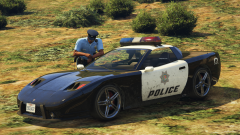 Intended to look like this I assume? Damn, now I want to play NFS Hot Pursuit 2.
 -
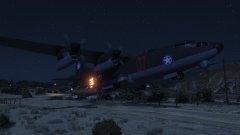 That plane is not even to buy!!
 -
That was for the last update. They were waiting for the issue to be resolved before releasing the current version back in June.
-
I'm also banned from posting on anything of theirs on Steam. Pretty sure I didn't do anything to deserve that but be a member of this site. Oh wait, that's right. The developer posted a topic basically bashing LCPDFR, so I defended it. He then edited my last comment to say "Thanks" and banned me. http://steamcommunity.com/workshop/filedetails/discussion/252178673/540739861499052761/?tscn=1398904614