




PNWParksFan
Insiders
-
Joined
-
Last visited
Everything posted by PNWParksFan
-
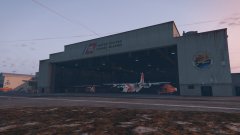
From the album: PNWParksFan WIP and screenshots
Having now found the texture files for this unused Pegasus airport hangar, I present USCG Air Station Los Santos, now stationed at Los Santos International Airport! I'll be keeping the station I've previously created at the docks for boats (and helicopter landings as necessary), but will be using this as the main location for USCG air operations now. The location is semi-accurate to real life, as the USCG Air Station Los Angeles is located at LAX. This is part of my Coastal Callouts pack which is currently under development.© PNWParksFan
-
It's actually E on the keyboard, but yeah.
-
Any chance you might bring that Silverado model back out and put your Whelen Freedom on it? That would look badass.
-
Not sure I follow. The IDs are siren1 through siren20. For siren1 the corona emits from the point where the siren1 part's axis is centered, but the emmissive mesh can be whatever you want. Check out
-
 Every ped needs a relationship group. There's info on the NATIVEDB. You can properly set the cops to COP, fire dept to FIREMAN, ems to MEDIC, and civilians to CIVMALE and CIVFEMALE. This will prevent them from all beating the shit out of each other. Also call Functions.SetPedAsCop and SetCopAsBusy on your cops to tell the LSPDFR API that they're cops but should be left alone.
- 166 comments
- 75 reviews
-
You need to set your relationship groups on your spawned peds properly, and probably should set block permanent events on most of them too. See what happens here when shots are fired near your scene: https://youtu.be/GTcsAMaUUHw?t=996
- 166 comments
- 75 reviews
-
The trick is having multiple lights under a single siren. The siren mesh can be as big as you want, and can be split into multiple separate polygons. All the sections under the same ID will just flash simultaneously, and only have one corona at whatever the position of the bone is.
-
You should probably make it very clear that this is an UNOFFICIAL group that you created to promote your channel. You make it sound like it's an official group. Also, Google+? Really?
-
Do you have "Using Rage;" in your file? It's not Ped.Model.SetVariation, it's just Ped.SetVariation. You should be get an Intellisense prompt to help you autocomplete it. What "doesn't work"? Are you getting an error in VS before you compile? Does it crash when you run it? "It's not working" doesn't tell us enough info to help you diagnose the problem.
-
I can say with certainty that it will be released before the year 2069, possibly even before 2025! Seriously though, I am unable to give any kind of timeline estimates. While I am making steady progress, it is slow progress, and there are many things left to do. I will continue to post updates to this forum thread, so everybody will know when it is available.
-
Just wanted to give people a quick update and let you know that yes, this is still under active daily development! Still working on setting up custom layouts for various vehicles to be included in the coastal vehicle pack. The Coast Guard boat will be able to fit 10, and the Jayhawk heli will be able to fit 8. Helicopter features are pretty much stable. Working on custom boat pursuit AI. The default pursuit AI are basically useless on the water, as any pursuing police boats like to ram into each other and don't do anything to stop the suspect. The custom AI intelligently selects a boat crew to pull up closer to the fleeing boat and fire shots at its engines, while other pursuing boats hang back a bit to give them room to operate. If the suspect boat stops or the suspect gets out of the boat and starts swimming, they'll move in closer. This custom AI is still rudimentary, but I'm working on improving it. Working with Albo on improved arrest manager integration. Arrests will work much smoother on water now, and boat prisoner transport will be coming to arrest manager to support coastal callouts. Edited various YMT files to affect which peds spawn at the coast guard station. Successfully removed random civilian peds that would spawn on the dock and pilot peds that would spawn near the heli pads, and replaced them with coast guard peds. The coast guard station is feeling pretty legit now! Still need to add some way to replace the boat spawns with coast guard boats. Thanks for all your interest and support! I'm still working hard on the mod and look forward to sharing it with everybody when it's ready.
-
Could you link me to that? Hadn't seen his guide, I'm sure that'll be helpful. Thank you! The sirens are named siren_18 and siren_19, and the coronas flash properly. When the emissive material was below the glass material they even flashed correctly. Perhaps I have the siren glass part named wrong.
-
Not sure if they're properly named. Haven't made sirens before. I initially had it at the "real" size, and they worked but of course the emissive part was 2x bigger than it should've been. When I scaled it down, it didn't shine through the siren glass. Then I rearranged the materials in the material browser, now it shines through all the time. What's the naming supposed to be?
-
When I do this with a siren light to fix the emissive material not showing through the siren glass, the lights are on all the time even when the siren is turned off. Just a constant glow. Is there a different trick to fixing this for sirens?
-
 @Captain14 I'd like to suggest that you change the naming order, to keep things more consistent with what the default in-game vehicles are. Move the crown vic to police Move either the taurus or impala to police3 Make an unmarked car and put it in police4, or else don't overwrite police4 The last one is particularly important, because scripts sometimes assume police4 will be an unmarked vehicle. You don't expect to have a marked car show up. All the vehicles you have are awesome, would just like to not have to mess around renaming files and meta lines every time I update it!
- 779 comments
- 187 reviews
-
-

- 2
-
-
Amen to what both of the previous posters said. I'll add that having a degree opens many more opportunities for you down the road. In your small town it may not matter, but someday you might want to move somewhere else. Maybe you'll meet a partner who wants to move to a bigger city, or maybe you'll exhaust the opportunities for career advancement in a small department and want to move to a state agency or go into a more specialized role. Getting a degree has consistently been shown to be one of the best investments you can make. People with degrees consistently achieve higher positions, make more money, and have greater career satisfaction. You don't need to go to a $100k university. Community college is a great place to start. The trend will continue to be towards requiring degrees for higher positions in law enforcement at more and more agencies. You're young, get the education while it's relatively easy to get financial aid and find time for it.
-
Oh man that ambulance... we so desperately need a good ambulance model!! Please make sure that the scene lights can be turned on, either when the door opens (not sure if that's possible) or else when the high beams are on.
-
-
 The model is currently available on gta5-mods.com, however the updated model we are working on with the added features mentioned above isn't released yet. It will be though, hopefully very soon. I'm also working on Coastal Callouts, an LSPDFR mod which will make water patrols possible. That's moving more slowly because it's a very complicated mod, but it will be available in due time!
 -
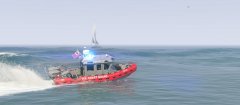
From the album: PNWParksFan WIP and screenshots
Improvements to the USCG 25' Defender Class Small Boat by @SkylineGTRFreak continue. Now the lights are working properly, realistic instruments have been added to the interior, the flag has been replaced with the USCG Ensign, and the doors have been separated out into toggleable extras (since actual doors don't work on boats). Still working on the layout so peds can enter/exit the vehicle naturally.© PNWParksFan
-
As part of this change will you be fixing it so that the "last updated" date doesn't change when you just modify the description?
-
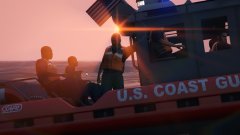
From the album: PNWParksFan WIP and screenshots
Working on adding additional seats to the new USCG 25' Defender small boat by @SkylineGTRFreak. Still a WIP getting all the animations and positions just right, but it's coming along nicely. Peds on any of the exterior seat positions can use weapons, and the ones on the sides and front can use 2-handed weapons like machine guns and assault rifles. You can also see a custom flash pattern in use here, and further improvements to the lights are being worked on. Original mod: https://www.gta5-mods.com/vehicles/uscg-defender-class Layout and lighting changes are still WIP and not released yet.© PNWParksFan
-
Everything you can do in Custom Backup in terms of vehicle and ped customization is possible in better ems as well. same syntax for the <Vehicle> and <Ped> entries, except no <Weapons>.
-
Most callouts don't need to be updated for every new version of RPH. Pretty much all of the popular scripts and callouts work just fine. All of albo's, arrest manager, wilderness callouts, all of darkmyre's, etc. All work just fine.
-
XML validator only tells you if it's valid XML. It doesn't tell you if it's XML in the format that Custom Backup expects. Try with the default XML file. If that works, the problem is in your XML file.


