Skip to content
View in the app

A better way to browse. Learn more.

LCPDFR.com

A full-screen app on your home screen with push notifications, badges and more.

To install this app on iOS and iPadOS
  1. Tap the Share icon in Safari
  2. Scroll the menu and tap Add to Home Screen.
  3. Tap Add in the top-right corner.
To install this app on Android
  1. Tap the 3-dot menu (⋮) in the top-right corner of the browser.
  2. Tap Add to Home screen or Install app.
  3. Confirm by tapping Install.

legionarius

Members
  • Joined

  • Last visited

  1.    igor4321 reacted to a file: LSPD CVPI
  2.    Alex0365 reacted to a file: LSPD CVPI
  3. PaWPaW2014 started following legionarius
  4.    legionarius reacted to a review on a file: LSPD CVPI
  5.    legionarius reacted to a review on a file: LSPD CVPI
  6.    legionarius reacted to a review on a file: LSPD CVPI
  7.    legionarius reacted to a review on a file: LSSD SandkingXXXL [Add-On]
  8.    legionarius reacted to a review on a file: LSSD Volunteers (car-peds)
  9.    legionarius reacted to a review on a file: LSSD Volunteers (car-peds)
    that's awesome, especially the "new" radio skin is a masterpiece .......... seems to me sooooo familiar 😆, great work guys, really a great work 😁
  10. MCpl.Geister started following legionarius
  11.    Swed reacted to a file: LSSD Volunteers (car-peds)
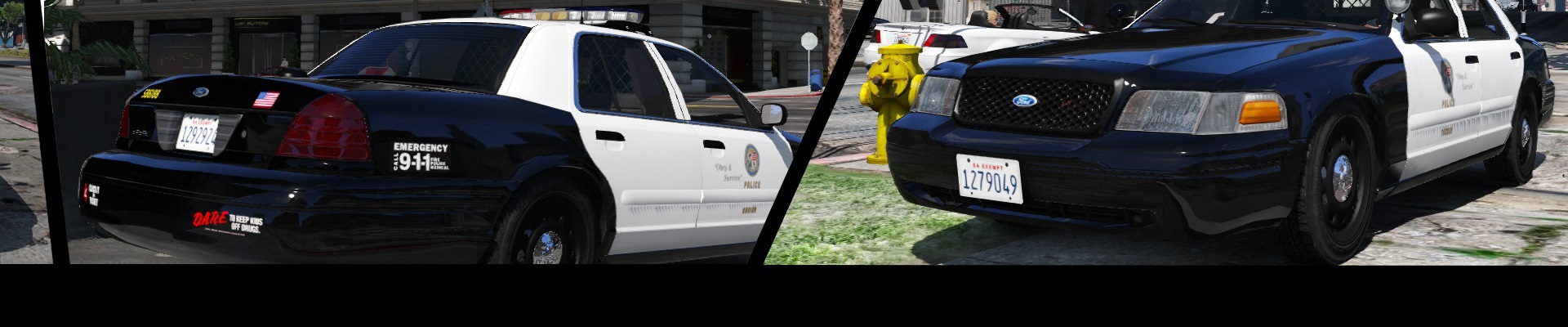
  12.    Deputy Peyton reacted to a file: LSPD CVPI
  13.    Officer GILLETTE ABDI reacted to a file: Some peds
  14. Finger started following legionarius
  15.    HarwoKing reacted to a file: LSSD Volunteers (car-peds)
  16. FDIC1999 started following legionarius
  17. 11john11 started following legionarius
  18.    Kilyin reacted to a comment on a file: Some peds
  19. it doesn't matter, I like this no sense name
  20. :D, thx to you and @Kilyin for 2 nice and competent reviews
  21.    Scuderio reacted to a file: LSPD CVPI
  22. BlueSteelShield started following legionarius
  23. *credits: belt and radio textures by legionarius
  24. maybe in the next update, I have to edit it in ZModeler I'm sorry, let me know if it works
  25. maybe.... thx mate
    • 853 downloads
    • Version 1.1.0
    This mod add some peds to the game so you dont have to replace any existing peds -new male sheriff (with hat and without boots) -new female cop (without hat for now) -new female paramedic Installation in the archive im using this peds for a bit of variety in my backup scenario with LSPDFR, male sheriff and female cop in Grand Theft Auto V\lspdfr > backup.xml female paramedic with better ESM in Grand Theft Auto V\plugins\LSPDFR\EMSmod > EMSUnits.xml plans: improve female cop female paramedic (I'm too lazy for now) add more peds
  26. ok, and volunteers are armed or unarmed?
  27. but will be like an civilian car with radio stations and without sirens
  28. works...... if it works well I do not know :D, you can try, just install the car as described I made for me an LSSD and LSPD version but not an LAPD many things do not make sense in this world :D, thx mate, is just my choice where is written this rule :O, my rule is to block the models where I worked :)
    • 603 downloads
    • Version 1.1.0
    This mod is designed to be used with Arrest Manager so you can use this unit as prisoners transport CAR amber lightbar, all lods, multy livery, Template, installation option "without sirens sound" so you can choose, without sirens sound is like rl volunteers car counterpart (thx to @11john11 for tips) PEDS peds are set like civilians and unarmed, like rl counterpart, with only the voice from cop (thx to @Schecter004 for tips)
    • 1,043 downloads
    • Version 1.2.7
    lore friendly LSSD SandkingXXXL All lods Multy livery Installation instructions in archive
  29. sure I have not changed the taillights from dev model, however I am no more working on this model, you can easily find better CVPI in this site have a good day

Account

Navigation

Search

Search

Configure browser push notifications

Chrome (Android)
  1. Tap the lock icon next to the address bar.
  2. Tap Permissions → Notifications.
  3. Adjust your preference.
Chrome (Desktop)
  1. Click the padlock icon in the address bar.
  2. Select Site settings.
  3. Find Notifications and adjust your preference.