



Original Light
Friends of LSPDFR
-
Joined
-
Last visited
Everything posted by Original Light
-
MODERATOR NOTICE I deleted your duplicate topic and moved this one to the correct section.
-
MODERATOR NOTICE Moved topic to Content Modifications
-
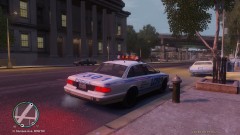 Where did you get that Vapid? It looks like the beta police car.
 -
Games will most likely be more compatible with Windows 7, considering that Windows 8 is fairly new. And as said above, Windows 8 has not had the best reviews.
-
You mean the cell phone? Up arrow to take it out and backspace to put it away if you're using the keyboard, and the up button on the D-pad to take it out, and the down button on the D-pad to put it away if you're using a controller.
-
Where would they shoot it down? Unless there's open land, but even then, it's risky. The only possible place I can see is an ocean.
-
I don't know how true this is, but some people say that drones can be the size of a bug, and can squeeze into cracks and such, being able to get through a variety of areas. I think it was from that T.V. show Conspiracy Theory, but I don't know how true it is, especially since it's from T.V. But if this is true, it shows you how far we have come in terms of technology. In 10 years from now, who knows where we'll be. They say that we're advancing faster and faster, because the technology itself helps us develop technology.
-
Though I don't use foreign police cars in my game, this looks incredibly sexy.
- 13 comments
- 9 reviews
-
Drones? There's both good and bad that can come from this. It could save cops, it could reduce time to solve cases, but it will also cause a lot of controversies. If people think that they'll use it against innocent people, it will lead to a lot of conspiracies.
-
You should also be a bit more specific, and use punctuation + grammar so people understand what you're trying to say.
-
I hope nothing bad happened to him also. I like the way he looks at the job, "treat it like a circus".
-
And if they were converted, they'd probably be low poly. It would need a lot of work to look good. Am I right about this?
-
WeaponInfo.xml is the file you want to look for. This guide might help you: http://www.gtaforums.com/index.php?showtopic=383690
-
Looks like it has something to do with LCPDFR. We can't offer support if it's related to LCPDFR until the next public version is released. Try removing your mods, and then try. If that doesn't work, try reinstalling. Also make sure you're using the latest version. Other than that, there isn't much I can do now. You can also try searching the LCPDFR support section, and look if someone else had the same problem as you. Nick Nothing to see here! This topic has been closed by G17 Media staff. If you feel that this topic has been closed in error, please report this post.
-
Please download this: tell me your results.
-
MODERATOR NOTICE Topic moved to Content Modifications
-
I saw a few videos on Youtube, but they were CVPI's, and none of the videos had links.
-
MODERATOR NOTICE I've moved your topic to Gameplay/Misc Modifications, since it's related to a modification. Can you elaborate a bit more on the mod?
-
There's no LCPDFR version without the flashlight and cop animation. I'm not completely sure about this, but you might be able to remove them. But back up the files first.
-
Did you change or modify the game files in any way before this happened?
-
Wait... Did you try restarting the game, restarting your computer?
-
So aznairsoftdude is never going to relase his LAPD version?
-
What program are you using to record with?
-
Police Cruiser slot mostly, which is a Crown Victoria - LAPD style.
-
