The Loot
Members
-
Joined
-
Last visited
Everything posted by The Loot
-
Not actually even a requirement. You can add a completely new model slot, and after making a carvariations entry that determines the "sirensettings" of the vehicle, it's fully functional.
-
Right, but none have been released yet.
-
Figured that was too good to be true without a newly mapped model. Mean tease putting that one on the download.
-
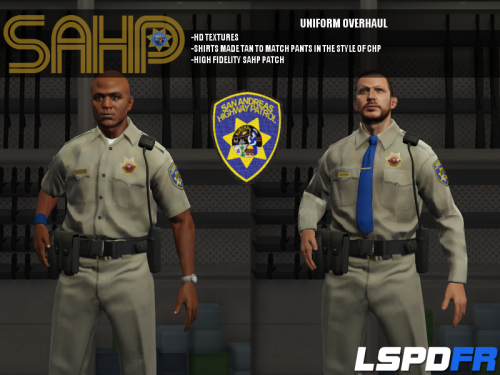 Why? There is no mention anywhere of Blaine County having it's own department, and it's completely plausible for the Los Santos Sheriff's Department to run a contract for them. It's your preference, but they aren't "supposed" to be anything other than what they are.
- 95 comments
- 17 reviews
-
And? They've also banned someone who is in no way involved in development nor even a player of GTAV.
-
Seems pretty clear that these bans are related directly to simple affiliation with the project, not even development. Yeah, which is why I added the last part to my post after reading the update on the article.
-
Can't have an open park next to their walled garden. Classy, R*. Ironic when the whole reason of forcing a launcher login was to make sure people had valid ownership of the game, well, at least I thought it was.
-
Ragehook will spawn them if you type in the model name, and the Enhanced Native Trainer has a manual entry option. LSPDFR is separate and currently unchangeable, until they add API support for those features.
-
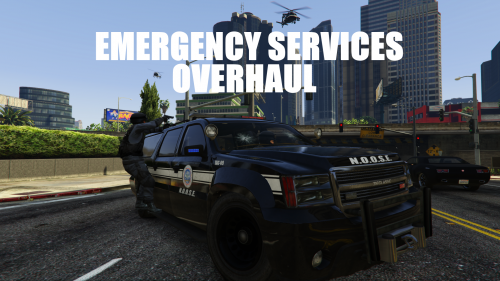 Additional vehicles, man! It's real easy to create a unique vehicle with GTAV! Sadly, since modding is still limited in many respects, new vehicles may not function exactly the same as their base, i.e only FBI2 and Sheriff2 work with SWAT dispatch correctly. I may have 5 additional Grangers in my game (LSPD, NOOSE Border Patrol, two different NOOSE variants, and a copy of Sheriff2 so I could turn it into an unmarked white vehicle to give the my non-Federal SWAT guys a different vehicle than FBI2), but none will work like those two slots for SWAT.
- 42 comments
- 10 reviews
-
Just a quick note: SirenSetting 1 also works for FBI2, so basically all of the Granger models. Anyone mess around with 3, 8, 11, or 12?
-
I'd assume one of the four values would control that, just not sure which is which.
-
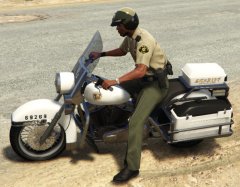 Hmm, what have we here?
 -
Just a showcase of what I've done so far.
-
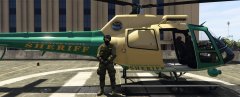
From the album: GTA V Police Peds and Vehicles
Los Santos Sheriff's Department Special Enforcement Bureau Officers keep a keen eye on things from the LSSD Maverick, mostly trying to spot topless sunbathers along the county's beaches, and occasionally trying to tag deer up Raton Canyon. (Peds and Vehicles integrated into the dispatch system.) -
Under the vehicle entry in the vehicles.meta file, there's a "Drivers" entry; change the ped model defined there and you're all set.
-
From the album: GTA V Police Peds and Vehicles
Dismayed at the revenue the SAHP was pulling in from traffic tickets on the highways, the Los Santos Sheriff's Department has rolled out a new traffic division to teach county residents just how expensive owning a car is. -

From the album: GTA V Police Peds and Vehicles
Not one to be upstaged by their big city cousins, the Los Santos Sheriff's Department has rolled out a full set of vehicles. Now LS visitors can feel right at home between the end of a baton a a car hood. (Vehicles integrated into the dispatch system.) -
-
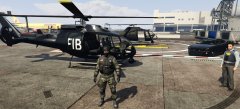
From the album: GTA V Police Peds and Vehicles
The Federal Investigative Bureau works alongside the National Organization of Security Enforcement to combat extremely dangerous suspects and situations. FIB Security Agents run headlong into danger in their unmarked Buffaloes while FIB Tactical Agents soar through and drop from the sky with black Froggers and Mavericks. (Peds and Vehicles integrated into the dispatch system.) -
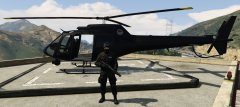
From the album: GTA V Police Peds and Vehicles
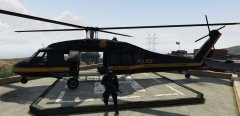
The NOOSE's TRU air fleet includes Annihilator Gunships and the fabled Black Mavericks. Used by TRU Operatives to rain fire from the sky or make dynamic entrances on unsuspecting threats to American safety. (Peds and Vehicles integrated into the dispatch system.) -
From the album: GTA V Police Peds and Vehicles
The NOOSE's TRU air fleet includes Annihilator Gunships and the fabled Black Mavericks. Used by TRU Operatives to rain fire from the sky on unsuspecting threats to American safety. (Peds and Vehicles integrated into the dispatch system.) -
From the album: GTA V Police Peds and Vehicles
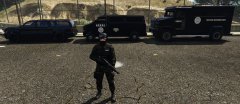
The NOOSE's TRU fleet includes Unmarked Grangers, NOOSE Transporters, and Riot Enforcers for use against extremely dangerous criminal or terrorist suspects. All are manned by NOOSE TRU Operatives armed with various lethal weapons and the urge to use them. (Peds and Vehicles integrated into the dispatch system.) -
Nice work! Hopefully in the future we can find a way past R*s roadblocks and make vehicles more versatile.
- 42 comments
- 10 reviews
-
-

- 1
-
-
It's not the vehicle set that's causing the issue. it's the dispatch type. These have to be controlled in some other file we can't yet access, and SWATAutomobile must have specific models defined elsewhere, crusader, fbi2 and sheriff2, and those are the only ones that will work. But setting them as a PoliceAutomobile type works fine (though the Grangers only hold two doing it that way).
-
Hmm, I was thinking it was just a skin replacement for police3, but if you've followed the tutorial for adding new vehicles, it includes carvariations for whichever DLC pack you're using. I don't know which value under the colors section determines what, or what the values are for what colors, but it's there for testing.