




ineseri
Friends of LSPDFR
-
Joined
Everything posted by ineseri
-
You can't with the standard noose ped since it's hardcoded to that model. You can, however, use the NOOSE helicopter pilot since that model has the standard walking animations.
-
Do you have the latest GTA IV patch? (http://support.rockstargames.com/hc/en-us/articles/200145406-Grand-Theft-Auto-IV-Patch-7-Title-Update-v-1-0-7-0-English-1-0-6-1-Russian-1-0-5-2-Japanese-).
-
Good :) Let me know if it worked!
-
I really recommend you to update to Windows 7. Anyway, are you running the game as administrator?
-
Okay, why doesn't that have anything to do with it? GTA IV is a resource heavy game. Adding mods to the game will slow it down further, hence sometimes some commands will not execute properly.
-
Could be because of some things. Are you using a trainer? Do you have many mods loaded at the same time? Using ELS?
-
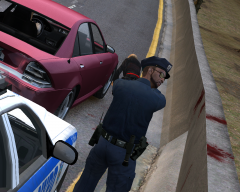 Great pic. Just minor collision damage on that pink car :p
 -
Hey! I recommend you to use the new version of LCPDFR! ('?do=embed' frameborder='0' data-embedContent>>). Any reason you want to use 0.95RC2 instead?
-
Alright, happy gaming. If you have any further questions, don't hesitate to ask.
-
Just a quick question, did you use LCPDFR 0.95RC2 prior to installing LCPDFR 1.0?
-
Modded cars tend to crash the game more often, just so you are aware of that fact.
-
Have you modded the NOOSE cruiser? Also, it would seem like NOOSE vehicles are unstable for some users, not sure why.
-
ELS does that from time to time. I notice you have a ton of taxis, I'd recommend using this mod (>www.lcpdfr.com/files/file/13-traffic-flow/) and using these commandlines. create a txt file called “commandline.txt” (without quotes) in your main GTA IV installation directory and insert the following lines: -norestrictions -percentvidmem 100 -novsync -frameLimit 0 -nomemrestrict
-
1. Yes, it's possible to run ENBs on the latest patch. 2. No, LCPDFR 1.0 won't run on any other patch than 1.0.7.0 3. I don't really use ENBs, but you should be able to find one pretty easily.
-
Yes, that should work just fine :)
-
Running the game as administrator: Go to the GTA IV folder, right click on GTAIV.exe, Properties, Compatibility and select 'Run this program as administrator', do the same exact thing to the LaunchGTAIV.exe.
-
So..... do you have a FN key?
-
I think you do, sorry. And it's no problem!
-
You didn't really answer my question. I'll rephrase it: Did you, or did you not use the manual installation? :)
-
Have you read my previous replies? Specifically this: Could I see a screenshot of your GTA IV directory?
-
Please do :)
-
I have no idea, since I have no idea what keyboard you are using. If it's a laptop, then yes.
-
Okay, glad to hear it.
-
I don't think your computer can handle the game IMO. Your card is about 900% slower than a 560 Ti. (http://www.hwcompare.com/8908/geforce-gtx-560-ti-vs-radeon-hd-5450/). A 560 should be able to run medium/high. But to circumvent a less powerful computer, and maybe get the game up and running, create a txt file called “commandline.txt” (without quotes) in your main GTA IV installation directory and insert the following lines: -renderquality 0 -shadowdensity 0 -texturequality 0 -viewdistance 0 -detailquality 0 -novblank -norestrictions -percentvidmem 100 -minspecaudio -novsync -renderquality 0 -frameLimit 0 -nomemrestrict
-
I'd say hang tight for a patch, MP isn't really supported yet.

