


trewq34
Members
-
Joined
-
Last visited
Everything posted by trewq34
-
Haha, they have fiber optic now but I doubt it's anywhere near as fast as Virgin. I don't see why my brother wants Sky broadband (except from the fact that it's unlimited)
-
Indeed, as said above by Break. If you want some decent ENBs try the following: '?do=embed' frameborder='0' data-embedContent>> '?do=embed' frameborder='0' data-embedContent>> '?do=embed' frameborder='0' data-embedContent>>
-
Firstly, do you have a legal copy or a pirated copy of the game?
-
-
If you don't want to use GIMP and can't afford Photoshop, why not try Paint .NET
-
Indeed as mentioned earlier, but kids these days are too lazy to read things :P
-
The problem here is the parent is called misc_k whereas it's children are called misc_k_aLx you would need to rename the parent to misc_k_a and the children misc_k_a_Lx. (let x be 0 or 1)
-
Haha neither do I, when I'm not recording there's EMS teams left, right and centre :)
-
It's just the sounds that were supplied with the weapons: Glock: http://www.gta4-mods.com/weapons/g17-with-glowing-night-sights-beta-f19404 MP5: http://www.gta4-mods.com/weapons/mp5-ris-nom900a-f15700 G36c: http://www.gta4-mods.com/weapons/push-hk-g36c-tactical-f14486
-
Rename the unchecked one to "extra_1_L1" or remove it completely
-
Are you using "H" to enable the siren in multiplayer? If so then use "G" as stated in the manual...
-
-
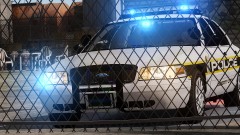 Great pic, do you mind if I use it as a YouTube thumbnail?
 -
The uniform can be found here: https://www.dropbox.com/s/4cxz53pnpril9f8/Met%20Biker%20Uniform.rar (thanks to reece.daw for the link) Thanks so much :)
-
Are you using EFLC, if you are then put the visualSettings.dat file into the following folders: EFLC Directory/TBoGT/common/data/ EFLC Directory/TLAD/common/data/ (not sure if this is needed as there wasn't a visualSettings.dat file in this folder when I installed EFLC)
-
You don't have to be in a clan to play LCPD:FR online. You could play it with a few friends online, just make sure you all have the same mods to stop frequent game crashes.
-
Might be a different file?
-
Yes you do. What else would you like help with? Ok.....
-
Well your statement, "Thirdly, your car isn't even templated properly.", implies that you could have done a better job...
-
No I used Kinksta's
-
Well sorry for this being my first template. I'd like to see you do better! (since you're complaining of it not being templated properly...
-
Hi, I was just wondering if anyone wanted a Ferrari 458 Italia unlocked and templated. The pic below shows how long I spent templating the car. How long it actually took me: Pics of the car with the template: If you'd like me to upload this to the development section just let me know :) Credits (these credits are correct, according to my Portuguese skills :P): Model converted to GTA IV from GTA SA by Rodrigo Célio [RC.3D] Templated by trewq34
-
Let me know what you think :) http://www.youtube.com/watch?v=v6HnQqnU2w0
-
I have a Samsung Galaxy S but I plan on getting the S4 mini when it comes out (saw an ad in Phones4U the other day)
-
You are allowed to edit it only if it's for personal use. If you wish to release you have to ask for permission from the original author

