


0taku
Friends of LSPDFR
-
Joined
Everything posted by 0taku
-
 No real images...oh wait
 -
From the album: 0taku media
A model I'm converting to help out a friend. At this moment of time a unlocked release of this model is planed -
Looking on the back of the box (cause I have the CD copy) I believe you should be able to run it because your above the Minimum specs, but you don't have anything close (apart from a 64bit OS) to the recommend specs. You should still be able to run it but on med-high settings but you won't get any higher then maybe 40FPS, if you have a 1920X1080 screen. I have simmer specs (I7 instead of a I5 and a GT730 instead of a AMD) and I run GTA V at 25-35 FPS on med-high settings
-
 Strange, it exported fine. I'll replace it with the .Z3d.
 -
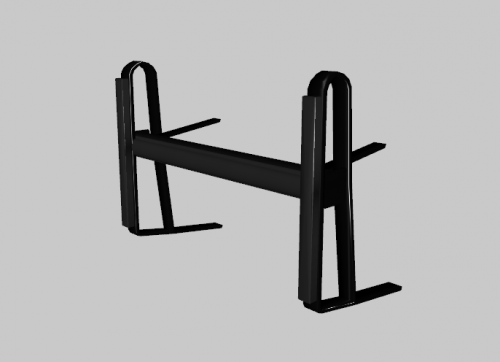
I was board and I wanted to make a pushbar that would fit most cars with out much change so I made the Setina PB200. Only download if you know how to use programs such as Zmodler 2/3 and Blender. I will not give support to people asking 'how to use' so sorry about that. You guys are also free to convert this to anyother game or pushbar as you please --------------- Polygon count 519 Triangle count 819 ---------------------- Files types are: .YFT for GTA V .OBJ for most other programs.
-
From the album: 0taku media
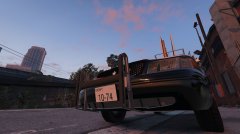
I was board and I wanted to make a pushbar that would fit most cars with out much change so I made the Setina PB200. If people want it I release it if, if not that's fine. -------- Just note that the lights will not come with it. This Image is to just show if the pushbar nad it comes in at a little over 500 polygons (850 triangles) -
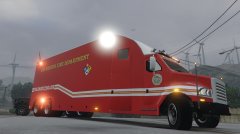
From the album: 0taku media
LSFD Hazmat truck responding to assist the LScFD with a hazmat fire at the LS power plant. ------------------- Just a concept showing what else the MCC i'm working can be used for. I most likely will not be upload this light setup up and skin but I will be putting out the model -
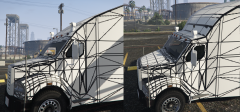
From the album: 0taku media
Getting back into working on the MCC and I think about altering the roof of the cab a little to better suit lightbars. So which looks better The fully curved roof makes it look smother and neater however is harder to add a lightbar it without have all the back where it levels out. The flat one adds a nice spot for a lightbar but it doesn't look as smooth (plus I'll have to re-map that area) So which one do you guys like. I'm fine either way -
I started a Command center late last year. I was around 90% done before I got 'burnt out' from Zmodler because I was using 5+ hours a day, I hope to be able to get back into it and finished the last 10% of it
-
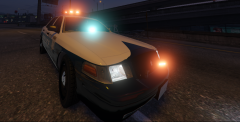 Yeah I'm trying to make the texture more blue Your a bit right. Skin is based of what the Tokyo police use, Badge on the front is also what they use and light is an Patlite AXL Aero Boomerang; which is what is also they use. Other lights are random lights I have made.
 -
From the album: 0taku media
-
These guys deserve to have the citizenship take away like to do with real terrorist. Because the are in fact cause 'terror' for by definition the are in fact terrorist.
-
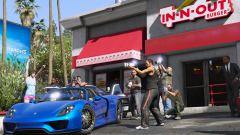 Getting blackmail for someone most likely
 -
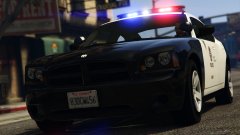 So which charger are you using. I believe you using my Interior, just wondering about the model
 -
Might I suggest making the colour for the glass lighter (Vanilla lightbar glass texture). Because I think that texuter might be to "saturated' for the day
-
@Penguinsurfer Well there is a mod that turns of the corona's for the police vehicles but this makes the lights look dull https://www.gta5-mods.com/vehicles/full-blue-police-siren-with-corona-removal
-
Most typed of music expect the screaming ones (you know the ones), thought my playlist has both English and Japanese (and a few Russian) Examples of what I like as for what Is Listening to right now
-
![LSPD Funeral Procession [REL]](//s3-gallery.int-cdn.lcpdfrusercontent.com/monthly_2016_02/small.2016-02-10_00049.jpg.f8c5b4448c449a6804905431a09de743.jpg) I shouldn't be laughing at this. but I can't stop
I shouldn't be laughing at this. but I can't stop -
@MrGhostman Is this it, or is this the modern one? http://sirennet.com/store/product/federal-signal-pa300-siren (Click Tones)
-
This is hard right now as we can't edit a file that host the corona's for the lights for the police models (or any of the base non-DLC cars) as it is still encrypted. If someone did make all the light Siren 1-15 (the LED ones) all blue, The red ones (Siren 1,2,3,7,ect) would appear as a purple because of the RED corona. As for the all blue models out there, I believe they only use the BLUE sirens (4,5,6,8,ect) to give it that all blue look.
-
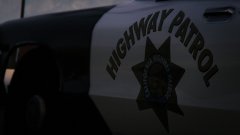 A 1600 × 900 jpg which is 104 kilobytes in size and is post to the gallery of a police RP forums
 -
Please state the error you are given when trying to upload as it help to find what could be wrong easier
-
I think I read somewhere that 1080P only dose 50-60hz so this might be the issue
-
 Looks great man, I have and Idea how you did it but I'm not going to say anything
 -
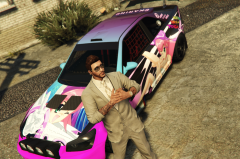 I don't thinks its lewd enough for Lundy, or Loli (or is it Illusionary that like the Loli's)


![LSPD Funeral Procession [REL]](http://s3-gallery.int-cdn.lcpdfrusercontent.com/monthly_2016_02/small.2016-02-10_00049.jpg.f8c5b4448c449a6804905431a09de743.jpg)
