

Skip to content
View in the app

A better way to browse. Learn more.

LCPDFR.com

A full-screen app on your home screen with push notifications, badges and more.

To install this app on iOS and iPadOS
  1. Tap the Share icon in Safari
  2. Scroll the menu and tap Add to Home Screen.
  3. Tap Add in the top-right corner.
To install this app on Android
  1. Tap the 3-dot menu (⋮) in the top-right corner of the browser.
  2. Tap Add to Home screen or Install app.
  3. Confirm by tapping Install.

Which looks better?

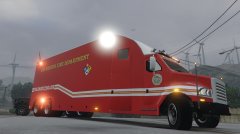
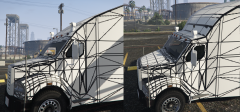
Getting back into working on the MCC and I think about altering the roof of the cab a little to better suit lightbars. So which looks better

The fully curved roof makes it look smother and neater however is harder to add a lightbar it without have all the back where it levels out.

The flat one adds a nice spot for a lightbar but it doesn't look as smooth (plus I'll have to re-map that area)

So which one do you guys like. I'm fine either way

From the album:

0taku media

· 218 images

Account

Navigation

Search

Search

Configure browser push notifications

Chrome (Android)
  1. Tap the lock icon next to the address bar.
  2. Tap Permissions → Notifications.
  3. Adjust your preference.
Chrome (Desktop)
  1. Click the padlock icon in the address bar.
  2. Select Site settings.
  3. Find Notifications and adjust your preference.