


jb431
Members
-
Joined
-
Last visited
Everything posted by jb431
-
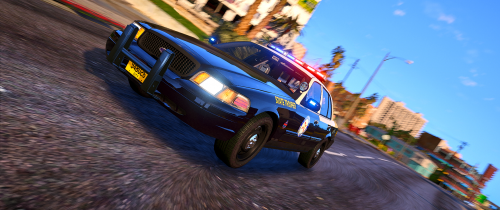 Looked like the best FHP pack out there. Only issue was the lights around the brake light did not light up. Good incorporation of their light bar.
- 58 comments
- 8 reviews
-
-
Yes. Not completely sure what you were trying to do, but maybe the base police cars could use siren tone 1,2,3 and the FBI cars could use 4, aux, and whatever you wanted to include.
-
No worries. It happens, just letting others know it wasn't just an issue for them.
-
Check out one of the files that contains EUP uniform changes and it will probably tell you where the files are that you need to edit. Just export and edit them in Paint.net or whatever program you have. Some of the files like the shoulder chevrons for short sleeve shirts are are hard to find though, I gave up searching. Main uniform locations should mostly be in these folders: Then you just edit the original file until you have what you are trying to get. The size and placement may take some practice to get exactly what you want. Original: My final: The uniform tie will be whatever color the stripe is on the right edge of the screen.
.thumb.png.a26b9e24878f91e2134814ebfe7d0f5b.png)
.png.673c54e7db186315d97f16d203821604.png)
.thumb.png.9a1ccabaecebeb393f93ef9ad78f22d6.png)
-
I have also had issues lately. Sometimes a file will download normally, then the next one will take extra long. Even if it isn't a large file.
-
I don't know the total number of sirens are included in what you are trying to do. You might be able to load the sounds you want into the game and maybe edit the ELS file to make the sirens you want active on some cars to say true, and the ones you don't to be false.
_LI.jpg.321e2ee1ca67996cd51009f4704f20e6.jpg)
-
 Put it in the latest patchday file. You can change the file names to put it in whatever car slot you want. I've swapped my veh files (handling, etc) around to accommodate placing different types of vehicles in different slots, but I think SUV's are normally put in slots like FBI2 and Sheriff2. I have my metas set up to support various SUVs in FBI2, Police4, Policeold1, and Sheriff2. You might want to double check this post in case I'm forgetting something:
- 60 comments
- 37 reviews
-
I am looking for some different packs that are equipped with rotators. I have some, but I'm sure I have missed a few. Didn't know if anyone could post some suggestions. I know some packs probably have a model or two mixed in with regular LED bars, etc. Not looking for SLR's, V shaped Vegas style bars, just regular old school rotators. Appreciate any suggestions. Thanks.
-
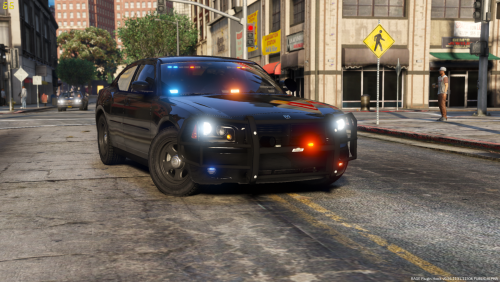 The info I read said they were cellular modems/transmitters for the Live PD equipment.
- 17 comments
- 10 reviews
-
-

- 1
-
-
 Anyone know a way to edit the file, or can I clean out the XML file without creating an error to keep the previous court cases from popping up at the beginning of each game? Once I go on duty the old court cases just keep displaying on the left side of the screen even if I delete them from the court menu.
- 1,178 comments
- 137 reviews
-
Yes, it is LP callouts
-
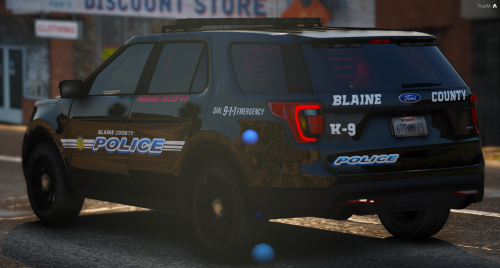 Good looking pack, with nice liveries to match. Can't seem to get the Caprice to display a license plate for some reason though, even tried editing the texture with the template provided.
- 48 comments
- 16 reviews
-
 If you want to change the driver of the vehicle, you have to change it in that vehicle's meta. The line you need to change will look like this: <driverName>S_M_Y_Cop_01</driverName> If you want it to be a sheriff ped it would be: <driverName>S_M_Y_Sheriff_01</driverName>
- 242 comments
- 18 reviews
-
 This is the handling line I use for all of my FPIU's and Tahoe's. Seems to work ok. I think baller2 is an option that others use, if you don't want to alter the handling metas. <Item type="CHandlingData"> <handlingName>fbi2</handlingName> <fMass value="2400.0" /> <fInitialDragCoeff value="8.5" /> <fPercentSubmerged value="85.0" /> <vecCentreOfMassOffset x="0" y="0.05" z="0" /> <vecInertiaMultiplier x="1.0" y="1.0" z="1.0" /> <fDriveBiasFront value="0.45" /> <nInitialDriveGears value="5" /> <fInitialDriveForce value="0.35" /> <fDriveInertia value="1.0" /> <fClutchChangeRateScaleUpShift value="2.1" /> <fClutchChangeRateScaleDownShift value="2.1" /> <fInitialDriveMaxFlatVel value="210.000000" /> <fBrakeForce value="0.80" /> <fBrakeBiasFront value="0.65" /> <fHandBrakeForce value="0.7" /> <fSteeringLock value="42.0" /> <fTractionCurveMax value="2.5" /> <fTractionCurveMin value="1.65" /> <fTractionCurveLateral value="20.0" /> <fTractionSpringDeltaMax value="0.15" /> <fLowSpeedTractionLossMult value="0.3" /> <fCamberStiffnesss value="0" /> <fTractionBiasFront value="0.49" /> <fTractionLossMult value=".5" /> <fSuspensionForce value="2.1" /> <fSuspensionCompDamp value="0.900000" /> <fSuspensionReboundDamp value="0.900000" /> <fSuspensionUpperLimit value="0.11" /> <fSuspensionLowerLimit value="-0.12" /> <fSuspensionRaise value="0.0" /> <fSuspensionBiasFront value="0.5" /> <fAntiRollBarForce value="0.9" /> <fAntiRollBarBiasFront value="0.5" /> <fRollCentreHeightFront value="0.75" /> <fRollCentreHeightRear value="0.40" /> <fCollisionDamageMult value="1.7500000" /> <fWeaponDamageMult value="1.0" /> <fDeformationDamageMult value="1.7500000" /> <fEngineDamageMult value="1.5" /> <fPetrolTankVolume value="65.0" /> <fOilVolume value="5.0" /> <fSeatOffsetDistX value="0.0" /> <fSeatOffsetDistY value="0.0" /> <fSeatOffsetDistZ value="0.0" /> <nMonetaryValue value="25000" /> <strModelFlags>440010</strModelFlags> <strHandlingFlags>20000</strHandlingFlags> <strDamageFlags>0</strDamageFlags> <AIHandling>SPORTS_CAR</AIHandling> <SubHandlingData> <Item type="CCarHandlingData"> <fBackEndPopUpCarImpulseMult value="0.1" /> <fBackEndPopUpBuildingImpulseMult value="0.03" /> <fBackEndPopUpMaxDeltaSpeed value="0.6" /> </Item> <Item type="NULL" /> <Item type="NULL" /> </SubHandlingData> </Item>
- 427 comments
- 75 reviews
-
I don't think it's compatible with the newest game versions.
-
Good deal. I was asking for myself as well. If you found a different way to do it I was going to try in the future.
-
Link? NM, found it.
-
I have the animated CVPI, and I personally don't use the wipers. I just liked the look of the car and the lightbar. Plus the model I found on here has a wiper stuck in the on position on the driver side and it's super annoying. I wouldn't want to have to deal with another mod and compatibility issues just for wipers, but that's just me.
-
What did you do, just darken/decrease the texture transparency? I believe that's what I tried before and it worked.
-
That's too difficult to nail down because any slick top can be turned into an unmarked with a simple livery change. Plus there are so many different vehicle models to choose from. CVPI's are always a classic favorite, but I also like the lines of the new model chargers.
-
@Walters Thanks, I've been trying to figure this out for a while, and just use dark colored unmarked CVPI's most of the time. Here's another one for you. Do you know how to make PBUS function as a police vehicle? I've copied vehicle and handling metas from the police slot into pbus, but cars still don't pull over or react to the lights, etc.
-
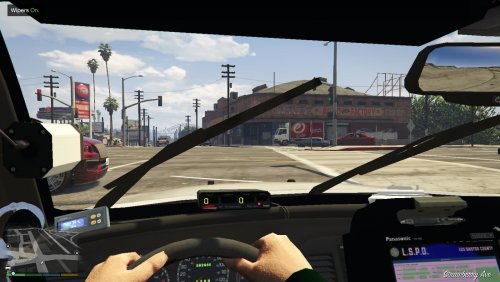 Is the driver side wiper always in the up position? I know there's a link for the wiper function in the download, but I'd prefer not to add another mod since I won't use it. Just wondering if there's a file that can be i,ported, etc so the wiper isn't extended all the time.
- 49 comments
- 22 reviews
-
.thumb.png.5e2c5eadd71e25a1ae8d904f3e8a8d6b.png) WIP. Started to make a skin pack, but got sidetracked and never completed it. Here's the only one I completed.
WIP. Started to make a skin pack, but got sidetracked and never completed it. Here's the only one I completed. -
 I was just trying to do the Explorer. I think each car has that same light on the quarter panel. There seems to be some correlation between the tir3 and Whelen M2 textures. When you view the model in OIV after editing either of these they appear green.
- 269 comments
- 17 reviews

.thumb.png.f8f51d0f8db4a7188715b93cc8e21ded.png)
.png.74256cde6c00e0e19140304929a81163.png)
.png.673c54e7db186315d97f16d203821604.png)
.png.ba253938ae2b2d97a2ad42a395ebbdb9.png)
_LI.jpg.321e2ee1ca67996cd51009f4704f20e6.jpg)
.thumb.png.5e2c5eadd71e25a1ae8d904f3e8a8d6b.png)
