




Dozel
Members
-
Joined
-
Last visited
Everything posted by Dozel
-
Well.. I firstly see that kinda problem in my experiance, or your game graphics corrupt (you could try rename mods folder to _mods, disable/remove graphic mods and verify game files) or it's signs of dying GPU. But again, It's just my guess, I could be wrong.
-
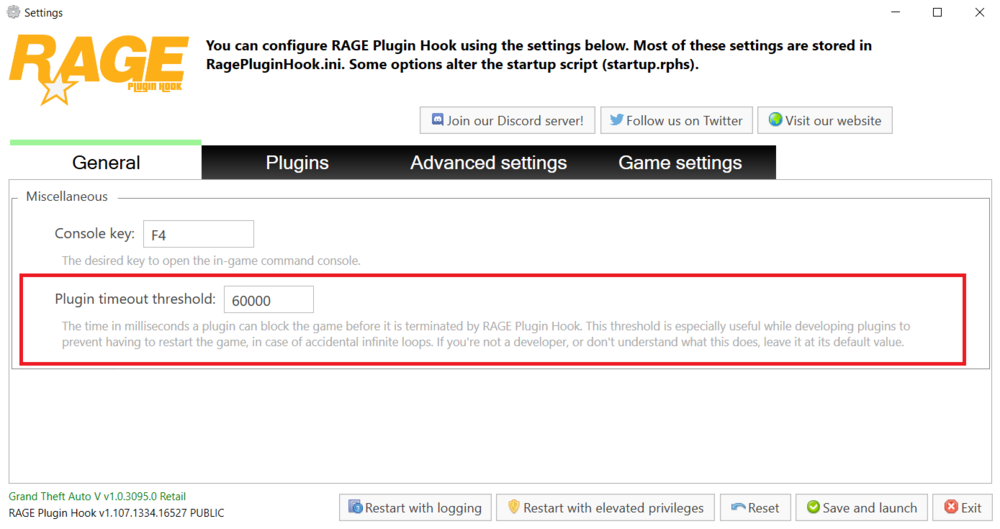
Well... you're welcome, hope you'll not get any crashes in the future. Also my advice for a better experience is to set Plugin Timeout Threshold to 60000 in RagePluginHook settings.
-
It could be resahde actually. But that's just my guess. You could try to temporary remove/disable it.
-
So did you rename mods folder? If not, let's continue with police computer. When you going on duty (ForceDuty in console, or manually), write StartCallout ArrestWarrent, and try to use computer. If game will crash, send RagePluginHook.log.
-
All right. Let's start from the beginning. If you got crashed on startup, try to load base GTAV, without RPH. If that works, load RagePluginHook. If you still got crash try to rename mods folder to _mods and try again.
-
That one crashing in startup, not after using of police computer. Also, which police computer are you using? Vanilla, Computer+, CompuLite, etc.?
-
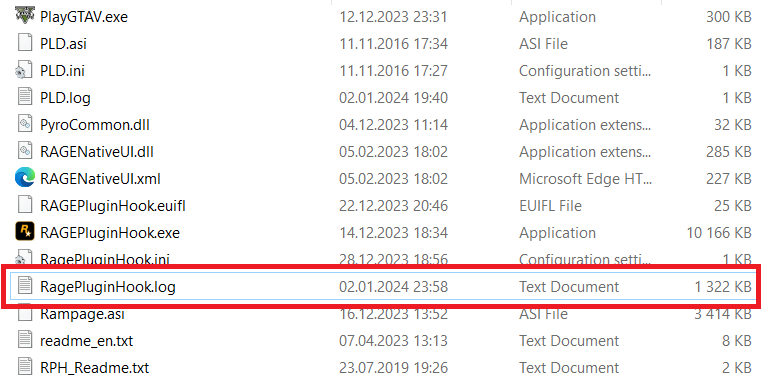
Provide RagePluginHook.log, file located in GTAV main directory, NOT from the logs folder.
-
If I had that and I wasn't using graphics mods, ENB, Reshade, etc, I would say R.I.P Graphics Card.
-
Please provide RagePluginHook.log, file located in GTAV main directory, not from the logs folder.
-
Original GTA V uses .ymt files in update.rpf. And there is no data for sheriff2, because that car uses fbi2 data, just in case if you are looking for that. So I'm not sure that carcols.meta for base emergency vehicles even exist, only carcols.ymt as far as I know.
-
You mean installation?
-
Also for working sirens with that pack you have to install ELS and SSLA, just in case if you don't know that.
-
Rename mods folder to _mods and try again. If game will work, then you defently did something wrong while installing cars/gameconfig/Pack limit adjuster
-
1. I think you are missing CalloutInterfaceAPI, make sure it's in GTAV main folder, if not, take a look at Plugins or Plugins/LSPDFR folder, if you find it there drag&drop into GTAV main directory. If there is nothing, reinstall CalloutInterface properly. 2. Update Riskier Traffic Stops 3. I'm not sure about that weird stuff going on 4. And about that crash as well, I think it's becouse of AmbientAICallouts, but I could be wrong. 5. According to the log, AI:Respond, is loading well in the beggining But that's all for AI:Respond, I didn't find any traces of using that plugin. Maybe UnknownBastion could figure it out. That's what I've got from your log, but I may be wrong and maybe there is more. You could try to do first step, or wait for UnknownBastion replies.
-
Yeah I saw topic with that kinda issue, the guy also has ALPR+, but as far as I get it was really related to improper removal of RDE. But advice is good. @cop4lifer has to delete ALPR+ for more game stability, use ALPRLite instead.
-
My thoughts is that issue connected to some plugin you have install, or was installed in the past. According to that, my guess is that your crash accured while game tried to spawn "suspect" but couldn't assign "suspect" either a name or a plate number for car and stuff. But that's only my thoughts, I could be wrong.
-
You mean your GTA V crashing, or execlty LSPD First Response.dll?
-
You have to firstly install ultimate backup and AFTER THAT EUP backup configurations.
-
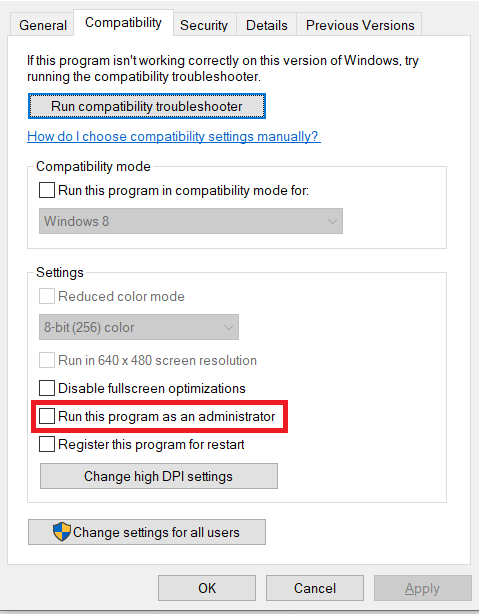
I mean you don't have to run programm as admin manually, sometimes there is check box which is automatically sets in Properties -> Compatibility Tab Just in case take a look there.
-
That's the way it's supposed to be. If after renaming _mods back to mods you are still experiance crashes, then it was related to the mods installed in the mods folder. You can try to revert recent changes or start fresh mods folder.
-
I think he talks about that one
-
Just for info, opening OpenIV as Admin can cause some bugs, that could be one of them, also you can't drag&drop from winrar archive (for me it's not possible for some reason)
-
If loading base game gives you the same error, then I think your games files was corrupt (you may accidentally delete something wrong). All I can advise is verify game files, but maybe UnknownBastion has another idea.
-
You don't need to LoadPlugin, it should be loaded automatically when you going on duty. So I'm pretty sure you have installed plugin(s) incorrectly. Move UltimateBackup files to Plugins/LSPDFR.
-
So you can play base GTA 5 which loaded via RPH, but when you typing ReloadAllPlugins in console you getting crash? I think it could be because of big amount of plugins, or because of inappropriate plugin installation. I think, as diagnostic measure, you could try load plugins one by one using LoadPlugin command, if there is some pluging which is broken or installed inappropriate your game is gonna crash, and you will know which one. Or you could try load plugins on startup as well, and you don't have to use reload all plugins command. But I think your game is gonna crash but we're gonna know which plugin will cause that crash.


