


Break
Members
-
Joined
-
Last visited
Everything posted by Break
-
Not everyone in the EU has a Ö on their keyboard. And even if you do have the Ö, that's not the key you wanna press, it's still the one above the TAB button. Please don't spread wrong information.
-
You can press the key above TAB and enter spawn <vehiclename>. If you wished to spawn a turismo, for example, you would enter spawn turismo and press enter.
-
0/10 Obvious troll is obvious. Lost it at the part with the "large donation". Everyone should calm down a little and stop giving that person what he wants - your attention. Also you and everyone else that's been posting memes and two-worders, avoid making pointless posts like that in the future, thanks.
-
Nonetheless, the commandline chikamru made contradicts itself and that's not something that helps performance. I never understood the purpose of premade commandline.txts anyways, since they're for a specific PC. It's always best you research what each option does and then find your own best settings. Like I don't have the most up-to-date GPU, however I do get above 50 fps constantly, with modded cars, ELS and only 1280 mb of vram. Oh and btw, -availablevidmem 2 actually tells the game you've got 2 gigs of vidmem, from what I looked up. So you're kinda shooting yourself in the leg with that. But hey, let's just give our game commands without actually knowing what they mean - I'm sure that'll make my PC run damn good ;)
-
Chikamru's commandline is bullshit though: -nomemrestrict (is telling GTA IV, that there's no memory restriction) -memrestrict 681574400 (is telling GTA IV there's a memory restriction) -memrestrict 629145600 (is telling GTA IV there's a different memory restriction) -availablevidmem 2 (is telling the game to use twice the vram you have) It all contradicts itself. Also; -noprecache makes things worse in things texture leak -novblank isn't needed for 1.0.4.0 upwards, has no function If you really want to use a commandline, I suggest you try these one for one and find the one that works best for you (with no lag and no memory leaks) and that's the only thing you put in the commandline.
-
Mind giving us a detailed explanation of what happens?
-
Restore the game from the backup you made, so as to have a fresh installation. Install the patch over that and see if it works.
-
Installled any new mods?
-
Hey! First off, you're running an old version of the game, please update your game to Patch 7! You can download the patch by clicking here. Simply run the installer, wait until it's done, then re-install LCPDFR and tell us how it went!
-
Do you have ELS cars installed? Did you install all the files that came with ELS?
-
It's a file in your game directory telling the game how to behave regardings a whole bunch of stuff. May I ask how much vram you have?
-
Sounds like a memory leak. Do you have a commandline.txt?
-
I'd love to have a LA Noire sequel (NY Noire? Set in a 60's environment? Cold war and crime? I'd be up for it) or a LA Noire for policing, instead of a point and click adventure - my experience just is, that point and click games suck.
-
ELSv7 does a pretty good job at clearing the streets, imho. But I do agree that the AI takes it too seriously sometimes and rams into stuff.
-
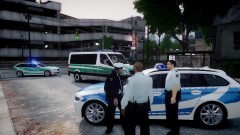 I'll take that as a compliment, since I made the liveries.
 -
-nomemrestrict -percentvidmem100 these lines contradict themselves.
-
Sounds like you installed a faulty mod in WeaponsInfo.xml or weapons.img. You should replace them with the backup you obviously made, because it tells you everywhere to do so.
-
That thing won't even run GTA IV. Hell, it doesn't even have a graphics card.
-
Winterberg. It's the best mod out there, hands down.
-
Try making higher res textures. e.g. from 1024 to 2048
-
'?do=embed' frameborder='0' data-embedContent>> That's what you saw in the video.
-
Okay, you didn't install the patch (correctly). Download it and run the installer.
-
That's the wrong file. You don't want to look at that security catalouge, you wanna look at a file called GTAIV, with a huge IV as icon.
-
NO YOU DON'T. LaunchGTAIV.exe is not the file that's interesting to you, interesting to you is GTAIV.exe
-
That's okay. If you hover over GTAIV.exe it should say 1.0.7.0


