


Break
Members
-
Joined
-
Last visited
Everything posted by Break
-
Are you going to be using the upcoming Callouts API from LSPDFR? :)
-
Thank you for your input, it means alot to the dev team. Alot of the issues you report are already known and being worked on. For the content (or lack of) please consider reading this: http://www.lcpdfr.com/forums/topic/51332-lspdfr-future-development/
-
Never. The whole vegetation and terrain transmits the feeling of a mediterranean climate, as it is in California. Maybe the nothern areas around Paleto Bay and Mount Chilliad could work, but as for the rest of the map, that is definitely not the case.
-
@RedBugs http://www.lcpdfr.com/forums/topic/51332-lspdfr-future-development/
-
Update your ScriptHookV on the website provided by the poster above. This has nothing to do with LSPDFR though.
-
I've been wanting this mod ever since I first saw it on your video.
-
There's no way to do that yet, since they mapped the right side of the vehicle to be copy of the left side. You'll have to wait until we gain access to the vehicle models.
-
I think @Cyan will be on this as soon as he has time. Thanks for the input though
-
The Simple Trainer by Sjaak327 is by far the most advanced and content-rich trainer out there. If you were to use it, you wouldn't need your Bodyguard menu, since the Simple Trainer already has one.
-
Or just use the Simple Trainer by Sjaak. Which is superior in any way to the Native Trainer (which was only supposed to be a tech demo anyways). On top of that, it's toggled with F3.
-
Although that will probably change in the future.
-
It's all about opening your eyes :)
-
It's probably heavier, which would make it good to perform pit manuevers and box people in.
-
Oh it's THIS discussion again. If you want to play Police in GTA Online, go ahead download the Police Mod and some cracked ScriptHookV then. LSPDFR won't be supporting GTA:O for a very good reason which ineseri keeps explaining. Maybe, just maybe, it's time to actually listen to what he's saying, because he has a valid point! Maybe some time in the distant future, when mods enable us to use dedicated servers without interfering with GTA:O, LSPDFR will come for Multiplayer. But I repeat, Multiplayer, not Online. Those are two very different things.
-
Thanks, as someone who learnt to code in Java I found this really useful. I guess now it's my turn to get to know C#.
-
Contradicting yourself much?
-
If R* did everything they could to stop modding, you could bet your ass, that there wouldn't be any mods now. As I've mentioned before, there are listeners implemented in the game, which scan for code injecting .dlls. Rockstar knows who uses Scripthook and who doesn't, even in SP. It'd be no problem at all to just ban everyone from GTA Online and Steam; or just to implement measures to stop people from loading in code through .dlls. But they choose not to, because they know, that singleplayer mods got GTA to where it is today and they don't want to piss off the big community behind the scene. They're just trying to protect their source of income, which is GTA Online and the Shark Cards.
-
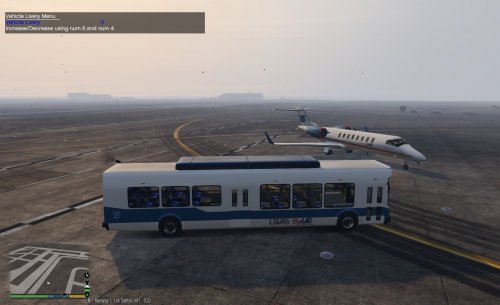 I got annoyed when I saw that the Airport Bus didn't use a LSIA livery and there were no airline liveries, like in real life. So I went ahead and made some liveries to match GTA V's airlines. There's a FlyUS/LSIA, an Adios Airlines, Air Herler and Caipira livery. Matches the planes quite nicely imo. Don't forget to check out the readme.txt for installation instructions and a small FAQ.
 -
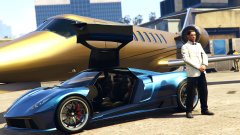 That's an Osiris tho.
 -
You most likely haven't installed it correctly. You need ScripthookV and ScripthookV.NET (https://www.gta5-mods.com/tools/scripthookv-net). The .dll file then goes into the scripts folder in your GTA V directory.
-
As expected. Not even a day after it was broken. ;)
-
Wooow, all this bitching. I couldn't agree more with ineseri. They're throwing updates and more content at us, for free. Whilst unintentionally breaking single player mods for maybe 1 or 2 days. They're trying to protect online, which is generating their income for more free DLCs - if they really tried to stop people from modding, they'd just ban everyone who loads .dll's into the game (and yes, they're able to do that with no problem at all - the listeners are there!). Furthermore just imagine if this was a game by EA, you'd be paying $30 for each stupid DLC and would enjoy your Origin ban just for messing around with mods in single player. You guys need to seriously calm the fuck down.
-
As far as I've understood, cosmetic mods are okay, gameplay interfering mods are not. Cosmetic would be as in FOV, Textures, Visualsettings etc. A police mod tampers with the game mechanics and is therefore not allowed. If you don't believe me, go ahead and shoot R* an E-Mail. And yes, even if it's only in a private session, since the stats/ammo/money are global and not bound to a single server/session.
-
I don't think we need a full-fledged ELS like in GTA IV anymore. A siren mod which would allow us to toggle the different siren tones separately and use the lights without sirens would be enough in my eyes.
-
GTA IV's Multiplayer was a collection of minigames. GTA:O is (at least in my mind) a completely separate game to GTA V, and should be treated that way. The sole reason we do not condone online modding, is that usually what starts with a small police mod in a closed sessions, quickly escalates into a trainer in a public session. It just kinda ruins the game for everyone else.


