Vampyre
Members
-
Joined
-
Last visited
Everything posted by Vampyre
-
Perhaps, rather than Thero's idea of a dedicated forum, maybe another tab on the Profile next to Activity, About Me, Albums, put a Wall of Praise or something to that effect? Then to further cut moderation we can have the person themselves allow/deny a praise post?
-
I typically use ABP on most other sites and I don't mind turning it off here to support the cause, but I'm now having to turn ABP back on because of all the constant voice ads. Please stop them or I won't be able to support the site's advertising anymore. I can't have voice ads playing.
-
 @Stealth22 I encountered a non-gamebreaking bug. If you pull someone over while ALPR is NOT on, after the stop is over and you get in your car, it WILL be on. While its not the end of the world, its annoying if you don't intend on using ALPR and don't want to have to turn it off after every TS.
- 153 comments
- 32 reviews
-
-

- 1
-
-
You can leave a message on a person's profile which other people can see I believe. Not sure if a whole forum is really necessary or a good idea, it probably would end up with people posting praise and for support on them instead since most people /= smart. It's great to give modders praise, but even mod reviews are abused. I can't imagine a forum for this would be any different.
-
 Just used the BetterEMS CancelKey, I find that if something does get stuck or if they're acting retarded when trying to leave, i.e. driving constantly into a tree, if you cancel the call they get out and drive less retarded.
- 781 comments
- 85 reviews
-
I thought I was following it but I'll check again. The log must have gotten cut when I edited the post, I just updated the orignal post with it again.
- 781 comments
- 85 reviews
-
@PNWParksFan Had a crash while using BetterEMS' current release version. I had used stop there for the ambulance which was continually smashing into a car and after the call was finished one of the FD peds was stuck in place so I forced cleanup, few seconds later BE crashed.
- 781 comments
- 85 reviews
-
 If you do the callout yourself are you able to recreate the same thing in your own log? It may not necessarily be your code that's creating and issue. If you're not able to recreate it then just let me know and I'll test it further to see if I can find out why its doing that, but I've done the same thing 3 times and all 3 times got the same problem with the log.
- 329 comments
- 53 reviews
-
That all of that failure to clean up continues to fill the log after the callout is finished. Last time I ended up with a 99MB log file after playing for just an hour. That's insane and it makes it impossible to trace any other issues.
- 329 comments
- 53 reviews
-
@ScottehBoyy Just tried it again with the version you just uploaded and still the same thing. Callout goes smooth and finishes successfully but that starts in the log and keeps going long after the callout is finished.
- 329 comments
- 53 reviews
-
-
Did you also copy the vehicles.meta and carvariations.meta from your old mods folder? Everything gets wiped out by the patch when you copy the new update into mods so you have to move the car files into PD11 then copy or recreate the vehicle.meta and carvariations.meta. After you've done that everything should work again.
-
Yup, this is with the latest version I checked that first. It didn't crash this time, it just kept pouring that out in the log after the call was finished. My log was a whopping 99MB after.
- 329 comments
- 53 reviews
-
I just noticed when I had a crash for something else after having a Stolen Tanker call successfully finish earlier that the below was repeating since then in my log. Looks like there's a clean up issue with the callout.
- 329 comments
- 53 reviews
-
It sounds a lot like you have them in the wrong place. Can you tell us what is the exact location you put the files in including subfolders (whole path)? Is it just Police and Police3 you're replacing?
-
There are in game settings to control audio-out. Try changing it through there, I don't remember exactly where it was but its in there somewhere.
-
@ScottehBoyy Just had a crash from the Stolen Tanker callout. I was en route to the callout and the tanker was stuck down the one way beside the BCSO station in Paletto Bay right next to the waterline. My guess is something happened there that made the callout freakout, not sure what though since I didn't get there yet.
- 329 comments
- 53 reviews
-
 @Stealth22 Another crash log for you! Looks like another ambient event crash.
- 422 comments
- 73 reviews
-
 @Albo1125 Just had a crash after accepting a callout from this pack. However, it looks like the crash may have been from an error in either your Common file or LSPDFR itself. If it looks like its just LSPDFR to you let me know and I'll post this in the bugs forum.
- 1,081 comments
- 166 reviews
-
-
.thumb.png.b19141183625f86104aaa1e2cc931048.png) @ISPfan12 Great job again! Any plans to add their 2013 FPI as well, it's the same as the CVPI for the most part.
@ISPfan12 Great job again! Any plans to add their 2013 FPI as well, it's the same as the CVPI for the most part.- 2 comments
- 1 review
-
.thumb.png.e9b697a3b831d11ad06314ac3ee9d6af.png) Great work and attention to detail! Keep up the great work, it's good to see another great skinner in the community!
Great work and attention to detail! Keep up the great work, it's good to see another great skinner in the community!- 7 comments
- 3 reviews
-
This would have to be part of the actual models not the skin itself so not a reasonable request in this case. When you leave comments like this make sure you know the difference between model or skin and what is part of which, cuts a lot of confusion. @ISPfan12 Great work! I can tell you put a lot of work and care into making these as perfect as you could, keep up the good work!
- 7 comments
- 3 reviews
-
-
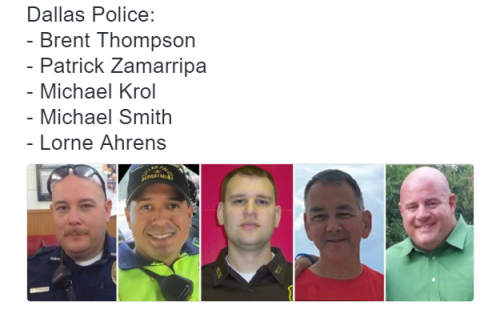 On that note, I just realized you spelled both Michaels wrong. You got it right in the description but spelled it Micheal according to the screens.
- 12 comments
- 7 reviews


.thumb.png.b19141183625f86104aaa1e2cc931048.png)
.thumb.png.e9b697a3b831d11ad06314ac3ee9d6af.png)