


Vampyre
Members
-
Joined
-
Last visited
Everything posted by Vampyre
-
It can still happen with replaced vehicles as well, depending on the size of them. What a modded gameconfig does is reduce the load of cars being loaded into the game so you have more memory to play with, so even replaced cars can hit that limit given they are generally at least twice the file size of vanilla cars. To make it easy, try renaming your mods folder and starting the game, if it loads then that's most likely what it is and you can test it further by either putting some vanilla cars back or just replacing the gameconfig and see what happens. *****Make sure to backup your gameconfig.xml before replacing it - as I said some modded version can be unstable and you may want to revert for testing later.
-
If you have custom vehicles installed and this happened after you installed another vehicle recently this is probably because you don't have a custom gameconfig.xml to allow more cars. A good test for this is remove a few cars, if it loads then that's why. You can find a few of them on gta5mods, some are more stable than others but it varies from person to person so you may have to try a few before you get something that's good for you.
-
It's your carcols/siren settings. If you have custom carcols installed it can affect other vehicles that use the same siren setting, try changing the siren setting number in carvariations to something else.
-
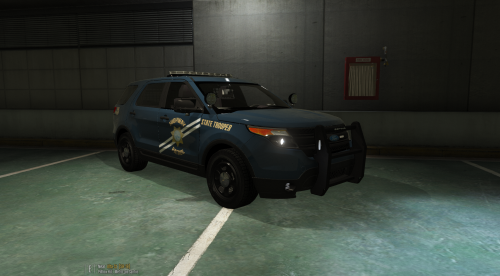 You have a good base here, good job so far, but there a lot of things wrong as well. The most striking is you have the completely wrong shade of blue, it's not even close. Then there are plenty of little things like you put DPS after Trooper on the CVPI and as you can see below it shouldn't be. You also have the cutout in the line on the CVPI facing upwards and not downward following Highway's curve. I'd recommend doing a good hard comparison with some images on Google and going over everything again to make everything perfect. Good work getting it this far!
 -
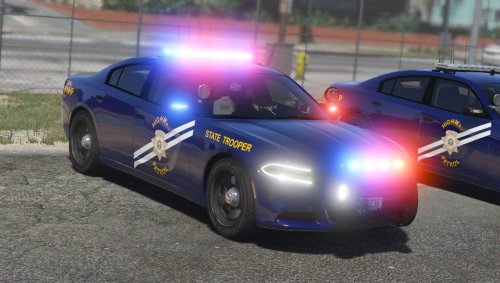 @LVMPDFAN Not sure if it's just me or a bug, but I just noticed if the car gets really really dirty that the lightbar gets completely covered and doesn't light up anymore until cleaned.
- 38 comments
- 19 reviews
-
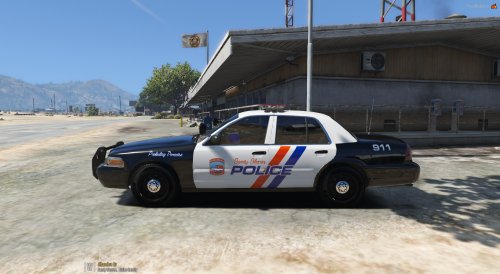 The driver's side rear has white on the rear trim spilling over from the door, the roof has a few spots where black is peeking through and there's a random red spot on the rear pillar on both sides. Also you haven't stated if you got permission from @Gump to modify his skin. If you haven't you need to and should take this down until you have his permission to release this.
- 3 comments
- 1 review
-
-

- 1
-
-
 @Albo1125 Just got a crash taking a callout. LSPDFR crashed as soon as I tried to take the callout. RagePluginHook.log
- 1,081 comments
- 166 reviews
-
I usually follow what Arariel suggested and what Police usually do, wait until the light changes for traffic to move out then pull them over. Real Police would only pull you over at a red light if they thought you were dangerous i.e. DUI or if they were worried you might run and wanted you blocked in.
-
 Gamecopyworld has the old school No CD crack with it. Its v678, but completely legit.
 -
You're doing it wrong, OpenIV is looking for a Folder at that part of the setup. Create a folder called GTAV and put GTAV.exe in it, then point the setup to that folder and click Select Folder. I just tried it myself again and it works still.
-
Both of us can get banned just for talking about game file sharing. Unfortunately I cannot do that. If you do some Googling you might find it somewhere for the same purpose.
-
All you need is a copy of GTAV.exe not the whole game. If you have a friend with the game just ask them to email you the file and you can run OpenIV with just that. I know because I've done it before.
-
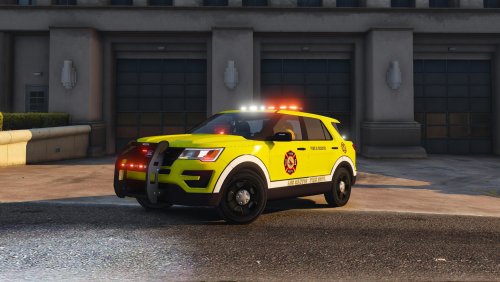 That may be true, but this skin's pattern was inspired by an existing vehicle with this pattern.
 -
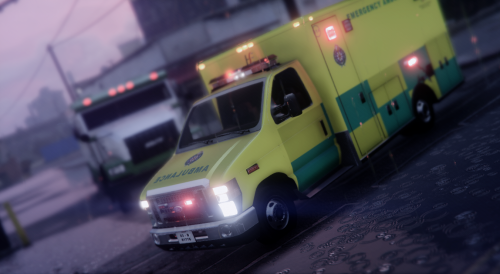
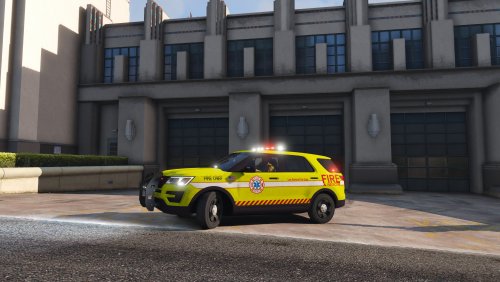 2013 & 2016 FPIU Thehurk LSFD ERV Skin created by Vampyre Do NOT reupload to any sites as your own work. If using any portion of this work as your own please give proper credit where due.
 -
2016 FPIU Thehurk LSFD ERV Skin created by Vampyre Red and White light files are included, if anyone wants Red only lights let me know - if there are enough people I'll make them and update. Do NOT reupload to any sites as your own work. If using any portion of this work as your own please give proper credit where is due.
-
Nope, it's definitely coming from LCPDFR I can see the speaker on the tab and mute the tab in Chrome and it'll go away. @Cyan I was finally able to capture a screen of one of the videos, this time it played as soon as I loaded the page. Of course now I can't post the picture for some reason so here: http://imgur.com/a/7cYlr
-
@LVMPDFAN There seems to be an issue in the templating of the vehicle (?). On both front doors at the bottom it warps anything put there and makes it look like it was pulled toward the bottom of the door.
- 38 comments
- 19 reviews
-
Have you tried requesting the @PNWParksFan add them to his 4K Park Ranger's Pack? That's probably the best place to start and I'm sure if you ask nicely he'll do it when he can.
-
@Cyan There definitely are still video/voice ads going around. I've encountered about 5 since reporting this; unfortunately I haven't been quick enough to screenshot any of the video ads. I just got one that was the McDonalds Olympic ad, again I was too slow to screenshot it. Eradium seems to be right that it waits for you to not be on the tab or just looking at another program to change the ad. Not sure if thats a coincidence or not but it seems to be true from what I've seen so far. If I do get any screenshots I'll post them once I can.
-
@phoenixpolice This already was a thing, it fell out of development long ago and not many people really used it. To get something like this going again if you want it, you should probably start it yourself and use the vast resources of the modders on this site to help with it. If you're serious about making it they will always try to help however they can with any issues or questions you may have. For reference this is the previous script:
-
-
I've had this happen as well and its not tied to Insert. I assumed it was the first time it happened to me and was unable to fix it, I had to copy paste my post, refresh the page then manually retype my post again. I've had this happen with using both Tags (@) and Spoiler and I don't use BBCode I used the button for spoilers. It may not be a common bug and may not happen all the time, but he is right, it does happen.
-
Okay, I will turn ABP off and see if I get anymore and alert you about them. Its only been over the past few days. Yesterday I was just sitting on a page writing a comment and they just kept coming up in the background while I was on that page, I tried to find it on the page but nothing looked like it was moving but the sound was definitely from that page, I muted the tab with Chrome and it stopped, unmuted and it came back.
-
I know, I was the one who pointed that out to Thero. Just throwing that out there as an idea to further his thought.
-
 @Stealth22 First, sorry for the coming bad news... I know you thought you were done with the ambient crashes but I got another :/ I was driving on the highway when I saw a pursuit starting behind me so I pulled over to see what happens if they need backup or not. Turns out they didn't so I just moved on, there was a ton of traffic behind their stop so that could be part of the problem. Anyway, I drove off and few seconds down the road ambient crash.
- 422 comments
- 73 reviews


