Wippy
Members
-
Joined
-
Last visited
Everything posted by Wippy
-
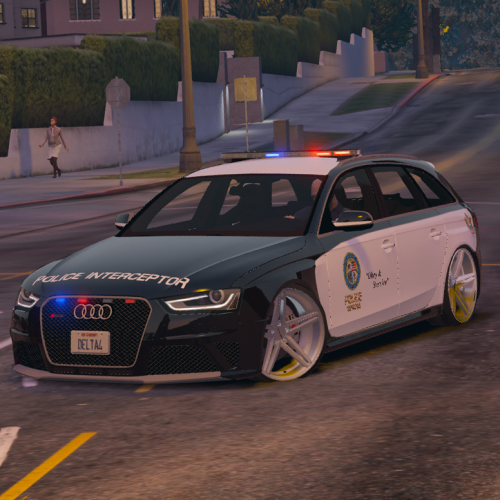
 Native carvariations are encrypted. Police3 slot uses sirensettings=2, but these cars use sirensettings=1. You may grab carvar from other vehicles here, e.g. sheriff2, pranger slots. Or grab carvar from police3-optimized vehicle, change sirensettings to 1 and use it, you should be fine.
- 70 comments
- 16 reviews
-
-

- 1
-
-
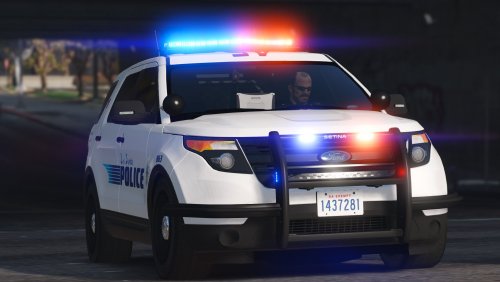
 I really don't know why people give 5 stars. Yes, it's cool vehicle and have great customization and lighting equipment. But it also has huge amount of bugs. Floating taillight textures, not good collisions, interior is pretty choppy and can be damaged ridiculously, rims are bugged when tyres are off. It's good vehicle until you crash it into something or get your tyres off. I hope (and doubt) there will be fixes and updates.
- 158 comments
- 54 reviews
-
 Yes, I see, but it's only one plugin in my plugins folder that throws errors, others just detect new version and say nothing about it :) So I wondered something is wrong.. Thank you for response.
- 783 comments
- 86 reviews
-
Got the error message after RPH was updated called "dependency error". I'm sure you're aware of it, just curious is plugin still working with dependency error? Seemingly not (pressing keys does nothing), but it's loaded according to logfile (if I understad logs properly):
- 783 comments
- 86 reviews
-
 Strangely, I'm getting something similar to "error occured when loading LSPDFR+.ini file, loading defaults". All I did was set Court System and Pursuit Tactics keys to OemPlus and OemMinus respectively. And disabled autochecks for updates. upd. I guess configuration is case sensitive. OemMinus is typed correctly, when OemPlus is not (Oemplus is proper spelling). Need to verify.
- 1,178 comments
- 137 reviews
-
Probably it'll be called "LSPDFR+" as it is with all Albo's plugins included (and police radio). Then LSPDFR development team will grab this guy and release ULTIMATE LSPDFR+++ 1.0 which will blow our faces off. Just because they can
- 1,178 comments
- 137 reviews
-
-
- 1
-
-
-
Huh, then I'll give it a try (well, I'll give it a try anyway, just because enhanced AI can be turned off). Thank you very much sir!
- 1,178 comments
- 137 reviews
-
Oh jeez, wow! Very excited about it. I'm just afraid of how Enhanced Pursuit AI will eat my not-very-good-at-all performance since it's realtime background script. Albo mentioned that there's no significant drop, but we just can imagine what does "significant" means for Albo
- 1,178 comments
- 137 reviews
-
-
- 1
-
-
 Yay! Five stars for this stunning thing. Some more roleplaying to LSPDFR? YESS! I hope someday here will be some punishment for bribetaking. It'll be probably when LSPDFR get (if it ever will) some kind of law, benefit and penalty system.
- 69 comments
- 16 reviews
-
-
- 1
-
-
 IIRC, this mod is kind of gimmicky, just because it's features can be made via editing .meta or other text files, without any performance drops. Shots fired reaction, brawling, etc. It's more complicated method I guess, but it's more performance-friendly. Correct me if I'm wrong. We just need a person who can make those changes right way and speaking normally (hi Zippo, how's it goin?)
- 268 comments
- 44 reviews
-
-
-
 Thanks for info. There are no good Challengers or even 2015 Chargers except yours, imo.
 -
Nice CHP pack. Love that CV rambar. You said it's coming soon, but what's about your great blacked out 2015 charger? Or challenger maybe?
-
 Nice CV. Noticed that rims are narrower than tires and because of that some transparent seams can be seen.
- 50 comments
- 26 reviews
-
I'm sorry, then I didn't understand that properly. " Please download the attached file " and " I will periodically update this post with the most updated files " have entirely confused me.
-
I see the files from users, but not the initial file(s) from fiskey111. Maybe I'm retarted or don't understand something?
-
Hmm, I don't see any attached files.
-
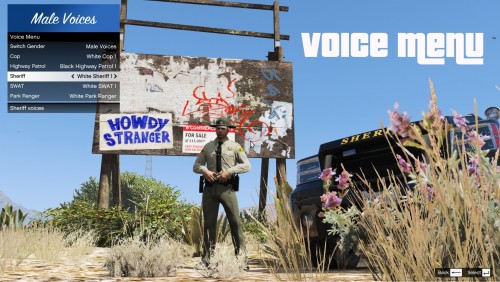 Yep, I don't underestimate the importance of this mod I just want to tell about my experience. Many people say that they have problems with EUP, such as going on duty and no voice-acting. They don't know some nasty tricks :) Then, I always go into garage after going on duty, so it's not a big deal for me.
 -
" The only thing that could be done so far was to choose your character before going on duty and then forcing the duty state through the console " Wrong. Here's what I do: I go on duty, choose default character. After loading stuff I apply custom skin via Skin Control. Gender must be the same, so if you want to play as custom female, then choose one of the default female skins. After applying I have no voice, right? Then I go into Garage, grab my vehicle and *DING* my character have the voice of that character, which was chosen at the begginning.
-
 Must have for those people who don't want to use default messy officers with weird props in FPV. Now you can actually use your sunglasses and hats. Also I want to clarify one thing: I apply custom skin (made in skin control) AFTER I go on duty, not before. I pick agency, gender, appearance as usual in stations. After stuff loads I apply my custom skin. I don't have any problems with it. Just one note: character will have your first picked officer's voice (atleast in my case), but voice starts working only after you get into garage and choose the vehicle (I don't know if it's a native LSPDFR problem or problem with Skin Control). tl;dr I really can't realize why people have problems with Agency Callouts for example. Just go on duty from stations and then apply your custom skin and you're good to go. Your character will have voice and hence agency, while having your custom appearance.
- 2,350 comments
- 238 reviews
-
 I know. I'm just whining because seemingly there's no way to fix it for now. This thing happens in RPH logs too, so it's a native problem of the game itself or RPH
- 200 comments
- 22 reviews
-
Sadly this plugin doesn't work with my language (Russian). I get scribble like "РСЃС‚-РЊРЁСЂСЂРЅСЂ-Храйв" instead of proper street names.
- 200 comments
- 22 reviews
-