


Wippy
Members
-
Joined
-
Last visited
Everything posted by Wippy
-
I has been out of the loop, you guys are doing great with the next LSPDFR update, thank you. I have a question though. Since Albo1125 was "integrated" into the team (as far as I remember), are (some of) his mods going to be included into LSPDFR? Albo's mods are essential (in fact they're in "essential" category), they look like they should be in the package by default.
-
 I really like Dodge cars. I'm truly in love with old Challengers, new ones are fine too. I always wanted to have unmarked Challenger in my police fleet. But this is no way 5\5 car like people write here. Tons of bugs. TONS. The first one is noticeable even outside of the car, just look at those windows. Firstly I thought there were no windows at all, but they're just 99,9% transparent. They also seem to be unbreakable. Meh. Okay, you get in the car aaand hit it a bit. Damage model is awful. There are some outlines and textures hanging in the air, strange pieces protruding through the car.. ugh. Rims are pitch black (I suppose they're made of velor? Or why can't they reflect the light?). I can't even think about it. Just check it yourself. Seems like people here don't even drive this car, or they just don't care and easily rate every car with "OMG 10 OUT OF 10". I personally can't give 5 stars to such an unpolished car. If you're looking for well-made (technically) vehicle, pass by. 1 star for trying and 1 star for the lighting. I hope MrPotato repair this Chall someday. This review may contain bad grammar, sorry for that.
- 85 comments
- 45 reviews
-
-

- 10
-
-
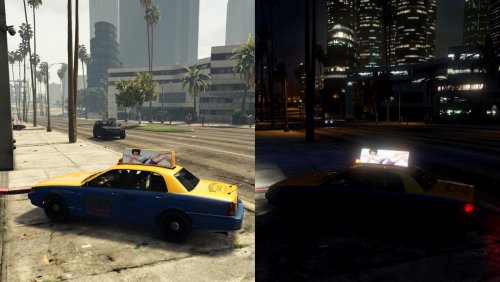 Colors are shifted. Just compare them to vanilla. That white girl on vanilla ad looks like a black girl on those fixed ads. Some parts pass bright light, thus making ads patchy (not uniform). Quality of ads (sharpness) probably depends on your in-game settings though. My ads are completely the same as vanilla, with good compressing and with no colors shifted, i.e. they're authentic. I don't blame anyone, I just made my own fix that fit my tastes and shared it here.
- 10 comments
- 8 reviews
-
-
 Great plugin, if you want to customize your loadout. Some weapons are missing, as well as paintjobs, but it's not critical thing in this case. Install it and you'll be happy with your guns.
- 128 comments
- 34 reviews
-
Okay, where are they? Show me. "Tons" are actually two, that one mentioned by me and another in "Make Visuals Great Again" package (which is completely THE SAME as the first one)? They're both the same and weird, I guess it's the same texture released by two guys.
- 10 comments
- 8 reviews
-
-
- 4
-
-
Hello there! It's another (second) Taxi ad fix on LSPDFR. It's a humble fix, it fixes Taxi Ads when using any mod that modifies visualsettings.dat file. The first one (by PDaniels) is quite good but a bit weird aswell. I found 5 minutes to create a better fix since there's only one (or I just think it's better LOL). You may use it or not use it. It's always good to have different choices, right? Installation: 1. Pick one folder depending on your taxi. 1.a) If you have vanilla unmodded taxi, then pick up "ytd" folder and place taxi.ytd in any patchday (the latter the better, because of .rpf size) archive into x64/ levels/gta5/vehicles.rpf. 1.b) If you're already using vanilla modded taxi (changed textures for example), then pick "texture" folder and replace taxi_signs_2 in your taxi.ytd via OpenIV like you did with other textures. Only you know where's your taxi.ytd. Default GTAV location is x64e.rpf/levels/gta5/vehicles.rpf , but I prefer putting vehicle files in patchdays because of rpf size. This fix probably will not work with custom taxi models, if they use their own ad boards. RESULT MAY VARY DEPENDING ON YOUR VISUALSETTINGS.DAT FILE. TESTED WITH "NOT TOO BRIGHT LIGHTS". PLEASE REPORT UNCOMFORTABLE BRIGHTNESS WHEN USING OTHER MODS.
- 10 comments
- 8 reviews
-
-
- 11
-
-
.thumb.png.04a1687a445e54a18a959b7926b87d7b.png) @OfficerFive0 Great pack, thank you! Though I have a problem with Tahoe (actually Tahoe has a problem). There's a really huge gap beneath front bumper when the bumper is off. It's weird.
@OfficerFive0 Great pack, thank you! Though I have a problem with Tahoe (actually Tahoe has a problem). There's a really huge gap beneath front bumper when the bumper is off. It's weird.- 217 comments
- 38 reviews
-
 Yep, seems like it was, according to the changelog. Probably. I'm gonna check it.
- 1,081 comments
- 166 reviews
-
-
- 1
-
-
My custom vehicles (there are 4 for now) are pretty much lightweight, the largest one is ~300k polys, 8 mb, "pranger" slot, ELS FPIU by TheHurk. Others are under ~200k polys, installed in police, police2, police4 and fbi slots.
- 1,081 comments
- 166 reviews
-
 Maybe. We should wait for TheHurk response about scene lights, if they work for him then something is wrong with ELS itself. I clearly see orange and cyan on those screenshots. I think it's intentional. You can use slicktop version, it has red and blue colors.
- 427 comments
- 75 reviews
-
Thehurk says this FPIU has SCL support. CVPI by BxBugs seems like to be having SCL support aswell (according to Albo's video). Maybe it's just a bug? I can see a lot of feedback about ELS not being working at all.
- 427 comments
- 75 reviews
-
 I don't know where I should report bugs, but I'm gonna create bugreport right here. So. Game version: 944 RPH version: 0.49.1041.10069 Other .asi mods: BVA, ENT Issue description: scene lights (SCL) do not work for me. I have 4 vehicles installed, 3 of them actually have scene lights, they're enabled in VCF and supposed to be working. SCL button isn't active (it shows as "-"). Hotkey (alt+]) does not work. Removing other .asi plugins does not resolve the problem. Reinstalling does not resolve the problem. Seems like ELS does not read particular settings from .ini file. Seems like nobody else has this problem (I'm lucky). Logfile: http://pastebin.com/xkQi87V8
- 2,700 comments
- 241 reviews
-
Thanks. Button on ELS panel isn't active (I see "-" instead of "SCL"). I can't turn it on. I have this problem with other vehicles. I don't know what to do. Screenshot here (look at the roof): I thought you mean screenshot for scene lights, my bad. What the hell. I edited my first comment, then I edited it again to add the screenshot, it was doubled with my first comment.
- 427 comments
- 75 reviews
-
Thanks. Button on ELS panel isn't active (I see "-" instead of "SCL"). I can't turn it on. I have this problem with other vehicles. I don't know what to do. I will post screenshot with that lights soon.
- 427 comments
- 75 reviews
-
There's a problem with slicktop version. Some light textures and emissive effects on the roof still persist (I guess they're from normal version), they're pretty noticeable on 1-2 stages. Also, wheels aren't centered properly. Just do burnout and you'll see they spin not just right. upd. I don't understand how do the scene lights work. VCF has them turned on, changelog says the same, but I don't have such button on ELS panel in-game, thus I can't turn the scene lights on. I have this issue with all cars I have installed.
- 427 comments
- 75 reviews
-
Hey guys. Seems like my scene lights aren't working at all. Button isn't showing up, hotkey isn't working either. Vehicle actually has scene lights enabled in config file. Every car I have does have scene lights enabled, but there's no such option in-game. WTH? Maybe I missed something, though I've read official guide? For example, CVPI by BxBugs featured in Albo's video has scene lighting (button is there as you can see), but in my game it does not.
- 2,700 comments
- 241 reviews
-
I've got a crash on brand new LSPDFR setup. I'm sure my setup is completely issue-free, doublechecked with troubleshooter, it found no issues. I'm using latest legit GTAV copy with latest RPH with all requirements (doublechecked). Here's the piece of log showing the issue.
- 1,081 comments
- 166 reviews
-
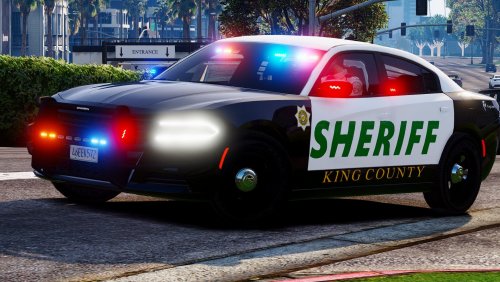 Man, you just saved my time that I was going to spend complaining about sheriff charger being an FBI vehicle. God bless you.
- 20 comments
- 10 reviews
-
-
- 1
-
-
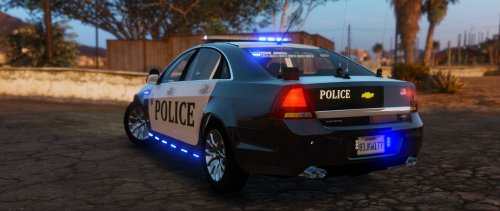 It may have nice lighting, but hey, wtf with that tires (not rims)? Why are they pitch black? Why are other "dark" parts of the car (wipers, pieces here and there) actually PITCH black? It's bad. Every surface should reflect some light, and thus must not be pitch black. I can't even see tire tread texture. What a shame.
- 32 comments
- 14 reviews
-
-
 Hi guys, how about FPS drops and weird samely traffic now? Last time when I tried it, it was in 2015 somewhere, I got pretty much bugged out traffic and major FPS drops (~5-10 fps).
- 1,524 comments
- 85 reviews
-
 I don't mean CVPI is boring, I actually love them pretty much (especially old ones). I mean everyone now is making CVPI for ELS, there's already a bunch of CVPIs coming in different flavors, but there's still no good old cars such as 90s caprice. This is annoying. Yes we can still use old pre-ELS cars, but we have to have both SirenMastery and ELS installed to get control over the sirens with all cars. It's clunky af. Anyway, good luck with that Camaro. She is beautiful.
 -
Amazing. Brutal. Freshy. Lundy, you are the only hope to dispel that ELS samely boredom with CVPIs, FPIUs and '16 chargers (I suppose you're gonna release it as ELS vehicle). I'm fed up with those, ugh.
-
 I'm afraid you can't do anything unless you know which files you should replace. Usually sirens comes as packages (if they're meant to be replacers) with instructions. If you use SirenMastery-only siren, I can't help here. I don't know why people release sirens for SirenMastery only, because default sirens (and their replacers too) can be manually extracted into SirenMastery via OpenIV.
- 853 comments
- 108 reviews

.thumb.png.04a1687a445e54a18a959b7926b87d7b.png)
