Wippy
Members
-
Joined
-
Last visited
Everything posted by Wippy
-
 Another great addition to LSPDFR experience. Handy police computer with unique interface and some neat features. Just give it a try and you will fall in love.
- 1,743 comments
- 172 reviews
-
-

- 1
-
-
I never used X to decline or force callout, didn't know that, thanks for information. Official FAQ says that X is button to force callout, but there's nothing about cancelling. Ugh. I've been using RAGEcomputer by Guadmaz to cancel callout, it's pretty immersive btw. But now I will use this Computer+.
- 1,743 comments
- 172 reviews
-
-
-

- 3
-
-
Wow, finally! My greatest wish is ability to cancel current callout (if callout gets buggy\stuck).
- 1,743 comments
- 172 reviews
-
-

- 1
-
-
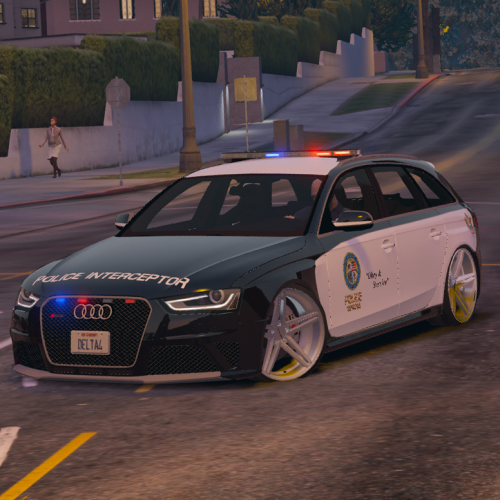 Honestly I really don't like those new rims. Those "dog dish" rims were much, much better. Maybe they weren't accurate in terms of reality, but these low profile tires aren't realistic either (tires are more thick in reality). It would be really nice if you make second version with lovely "dog dish" rims for those people who really like them.
- 53 comments
- 10 reviews
-
 As I know Vocal Dispatch uses Windows speech recognition. So, will it work if speech recognition is not supported for my current language and if using english version of VocalDispatch (seemingly translated version will not work, but what about english?)?
- 587 comments
- 106 reviews
-
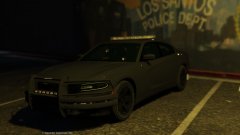 Now that blacked out design perfectly fit the grim design of the car itself. I love those rims.
 -
 No god please no.
 -
-
 I reported a crash situation a while ago, with log. Didn't recieved any word, "roger that" would be fine atleast. Didn't read your post about "taking on board" properly. Sorry for that. But I wanted to hear something about actual crash, I can't read logs properly (I'm not a modder). But I got you, my bad.
- 329 comments
- 53 reviews
-
 Ok. I'll try to do some research. Vehicle replacers are my current suspects.
- 1,081 comments
- 166 reviews
-
Hmm. I'm not a native english speaker so maybe I mispelled something. Again: 1. I encounter crashes (CTDs) when using the Assorted Callouts and playing Organised Street Race. 2. I haven't recieved crashes (CTDs) in usual LSPDFR-experience before I updated AC to the newer version and played OSR callout. 3. Crashes (CTDs) related to glitchy vehicles are only crashes I had before, they are not related to LSPDFR or it's plugins.
- 1,081 comments
- 166 reviews
-
Very rarely. Those rare crashes happened because of glitchy vehicles (which were removed ofc). In normal regular playing LSPDFR I don't encounter ctds, only LSPDFR-crashes. I have some replaced vehicles, but nothing special, all vehicles are mid- and low-poly from trusted modders. No ENB or any visual overhaul stuff, just tweaks for removing chromatic abberation effect. All plugins for LSPDFR I have are up-to-date and compatible with latest LSPDFR. RPH is up-to-date also. Maybe something wrong? I usually recieve message "new 0.3.1 version is available", but I have latest version already and reinstalled LSPDFR twice, but message still appears.
- 1,081 comments
- 166 reviews
-
-
-
First one is latest, second is previous. Can't find third in my junkyard, but I guess two is enough. RagePluginHook.log prev log.log
- 1,081 comments
- 166 reviews
-
Every time (3 times in a row) I get Street Race and get closer to "search area", my game crashes with memory error. Two times it was err_mem_embeddedalloc_guard_1, and err_mem_embeddedalloc_guard_5 once. I really don't know what is it, but I haven't recieved any errors like these while playing LSPDFR before I updated Assorted Callouts. Sadly I had to disable Street Race in .ini. Other callouts work fine.
- 1,081 comments
- 166 reviews
-
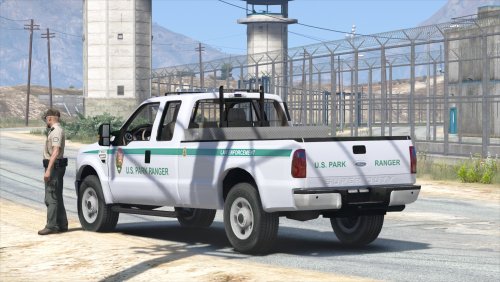 I agree with other people here. Before making better interior some mentioned bugs should be fixed. But I really hope they will be fixed, so for now I give 5 stars in advance.
- 29 comments
- 15 reviews
-
-
- 1
-
-
So, I've tested it for some time, here are my thoughts. Plugin is good in general, but some callouts are meh and\or need improvements: 1. Rocks blocking the road. Haul truck comes, cleans the road and sometimes goes away (I've got 2 or 3 situations when that truck-man just stayed on the road forever after cleaning. Also people try to ram those rocks instead of waiting and\or trying to find another way to pass through. My suggestion is using the same method used in other plugins for putting barriers (Traffic Policer IIRC) which prevent people to ram them. Maybe I just got bugs, idk. 2. Demonstration. Weird as f*ck. All three demonstrations i've got were a big mess. Once I chose "waiting for further actions", then all the people just tried to kill me and other officers as well. The fact we (officers) were armed to teeth or got pistols atleast and those guys were with bats, knives and other melee stuff doesn't matter at all, people just died under fire, nobody tried to flee. It was like a mass suicide. Just stay and shoot at people. Then I chose "use the smoke grenades" with the same result. My suggestion is implementing fleeing behaviour to avoid such weird actions from peds when shots fired and\or 3 or 4 people are dead. 3. Suicide attempt. Good callout, no bugs\weird stuff encountered yet, but I just suggest to add some more outcomes\lines to it.
-
 I rate it 4\5. It's really nice plugin, I guess everyone knows that. But it has some problems and I would 5\5 if they would be fixed: 1. Opening doors, hood, trunk should have an option to NOT close doors etc after searching. For example I search in already opened door, but after searching it closes. And it isn't a problem at all, but those closing\opening animations have really strong force and can grip you, it looks weird. Also, hood always pops off when I try to search it, due to huge force. 2. Items from trunk (medkits, weapons etc) should be availabe once per car or two if it's van or suv (fbi2, sheriff2, pranger etc). Black hole in trunk full of items isn't what I call "immersive". It's quite cheat also. I really hope plugin isn't dead and will be improved.
- 342 comments
- 49 reviews
-
-
- 1
-
-
Got crash. I was next to Vinewood Hills, then just accepted "panic button" callout and *DING* LSPDFR crashed. Here's log:
- 329 comments
- 53 reviews
-
Somehow audio dispatch for vicious dog callout didn't played at all. Just message without any sound. Other callouts from other plugins work fine, though I haven't recieved any other callouts from this plugin.
- 329 comments
- 53 reviews
-
Thanks for reply. I forgot to say that rear lights should be darker when turned off. sorry if I confused you.
-
Really decent vehicle. It's great, really. But I just realized that we should report bugs in WIP thread, so I "double" my thoughts which already in the comments section: 1. Rear lights should be darker and\or a bit transparent to be a bit closer to original. Now they look a bit plastic. 2. Bug with front-bottom lights, they aren't attached to the body and just hang in the air when bumper is damaged and still emit light. 3. Bug with windows. Cracked glass texture (I guess it's called so) is outstretched or\and scaled on the rear and middle side windows (other two on each side are fine). Thank you for this great Tahoe. It's the best one here imo.
-
 Also something wrong with windows (outstretched shattering texture on rear and side middle windows).
- 148 comments
- 34 reviews
-
Wow, really decent replace for sheriff2 (only one I found here). Noticed that front bottom lights (which are between pushbumper and wheels iirc) are not attached to the body, so after damaging front part of the car, they just hang in the air and emit light. Also taillights should be a bit transparent and\or a bit darker, because they look a bit plastic and bright when turned off. However it's really cool vehicle to replace (but I haven't properly tested it yet), I really like overall quality and especially hands on steering wheel (they sit really perfect, that's important for FPV-players like me).
- 148 comments
- 34 reviews