
Darkmyre
Members
-
Joined
-
Last visited
Everything posted by Darkmyre
-
myPed.Tasks.FireWeaponAt(...) Takes an entity not specifically a ped, so can be used for peds and vehicles.
-
Found a pretty decent spot to run some radar for an Aussie-themed highway patrol stream. Must've been a good Saturday night in Del Perro with all the drunk drivers first thing on a Sunday morning!
-
Don't suppose you'll be making the traffic drive on the proper side of the road too?
-
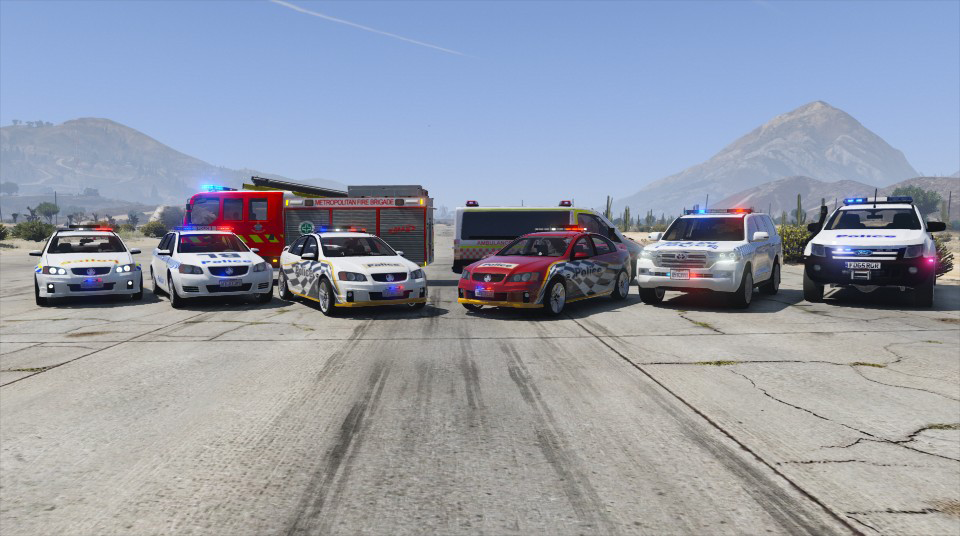
Rolling with an all-Aussie police fleet... now if only I could get the traffic to drive on the proper side of the road.
-
It's worth noting though that this is also what can cause vehicles to spawn in the canals. Canals, alleyways, dirt tracks, sections of sidewalk (I'm looking at you, Los Santos Cemetery) all seem to somehow count as roads. Hell, I've even had things spawn on Vespucci Beach (like, on the damn sand!) that apparently counts as a road. The main drawbacks to using static spawns are it takes a metric crapton of time driving around the map and grabbing coordinates, and can cause issues when the player triggers your callout but is a long way from the nearest static spawns.
-
AFAIK you can only downgrade if you prepare for it by taking a backup (which is almost always a good idea anyway). When launching RPH, if you hold down the shift key or click the cog icon you'll boot into the settings for RPH. Click the last tab on the right and select backup to take a RPH-compatible backup of the current game version. Then in future when R* bring out something new to waste your GTAO money on, repeat this process and click the 'revert' button to switch back to the backup you took. If you play online, you can take a backup of the new version and "revert" back and forth between them depending on whether you want to play LSPDFR or GTAO, until RPH updates for the latest version
-
That would freaking amazing!
-
It is possible, however you'll most likely need to change the handling files for the other slots. If the car you downloaded was for say, police3, and it has a handling.meta file (or lines to add/replace your handling file), you'd need to replace them for police &/or police2.
-
Pretty relaxed Saturday morning Highway Patrol
-
Tonight's patrol started off pretty quiet, till the Pacific Standard Bank got held up!
-
Just an idea, but maybe try adding .WaitForCompletion() to the end of the animation task instead of sleeping it for a set time? I've found a few cases where this works better, even when the task has a set time it should be running.
-
 This looks amazing, gotta love all those lights! Will it work ok in a different slot (obviously with updated meta etc files)? Also, any chance of a version with siderunners?
- 126 comments
- 41 reviews
-
We could probably break them up a bit too, eg having the vehicle descriptions in one pack, the crime ones in another, etc. Will help out with the doc as I have time over the next few days.
-
Are we able to play them directly from the RPF? I thought they had to be below GTA V/LSPDFR for the api to play them. I've extracted and listened to all of them but didnt take notes or rename them until I found a use for them. Would be happy to contribute to such a doc if we can play them directly, that'd make our callout downloads much smaller!
-
x64 > Audio > sfx > POLICE_SCANNER.rpf The annoying part is having to listen to them all to work out what they are..... some of the folders inside the rpf give an idea but not all of them.
-
Today's partner was much less homicidal (huge thanks to Albo and Alex Guirre for their help fixing this).
-
You only need the Rage.Attributes line if making a standalone plugin (ie, not an LSPDFR plugin). Not sure if it makes a difference, but my main class is defined as public not internal. I can tell you it's definitely not VS2015, as I've been using that from the beginning and it works just fine for callouts / rage plugins in general.
-
From the album: Darkmyre's LSPDFR Screenshots
-
I should've mentioned I did try this, but then LSPDFR likes to take over the Ped (part of the reason I'm using the freemode model instead of a cop model) Only reason I used natives was I didn't know there was another way lol For some reason I seem to default to checking natives rather than poking about the Object Browser. Will give Companion a try and see if that helps, thanks guys :D Edit: Changing the relation to Companion worked perfectly, thanks again Alex!
-
So I'm trying to work on a Partner plugin, however no matter what I try, I cannot get around one fatal flaw: As soon as the partner ped starts shooting near other cops, they all turn on him en-masse and slaughter him. I've set him to his own RelationshipGroup and obtained the hash for that, and am then trying to set his relations with both the player (to stop him slaughtering the player) and other police - the player relations seem to be working fine, however the cops still hate the poor guy. I've included the relevant code below, in case anyone can shed some light on wtf is going on: Partner.partner = new Ped("mp_m_freemode_01", Game.LocalPlayer.Character.Position.Around(3f), ); Partner.partner.RelationshipGroup = "PARTNER"; Game.DisplayHelp(Partner.partner.RelationshipGroup.Hash.ToString()); // returns 169451935 NativeFunction.CallByName<uint>("SET_RELATIONSHIP_BETWEEN_GROUPS", 1, 1862763509, 169451935); //player->partner NativeFunction.CallByName<uint>("SET_RELATIONSHIP_BETWEEN_GROUPS", 1, 169451935, 1862763509); // partner->player NativeFunction.CallByName<uint>("SET_RELATIONSHIP_BETWEEN_GROUPS", 1, 4208871491, 169451935); //cop->partner NativeFunction.CallByName<uint>("SET_RELATIONSHIP_BETWEEN_GROUPS", 1, 169451935, 4208871491); // partner->cop Partner.partner.CanAttackFriendlies = false; Partner.partner.CanBeTargetted = false;
-
Took my in-dev Police Partner plugin out for a spin on today's stream, resulting in some blue-on-blue violence as he didn't like my style of policing.
-
I've avoided using any packs, mostly as I haven't found one I like, and I've found lots of individual vehicles I like. I'm using a CVPI for my police slot, I think it was by BxBugs but I cant actually find the original download page now to double check sorry.
-
Mountain Lions and Meth Heads make sure its never a dull moment in Sandy Shores
-
If you're not already, wrap it in a GameFiber. If you are, then add a call to GameFiber.Yield(). Something like this should work: GameFiber.StartNew(delegate { while(true) { if (Game.IsKeyDown(Keys.L)) LKeyPressed(); if (Game.IsKeyDown(Keys.K)) KKeyPressed(); GameFiber.Yield(); } });
-
I've been using something like v.IsDrivable=false in my WIP ambient events plugin, though I'm also killing the engine health at the same time so I'm not sure if its that that's stopping them.