
Darkmyre
Members
-
Joined
-
Last visited
Everything posted by Darkmyre
-
In pretty much every stream/video I've seen, the police radio image and the various windows drawn by other plugins (Traffic Policer's observation window, Arrest Manager's prompts to take suspects in yourself, the assault callout's descriptions of the victim, etc etc) show up fine... but for some odd reason I can almost never get them to show when I'm streaming or recording. I'm using OBS to record with Game Capture, and I think I've seen them show up twice only. The fact that they've shown up twice is even more confusing, as there is literally nothing I've done differently these two times (once, I was recording without the windows showing and GTA crashed... relaunched GTA and restarted the recording, and police radio etc showed up fine.... GTA crashed again a bit later, restarted both, and it was gone again!) Has anyone had success with getting police radio etc to consistently show when using OBS/Game Capture, and can maybe offer some tips on what I can tweak to get it to show for me?
-
In OpenIV, you can use Tools->Search and enter the vehicle model name to find where all of its files are.
-
It was in 0.2b, but hasn't been the case since 0.3/0.3.1 Even perps in vehicles are easy to take down now, as long as you can box them in long enough to jump out and fill up the takedown meter, they're done.
-
AttachBlip only works for peds and vehicles, not vectors. To make a route to a vector3, use something like this: myBlip = new Blip(targetVector3); myBlip.EnableRoute();
-
Finally able to get some more streaming done... and Los Santos welcomes me back with a bucketload of weirdness. Part 1: Part 2:
-
Props should go to @LtFlash for the coord saver script, all I did was add a couple of very minor tweaks to his excellent work.
-
The official API github is a great place to start: https://github.com/LMSDev/LSPDFR-API
-
This would be pretty epic, as long as the frequency was done right.
-
I think personally I prefer the R* colors and I'll probably use these, though I don't think we all need to agree to use one or the other.
-
Great idea, will definitely update Agency Callouts as soon as I have a chance. On a somewhat related note, the latest version of Agency Callouts I've broken the officer profile (for my purposes this is officer name, and beat/division/unit codes) into a separate file from the rest of my settings. Been a bit busy to write up a post like the OP, but the general idea here was if we're all using something like this, referencing the one file, the user can simply set their officer details once, and have it apply to all callout plugins that use it... with the added advantage of not having to set it again as long as they dont copy over the myOfficer.ini (in my case) file again.
-
Would love to be able to use a tool like this
-
There was a bug with the initial release, 0.1.1 should fix that
-
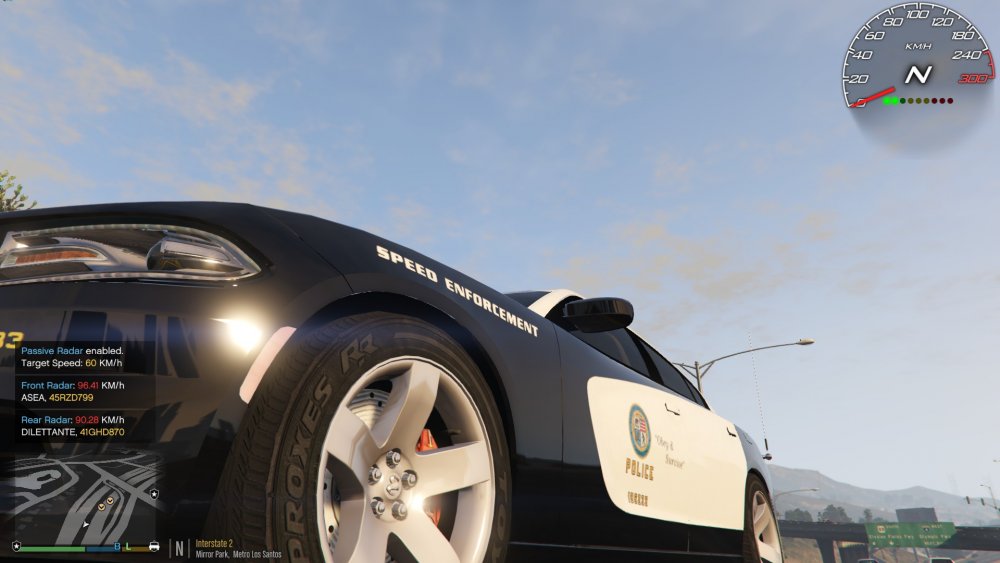
There isn't much to show with screenshots, its not a fully graphical GUI like the other one that never got released (mostly cause I have very little in the way of graphical skills lol). I'll attach below the screenshot I used for the download thumbnail though, which should give a pretty good idea of the blipping and notification format. (The speedo isn't part of my plugin)
-
Took a bit longer than I'd hoped, but the first version is finally available:
-
Your RPH might not be auto-loading plugins. Bring up the Rage console (F4 by default) and try LoadPlugin "LSPD First Response.dll" If that works, you can change your auto-load settings by holding down the shift key when you first launch Rage. Not sure how long you're meant to hold it down for, I tend to just hold it down until the settings screen pops up
-
 Yep, I'm using Arrest Manager latest version also. I'd tested the RestrictCallouts idea by just reloading LSPDFR via the console though, so got the same result as you... I see now reloading the entire game, the first time it seems to always crash with all 3 plugins installed. To make things even stranger, it seems to be only related to ForceDuty, I just launched the game fresh with all 3, and went on duty via the Downtown station locker room without any crashing....
- 542 comments
- 98 reviews
-
Ok, it seems its the RestictCallouts setting - if you change that to true it works (and as long as ForceAgency is set to LSPDFR, they wont be restricted anyway). Will try and find a proper solution for the next version of Agency Callouts
- 542 comments
- 98 reviews
-
Hmm, I've just downloaded HEROCOP and was able to ForceDuty without any problem. I'm working on a new version of Agency Callouts atm but I don't think there's anything in it that'd have resolved any crashes... will tinker a bit with the ini files and see if I can reproduce it.
- 542 comments
- 98 reviews
-
 Really loving the updates, except for one minor immersion-breaker. When you take a perp to the jail drop-off, and select to have another officer deal with them from the new option choice thinger, their name gets reset. It displays correctly in the option menu, but when you warp back to your vehicle and the AI officer retrieves them, the name shown in the notification is wrong.
- 1,915 comments
- 242 reviews
-
I've decided for LSPDFR to focus on twitch, though I'll still export the videos to YT when they're done (apparently twitch only saves them for a few weeks or something, which is stupid but I guess saves harddrive space on their servers). Had a couple of crashes with my first stream, but the videos are up here: Part 1: Part 2: I don't play super realistic like most of the big LSPDFR Youtubers, partly cause I enjoy the game playing more... well... gamish... and partly because as an Aussie, I'm pretty damn clueless about US police protocol :P And yep, my pursuit driving could still use a lot of improvement lol
-
If you've got the steam version, you can hit F12 (by default) to take a screenshot, even while playing RPH (I believe even with steam overlay turned off, but not 100% on that)
-
Ooh, don't think I've seen that one yet.
-
While in theory the idea is great (it really pisses me off seeing how many idiots get away with speeding / running reds / generally driving like dumbasses, so I'd probably quite love to be a traffic cop), I don't think I have the patience to try it in the real world. I've heard it's frowned upon to do things like shoot the suspects in the head when they wont quit being dumbasses, or run out of taser range :P
-
Actually its from Agency Callouts... and its not really a drug deal event, just drug related.
-
That looks amazing! Does it have an optional rambar via extras?