
Darkmyre
Members
-
Joined
-
Last visited
Everything posted by Darkmyre
-
I guess that also explains why they tend to die from tasing a lot more often now!
-
 As a plugin author, is there any way I can make the Drugalyzer return a positive reading for a ped I spawn in?
- 3,646 comments
- 306 reviews
-
Pretty sure those are all potential outcomes of the traffic stop callouts added by Traffic Policer, so its not native LSPDFR logic. Not the kind of thing that can just randomly happen when you see someone driving like a dumbass, or are bored and pull over some random for the hell of it.
-
Just started streaming, I have a lot of room for improvement but I'm planning on streaming LSPDFR at least three times a week once I get the hang of it: http://www.twitch.tv/darkmyre
-
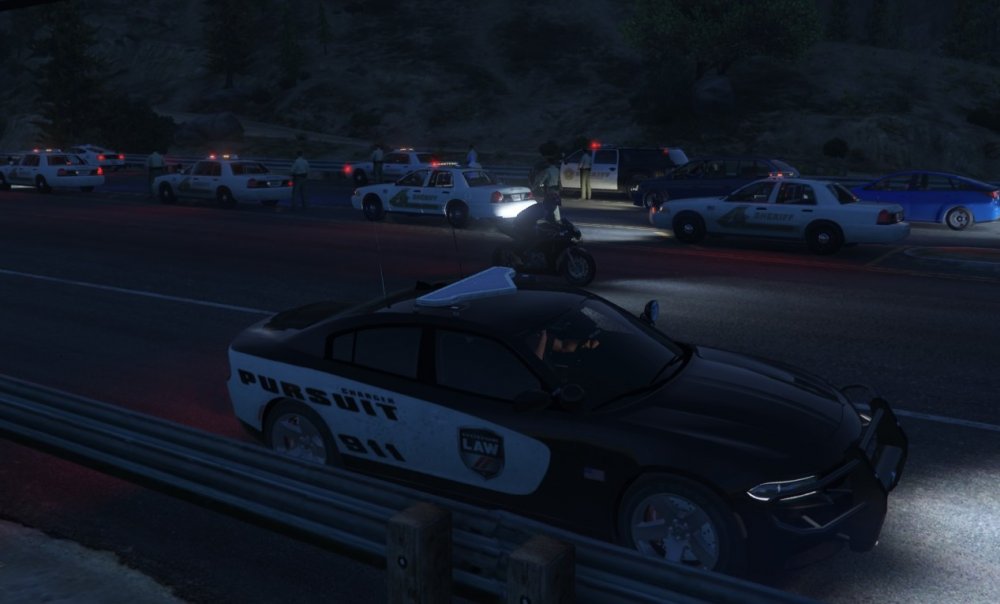
Assisting Paletto Bay Sheriff Department with an early morning DUI Checkpoint
-
Haven't worked with any LEO's, but due to a variety of reasons have had many many many interactions with police. From my personal experience, I'd say most of these are fine - though I agree a cop would probably never volunteer that he wasn't going to search/arrest a suspect. Almost every interaction I've had, the officer was personable and used terms like "mate", "pal", "buddy" etc - I guess to try and encourage a positive reaction and keep me "on-side" while they assessed if I was actually a threat or not. On some occasions (particularly during the wee hours of the morning, and where there was only one officer) they'd even go a bit further, coming across as almost apologetic... "Sorry to bother you mate, just need to check your id real quick".
-
Here in Australia, most states have police vehicles equipped with speed radars that can be operated while mobile and monitor traffic heading in both directions, which this plugin attempts to emulate. The plugin is almost ready for release, and adds a speed radar to the game with the following features: Ability to set target speed in mph or KM/h. Initial target speed set via INI, can be adjusted on the fly in-game. While active, passively checks the speeds of vehicles in front and to the rear of the patrol car. Any vehicle detected travelling over the target speed is blipped for 15 seconds (can be toggled off via INI for those that hate blips). A notification advises the operator of the model and license plate, and identifies which radar detected the vehicle. Also blips/notifies on stolen vehicles. As this plugin is separate from LSPDFR, it does not alert on any other vehicle/driver flags raised by LSPDFR - there's plenty of other excellent plugins that already do that. Can be toggled off via the INI. Hoping to release this in the next day or two, just working on a few final tweaks and doing some last minute testing to make sure there aren't any bugs.
-
Pretty sure this was a feature of CalloutsV, which from memory isn't updated yet.
-
Didn't get a screen cap, but I've ran into a "Killmo Nigs" a few times. Funniest time was when he was black.... though I don't think names like that should really be in the database personally. Pulled over Charlie Sheen for driving like a "winner" last night, surprisingly the drugalyzer came back negative.
-
What I'm doing for ambient events, is starting a new GameFiber as part of my "OnDuty" function. This fiber then does the random check for an ambient event, calling the relevant code if one gets triggered, then sleeps for 60 seconds, all within a while(true) loop (the 60 seconds is primarily for testing, it should be longer than that to avoid spamming the user with events). Not sure if this is the best way to do it, but it works.
-
I've been using getattachedblip for my cleanup code and it seems to work fine on both rph29 and the current one.
-
Only thing I've managed to get to work for gta was nvidia shadowplay, but that's mostly cause I have shader mods that stop obs from working.
-
Yep, this is the way to go. Yeah, if you're wanting to sleep you should start a fresh GameFiber. The 'delegate' is the method used for starting the gamefiber, not its actual name, though you can name a GameFiber like so: GameFiber.StartNew(delegate { GameFiber.Sleep(5000); Game.LogTrivial("I'm a sleepy fiber"); }, "Sleepy Fiber Name"); Although I haven't quite figured out if this is actually useful in any way (though it does appear to at least show the name of the active fiber in logs, which can be good for troubleshooting)
-
lol I feel your pain... for me it was stupid EMS ram-raiding their way through the scene of my accident callout, before treating the peds in the accident and the others they'd just run down. Amusing but so frustrating at the same time lol
-
After a lot of trial and error, I found the best way to get them to stop near you is to set them to DriveToPosition of the player's ped, and use the overload that lets you specify an accepted distance. This seems to work a lot better than telling them to drive to a random position near the ped (can quite easily be a place thats not reachable). For example: emsMedic.Tasks.DriveToPosition(target, 35, VehicleDrivingFlags.Emergency, 30f).WaitForCompletion(); The 30f here is the acceptable range - as soon as my medic gets within this range he stops driving and the thread continues.
-
... I cant believe I missed that, sorry.
-
It'd be great if we could trigger a specific callout by name using a command, ideally even with "Available for calls" set to no. This would make testing callouts during plugin development a lot easier.
-
In the hour or so I've had time to play so far, this was only really an issue with the default callouts. With third party callouts or traffic stop-initiated pursuits it was fine (unless of course you're right near a police station, which adds a wonderful new layer of immersion IMO).
-
Keep Calm could use an update too when you've got a chance.... totally appreciate that these things take time. I'd actually forgotten how amazingly necessary Keep Calm is till playing around with 0.3 for a bit lol
-
-
Not yet, I'll keep messing around as I have time though
-
The Entity Persistence plugin is great, I've never had a suspect car despawn since installing it. It does add a performance hit as the game has to keep bodies and cars in memory, but you can configure the distance away that they'll despawn so for most people it should just be a case of tweaking the settings till you get it right for your system.
-
I extracted all of the dispatch audio files from the game to see what there was to work with..... there's quite a few interesting ones that I haven't seen used yet (not even within the game itself), now the hard part for me is working out how to turn those dispatch crimes into fun callouts lol
-
We can replace sirens, so I can't see any reason we cant replace voice files. The hard part would be finding the right file to replace (though I guess the LSPDFR devs could point their "ask for id" action at any particular GTA sound file, so its more a case of figuring out what is used rarely enough to be replaceable). Unlike the audio files that are packaged with LSPDFR that have nice readable names, the sound files internal to the game have lovely names like "0x0792F0F1.wav". I wonder though if they could do something like is done with dispatch audio, have extra wavs bundled with LSPDFR that are loaded in by their own function - then people could customize their personal installs easily, and we might get some talented voice actors making themed speech packs.
-
It really is a great time to be playing LSPDFR with a new version on the horizon and so many active plugin authors :D