PNWParksFan
Insiders
-
Joined
-
Last visited
Everything posted by PNWParksFan
-
That sounds like a scam if I ever heard one
-
Could you take an approach sort of like Ninite or the Visual Studio installer? Keep the big files on the cheap download server. Dynamically generate an EXE that when executed, fetches each of the required files from the server and puts them in the desired location. We can already get a direct download link from the web interface for our own uploads, so you would just need to get that list into the dynamically generated EXE. You could embed a token in the EXE and use a POST request for each file download, putting the token in the POST request, so that you can verify the download. That would allow you to add restrictions to prevent abuse, such as only allowing the large files to be downloaded from the same IP address the downloader was generated from, and for a limited number of times.
-
 As you can see, the version of RagePluginHook doesn't match the expected version. The plugin expects RPH 0.39, but you probably have 0.40 installed. It's not a problem; you can keep playing as RPH 0.40 is backwards compatible. The next release of Better EMS will be compiled against RPH 0.40.
- 781 comments
- 85 reviews
-
Whenever there's a game patch or somebody with lots of mods (cough albo) updates all of them, it takes forever to fill out the captcha for each one, click download, etc. It would be nice if there were a bulk download function. There could be a button next to each download called "add to download list" or "add to cart", then when you're finished selecting all the files you want, it would download one ZIP file with all of the individual mods' ZIP files within. This would make the update process much quicker.
-
Do you perhaps mean captchas?
-
-
Should, but I haven't had a chance to test it yet.
-
ANPR callouts come from traffic policer. I'll talk to albo and look into it.
- 781 comments
- 85 reviews
-
Was it during an active callout which might have its own ped AI? The peds are set invincible while being treated, but they shouldn't ever attack. Something would've had to have messed with its tasks and cleared out the animation task. If you can figure out what callout might have been running I can try to work with the developer to ensure compatibility. I have it set to suppress the LSPDFR API from messing with "dead" cops when a pursuit is still active, but I don't think I can do the same for suspects.
- 781 comments
- 85 reviews
-
 Better EMS has an API allowing you to call for an EMS response to any location, or to have an ambulance come pick up a ped. Could you integrate these with Vocal Dispatch so that somebody can call EMS using vocal dispatch?
- 587 comments
- 106 reviews
-
I'm not from CA, although my understanding is that in the LA area it is pretty typical for a fire truck to get dispatched to most medical calls. Where I am in the pacific northwest, we pretty much always see a fire department unit responding first. I've heard from numerous people that they find the fire response unrealistic for their area, so I'll be working on an update to give an option for separate responses. In the meantime, you could edit your XML file to make it more realistic by changing it from a fire truck to something like an EMS flycar - if you don't have an appropriate add-on car, you could use a white FBI2 SUV with the paramedic peds.
- 781 comments
- 85 reviews
-
-

- 1
-
-
The version check just checks to see if the dependencies have the version expected. As far as I know, RPH 0.40 is backwards compatible with 0.39, so it should work fine. I'll upload an updated version in the next couple days, but if you had a crash I doubt it's BetterEMS. Feel free to upload an RPH log file though if you think it might be related.
- 781 comments
- 85 reviews
-
 I could certainly consider adding support for slowing down near the scene. Invincibility and dirt level I could probably add too, you thinking just a flag in the XML definition, like <Vehicle invincible="true" dirt="4">police</Vehicle>?
- 378 comments
- 23 reviews
-
-
- 2
-
-
I mean that seems pretty unreasonable. How are you going to improve your stuff if you refuse to hear anything negative about it?
-
I will eventually add an auto-update-check. Users may not always replace their INI file, so that's not a reliable way to keep track. However, if you right-click on the DLL file and choose properties, the version number will be shown in the list.
- 378 comments
- 23 reviews
-
-
- 1
-
-
-
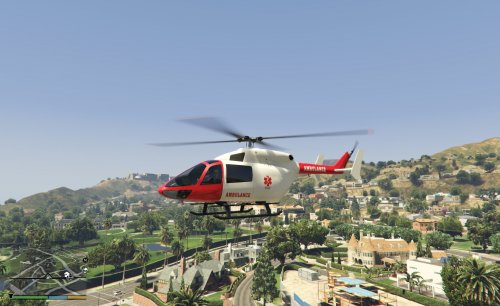 Basically, what I do when I want to rappel in a script, is I check Vehicle.HasBone("rope_attach_a") first, then I check if the right rear door is open, and if both are true then I rappel. If both are false, I try the other side, and if still false, I tell the user they can't rappel from that helicopter.
- 11 comments
- 1 review
-
I think all you really need to do is make sure to have rope_attach_a and/or rope_attach_b bones on the vehicle. Plugin authors should be checking to make sure the door is open before calling the rappel task.
- 11 comments
- 1 review
-
-
-
-
You may need to update RageNativeUI.
-
Please follow the instructions provided above in the file details for getting support. I will look into this and let you know. Can you upload your XML file?
- 781 comments
- 85 reviews
-
-