PNWParksFan
Insiders
-
Joined
-
Last visited
Everything posted by PNWParksFan
-
Since @Stealth22 doesn't seem to like to include links https://github.com/LMSDev/LSPDFR-API/issues I've added these requests to the tracker; would still be interested in people's suggestions here.
-
Some common issues have come up repeatedly in the LSPDFR plugin developers discord, and I think many of them could be solved with some particular additions to the LSPDFR API. Some of these are also just things I'd like to see for use in my own plugins. Anyways, I think it would be good to have a central list of feature requests, where plugin developers can discuss what they would use, and the LSPDFR developers can comment on what might be possible for future versions. Without further ado, my current requests: Event handlers Right now, a lot of plugins run a bunch of loops in a bunch of gamefibers to detect things that LSPDFR knows about already. It's a big waste of resources, and inefficient from a programming perspective as well. I'd like to suggest adding a lot more event handlers in the next version of the LSPDFR API. OnPedArrested(Ped suspect, Ped arresting_officer): An event for whenever a ped gets arrested. Event arguments should give the arrested ped, and the officer who arrested them. This would trigger for both arrests by the player and by the AI. Devs could distinguish by just checking if arresting_officer == Game.LocalPlayer.Character. I imagine this would reduce the overhead of plugins like Arrest Manager. OnCalloutDisplayed, OnCalloutAccepted, OnCalloutDeclined, OnCalloutFinished. All of these should correspond to the equivalent methods in the LSPDFR base callout class, but would trigger for any callout, and would return some kind of callout info object which would tell you the name of the callout, current status, etc. I can see this being useful for a wide number of things... mods like Vocal Dispatch and Computer+ for example could get better integration. Ambient events could detect if a callout is active and behave differently. OnPullover(LHandle pullover) and OnPulloverDriverStopped(LHandle pullover): For whenever a ped is pulled over. You can already get the current pullover using the API, but you have to constantly call that method to detect when a pullover start. An event would let you trigger some behavior immediately when a pullover starts. OnPursuitStarted(LHandle pursuit): Likewise, you can detect the current pursuit but need to loop to find out when one starts. This would reduce overhead for mods which wish to affect pursuit behavior. OnPedStopped(Ped suspect): Would return the stopped ped when stopping a ped on foot, i.e. by pressing and holding E. There are probably other events which would help as well, but those all are ones I've been thinking about. Menus and callout actions There's been some concerns recently about running out of keybindings what with all of the plugins available these days all having their own menus. I'd like to propose a couple of solutions to this. First, a "callout actions" menu which could be created within the Callout class, and would be removed when the callout is over. The way I'd do this, although obviously I'm open to other suggestions, would be to have the following methods of the Callout class, which would modify the menu for that callout. The menu would be created during OnBeforeCalloutAccepted, the menu would become available at OnCalloutAccepted, and would be removed at End. uint AddMenuItem(string MenuEntryName, Action CallbackFunction). This would add an item to the menu. When the user clicks the menu item, it would close the menu and execute the CallbackFunction. Perhaps figure out some way to ensure the callback function is a method of the callout class owning the menu. The uint returned would be a unique handle to that menu entry. void RemoveMenuItem(uint handle). Remove a menu item which had been added by AddMenuItem. These actions could either be put under a new menu with a new keybind, or could be added as a tab on the N menu which would be selected by default when you press N during an active callout. I think this approach would help with a lot of the callout-specific actions which don't need to be present all the time. For more persistent menus which users might want to access when a callout isn't active, I'd like to see a master menu. It could also be a tab under the N menu, or a new keybind. Each plugin could register one entry, which would simply be the name of the plugin. That entry would have a callback function, and whenever the user selects that menu option it would execute the callback. This would effectively allow "submenus" without requiring the LSPDFR API to implement a complicated full menu API, because the callback could be code to display a RNUI menu or other. So the "plugin menu list" might look something like [Arrest Manager, Assorted Callouts, Better EMS, Code 3 Callouts, Partner Mod, Search Warrant, Wilderness Callouts], and clicking any of those would open the main menu for that mod. Plugin authors could still have a keybinding to open the menu directly, but set up their INI file such that the key could be None, allowing access only through the main menu. They could also have an INI option for whether to register on the main menu or not. This way, users could configure their INI files to the menus they want are available with the click of a single key, and the menus they use less frequently they can access through the master menu, without having to remember some infrequently used keyboard combination and using up yet more keys. Additional API functionality Some other API functionality I'd like to see improved: PlayAudio: add a bool flag MustPlay. If true, the audio would always play, eventually. Right now if you request scanner audio and there's already one playing, yours just won't play. If the flag were true, it would wait until the current audio was finished, then play your audio. Would have to trust developers not to abuse this, and only use it for audio that's actually important to the context of the situation, and not little things like "Roger that, we're just around the corner!". RequestBackup: add an overload to accept a Vehicle and a List<Ped>, so that you can specify the backup you want to call. Keep the current response enums in the method signature too, so you can specify that you want the unit to behave like a SWAT unit (for example). That's all I've got at the moment, I'm sure other devs will have some good ideas to add or suggestions on how to improve these ideas. Looking forward to seeing what the next LSPDFR API release will allow modders to make!
-
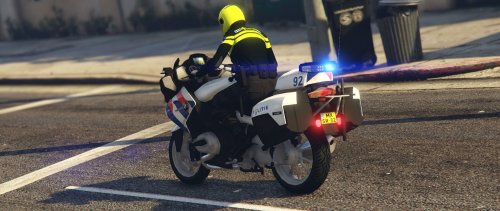 What is stopping you from putting "Dutch" in the title?
 -
-
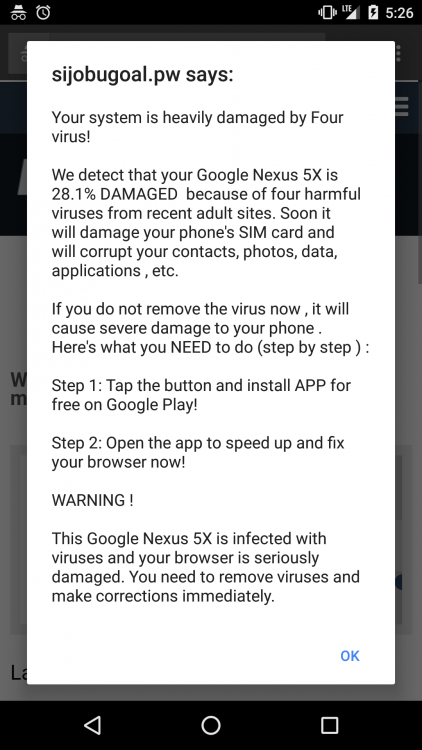
While logged in from my Android phone I clicked the log out button on the main menu. After clicking, it went to the logged-out page with the form to log back in. After a moment, the malware pop-up below appeared. I just clicked ok to dismiss it and it started trying to redirect me to some undoubtedly malware-download-ridden page. I closed the tab and all seems ok now. you can see in the screenshot that it is an lcpdfr.com page behind the pop-up. So, the pop-up was initiated by JavaScript running from a third-party domain (sijobugoal.pw) embedded in lcpdfr.com. This is almost certainly drive-by malware embedded in an ad I don't know what ad networks this site uses, but obviously one of them is distributing malware and can't be trusted. I understand the need to have ads to pay for the site, and that less reputable ad networks might pay more. But you will lose money in the long-term, because when things like this happen, people are much more likely to use ad blockers. I whitelist sites I want to support in my ad blocker, even if they have somewhat annoying ads like this site does. I will not toleratr malware though, so back on the block list it goes. I hope you will determine which ad network is serving up malicious scripts, terminate your relationship with that network, and consider using an advertising network which is safer for your visitors.
-
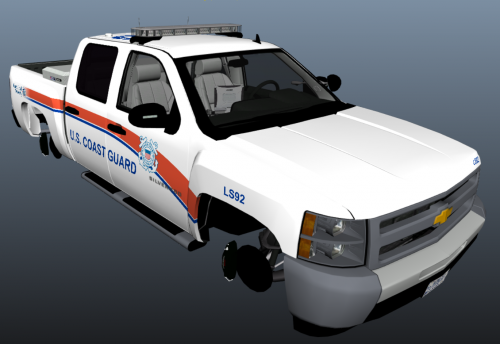 These are two federal law enforcement skins for the marked Silverado port police by @Black Jesus. A US Coast Guard skin and a US Park Ranger skin are included. Later I will add US Customs and Border Patrol, US Forest Service, and possibly others. Apologies for the low-quality screenshots; I'm on my laptop right now. I'll upload better screenshots tonight.
- 1 comment
- 1 review
-
-

- 1
-
-
-
Probably not. GTA V only runs on Windows, so you'd need to install Windows. While it's possible to install Windows on a Macbook Air, the processor and graphics likely won't be fast enough to play it. You really need a dedicated GPU to run GTA V.
-
Please give your file a more descriptive name, it sounds like you've uploaded multiple models of the same type, when in reality you've uploaded several skins. Also why is this download up twice?
-
 I think that's a bug in LSPDFR related to the "close nearby roads" feature. I think it actually removes driving path nodes or something, which unfortunately means there's nothing I can do about it. Maybe try using the "N" menu to close/re-open nearby roads and see if that fixes it? Oh and BTW is that with the 1.0.0.0 release, or with the beta you have access to?
- 781 comments
- 85 reviews
-
-
You can change the button in the INI file. You can even change it to None and use the keyboard to call them.
- 781 comments
- 85 reviews
-
There are about two dozen comments about the dependency check already. It will be addressed in the next release. Do you get FPS drop all the time, or only when EMS is responding?
- 781 comments
- 85 reviews
-
Based on this info I agree that LSPDFR seems to be running multiple instances. It's possible there's a bug which isn't fully unloading Better EMS if you go to the station and go off-duty. I will check into it when I return from vacation next week. In the meantime, try reloading your plugins (Press F4 to open the RPH console, type reloadplugins), and then go back on duty by typing "forceduty". That should fix this issue.
-
I see nothing in that log indicating that EMS was called twice. You sure it wasn't some default GTA fire truck or ambulance coming, which they do naturally sometimes when there's explosions?
-
Just upload your ragepluginhook.log as an attachment on this forum thread.
-
What?
-
It should prevent you from calling twice from the same location. Does this happen every time?
-
If your plugins don't seem to be working, try the troubleshooter: Also, almost all mods include very clear installation instructions. For the majority of mods, those instructions consist of simply copying and pasting things into your GTA V folder. To install things like Traffic Policer, you shouldn't need to go into the individual folders. Just copy the whole shebang where it tells you to. If you follow the instructions word-for-word, and try running the troubleshooter above, your install should work.
-
 In the INI file there is an option to integrate better EMS. If you enable that option, then when you call for an ambulance through the Custom Backup menu, you'll get the better EMS response. There is an example in the XML file of specifying <Weapons> for an entry. You can do it the same way for any of the categories.
- 378 comments
- 23 reviews
-
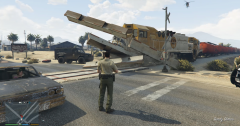
From the album: PNWParksFan WIP and screenshots
This game can really go off the rails sometimes! -
Support instructions are specified in the README and in the file description above. Please follow the instructions provided, and try Albo's troubleshooter.
- 781 comments
- 85 reviews
-
I just made a slight update to the description text, which unfortunately makes it show up in the list as if I had uploaded a new version. Keep an eye on the version number and the changelog. I'll be uploading an actual new version sometime next week.
- 781 comments
- 85 reviews
-
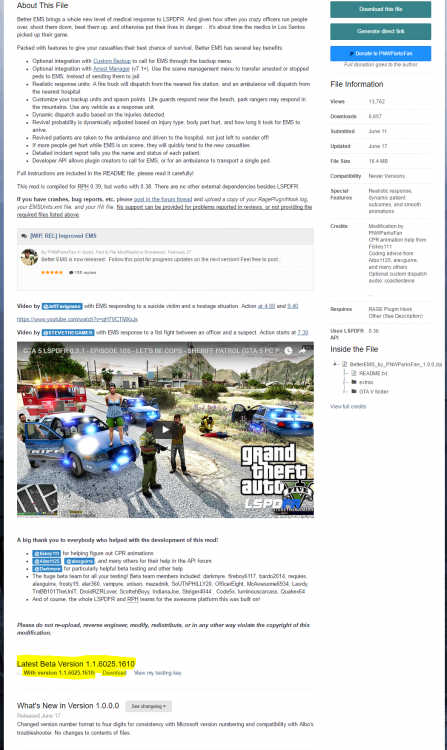
I'm expecting to release Version 1.1 next week. Here is a list of the major changes: Fixed bug with ambulances without door indices 2 and 3 crashing the plugin Added API to override death statistics Improved stability of patient pickup API Prevent patients and medics from being arrested Ambulances will now select the nearest delivery point, even if spawned from a station with no delivery points Fixed issue with canceling an inprogress response Added command to stop response vehicle at current location and force medics to walk from there Improvements to dependency version checking, to reduce frequency and improve clarity about "dependency out of date" messages A beta release of version 1.1 is now available to beta testers from the download page. Scroll down past the description and you may see "Latest Beta Version" and a download link. If you don't have beta access and you actively participated in the original beta, respond to the most recent PM we exchanged about the original beta, and let me know if you'd like access to the new beta version. If you are a plugin developer with 1 or more published LSPDFR plugins with at least 500 downloads, or if you are a YouTuber with at least 500 subscribers and have recent LSPDFR videos with significant numbers of views, or if you have donated $10 or more to any of my mods, you can also PM me to request access. If you do not meet those criteria, please refrain from requesting beta access unless we really truly know each other. The public version will be released soon.
-
I actually already started a project like this. https://docs.google.com/spreadsheets/d/1I4HD0pMUNj-XihEssqMoSSWxEEu-Oa5mTlL8XzMHv9E/edit?usp=sharing Perhaps we can combine efforts here? My spreadsheet is set up a bit differently; it has a tracking tab to keep track of who helped contribute and to know which directories are already being worked on so effort isn't duplicated.