c13
Friends of LSPDFR
-
Joined
Everything posted by c13
-
This is the >police station mod, and it makes a huge difference. Be sure to change "UsingPoliceStationMod=False" to "UsingPoliceStationMod=True" in the LCPDFR INI file once downloading the police station mod for officers using computers and officers frisking/seating suspects.
-
Traffic stops can't be controlled, but the amount of world events can be. Go to LCPDFR.ini, then to the setting called "AmbientScenariosMultiplier." By default, it should be 250. The higher the number, the more often it happens.
-
It depends on the department. Some Police Departments don't have them for standard patrol (NYPD being one, Boston Police is currently battling city council to have 2 cops in each district armed with them each shift), others have limited amounts (most cities, LAPD being a major one) and some PD's, mainly suburbs, sheriff's offices in rural areas and state police agencies have them as standard issues. As far as where the weapon goes, it depends on the department. Most keep them with a shotgun between the seats, others keep them in a rack on the ceiling of the car, some keep them in the trunk and the Kansas Highway Patrol keeps them in the back seat oddly enough (with a rear partition separating suspects from the guns). As far as GTA 4, go to LCPDFR.ini, then to the setting called "VehicleTrunkWeapons." You will then need to put the ID down (full list in the LCPDFR manual, page 28, section 5). You are then free to choose whatever weapon to be put in the back trunk
-
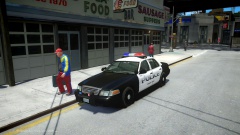 I'd go with some 98 hubcaps on it. Other than that, I like it.
 -
This section is for support with the actual website, not the mod. MODERATOR NOTICE Moved to LCPDFR Suggestions
-
MODERATOR NOTICE Moved to LCPDFR Support Requests, since that is the only place this would be relevant
-
Color me shocked
-
This section is for games outside of the GTA Series. MODERATOR NOTICE Moved to GTA IV Support
-
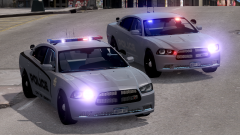 It just seems like there aren't enough lights for a slicktop vehicle from 2012. But anyways, smaller light modules, if there are 2 or less of them, tend to go on the dashboard. If you go with a light above the rear view mirror, I would say a slimlighter would look best. EDIT:Iowa State Patrol is using a similar setup to what I mentioned with the slimlighter above the rear view mirror. However, it has singular avengers on the side like the previous photos: http://policecarwebsite.net/fc/copcarpics/iowa251.jpg
 -
I'm not really liking the light setup on the slicktop. Perhaps a full length interior lightbar, or if you want to keep it simple, a whelen slimlighter on the center of the dashboard and single module whelen avengers on the sides of the dashboard. Here's some pics of the second setup I talked about: '' target='_blank'>> '' target='_blank'>> '' target='_blank'>>
-
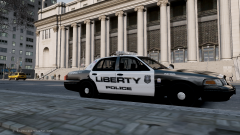 A stealth unit would be awesome to see also. Thanks for taking in my suggestion.
 -
Having cops in pursuit jump out from their moving vehicle after 75 feet wasn't intentional in .90?
-
The first suggestion is entirely possible, however such a feature would be far down the road, as lots of INI options cause issues and are problematic to test. It has been suggested in the testers forums before though. Possibilities that the development team are considering would include limiting officer ped models to certain vehicles, how many officers are in each vehicle model as well as choosing what weapons those officers carry. To show the scope of this, if things work out how I want it to (which unfortunately doesn't guarantee it will), I would be able to press alt+b, and I could have a chance of 2 LCPD officers armed with glocks and pump action shotguns respond in a Police1 vehicle model, a single State Trooper armed with a glock, pump action shotgun or an M4 respond in the NOOSE cruiser model, or a Sheriff's Deputy (let's theoretically say I replace M_M_Fatcop with a deputy model) respond in Police2 armed with a desert eagle, semi-automatic shotgun or an M4. Then, with calling in noose backup, I could either have 2 task force officers (m_y_cop_traffic in my game) armed with a glock, desert eagle, pump action shotgun, semi-automatic shotgun, MP5 or an M4 respond in the FBI model, or have a 4 man SWAT team, armed with M4s and MP5s, respond in the nstockade. But like I said, this is only being considered and implementing response customization is a long ways off, if it will be done at all with other priorities in the works.
-
Like with >another skin pack of yours, I'd like to see various units, like noose, traffic, highway patrol (yes, some PD's have units for patrolling highways in their city), DUI, supervisors/sergeants and K-9.
-
 On the visor (the thing that pops down above the driver and passenger side windshield to block the sun)
 -
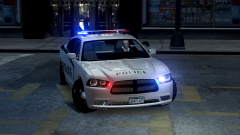 It is possible. BxBugs did this on multiple cars with pushbars and ALPR units, and he ised the same method you just described.
 -
Could you make the ALPRs removeable with a texture change?
-
Forcing callouts was taken out. You can open up the INI and change the values for minimum time and maximum time between callouts, and also change the multiplier to make them more likely to happen.
-
Expect issues later on. They were fairly high quality until they went bankrupt, and had to start mass producing. I'd go with a Dan Wesson (About $2000, hand made and a limit of 3000 a year made, so quality control is high) or a Springfield Operator (FBI Hostage Rescue Team chose those over Kimbers, $1500).
-
Does this happen after 1.0 is installed?
-
This is a forum for showcasing mods you created. MODERATOR NOTICE Moved to GTA 4 Support Requests
-
MODERATOR NOTICE Moved to GTA 4 Support Requests
-
I was patrolling Alderney, as usual, when I received a call of a drug deal. I responded and went to the shopping plaza on Beaverhead Avenue. Upon arriving on scene, I went to my trunk and pulled out my AR-15, then started walking towards the area. Upon approaching the alley, 2 suspects popped out, one with an AK-47 and another with an UZI. I have hardcore mode enabled, resulting in becoming slowly dying corpse on the ground. Calling for backup, I then respawned at the Alderney Medical Center. I spawned another cruiser, grabbed my AR from the trunk and followed two PD units and a SWAT unit to the area. Upon arriving on scene, 8 NOOSE units were already there engaging the suspects, with support from the patrol officers. The suspects went down before I slammed on my brakes and exited my car.
-
This section is for requesting mods. MODERATOR NOTICE Moved to GTA IV Support Requests
-
MODERATOR NOTICE Moved to Development Support