Steele1925
Members
-
Joined
-
Last visited
Everything posted by Steele1925
-
 You're very quickly becoming my favorite modeler..... Typically with vehicles, I think "This could've used some lights here or here". Not with yours! All the right lights in all the right places!!! 5/5 absolutely recommended.
- 126 comments
- 41 reviews
-
-

- 1
-
-
 Well it's about time I review this. The mod works exactly as intended, and adds so much to the original Vehicle Search Mod. Some gruesome, some comical, some serious. A good mix in my opinion. 5/5 from me
- 38 comments
- 16 reviews
-
-
- 1
-
-
https://www.youtube.com/watch?v=7ZnBwl7R4cg Part 1 https://www.youtube.com/watch?v=-M05f2MYo70 Part 2 https://www.youtube.com/watch?v=gRIagJSjd1s Part 3 https://www.youtube.com/watch?v=j0BO4JFwd_Y Part 4 If you need anything else, feel free to send me a personal message, and I'll see what I can do
-
You could give this site a try http://www.systemrequirementslab.com/cyri GTA 5 Requirements are OS: Windows 8.1 64 Bit, Windows 8 64 Bit, Windows 7 64 Bit Service Pack 1, Windows Vista 64 Bit Service Pack 2* (*NVIDIA video card recommended if running Vista OS) Processor: Intel Core 2 Quad CPU Q6600 @ 2.40GHz (4 CPUs) / AMD Phenom 9850 Quad-Core Processor (4 CPUs) @ 2.5GHz Memory: 4 GB RAM Graphics: NVIDIA 9800 GT 1GB / AMD HD 4870 1GB (DX 10, 10.1, 11) Storage: 65 GB available space Sound Card: 100% DirectX 10 compatible However, you should really have the recommended, which are OS: Windows 8.1 64 Bit, Windows 8 64 Bit, Windows 7 64 Bit Service Pack 1 Processor: Intel Core i5 3470 @ 3.2GHz (4 CPUs) / AMD X8 FX-8350 @ 4GHz (8 CPUs) Memory: 8 GB RAM Graphics: NVIDIA GTX 660 2GB / AMD HD 7870 2GB Storage: 65 GB available space Sound Card: 100% DirectX 10 compatible
-
 To the LSPDFR Community... Can this become the new standard? We already have a standard of blip colors, but can the options (menu) here become the new standard? 5/5, absolutely recommended.
- 102 comments
- 35 reviews
-
-
- 1
-
-
 Thanks buddy. I got it fixed. I must've accidentally deleted the variations line lol. It's working now
- 112 comments
- 36 reviews
-
I'd LOVE this. Also, I've been suggesting for some time now, a randomly generated "Wanted" notification for peds. What I mean is, you'd get a notification from dispatch (hopefully vocally) saying there's a wanted individual. It'd describe (from the ped pool) their general build, race, sex, and what they're wearing. Then it'd say their last known location (Davis for example) as the peds in GTA V spawn in their designated areas. I've tested the idea myself, by simply finding a ped on the street, and then telling myself to search for them in that general area again. Example I used Black Male Early 20's Families Gang Member White Tank Top Blue Jeans (light) White Shoes Green Baseball Cap Known To Frequent The "Davis-Carson Avenue" Area. After about half an hour of occasionally checking back in that area, I sure enough found exactly who I was looking for. I got the idea from the show "First 48", in which they'd look for murder suspects with these general guidelines. If we could have dispatch send us notifications like these, and have the ability to check back (ask again) for the info, that'd be great! Here's how I figured the call could go "Attention all units, we have a wanted felon on the loose". If you hit "Y", your unit would say (through text) "Dispatch, this is (insert unit here) show me additional info on that wanted suspect" Then, as above, dispatch would send you a random ped's description. No blips or anything, it's all just at the player's discretion as to whether or not a ped walking/driving fits that description.
-
Thank you fiskey111 and c13 for the help!!! Noob question... How do I get my text to line up properly when adding these lines to "carvariations"? Like a noob, I simply did a copy/paste, and well... It didn't line up properly, causing my game to crash lol.
- 112 comments
- 36 reviews
-
I'm with "fiskey111"... There is no extra file, and therefore the lights don't work. Please include it
- 112 comments
- 36 reviews
-
-
- 1
-
-
 So it's time for me to facepalm. I found the issue... I was putting the gameconfig in update/update.rpf/common/data.... When I was supposed to put it in MODS/update/update.rpf/common/data LOL. So I hope this helps anyone who may be experiencing the same issues, all is working now. *Slams head into keyboard*
- 1,524 comments
- 85 reviews
-
-
- 1
-
-
Stay safe buddy. High hopes that they'll be caught soon.
-
To get to what you're looking for, it should be like this update / x64 / dlcpacks / patchday4ng / dlc.rpf / x64 / levels / gta5 / vehicles.rpf
-
I can confirm that EUP works fine. I'm now using it again as I reinstalled everything except RDE. Also, yes I made sure to get the new "gameconfig", but that wasn't working either. It seems as though I'm the only one left who can't get it working, which is actually a good thing. That means that I'm still doing something wrong lol. I'll figure it out eventually and probably facepalm for an hour.
- 1,524 comments
- 85 reviews
-
Well at this point I literally have the vanilla game, and no callouts or any other unnecessary addons. The only mods I have are LSPDFR, EUP, Skin Control, and RDE. I made sure to rip everything (mod related) out of my directory as well. So at this point I think there's just some conflict with my system lol. Or perhaps I somehow installed it wrong. Here's my step by step... 1. Extract RDE Added Models (recommended) archive to desktop. 2. With OpenIV, use package installer and select "RDE Added Models (recommended) 3. Install it into a "mods" folder. 4. Let auto install finish and launch game 5. Crash just after "Loading and Populating Game World".
- 1,524 comments
- 85 reviews
-
I did have some vehicle mods at first, but decided to "Verify Game Cache" and replace all files, but to no avail. I suppose it could be one of the Callout Mods that I have. I believe some of them rely on specific vehicles. I'll start taking them out and report back
- 1,524 comments
- 85 reviews
-
Yes... All mods work fine, however when I add this one to the mix, it fails. So I removed everything, and both the vanilla game and LSPDFR work, but I add this again, and I get a crash, even with the updated "gameconfig" being placed in OpenIV.
- 1,524 comments
- 85 reviews
-
New gameconfig didn't fix it for me. I posted a crash report above (in my previous comment), and haven't been able to figure out exactly what's causing the crash on my end. So far I've reinstalled all vanilla files for the game, gotten rid of all scripts, and triple checked that I'm downloading the correct file (gameconfig). But something is still conflicting on my end...
- 1,524 comments
- 85 reviews
-
-
Well, just installed the new "gameconfig", and I still crash upon "loading and populating game world". Is there anything you'd like me to post that may help? I used the Automatic Installer, and everything was placed into a "mods" folder. Gameconfig was placed in "update/update.rpf/common/data" EDIT: Added Spoiler containing Crash Report.
- 1,524 comments
- 85 reviews
-
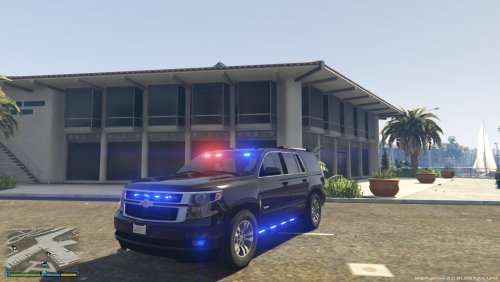 Perfect amount of lights... Works exactly as you'd expect. Any bugs/glitches (of which there are few) are the not the fault of the mod author here, but rather, the fault of the original creator of the vehicle. What more can I say? 5/5 I recommend this model.
- 27 comments
- 15 reviews
-
-
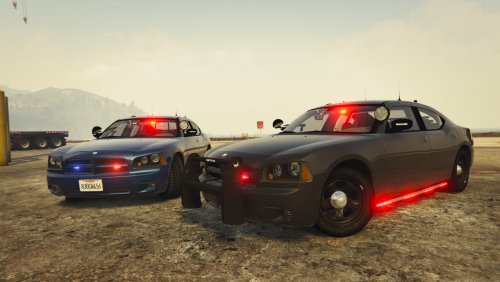 Wow, absolutely WOW!!!! High quality, everything works properly and as expected, and has options (like Steelies and Side Runners)! Already supports multiple liveries. I would like to note however... If, like me, you're using Radiance (lighting mod from Bxbugs123) then be sure to use the "Very Bright" option with this vehicle. Otherwise the lights may appear dim. 5/5 Great work and thank you to all who worked on this model.
- 64 comments
- 16 reviews
-
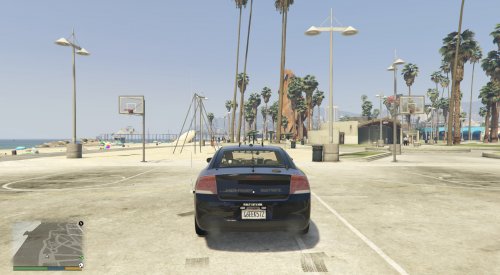 WOW!!! Now THIS model I'm blown away by. Lights work exactly as one would expect, the skins that come with the vehicle are top notch, and the option of either red/blue or all blue lights is fantastic. The side runners work flawlessly, and with "Radiance" mod, the lights are nice and bright. 5/5 for quality :) 2 suggestions however: 1. Unmarked Skin option 2. With the all blue option, there's still one small light (it's the driver's side fog light) that's flashing red. It's not a big deal though, and I barely noticed it. Fantastic work Gump, you make me smile
- 23 comments
- 13 reviews
-
Then you may have placed the vehicle file in the wrong location. Which vehicle were you trying to replace, and where (in OpenIV) did you place it? 2'nd, to fix your issues, (if you have Steam) you need to verify game cache. 1. Go to steam Library 2. Right click on GTA V 3. Click on "Properties" 4. Click on "Local Files" 5. Click "Verify Integrity of Game Cache" This will replace all files (cars, textures, audio etc.) with the original files. It will not mess with your LSPDFR, or any scripts.
-
Hello, and thank you for taking the time to read this... I was simply wondering if anyone is willing to replace as much audio as possible with the audio from Need For Speed: Most Wanted (2005). This sounds so much more realistic to me, than the GTAV AI saying "In, UHHHHHHHHHHH". Lol. Here's some "Fight In Progress" audio ;)