


NickieB
Members
-
Joined
-
Last visited
Everything posted by NickieB
-
Forgot about dropbox, +1 for that, fast, secure and easy to use. I always had a issue getting large files from one PC to another, at the time I didn't have a large flash drive and dropbox solved that issue
-
Not bad, finally a CVPI with a unique and rare lightbar on it. Nice job on the Defender too!
- 16 comments
- 15 reviews
-
Get your views setup, front, left, user, 3D, those are the views I use. Then using the move tool and having the X/Y axis active just move it into its desired position using the front/left views and using user/3d to check the placment
-
I'm drawing a blank as to the location of the tool, but its in the second list from the top of tools. It takes the X,Y,Z pivot and moves it from true zero, the center point of the whole scene and centers it on the object you tell it to. Therefore moving the pivot to the center of the object making scaling/rotating easier so it doesn't always try and move to the main center point or rotate on a crazy radius
-
modify>scale, modify>move, modify>rotate, all of those will adjust things. Make sure you center the axis before rotating or scaling.
-
There isn't anything else available publicly at this time besides Bugs and the Driver:SF model. EVI's does not exist unlocked so don't even bother trying to find it. Even with all the locked models of CVPI's they still are the same 2-3 models. There are a million CVPI's but they consist of the same 2 models so its not like there is a ton of different base models floating around out there. I know a few people have optimized Bugs CVPI, myself included, to better fit the game but like I said earlier they aren't available publicly.
-
You have to edit the emerglights file to the colors you want and then simply adjust the ELS config for that slot to the colors you want. If you expect someone to do it for you(which is what it seems you want) then you need to post the emerglights PNG's or links to the cars your talking about so if anyone is generous enough to do it they know what you need. Both the ELS config and the PNG editing are fairly easy to do. Just open the ELS config and scroll down, you'll see EXTRA_1=red or something similar, just change that color to whatever you need and do the same for the rest all the way down. Extra 5-6 is the wig-wags and 7-9 is the traffic adv./secondries
-
I couldn't help myself and I looked at the spoiler in th first post.....wow very cool is all ill say so I don't hint at anything and spoil it
-
 I did think about putting Intersectors on the mirrors but I ended up not doing it. I might add them though but it wouldn't be for the initial release. I put it out for testing, I just need a couple good reviews and then I'll be comfortable releasing it since there really wasn't much changed from the last version
 -
Mediafire works very good, I use that to distribute a lot of my stuff. Everything you upload gets stored in your account and you can password protect stuff or make it a one time download. Or Skype will transfer files very easily also. Those are probably your best easiest options
-
lol, you'll have a PM in a few minutes
-
From the album: NickieB Upcoming Releases
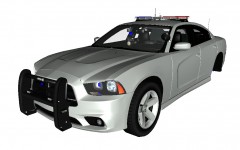
The red/blue version of my Ohio State Patrol Charger with the Code 3 Rx2700. Has a integrated traffic adv. in the back of the bar. Pushbar has been added and some lighting adjusted to better fit the new setup. Will be released tomorrow, 9/16 -
From the album: NickieB Upcoming Releases
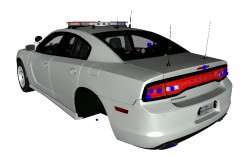
The red/blue version of my Ohio State Patrol Charger with the Code 3 Rx2700. Has a integrated traffic adv. in the back of the bar. Pushbar has been added and some lighting adjusted to better fit the new setup. Will be released tomorrow, 9/16 -
I'll still be around, like most have said, any time I open my browser this website gets opened so i can't see myself just not coming anymore. I'll probably slow down with the car making to make time for GTA V, i've already been slowing down anyway just making stuff for personal/friends. My buddy who i play online with, we've been talking about this and I think that even though GTA V will be a great game, we won't be able to get the sort of police "experience" you can on the PC with IV so I know I'll still be playing I'm just curious, was LCPDFR v1.0 delayed on purpose to coincide with the release of V to draw attention back to the mod/site or is it just a coincidence that its being released so close to V?
-
Its really a rather simple script to understand. You have 4 livery(skin) spots for each car, now with the ALM script you can restrict what liveries show for what areas. If you want liveries 1 and 4 to show in Alderney, set it up that way. If you only want livery 3 to show in Bohan then set it up that way. Livery 1,2,3,4 corresponding to police_sign_1, sign_2, etc. If you don't know the areas you should be able to find a map fairly easily on Google. Broker/Dukes is the first island, Algonquin is the middle, Bohan is the northern island, and Alderney is the western island. Anything more specific than that you'll have to refer to a map, I don't recall how specific the ALM is, haven't used it in awhile.
-
The lighbar should be back further, like right where the front/rear doors meet
- 15 comments
- 16 reviews
-
I think you should finish the conversion and then worry about what lightbar to use
-
Just make a copy and delete what you don't need
-
You can't find it because its not available publicly but can be made very easily with minimal zmod skills. TIP: Take the housing of the cvpi's 3rd brake light housing, scale it wider and adjust it for the angle of the window, add in some modules and your good to go.... it will look exactly like the real thing.
-
-
+1 for a video, although I do trust that the siren is quality, I still like to see a video of it before I take the time to install it.
- 12 comments
- 11 reviews
-
-

- 1
-
-
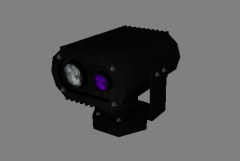 Seems like it should be larger than 30 polys... Looks good though
 -
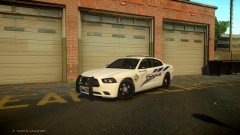 it doesn't look like the Forza model, I think its the one Dhruv release, modified heavily of course. I could be wrong though
 -
-
Its a Winglux S I think, just in case you wanted to know - Oops, quoted wrong person, meant to quote kshark...

