


NickieB
Members
-
Joined
-
Last visited
Everything posted by NickieB
-
![[WIP] Slicktop Explorer](//s3-gallery.int-cdn.lcpdfrusercontent.com/gallery/album_1177/sml_gallery_9139_1177_49060.jpg)
From the album: NickieB Upcoming Releases
Did a lot of work on it today, its coming along nicely. There is a little more to do yet but this is a pretty good idea of what it will look like -
![[WIP] Slicktop Explorer](//s3-gallery.int-cdn.lcpdfrusercontent.com/gallery/album_1177/sml_gallery_9139_1177_15589.jpg)
From the album: NickieB Upcoming Releases
Did a lot of work on it today, its coming along nicely. There is a little more to do yet but this is a pretty good idea of what it will look like -
![[WIP] Slicktop Explorer](//s3-gallery.int-cdn.lcpdfrusercontent.com/gallery/album_1177/sml_gallery_9139_1177_33296.jpg) He might be talking about the fact that sometimes pictures get posted of cars that are suppose to be released but yet they never are. I'm guilty of doing this in the past but I can say with 100% certainty that this car will be released within a week of today. So it will be released by at least 1-26 probably before that. I just want to give myself enough time in case I run into any issues.
He might be talking about the fact that sometimes pictures get posted of cars that are suppose to be released but yet they never are. I'm guilty of doing this in the past but I can say with 100% certainty that this car will be released within a week of today. So it will be released by at least 1-26 probably before that. I just want to give myself enough time in case I run into any issues. -
with 0.95 it would vary but I could get over an hour sometimes. With v1.0 though I get to play about 10-15 minutes and its a lucky day if I make it longer than that. I do use a lot of mods on top of FR and I'm not bashing them for the crashing but I'm using the same mods with 1.0 as I did with 0.95 and I had almost no problems with 0.95. I'm not willing to remove those mods either since they enhance the game to where I prefer to play it, so I'll just wait for more fixes for v1.0
-
From the album: NickieB Upcoming Releases
Just a WIP - COMING SOON so watch all major GTA IV police sites -
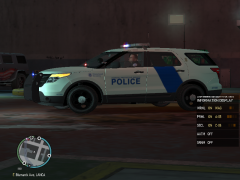 Looks like the skin Efox made for my Explorer
 -
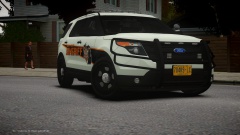 Who made those wheels?
 -
Just change the skin... there are numerous skins included with a unmarked skin in there also. Just keep spawning the car until you get the desired skin or replace them in OpenIV or Spark
- 18 comments
- 14 reviews
-
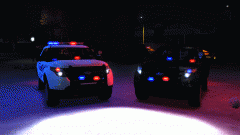 I do all my modeling in PS now, thats the best way to mod GTA. So much easier to switch things around and if you want a new part - no need to model it - just find a picture on the web and copy/paste it into photoshop. No more RC20 errors either.
 -
Zmodeler 2.2.4 or 2.2.6, there are torrents for older versions like 1.X.X but don't use those, they are to old and don't support what you need to model for GTA IV. The tutorials section of the forum has some great threads talking you through some of the basics. **Its not something your going to learn in 2 hours, it will take you weeks just to learn the basics of just moving things around and using the tools** and much more time than that to actually make progress on a car. Scratch modeling is a whole different ball game and if you want to do that then use 3DS Max, its much better than zmodeler when it comes to that. Modeling is hard and takes time and patience but once you get the hang of it, its a lot of fun. And make use of the tons of unlocked parts/cars available. There are so many unlocked resources available to new modders these days so you shouldn't have any issues finding parts to use.
-
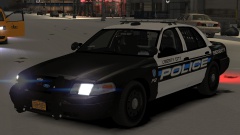 Its on GPM, not sure if this link will be blocked or not but here it is http://gtapolicemods.com/downloads.php?do=file&id=973
 -
Your COLs are all placed correctly and your wheel dummies are to? Because it seems like a combination of the 2. Looks like you've got some texture issues with your wheels too
-
Not necessarily true at all, when modelers create something its usually just modeled and then re-sized by the person using it. Sometimes the modeler will create it correctly to scale but thats not always the case. So you should always reference real life pictures to get the scaling correct
- 15 comments
- 1 review
-
Yes, the police station is just the lawyers office from a mission. There is a police station mod but I'm not sure what it changes or if it has new models or not
-
You could even do that, just open the icon up in any good photo editing program like photoshop and "desaturate" the image and it will make it gray.
- 6 comments
- 2 reviews
-
-

- 1
-
-
-
Well I had to go through a lot of trouble to get v1.0 to work but yes I did remove 0.95 and all its associated files
-
hmm, I'm starting to get annoyed because every time I walk up to a car they run. Out of the 10+ stops I've done, 1 went normal. This isn't the only issue I'm having but its the most noticeable right now. Plus a lot of crashing
-
Anyone else having the problem of 99.9% of traffic stops resulting in a pursuit?
-
Thats not true, he can just edit the texture in the WTD. Open the WTD of the lambo with openiv and find emerglights_emis or the texture that has the red/blue/amber els textures on it. Export it and then edit it as you need. Just copy/paste and move the blue over the red/amber if you want everything blue. If your talking about changing the flashing on the ground, make sure your changing the colors for the right car slot that the lambo is installed in. I just wrote a nice reply on how to do this a few weeks ago here '?do=embed' frameborder='0' data-embedContent>> just scroll down a few posts
-
Take the PNG in the link below, open up Spark or OpenIV and find "taho_steelrim" and replace it with the one below
- 33 comments
- 22 reviews
-
Especially when that site is your only hope...
-
I think I could count on one hand the cars that have been released with the fender wrap on it. If you search there were some so-so wraps that where released in the forum at some point. They weren't the best looking but it would be better than nothing if you don't want to make it. Idk if they are still around but it would be worth a search. All the fender wraps I have are for IV but I wouldn't give them out anyway. Like XBR said, there is no reason to bash GPM or another site when the person who mentioned GPM is right since there are few if no SA modders on this site. As it was also stated, GPM just re-opened its SA DEV section/team so you will have better luck with those guys but if SA parts are anything like IV parts you have to either know someone or make a name for yourself before anyone will give anything out. Like I said though, I don't know if its the same for SA since I haven't touched a SA part ever. Try looking on the Google Sketchup warehouse, you can convert stuff from there in 5 minutes
-
Its not a rare part though, it was available for the entire time since it was uploaded until the site being taken down. Asking for a trade for a publicly released part is crazy, even if its not available anymore. Whoever asked for it - if you want it just PM me and I'll give it to you privately, free of charge.
-
The first would be alright for the grill, they would look better on a pushbar or the rear deck IMO. As for the second ones, those aren't really suited for a CVPI or any police car. They are used most of the time on fire trucks and ambulances. So I would recomend finding something else, there are a ton of lights on here and other sites

![[WIP] Slicktop Explorer](http://s3-gallery.int-cdn.lcpdfrusercontent.com/gallery/album_1177/sml_gallery_9139_1177_49060.jpg)
![[WIP] Slicktop Explorer](http://s3-gallery.int-cdn.lcpdfrusercontent.com/gallery/album_1177/sml_gallery_9139_1177_15589.jpg)
![[WIP] Slicktop Explorer](http://s3-gallery.int-cdn.lcpdfrusercontent.com/gallery/album_1177/sml_gallery_9139_1177_33296.jpg)
