


NickieB
Members
-
Joined
-
Last visited
Everything posted by NickieB
-
 Thanks!
 -
From the album: NickieB Upcoming Releases
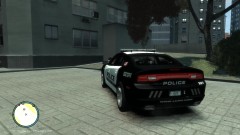
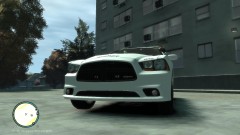
Coming soon! Its a Ohio State Patrol 2013 Charger - I know the skin doesn't reflect that but the skin isn't made yet... Will include the OHSP All blue setup and a red/blue for everyone else -
From the album: NickieB Upcoming Releases
Coming soon! Its a Ohio State Patrol 2013 Charger - I know the skin doesn't reflect that but the skin isn't made yet...Will include the OHSP All blue setup and a red/blue for everyone else -
From the album: NickieB Upcoming Releases
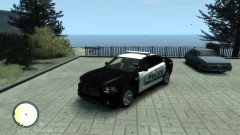
Coming soon! Its a Ohio State Patrol 2013 Charger - I know the skin doesn't reflect that but the skin isn't made yet...Will include the OHSP All blue setup and a red/blue for everyone else -
No its a bit more complicated than that and requires another program. Look at the tutorials, there is a lot of good info in there.
- 33 comments
- 22 reviews
-
you don't even have to mess with the dummy, just import the wheel, place it over the old one in each axis using the front/left view, scale as desired then pull the wheelmesh_lf and wheelmesh_L1 out of the hierarchy for the car, you can leave the COL there if you made the new wheel the same size as the original. After you pull them out or delete them then put the new wheel into the hierarchy of the car under wheel_lf make a copyrename for the L1 and your done. It really is very simple to do
-
Its not a Javelin or a MX7000. I think its this http://www.chiefsupply.com/signal-vehicle-products-sabre-lightbar-46-w-police-lights-package-5-halogen-rotators-2-z-mirrors-2-v-mirrors-2-strobe-intersection-lights-4td-2al-and-mounting-kit.html or the one Constable posted. The one he posted is the LED version where mine is the the rotator version. The OP looks to be the LED version though but both are made by "Star Sabre"
-
lol it sure does
-
Just PM him on GPM, easiest way to get a hold of him
-
Maybe you misread or didn't rear the first post entirely but I was just looking for the setup they use in the rear deck, the rear deck is the rear window area.
-
Thats the first place i checked but thanks anyway. Yea it looks like the Taurus's use two Whelen IONs, maybe they have them on some Chargers too but the only thing so far that I've seen is the 2 Avengers in that video
-
![[ELS] Federal Signal Valor](//s3-gallery.int-cdn.lcpdfrusercontent.com/gallery/album_680/sml_gallery_13885_680_4513.png) Exactly, I hope someone doesn't map it and then release it. EVI released it that way for a reason...
Exactly, I hope someone doesn't map it and then release it. EVI released it that way for a reason... -
It doesn't matter, either version. I just want to know what they use so I can get an idea of what I should put in there since every car seems to have a slightly different setup. Thanks for the video guys. I agree it looks like 2 Avengers or something similar
-
Just wondering if anyone knows what sort of setup the Las Vegas PD uses on the rear deck of their new '13 Chargers? I can't seem to find many pictures, especially from behind. Any help would be appreciated! I need to know for a WIP
-
You could replace the police model with the state trooper one but then you wouldn't have the original police model to drive the cars anymore, it would be all state trooper peds. Or like the others have said, the Troopers drive in every car in Alderney. It might be possible to achieve this with editing a txt file in COMMON>DATA... I don't know if you can do it, you'll have to look through and see if you can find something related to the police cars and the peds that drive them. There is everything and anything within those files so look close. Its also possible that its something thats hard coded (That might be the incorrect terminology, idk) and can't be edited
-
-
Are you being serious? If your having trouble installing the car look at the readme included in the file, its explained in there. Plus I'm sure you could find a tutorial in 30 seconds if you searched
- 33 comments
- 22 reviews
-
I know you said you've fixed this but I'll post my fix for it just in case. I ran into this problem a while ago too, it just randomly started and I tried everything to try and fix it and it kept doing it. I finally figured out if you turn up the "Texture Resolution" setting in the in game graphics menu that solves the issue. I had to go from low-medium and I did lose a few frames but its worth it not to crash all the time. Others who have had this problem have also tried this with great success
-
-
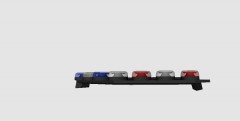 I agree with Tim, the shapes are a little off. Especially the modules inside the individual heads and the heads themselves. As for the ELS, its hard to say, the SLR has such unique flash patterns and idk if you could recreate those with just ELS-H. you might have to go with LED and then do some clever mapping on the lightbar with the secondaries.
 -
lol exactly. Did you even read my post? I'll say it again, my buddy tried it, located the file but it was not editable. Now I didn't investigate for myself because I don't mind the beep but I trust his findings.
-
He said the beep, like when turning the lights/sirn on and off. Not the ticking... As for the beep - No you can't edit it. I had a buddy who tried and he said that he found where it was located but the file was not editable. I didn't confirm this but feel free to search yourself if you wish
-
Those antennas on the top were made by Rockstar, they are from the police bike from EFLC
- 33 comments
- 14 reviews
-
The reason its probably hitting cars that are 20 feet away is because of the collision [COL]. You need to make sure thats setup in the correct spot around the respective item, in this case the pushbar. Thanks man, I appreciate it! :)
-
 Looks fantastic man!


![[ELS] Federal Signal Valor](http://s3-gallery.int-cdn.lcpdfrusercontent.com/gallery/album_680/sml_gallery_13885_680_4513.png)
