




James
Members
-
Joined
-
Last visited
Everything posted by James
-
Ah, your problem. Upgrade your game to patch 1.0.7.0. TOPIC MOVED TO DESIGNATED SUPPORT SECTION.
-
Please. Try to run the G17 Media diagnostics tool please. See my signature.
-
I'm almost sure that either radiance mod or luminescence mod comes with a README.
-
YOU NEED TO GIVE US YOUR SPECS. PLEASE GO TO START MENU AND TYPE IN AND CLICK ON DXDIAG..
-
Halogen is a mode in ELS that makes the lights rotate. Kind of for those older lightbars.
-
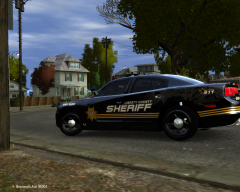 Looks epic. I'm very interested in this skin.
 -
As Faracus has said, you may use a controller, but you will still need your keyboard for various controls such as : If you have a controller with that many buttons though, feel free to configure away :P
-
should fix it. Tell us whether it does or not to make sure it's not another problem.
-
Coming from a Brit :whistling:
-
I will post more later. This car immediately came to mind. If you are looking for British mods (ew) I can forward you to those too.
-
Please note, as long as you can run GTA:IV, you can run LCPDFR.
-
Have you got these mods to work successfully in your game?
-
It's pretty buggy, but to my knowledge, was working on something to better enhance multiplayer experience. Not too sure how it is coming along.
-
Press Control+T on the layer. Click and hold control on the top corners.
-
Did you get the idea for this from G17 Media's FCRP by any chance?
-
Have you attempted to add vehicles, modify vehicles, modify sounds, anything?
-
These look pretty nice. Keep me updated!
-
I would have liked it better if you would have put a different cab on it. The cab kind of looks like a British truck, IMO.
-
This happened immediately after installing LCPDFR? Check out the G17 Media Diagnostics tool located in my signature.
-
Looks sweet, but I'd have to say the UPS sticker in the back kind of ruins it. Call me crazy.
-
After hitting ALT+P, hit ALT+P once more and the fuzzy screen will go away.
-
As long as the computer can run GTA:IV, you can run LCPDFR. You may need over the recommended to run some enhanced car mods and ELS.
-
Well, this is not really your topic, nor is it relevant to this topic, but you can find GTA:IV by going to your computer and pasting the following in the address bar: C:\Program Files (x86)\Rockstar Games\Grand Theft Auto IV
-
-
Nothing to see here! This topic has been closed by G17 Media staff. If you feel that this topic has been closed in error, please report this post. Issue Resolved.


