




LukeD
Friends of LSPDFR
-
Joined
-
Last visited
Everything posted by LukeD
-
Hi, I highly recommend you completely uninstall LCPDFR 0.95 and install 1.0b. The old 0.95 version is no longer supported.
-
Hi,When you load up GTA IV after installing LCPDFR, are you pressing ALT + P to start the mod? It does not start on its own. Also, use the Diagnostics tool which is packaged with LCPDFR 1.0b (inside the LCPDFR folder) and have it check your installation, this will verify it was installed correctly and check for all the needed dependencies.
-
Ok, try removing all your other mods so that you are left with only LCPDFR 1.0b installed. Then try it again to see if it still crashes. Also run the diagnostics tool that comes with LCPDFR 1.0b and see if it spits out any problems. And as a final check, make sure that you only install 1.0b. You do not need to have 1.0 and then 1.0a installed first. So be sure you have only got LCPDFR 1.0b installed on it's own.
-
Can you post a screenshot of your GTA IV and EFLC directories please. Is it a legitimate copy of the game?
-
I'm glad it works, ignore that error it happens when you mod GTA IV. It means nothing. The taser you have to press T to equip it to your holster, and then T again to use it. (once you have it equipped to your holster T will act as a toggle between taser and no taser.
-
I see in the screenshot you have both dsound.dll and xlive.dll. Get rid of one of them. You only need one asiloader.
-
Hi, Ok so, when you go in game pressing ALT + P still does nothing? Try running the game as an administrator? It shouldn't be detecting a modified scripthookdotnet.asi if you did an entirely fresh install and it also shouldn't be detecting more than one ASI Loader. you either have dsound.dll or xlive.dll. If you use dsound.dll try swapping it out for the xlive.dll and see what effect it has. xlive.d;; blocks online services however, but it runs more stable. I highly recommend using xlive.dll. But if you intend to play lcpdfr multiplayer then you have to use dsound.dll.
-
"as far as I know." Don't guess, go launch GTA IV and see. Did it run? Then it's installed. If it is, install LCPDFR to your GTA IV directory. Then launch again. This was my 600th post :D
-
Right ok. Completely uninstall LCPDFR. Get the automatic install for 1.0b and then run that, then try the diagnostics tool again. If that produces the same result, I recommend you uninstall it all (GTA IV included) delete any files which remain to be sure nothing is still modded. Then reinstall GTA IV again and make a clean backup. When you have done that verify GTA IV runs, if it does go ahead and reinstall LCPDFR 1.0b. and try the diagnostics tool again.
-
Yes. LCPDFr is a modification to GTA IV. You cannot simply install LCPDFR and expect it to work.
-
Can you please post a screenshot of your GTA IV directory? Also when you installed LCPDFR 1.0b did you ensure there was no other version of LCPDFR installed (for example 0.95)
-
You might be missing a dependency. Check chapter 3 of this guide '?do=embed' frameborder='0' data-embedContent>> Also run the diagnostics tool packaged with LCPDFR 1.0b it will highlight any install errors.
-
I can play for about 2 minutes...... Usually because I don't play the game I try to break it. No seriously I only ever play GTA IV now to test features in Callouts+, which is great for you guys because it means I spot the main errors and fix them before a release is made. In terms of real play time, I've never played it for long enough since I started Callouts+, but it runs very stable for me so. Mods I use, LCPDFR 1.0b, Callouts+ DevBuild, and the CryENB. That's it.
-
You could always not destroy it and save it for when you accidentally blow up your current one modding GTA IV. It always pays to have a backup. Failing that, why don't you install linux onto your old PC and learn how to use a new OS? Knowledge is key.
-
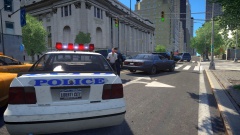
From the album: My Experiences in the LCPD
A callout to Middle Park, this chap was reported drunk driving. Investigations showed him to be way over the legal limit leading to him being arrested and his vehicle later impounded. -
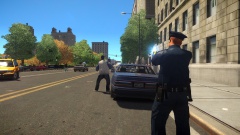
From the album: My Experiences in the LCPD
Closure to this pursuit, one suspect arrested and another being shown how a taser works. The suspect attempted to steal a second getaway vehicle after their first failed them. Police are now however appealing to the public for witnesses, as a civilian was critically injured during a hit and run which occurred right under the officer's noses. -
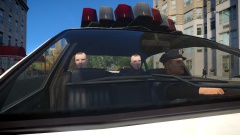
From the album: My Experiences in the LCPD
An early morning shift led this rookie cop to discovering two criminals dealing drugs, a quick frisk of both suspects revealed high quantities of money and illegal drugs. Both were taken to the police station for processing. -
Hi, Can you post a screenshot of your GTA IV directory please? Also what other mods are you using?
-
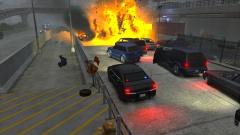 Meanwhile the cop on the left of the screen is saying "Guys, can someone please free me from this concrete, it's not funny anymore!" Nice image though, and the mini story behind it is nice too, good job :)
 -
I may look into the idea No updates yet folks, working on this and my coursework at the same time so progress is slow. But here is a nice little image for you to guess at. Courtesy of the LCPDFR facebook page https://www.facebook.com/lcpdfr/photos/a.357112141049760.83620.185574198203556/617885581639080/?type=1&theater
-
No need to bump your own thread. remember that we volunteer our time to help in this forum section, so even if we don't reply straight away we will have seen your topic. We can't always reply instantly. Patience is a virtue :) I see the following error in your LCPDFr.log file GTA.NonExistingObjectException: Invalid call to an object that doesn't exist anymore! This means it's made a call to an object that suddenly has vanished. For example a vehicle. Go into the LCPDFR.ini file, and underneath [Main] add the line "PreloadAllModels = True" that should help.
-
Glad it's working for you now, enjoy.
-
Yes it is entirely possible :) I'm working on something right now which is almost entirely irrelevant to callouts but is integrated with the API so it functions nicely and can be called by any callout I so choose :P
-
Are you launching it as administrator?
-
Erm, yes it does :S So long as you have applied the 1.0.7.0 update to it, LCPDFR should run fine.

