




brenden.iannetta
Members
-
Joined
-
Last visited
Everything posted by brenden.iannetta
-
Download this zip, open it, then drag RAGENativeUI.dll into your root GTAV folder. https://github.com/alexguirre/RAGENativeUI/releases/download/1.9/RAGENativeUI.zip

-
Glad to see someone else is making sense of my script lmao.
-
Download and install this: https://www.gta5-mods.com/misc/100-save-game
-
No problem 🙂 It's a tool I made to make my life easier. See more here: https://darkvypr.com/checker
-
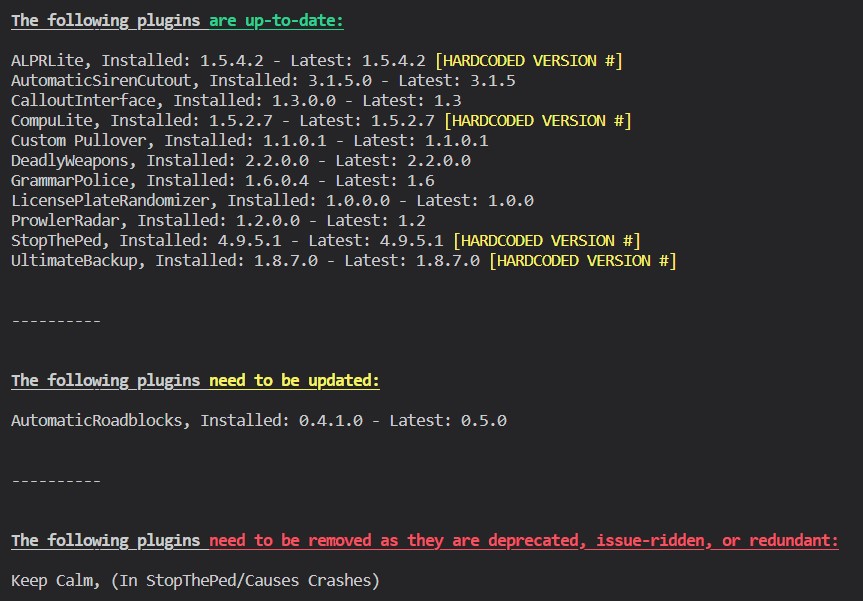
Next, follow this:

-
Do you have a mods folder?
-
No problem.
-
If this doesn't happen constantly you are fine. This is an issue with RadioRealismFR, and the author is working on a fix.
-
Download this zip, open it, then drop RAGENativeUI.dll into your root GTAV directory. https://github.com/alexguirre/RAGENativeUI/releases/download/1.9/RAGENativeUI.zip
-
No problem. It's not completely solved though, you just disabled your mods folder. There is an error somewhere in your mods folder. Try reverting any mod you recently added.
-
Please send your RAGEPluginHook.log again. This doesn't have enough info.
-
That is the correct file. Download this zip file, open it, then drag RAGENativeUI.dll into your root GTAV folder. https://github.com/alexguirre/RAGENativeUI/releases/download/1.9/RAGENativeUI.zip
-
Try renaming your mods folder to "_mods".
-
Have you modded your police flashlight? Seems like you maybe edited that or a meta file that is associated with it.
-
That's weird. @alexguirre sorry for pinging, but am I missing anything?
-
Please send the RagePluginHook.log file from your root GTAV folder.
-
This is 100% a problem with Spotlight. Looks like it's installed wrong. Can you send a photo of Grand Theft Auto V\plugins and Grand Theft Auto V\plugins\LSPDFR.
-
Yep. Follow this:

-
This is the wrong log. Please send the one from your root GTAV directory. This one is from the 29th of May.
-
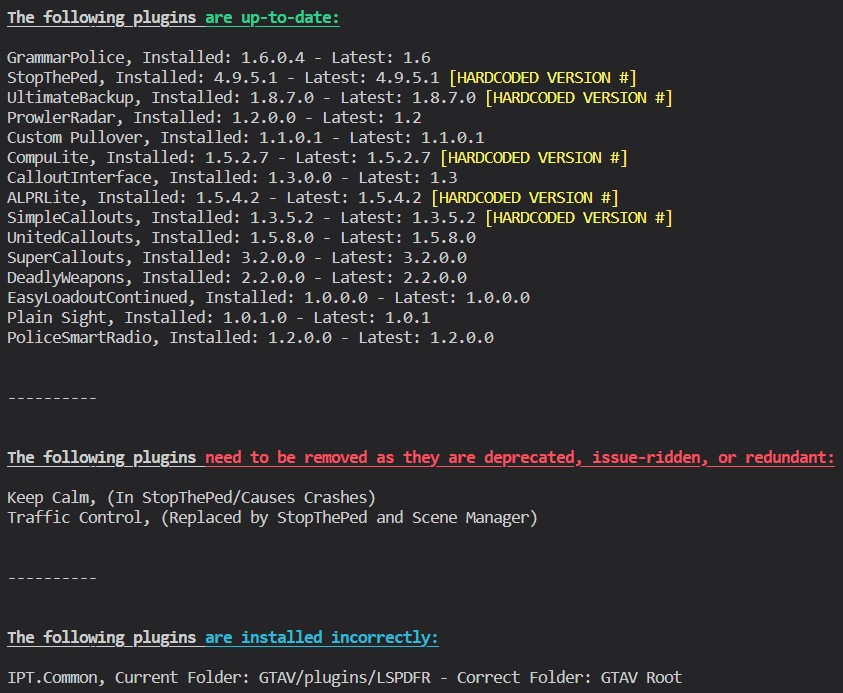
Hmm. Try this: Also: Note about the incorrectly installed plugin: Common files shouldn't go in your plugins folder. They should be in your main GTAV game folder. Make sure you install the file I linked above accordingly.
-
Yeaaa unfortunately you might have to. Try messing around with the metas/models you changed once more though. Maybe you can get it fixed without the extra hassle.
-
Yea this is crashing right as LSPDFR loads. Not sure if you've tried renaming your mods folder to "_mods" yet? Don't think it'll help but worth a shot.
-
Try updating RNUI. Download this zip, open it, then drop RAGENativeUI.dll into your root GTAV folder. https://github.com/alexguirre/RAGENativeUI/releases/download/1.9/RAGENativeUI.zip

-
Please send the RAGEPluginHook.log file located in your GTAV game folder.
-
Please send the RAGEPluginHook.log file located in your GTAV game folder.



