




brenden.iannetta
Members
-
Joined
-
Last visited
Everything posted by brenden.iannetta
-
Can you approach the car and press "G" or "E"?
-
... What? You've determined it's not working by determining that it's working?
-
-
Right click the one you downloaded, click "Open With", then find OpenIV in the popup. You may need to expand it. If you can't find it, click "Look for Another App On This PC" or something along the lines, then navigate to C:\Users\<YOURNAME>\AppData\Local\New Technology Studio\Apps\OpenIV (or wherever your OpenIV is installed), and click "OpenIV.exe".
-
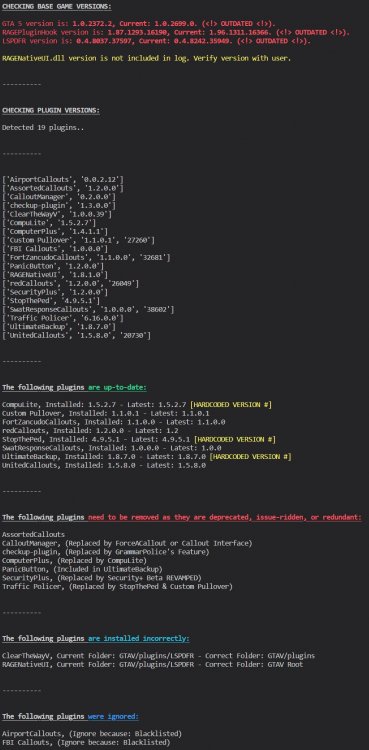
Well I'm 99% sure that you've pirated GTA. As of today, the game is literally $15 on Steam. If on the very slight chance that you do have a legal copy of GTA, update it, as well as LSPDFR as yours is extremely outdated. Follow everything in the screenshot.
-
And how have you determined that they aren't working?
-
This log indicates you were playing for an hour. If your game crashes again, send the RAGEPluginHook.log file from your GTAV root folder, not your logs folder.
-
You have a very, very old RAGENativeUI.dll. Download the zip from the following link, open it, then drag RAGENativeUI.dll into your root GTAV folder. Also please send the RAGEPluginHook.log file from your root GTAV folder.
-
You've found the issue yourself, unfortunately it's probably the worst outcome. There is an issue somewhere in your mods folder. You need to sort through it & possibly remake the folder. Crash reports don't show the root cause for these crashes.
-
I'd recommend installing these plugins: https://www.bejoijo.com/ There are heaps of tutorials on YouTube that can help if you're stuck. Also try holding down "E" when someone is at gunpoint. This should solve one of your issues.
-
If this doesn't happen often then you can ignore it, otherwise remove the following plugin. OfficerPorciPlugin (RadioRealismFR) caused this, and it's a known bug.
-
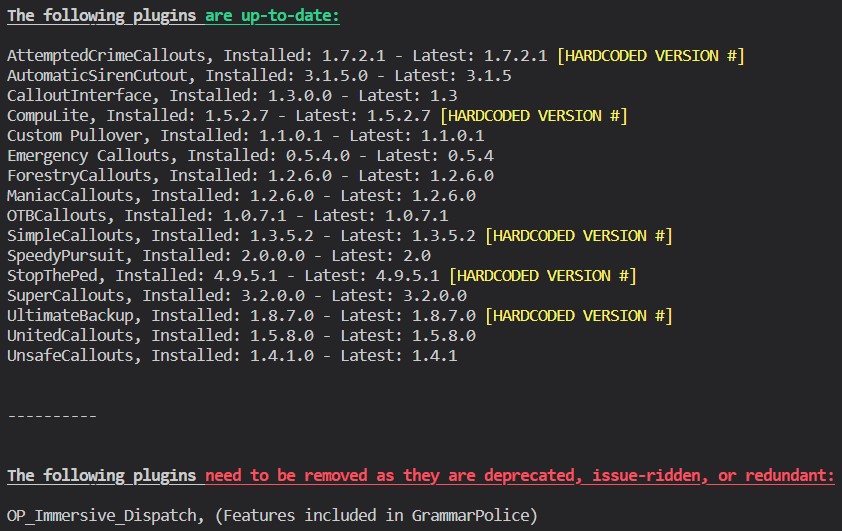
Follow this:
-
https://www.microsoft.com/en-ca/download/details.aspx?id=26999 Did you try Googling that package? This is the first result.
-
Please send a photo of GTAV/plugins and GTAV/plugins/LSPDFR.
-
Try disabling any overlays like GeForce Experience and Discord. After this, open normal GTAV, then launch RAGE when the main menu pops up.
-
Nope. Try renaming your mods folder to "_mods". Also make sure to send the RAGEPluginHook.log from your root folder, not your "logs" folder.
-
This is a pretty well known issue on here. We are waiting on a fix.
-
This is a known issue in OfficerPorciPlugin. Just remove it for now if its causing constant crashes.
-
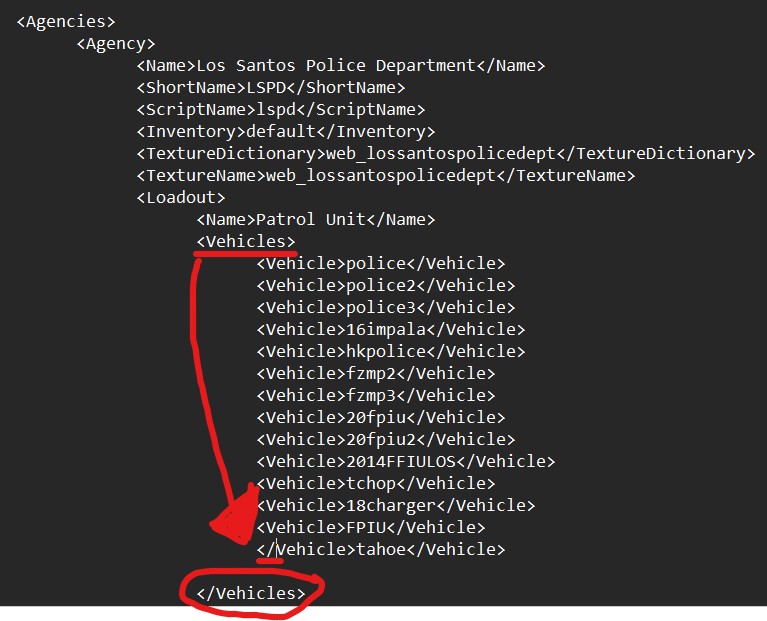
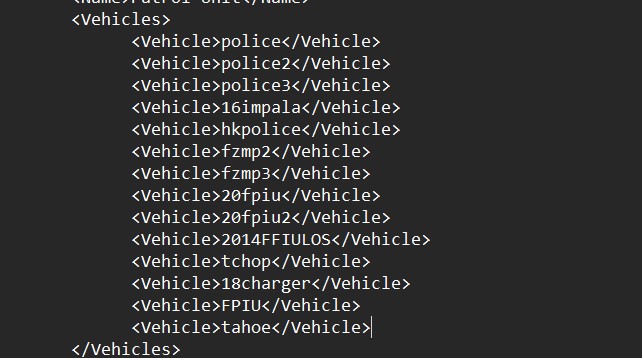
Try reading the error before you post here. This error was perfectly explained in the log... Yours looks like this: It is supposed to look like this:

-
What does "not working" mean? Is it crashing? If so please send the RAGEPluginHook.log file from your GTAV root.
-
This is not a plugin issue. You have edited an XML, presumably in "FirstLSPDFRPlugin" which has a bad value somewhere. Exception message: The 'Vehicle' start tag on line 648 position 7 does not match the end tag of 'Vehicles'. Line 649, position 7.
-
Try removing redCallouts. Also please send the RAGEPluginHook.log file from your GTAV root, not the one from your logs folder.
-
This looks like a clear cut tint issue to me. Open any trainer of your choice, then find vehicle tint. Should be under Menyoo customs or something if you are using Menyoo. Just set it to "Stock".
-
Weird. Out of curiosity, try downloading the older version of ELS and using the AdvancedHook from that.
-
This is just a root issue with SHVDOTNET. Your game/computer doesn't like it, and it won't work no matter what you do. https://github.com/crosire/scripthookvdotnet/issues/976





