


trewq34
Members
-
Joined
-
Last visited
Everything posted by trewq34
-
-
We're not being stubborn. Some of us work on the models to improve them, my Explorer, it's a lot better than it was when I released it all those months ago. Mostly to do with me sitting there for ages, working on it, not releasing much. I can't speak for all modders, but that's what I do with models that aren't quite perfect. I play with them (-_-).
-
Well don't. Simply don't. Spend more time on it, get to know your model, sleep on it to decide different lighting or equipment. You might not like something one day, but the next it might be your favourite. It's quite bad that you're producing these in 45 mins. Try a bit longer and you might be able to improve your skills ;)
-
I'm not 100% sure, but it could be to do with the fact that you might not be on patch 1.0.4.0.
-
You would need to edit the carcols.dat file located in You GTA Directory/common/data/
-
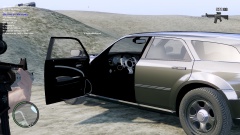 They don't come with that texture from Evermotion do they?
 -
Just use the already existing black, grey and/or brown peds and re-texture them to other colours
-
It needs the old Dodge Charger interior. It doesn't look right with a 2011-current interior and an SRT at that. I do however, love that wheel texture!
-
You have extras which go past 9. This isn't supported by the game's engine. ELS only makes use of the game's 1-9 extras. You have to attach them together rather than make a new extra for every light there is on the car.
-
I love the idea and just adore the attempt, I don't know whether or not to make that my wallpaper :P. I'll edit this post soon with my attempt...
-
Haha, I'm honored that you want it for my Explorer :P. I'll probably end up doing a RCMP model (as in with a FS Legend etc).
-
What mods are you using? Are you playing with a legal copy of the game? Could you send a screenshot of your game directory please?
-
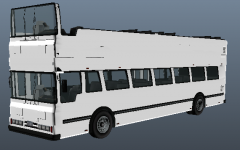 Nice work! I see one of these pretty much everyday in the summer. Hopefully you release it! :)
 -
Thanks, and that looks awesome. Keep up the great work! I'm trying to say this in the least pressurizing way possible: do you have an ETA on it?
-
I love it, but I would prefer to see some ELS before I make a "proper" decision.
-
I can't say for sure sorry. The ENBs I use are private. Just check the downloads section on here or on http://www.gta4-mods.com/
-
I have 512MB and it runs fine. Make a backup of your current game and put in an ENB. If it doesn't work well, just delete the ENB version.
-
That's some odd terminology... Anyway, it's hard to say but I highly doubt it'll be able to run GTA how it does at the moment. You graphics card seems to be integrated (which is normal for laptops) and integrated cards don't seem to perform as well as dedicated graphics cards. We'd need your dedicated graphics memory in order to say whether or not it'll run well.
-
trewq34 18/02/2014 ______________________________________________________________________________________________ IMPORTANT!!! MAKE SURE TO BACKUP FILES!!! ______________________________________________________________________________________________ MODEL OVERVIEW - NAME: Setina PB-450L - EXTRA PARTS: LEDs - OPTIMIZED FOR: Dodge Charger - MOD STATUS: Closed ______________________________________________________________________________________________ CREDITS [DEV]setinapb_charger (Setina PB-450L) - Setina PB-450L created by Turn 10 Studios. Converted to GTA IV by trewq34. - Textures by trewq34 and Ridgerunner. ______________________________________________________________________________________________ NOTES FROM AUTHOR This model is provided to you unlocked. Please credit properly and don't credit yourself for minor changes. So for example you move a vertice doesn't mean you "heavily modified" this part. It fades away the original author(s) and makes it look like all work has been done by you. The LEDs on this psuhbar need to be ELS mapped. It is assumed (by downloading) that you know how to map ELS. ______________________________________________________________________________________________ THIS MOD IS LICENSED UNDER A CREATIVE COMMONS ATTRIBUTION NON-COMMERCIAL 4.0 INTERNATIONAL (CC BY-NC 4.0). FAILURE TO COMPLY WILL RESULT IN PUNISHMENT. NO ONE MENTIONED IN THIS README IS RESPONSIBLE FOR DAMAGE TO YOUR GAME. BY DOWNLOADING YOU AGREE TO ABIDE BY THE LICENSE TERMS
- 4 comments
- 2 reviews
-
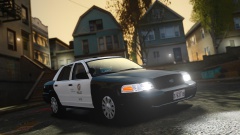 What ENB did you use for that pic?
 -
That looks pretty realistic. My new Desktop background. Thanks :D
-
First, learn to convert cars from GTA SA to IV. That way, you'll learn the basic skill of conversion: http://www.youtube.com/watch?v=2ez2yvfY21Q http://www.youtube.com/watch?v=Ursq2to-IWM Once you've watched the tutorial(s) you should be good to go (provided that you've converted a few GTA SA cars.) The reason it's often better to start with GTA SA cars is because they're a lot easier to convert. Forza cars are slightly more difficult and NFS cars are a lot more difficult. Try combining this tutorial with the above onces (for Forza cars): http://www.youtube.com/watch?v=FjdnE6WlAIU There are currently no tutorials for converting cars from NFS to the GTA series as it stands; you'll have to learn by yourself. With NFS cars, you'll often have to remap a lot of stuff as the rips don't keep the textures mapped for some odd reason; however, other car rips (from other games) do keep their textures mapped. I also recommend you take a look at Harper's tutorial (found in the tutorials section). It more so shows how the hierarchy should be setup and rather the extreme basics of converting. I hope I helped and if you'd like more info, just quote me and I'd be more than happy to help (please don't PM me). I just don't have the time to show you how to convert and I don't think that would be necessary, seeing the amount of tutorials on YouTube. EDIT: P.S. It does take a lot of time to convert cars; it's not an overnight skill. Don't get pissed off if you don't get the hang of it: try another car and don't forget to listen to some music!
-
http://www.youtube.com/watch?v=N9j0d6mLAL4
-
As it stands there are none: due to the distinct lack of base models.
-
I suggest you contact the dealer. It seems a bit dodgy at the moment and seems as if you got ripped off :(

