


Break
Members
-
Joined
-
Last visited
Everything posted by Break
-
I always thought what you described, NB, is the court house. The big thing with pillars and a huge staircase on a triangular property with securities.
-
There's no other way other than doing it through the tutorials you've read, you have to use zmod and you have to have a certain modelling skill.
-
I use OpenIV for everything except exporting/importing sounds. Being able to view models without starting the game and being able to drag'n'drop is just god tier. And don't get me started on the UI, which perfectly fits into Windows 7. If now only it made viewing liveries on models possible, I'd adore the creators of OpenIV forever. And SparkIV, well, I only use that for mods that require you to rebuild archives and soundmods.
-
Your ignorance is making me and a lot of people sick. It had to be said. There you go.
-
Just use the installer.
-
Nothing to see here! This topic has been closed by G17 Media staff. If you feel that this topic has been closed in error, please report this post.
-
Some people find it hard to read. (not only what DavidFortsch posted, but also the community guidelines.)
-
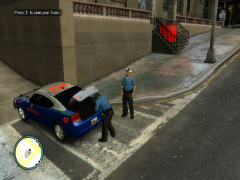 Nice skin, maybe the metallic noise is a bit too extreme though.
 -
To use the taser you need to leave the box checked while installing, then ingame press ALT+T twice. DashCam has an installer you can download from our downloads section.
-
Isn't that good for recording gameplay. Maybe try WeGame or XFire?
-
Sorry man, I don't really have time. I suggest you go to gta4-mods.com and browse around a bit in the Miscellaneous section until you find something you like.
-
As NB said, it's good to learn it. there's a great tutorial explaining you the basics. Then, we've also got which would save you painting the car and just reduce your work to writing the text on it.
-
Nah, I'm not good with ENB. Make sure you actually replaced the timecyc.dat and visualsettings.dat
-
Just needs a skin and an edit to the lightbar glass. Both can be done with picture editing programs.
-
Open the rar and read the readme. Every ENB is different, so you have the best chances of getting it to work by reading the installation instructions by the author.
-
If you have EFLC, you need to copy the contents of the rar to EFLC/TBoGT or EFLC/TLAD aswell, for it to work.
-
-
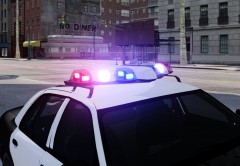 @Dhruv: Las Vegas Metropolitan Police Department (LVMPD)
 -
-
KevinDV has a similar one on his new E150 Van. You should ask him about it. EDIT: Yup, it's an Aerodynic.
-
Are you using ENB?
-
@Big96: It was released on GPM, he migrated to LCPDFR and took his mods with him.
- 9 comments
- 2 reviews
-
-
Nothing to see here! This topic has been closed by G17 Media staff. If you feel that this topic has been closed in error, please report this post.
-
Following that logic, you should be killed for demanding him being killed and it would be justified.


