




CouthInk4
Members
-
Joined
-
Last visited
Everything posted by CouthInk4
-
I have way too many shows that are my favourite to count, Although my top 3 shows right now are: 1. The Walking Dead 2. Blue Bloods 3. CSI (mainly Las Vegas but that has now ended so i guess Cyber takes it's place) I could list heaps more throughout the years of watching TV series, but it'll take far too long, so that is the top 3 shows i'm currently watching/enjoying
-
Honestly, it's 10x better than LCPDFR. however since LSPDFR is in it's beta stage, the only callouts are pursuits but download API integrated plugins will give you more callouts. with GTA IV you crash every 10-15 minutes, you probably encounter 2 crashes a week with LSPDFR (and 99% of the time it's not LSPDFR related). So i'm saying definitely buy it because it's worth it, even if it's in beta it's still more stable,fun and better than LCPDFR, and to be honest. it's only going to get better the devs will take this places LCPDFR couldn't go.
-
I can't explain the seculauncher problem, but i can explain the crashing.. It's alllllll your mods, GTA IV was poorly optimized for PC so putting mods in it is going to make it even more unstable, especially when it's high-poly car mods. Limit the amount of mods you have, it won't fix the crashing so it's gone for good, but it will reduce the amount of times you crash.
-
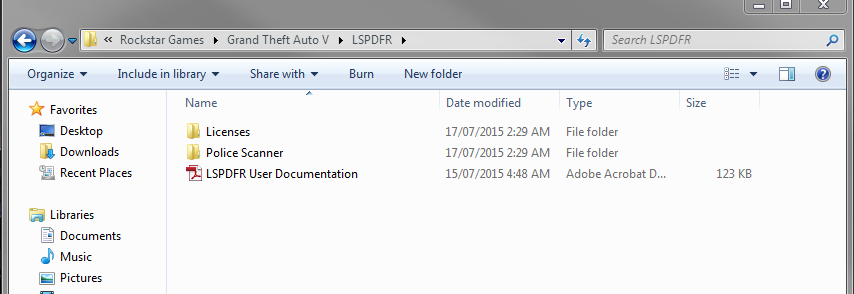
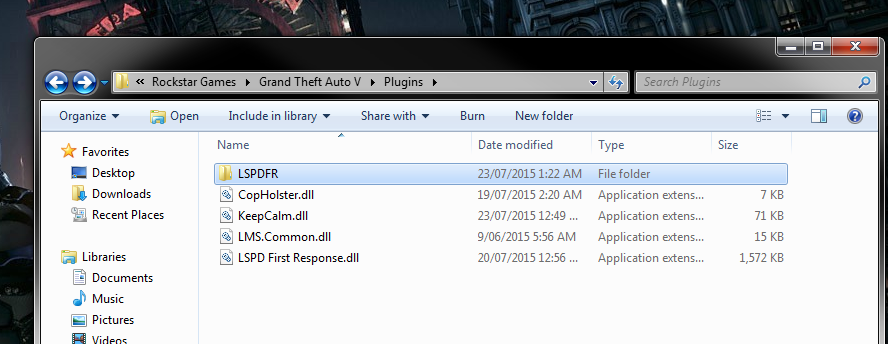
the LSPDFR in the main directory contains all the audio files and what not, the LSPDFR in the plugin folder is where your callouts/plugins go. Rockstar Games - Grand Theft Auto V - LSPDFR should look like picture 1 Rockstar Games - Grand Theft Auto V - Plugins should look like picture 2 If you're still unsure, then you should re-install GTA V and read the readme files of the mods before installing them because it has instructions on how to install them =)
-
It's a nice trailer, however i don't think it'll be official, mainly because LCPDFR has come to an end and the development team are focused on LSPDFR, also you're using real cars/mods (like the LASD and NYPD/LCPD Crown Vic) when third-party mods (like vehicle mods) aren't supported. nether the less, it's a pretty cool video/trailer =)
-
Also guys, try to pre-plan your download. it might be that there is heaps of other people trying to download the mod(s) at the same time which can put strain on the sites bandwidth, So try to download the mods when there is either not many people on the site or when a countries timezone is well, sleeping. So for example i'm in Australia, i'll most likely have problems downloading the mod(s) during the evening/night time because both European countries and America is beginning their day and they'll be online, and will most likely be able to download during the day in Australia because it'll be quiet. like ineseri stated, if you can't download it at that time, leave it for a bit and come back later to try =) I do hope you can all download LSPDFR very soon because it's truly awesome!
-
Download and install these. http://www.microsoft.com/en-us/download/details.aspx?id=30653 http://www.microsoft.com/en-us/download/details.aspx?id=30679 (please only download and install the x86 one) http://www.microsoft.com/en-us/download/details.aspx?id=5555 http://www.microsoft.com/en-us/download/details.aspx?id=35 If that doesn't work, then have a look through the Knowledgebase and see if you kind find a solution (i know that there have been a few people with this problem throughout the release of LCPDFR)
-
This is most likely a technical fault on their end as i've also just tried downloading LSPDFR and it's given me the same error, it seems that this error has started occurring when Cyan implementing the CAPTCHA software. Since the last time i downloaded LSPDFR 0.2a it wasn't linked with CAPTCHA.
-
I have no idea what you're talking about, i see no contradiction in my post
-
You can't just check the persons id and walk up to their vehicle without it telling you too? Are you able to upload your LCPDFR logs so we can see if the issue is listed?
-
Cyan has stated that it's running poorly because of the bandwidth, just keep trying every so often (preferably when there isn't heaps of people online) to access to downloads section, it's a pain but right now there isn't much anyone can do at the moment. GTA V + Newly released/anticipated PC mods = a lot of traffic. Cyan is working on fixing this issue though =)
-
Well if you have ELS and other script mods along with LCPDFR it'll cause crashing. FYI if you're not using car mods, then you don't need ELS.
-
You said you had LCPDFR, ELS and some scripts in your original post.
-
TheChef is right, GTA IV is veeeery unstable when mods are added. Especially car mods that are ELS enabled, there is no real fix to a crash-free game because GTA IV itself was optimized poorly and is unstable in it's vanilla state, so adding mods will make it worse. What you can do however is limit the amount of mods you have (when i played i only had 3-4 ELS car mods that were low-poly) and limit your scripts. Unfortunately crashing is something that isn't avoidable. =(
-
Sadly right now that won't change, the peds were made stronger so they weren't killed by tasers. Although the Pursuit of Armed Suspects call can easily be handled by NOoSE Air Support =)
-
Will definitely be downloading when you release it. it sounds pretty awesome =)
-
There is already divisions in LSPDFR i guess, Patrol,Highway,SWAT, Detectives (if you add the mod) and a Pilot ped is available in the ped selection of LSPDFR. You could also use the detective for a Gangs division and "patrol" the gang area. there is also a callout plugin which introduces a gang related callout. Official Divisions would be good, Choose character - choose car - choose division and you get callouts based on that division. that'll be a good feature to be honest =)
-
I believe that is an issue with GTA V itself, and not LSPDFR. most likely because they remove vehicles to make room to add more vehicles in traffic. Although the devs made it so your patrol car wouldn't disappear when you get far away or look away from it so they could change the way AI cars appear/disappear in future releases.
-
Oh awesome! Don't worry about if you can't do it, I just like little details like that. the callouts themselves is more than enough to make me happy with the mod =)
-
Oh i really hope this gets somewhere. it sounds amazing! =) Also, if it's not too much would you be able to do what LukeD has done and be able to add an officer name to the writing/broadcast of the callout? just a small feature so we can have a custom officer name/unit. like: Dispatch: Officer Needs Help in Vinewood accept [insert officer name or callsign] responding to call.
-
Then you're still going to get the same answer as you have on your past 3-4 topics. nobody will help you UNTIL you have a legit copy of GTA IV, people here don't support/nor will they help people who torrent the game.
-
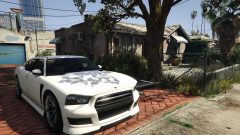 So preeeetty
 -
Still running that cracked version?
-
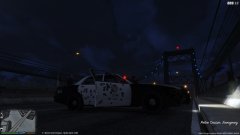
From the album: CouthInk4's LSPDFR Gallery
Like my images? Want to see more? Check out my Steam gallery! - http://steamcommunity.com/id/gamer9762/screenshots/?appid=sc_17540&sort=newestfirst&browsefilter=myfiles&view=imagewall -
 Well i've used your script along with other callout plugins and the only car related ones i've seen are street races (which work fine) and the ambulance escort (which works ok, the ambulance doesn't realize where AI cars are so i highly doubt it's because of your mod). If you need testers then i can do it, i'm available for the next 4-5 hours =)
- 268 comments
- 44 reviews
-
-

- 1
-



