




Iconography
Members
-
Joined
-
Last visited
Everything posted by Iconography
-
The only thing that would cause ELS to flash slowly is a lack of available resources, either your GPU (most likely) or your CPU isn't quite strong enough. The benchmark is a preconfigured scenario, perhaps the benchmark doesn't affect your performance in the same way normal gameplay does. It is hard to tell, though. It sounds like your system is really close to being strong enough to play GTA IV with ELS, but it can't quite pull ELS off. Remember, every time a light flashes on an ELS enabled vehicle, the entire vehicle is reloaded. It is doing this very quickly (or, it wants to). ELS might also slow itself down based on your FPS, but that is only speculation.
-
Just found this: http://mmomfg.com/2011/11/18/gta-v-maps-fake-1118/
-
Are you running the game as an administrator? Right click --> run as admin. That should fix the access denied error.
-
Downgrading to a lower version of GTA IV (I believe that's what you meant) does fix it for some people. The 1.0.7.0 patch causes the game to run like crap on some systems, but high poly car mods only make it worse. I never had any problems with my GTX 560 though, but a lot of people with weaker cards do have texture problems. My old GTX 260 had the same problem. GTA loves to eat up RAM and VRAM. Adding car mods makes this problem exponentially worse. The only real fix is to not use mods, or to get a better system. Other topics already created with this problem: http://www.lcpdfr.com/cops/forum/topic/2037-missing-textures-v091/ http://www.lcpdfr.com/cops/forum/topic/2426-missing-textures-roads-buildings-etc/
-
You either need a better graphics card, or you should follow Harper's advice:
-
It uses the same engine as GTA IV though so it probably would look a lot like a modded GTA IV. It is really hard to tell. I'm going to say fake but only because I want to optimistic and think there might be a larger map :) Even though this is still in development, and if that was a real snapshot it's possible half the map has yet to be implemented yet.
-
There's a period included with the link, remove it in order to see the video. Actual intended link: http://m.youtube.com...user=McBoneRapz EDIT: He linked a mobile version though.
-
Looks like an RPG blowing up some guy near a hot dog stand.
-
No, GTA is incapable of operating with car mods. We've been saying this for months and no one seems to get it yet. Some are 8 times larger than normal cars. The game runs out of allotted memory. If you have more questions, Dorrian, please make your own thread.
-
This thread is four months old. At the time, links weren't working. Don't get in our faces and say we don't "know how to properly link web pages" because they weren't working at the time. EDIT: And Sniper already linked the diagnostic log download in his post.
-
I think he means the mod fails to install? Sounds like installation errors.
-
To be technical, a directory does not mean the main folder. A directory is just another term form "folder" in a sense. The main directory for GTA IV == Main folder for GTA IV. A directory is just another "path" so-to-speak. To be exact, a directory is "A file that consists solely of a set of other files." [/geek] Just to avoid confusion down the line...
-
The Idle Animation mod only uses GTA IV's default animations, it doesn't create any. If the cops in GTA IV already pull weapons from their waste a mod could be created, but if there is no animation for it built in, it would take a lot of work if it was even possible. My two cents.
-
Sounds like a bug, then. If the mod works perfectly except for this.
-
In Liberty City. Being "sadistic" means being a pacifist. So you're normal! :thumbsup:
-
Guys, guys: This is how you handle the homeless (I don't mean to offend anyone.... I just had to post my screenshot. Apologies for large size.
-
Choose a character and press enter. Then you should be able to move.
-
Shouldn't be in support. Not LCPDFR related. Look at gtapolicemods.com.
-
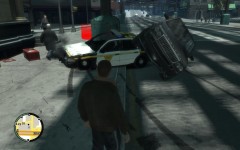 he probably got drunk trying to forget that there was a massive roadblock preventing travel to half of Liberty :P
 -
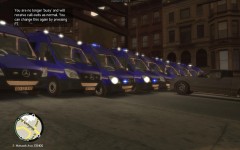 I'll admit, I have never quite seen a roadblock like that before...
 -
Hardcore mode is a mode for players looking for a very challenging experience. Bullets take massive damage, headshots of any type WILL kill you instantly, some blips for pursuits won't show up (so if you lose visual, chances are you won't find your suspect again), and other things like that. Hardcore doesn't (I believe) affect how the AI drive to any significant extent.
-
One of the developers will have to help then... I don't know why it isn't working for you. Sorry EDIT: With regards to starting anew with xlive installed, your savegame folder gets moved to [your documents folder]Rockstar GamesGTA IVsavegames Copy your old savegames into that folder if you want to use xlive and keep your savegames. Original savegame files are in C:UsersYOUR NAMEAppDataLocalRockstar GamesGTA IVsavegames (is a hidden folder)
-
-
Most dsound errors mean you did not run as admin. And, yes, please READ the stickies! How many times must I say it to people?
-
You ran through everything here, correct? Make sure that: You run the LCPDFR installer as an admin Your GTA IV folder is NOT read only. Also make sure your asi loader (dsound or xlive) is not read only. Make sure you have only one of them. GTA IV is set to run as admin (right click on launchgta.exe, hit properties, then go to compatibility and select always run as admin) Ensure you have C++ and .NET (linked before) If those have been followed exactly I'll need to think about this one.


