Skip to content
View in the app

A better way to browse. Learn more.

LCPDFR.com

A full-screen app on your home screen with push notifications, badges and more.

To install this app on iOS and iPadOS
  1. Tap the Share icon in Safari
  2. Scroll the menu and tap Add to Home Screen.
  3. Tap Add in the top-right corner.
To install this app on Android
  1. Tap the 3-dot menu (⋮) in the top-right corner of the browser.
  2. Tap Add to Home screen or Install app.
  3. Confirm by tapping Install.

Code 3 Callouts 1.2.1

(73 reviews)

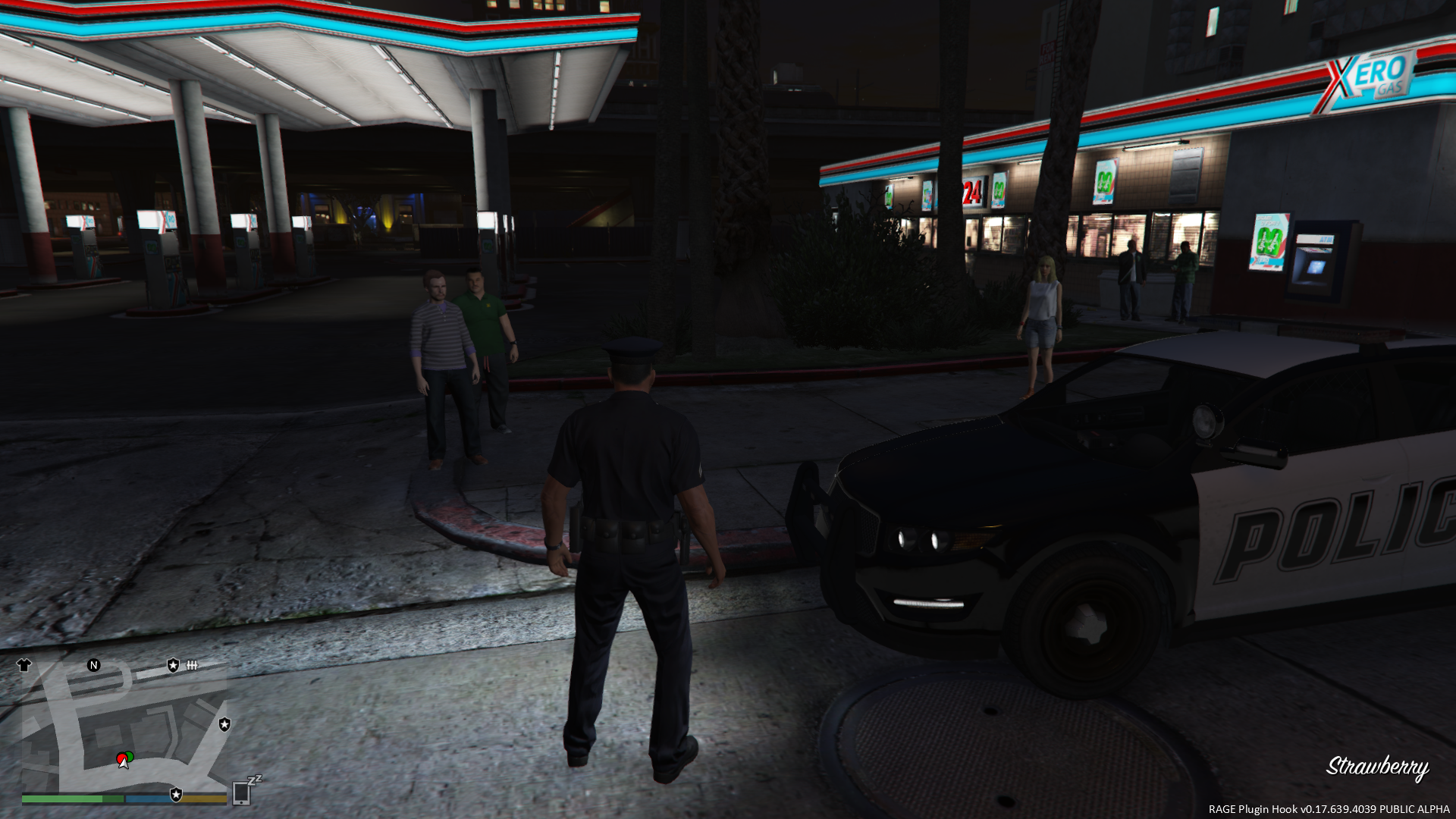
3 Screenshots

Code 3 Callouts
"Attention all units, officer needs assistance. Shots fired. All available units, respond Code 3."

This is a plugin that I have been planning for ever since I started writing scripts for LSPDFR. Now that the LSPDFR API has come out, this idea has now become a reality!

The focus of this plugin is to create a realistic experience where the player needs to do some actual police work. Police work is not always about flicking on the lights and sirens and flying down the road at 100 MPH. Nor is it always about pulling out an AR-15 and emptying a clip on a suspect.

In fact, most of the time, police work is all about dealing with people. Hearing both sides of the story. Figure out who is lying, and who isn't. Sometimes you have a helping hand when you have an eyewitness, and sometimes not. Or sometimes you will get eyewitnesses who contradict one another. Bob says the bank robber's car was blue. Jane says the car was red. Turns out, Jane was on her cell phone, and wasn't paying attention. Oh, and Bob was in the bathroom, so he didn't actually see anything. You later find out that the car was actually green.

The first version has four different callout scenarios. Each will have their own degree of variation, so you will not have exactly the same situation every single time!

Code 3 Callouts is designed to work alongside other callout plugins, to create the most exciting and realistic experience possible.

It is YOUR job to determine what actually happened based on the evidence. Its time for your shift, Officer. Gear up, and move out.

Requirements

  • You MUST have the latest version of Rage Plugin Hook installed, as well as a legal copy of GTA V.
  • YOU MUST HAVE VERSION 0.39 (OR NEWER) OF THE RAGE PLUGIN HOOK!
  • This plugin has been tested on v757.4 of Grand Theft Auto V, but will work with newer versions.
  • You must have at least v0.3.1 of LSPDFR

Features

  • TEN different callout situations, each with their own varying scenarios.
  • Fully integrated dispatch audio, to create a realistic experience.
  • Requires the player to investigate each call, and do some actual police work to determine what ACTUALLY happened. Remember, just because someone called 911 to report something, does not mean that's precisely what happened.
  • Altered suspect behaviour based on the response of the officer
  • NEW - AMBIENT EVENTS!
  • NEW - INTEGRATION WITH LSPDFR COMPUTER+!

Credits

A very special thank you to...

  • @LukeD - Lots of helpful advice, and helping me get comfortable with the API! Plus working together to ensure our callouts can work alongside each other!
  • @FinKone - Same as above, plus testing and showcasing the plugin for me!
  • Erwi - For helping me out with some code issues!
  • @DCP1293, @LtFlash, and @Straysify - Testing earlier versions of Code 3 Callouts for me! Thanks a lot!
  • @Albo1125 - For graciously sharing some of his code with me, helping me out with the CAD popup windows, giving me the idea for the new suspect vehicle search logic, and for helping me testing this version!
  • @JFavignano and @Bayareabuggs - For being my guinea pigs... I MEAN testers, and giving me lots of useful feedback! Both of you have contributed a lot towards the success of this plugin, whether it be testing things for me, or just showcasing the callouts! Your guys' videos gave me lots of ideas for things to fix and improve!! :thumbsup:
  • @Zachary Houseknecht and @Polecat324 - Thanks a lot for showcasing the callouts, and for testing beta versions for me!! I really enjoy watching your videos!
  • @goigle - For giving me the idea of the Assault observation window...which in turn led me to think of the CAD popup idea! Thanks a lot!
  • @MulleDK19, along with all the other dev's on the RPH IRC channel - For being patient, and helping me out with code issues that I had difficulty with, plus testing things out for me!!
     
  • My sincerest apologies if I missed anyone!

Callouts

Most of these callouts are "Code 2" calls, meaning, they do NOT require a "Code 3", or "lights and sirens" response. Part of police work is to actually drive at normal speeds, and obeying traffic laws and red lights while driving to a call!

If you're stuck in a traffic jam, you can use your lights to get yourself through an intersection, and then resume driving normally. But be careful about using the siren...you don't want the suspect to know that you're coming, do you?

See the PDF documentation for more information on all of the callouts included.
 

Future Development

Follow this thread on the forum for future development plans!

http://www.lcpdfr.com/forums/topic/52452-rel-code-3-callouts-add-a-new-layer-of-realism-to-lspdfr-screenshotsvideo-added/ 

What's New in Version 1.2.1

Released

VERSION 1.2.1

  • Fixed a bug that would cause a crash when exiting a house during the Burglary callout
    • Callout can now only respawn one of the default/stock police vehicles; GTA V seems to block spawning of standalone vehicles for some reason
    • Thanks to @Ranger61 for reporting this bug
  • Fixed crash bugs in ambient events...wrapped all ambient events with error checking to ensure it does not happen again
  • Fixed a bug with the configuration logic that would cause the EnableDispatchStatusCheck value to be ignored
    • Thanks to @Thehurk and @Polecat324 for reporting this bug
    • Made the status check interval customizable, in case anyone wants to keep it enabled, but make it happen less often
    • Added an extra prompt when Dispatch calls for the player's status, reminding the player how to open the menu

VERSION 1.2.0

  • Updated Computer+ API reference for Computer+ v1.3.2
    • Computer+ v1.3.2 is now required for police computer integration
  • Fixed a bug where responses to Dispatch (via the shortcut keys) were not being recognized
  • Added more error checking to the 'Carjacking' and 'Stolen Vehicle' ambient events, to prevent crashes
  • If the player's vehicle gets deleted by GTA V during the Burglary call, a replacement vehicle will be spawned in the same spot

VERSION 1.1.0.1

  • Optional update
    • Small bug fix for potential crashing at the start of callouts.
    • Thanks to @ConstableSly for finding it!

VERSION 1.1.0

  • Plugin now requires RPH 0.39 in order to run
     
  • New, simplified automatic install process
     
  • Completely re-done INI configuration file (NOTE: Older INI files are not compatible!!)
    • Allows individual callouts to be disabled
    • Allows nearly all keybinds to be modified
    • Allows certain features to be disabled
       
  • Integration with Traffic Policer (Optional; requires v6.9.5.0+ of Traffic Policer)
     
  • Integration with LSPDFR Computer+ (Optional; requires v1.3.0+ of LSPDFR Computer+)
    • This is a very exciting addition to the LSPDFR world!
    • Callouts dispatched to the player will now be visible in the Computer+ interface!!
      • Even calls the player does not accept!
    • The player can view/read all of the details of the callout before responding, and all information is updated in real time, just like a real police computer!
    • The previous "CAD popup" (opened by CTRL+D) has been removed in favour of Computer+
       
  • Interaction menu
    • You can now observe/question subjects in more callouts (previously was only the Burglary call)
    • The menu now allows you to trigger any of my callouts on demand
    • The menu can now be opened at any time, with limited options available
       
  • [NEW!] Dispatch Status Check!
    • Periodically, Dispatch will call you to ask what your current status is. You can respond via the menu, or the INI file allows you to set up shortcut keys to answer dispatch with. (Two possible answers: "I'm OK", or "Help me!")
    • If you don't answer, Dispatch will assume that you are in trouble, and need immediate assistance!
    • This feature can be disabled via the INI if desired, but it is enabled by default
    • It is recommended that this feature be left on for realism
       
  • [NEW!] New Ambient Events!
    • I have added two new ambient events:
      • Person stealing a vehicle
      • Carjacking
    • NEW FEATURE - Dispatch will now receive a 911 call when an ambient event occurs, and you will hear the call being dispatched over the radio
      • There will not be any notification popups, like a normal callout. You will simply see a red transparent blip appear on your map for a few seconds, telling you the general area where the incident occurred. Its up to you to find the perpetrator, or maybe you got lucky and caught him in the act!
      • This feature is enabled by default, but can be turned off in the INI file (again, its recommended that it be left on)
  • Fixed a bug with the Observe Subject window that would crash LSPDFR
  • Added an 'objective' notification at the start of each callout
     
  • Person With a Firearm callout
    • This callout has been ripped apart, and much of the code has been re-written
    • You will now receive a description of the suspect, and its up to you to find them in a certain area
    • The search area will be updated periodically, just like the "Hit and Run" and "Police Impersonator" callouts
    • The "suspect" may also not be a suspect! (Play this call to find out what this means!)
      • Basically, don't open fire on them right away! You don't know who they might be!
    • This callout was re-done especially for you, @Polecat324! Thanks for the feedback in your video a few weeks ago! I'm sure you'll like this callout much more now!
  • Lastly, I want to apologize...I wanted to make some changes to the Burglary callout, and add some more variation to it. But I didn't get time to do it for this release. Next update, I promise!

User Feedback

Recommended Comments

Stealth22

Friends of LSPDFR Author

Code 3 Callouts DOES require NAudio.dll, however, or else you will not hear any dispatch audio. I am not sure which version of that DLL Luke was using, but if you use the one I included, it should work fine.

If it still causes crashes, try removing it. You won't get any audio though. I'll keep an eye on this as we go along. If too many people have issues, I can look at changing it.

reaperco12

Members

Code 3 Callouts DOES require NAudio.dll, however, or else you will not hear any dispatch audio. I am not sure which version of that DLL Luke was using, but if you use the one I included, it should work fine.

If it still causes crashes, try removing it. You won't get any audio though. I'll keep an eye on this as we go along. If too many people have issues, I can look at changing it.

No what Im referring to is the CALLOUTSV the latest one dosent have an NAUDIO.DLL file the old one did when I installed code 3 callouts I still had the CALLOUTS AUDIO.dll file which was replaced by your one as soon as I started or excepted a call it crashed when I deleted this and did a so called clean install with your audio file I have not had a crash since so maybe there is a conflict if people haven't deleted the audio file from the last calloutv download because the new version dosent have it.

BigDeluxe

Members

im not getting any of your callouts, are u sure Im not supposed to load the plugin manually through rage console? lel


Stealth22

Friends of LSPDFR Author

im not getting any of your callouts, are u sure Im not supposed to load the plugin manually through rage console? lel


Yes, the Rage console will not do it even if you tried. Make sure the Code 3 Callouts.dll, .ini and Code 3 Callouts folder are in the Plugins\LSPDFR directory, not only in the Plugins directory.

If you have other callout mods installed, it may just be a coincidence. Check your RagePluginHook.log file, you should see a line that says something like "[Code 3 Callouts] All callouts registered".

MrFr33

Members

Great mod I had crashes at first when I installed it, it seems to be because I had more call outs v installed I had left the NAUDIO.DLL file from that still in my main directory and with the latest version you don't need this so I deleted everything from all the call out mods except strays call out and installed them 1 by 1 all are working fine and now were as before I only got morecalloutv call outs I get them all now so this maybe an issue for some people that are having crashes the only problem I have now is arresting people dosent seem to be working that great but I don't no if that's an LSPDFR problem.

Seems to have done the trick! I knew it had to be some minor thing.. :thumbsup:

BigDeluxe

Members

Yes, the Rage console will not do it even if you tried. Make sure the Code 3 Callouts.dll, .ini and Code 3 Callouts folder are in the Plugins\LSPDFR directory, not only in the Plugins directory.

If you have other callout mods installed, it may just be a coincidence. Check your RagePluginHook.log file, you should see a line that says something like "[Code 3 Callouts] All callouts registered".

That was the issue, thanks stealth, looking forward to trying it out!

BigDeluxe

Members

(edited)

 just got about 20 mins of playtime with mod only to have it crash on the person with a gun callout, just thought i should report it. if i knew where to get the crash log i would post it too. 


EDIT: NVM I found the rage log, however, i dont think my crash was related to your mod, not sure though, will keep playing and see if it happens again. 

EDIT 2: RAGE LOG 


8919edc19ffac9d9c51bd52245011407.png

I believe that is the relevant information (log stop at bottom "creating assault" with no bug report of why gtav crashed. The game crashed when the "Assault" callout poped up on my screen. I did not even have time to accept it before it crashed. It is also important to highlight that there was noticeable frame stuttering for about two or so minutes before this crash occurred. 

EDIT 3:  


http://i.gyazo.com/22b9dca1d209e9908a16d8fab1287ce8.png 

This time, upon loading into the game with LSPDFR, I did not load any additional plugins through the console. I was able to complete an "intoxicated person" callout and then attempted to complete a "person with gun" callout. Upon arriving at the scene for the "person with gun" callout, I got a notification from the rage console saying that LSPDFR had crashed. The log is in the spoiler. After that I reloaded  LSPDFR through the rage console and kept playing. 

EDIT 4: 

After replacing the naudio file just in case, I am having no crashes with the mod. I have been able to complete multiple callouts. However, I have not been running any other plugin mods with this mod simulataneously, I am about to try the ones I use one by one to see if any end up causing errors along the line of LSPDFR crashing or, as it was orignally, GTAV.exe. Ill comment again if I find a possible compatibility issues, thanks for everything Stealth, great work :).  

Edited by BigDeluxe

Stealth22

Friends of LSPDFR Author

I believe that is the relevant information (log stop at bottom "creating assault" with no bug report of why gtav crashed. The game crashed when the "Assault" callout poped up on my screen. I did not even have time to accept it before it crashed. It is also important to highlight that there was noticeable frame stuttering for about two or so minutes before this crash occurred. 

Ensure that both the Stealth.Common.dll and NAudio.dll files are in your MAIN/ROOT GTA folder. (Same folder as GTAV.exe and RagePluginHook.exe)

If NAudio.dll is already there, ensure that its the one included with Code 3 Callouts. If you have an older version of LukeD's callouts with this file, you will need to overwrite it. I think he was using an older version of NAudio.dll that isn't compatible with Code 3 Callouts. reaperco12 had the same issue, and this fixed his copy of the game from crashing.

BigDeluxe

Members

Ensure that both the Stealth.Common.dll and NAudio.dll files are in your MAIN/ROOT GTA folder. (Same folder as GTAV.exe and RagePluginHook.exe)

If NAudio.dll is already there, ensure that its the one included with Code 3 Callouts. If you have an older version of LukeD's callouts with this file, you will need to overwrite it. I think he was using an older version of NAudio.dll that isn't compatible with Code 3 Callouts. reaperco12 had the same issue, and this fixed his copy of the game from crashing.

I just replaced the naudio that was there with the one from the code3 callouts files. However, I believe I already had that one anyways, but I replaced just to be sure. Going to try it out again. 

vynlthrash

Members

its a magazine not a clip!!!!!

BigDeluxe

Members

(edited)

My GTAV.exe crashed again when the "assault" callout was created. This was roughly 3 minutes after I had loaded your "keep calm" plugin through the rage console. Prior to that, the game performance had been fine.

EDIT: I remember I was using keep calm 0.5.0, upgrading to 0.5.1, will see if I get the same result. 


EDIT 2: Callouts 3 still crashes spontaneously without any additional plugins running. Any idea why? Its always when a callout 3 callout appears or is accepted...

Edited by BigDeluxe

Kilyin

Members

(edited)

For those of you experiencing crashing issues, we need to have a lot more information to even begin to diagnose what the problem is.

There is really nothing in this plugin that would inherently cause the game to crash. I have not seen any crashes in my testing, and nothing has been reported by anyone who beta tested the plugin for me either.

As a first step, ensure that you're running the most up to date version of GTA V and RPH. Secondly, you'll need to upload your RagePluginHook.log file to pastebin.com, and post the pastebin link here. Otherwise, there is no way to tell what's wrong.

Thanks!

I would, but nothing meaningful is being logged into RagePluginHook.log. I click Story Mode, it tries to enter the game, and then it drops me to the desktop.

I am running 0.2a, latest version of GTA 5, and the latest RPH (4077 ALPHA).

Edited by Kilyin

Andyv81

Members

so I did all the readme said and I can get not one callout the rage hook did not even load it. I have the latest rage hook and all.just like it needed is there something I am doing wrong or am I the only one this has happened too.

BigDeluxe

Members

so I did all the readme said and I can get not one callout the rage hook did not even load it. I have the latest rage hook and all.just like it needed is there something I am doing wrong or am I the only one this has happened too.

it happened to me too, make sure that u put the callouts 3 files in the LSPDFR/Plugin folder. So go to the LSPDFR folder in ur directory and in that folder there is a plugin folder. It is not the plugin folder that is in the root directory. This was what I was doing wrong and stealth told me how to fix, hope that helps. 

Andyv81

Members

it happened to me too, make sure that u put the callouts 3 files in the LSPDFR/Plugin folder. So go to the LSPDFR folder in ur directory and in that folder there is a plugin folder. It is not the plugin folder that is in the root directory. This was what I was doing wrong and stealth told me how to fix, hope that helps. 

so does it have to be on both plugin files the one in the main root and the lspdfr plugin file. cause I put it in the file you told me and I still got nothing all the other call out loaded but not code 3.

Kilyin

Members

(edited)

Ensure that both the Stealth.Common.dll and NAudio.dll files are in your MAIN/ROOT GTA folder. (Same folder as GTAV.exe and RagePluginHook.exe)

If NAudio.dll is already there, ensure that its the one included with Code 3 Callouts. If you have an older version of LukeD's callouts with this file, you will need to overwrite it. I think he was using an older version of NAudio.dll that isn't compatible with Code 3 Callouts. reaperco12 had the same issue, and this fixed his copy of the game from crashing.

I was going to post a clean RPH log and then post one after the crash to desktop with your plugin installed... even though I wasn't seeing any errors or exceptions in the log. I reinstalled your mod the exact same way that I have at least 10 times previously, and now it works. So, I got nothin.

I will say that LukeD's CalloutsV, Straysify's Callouts, and your callouts mod running in conjunction provides a pretty rich experience in LSPDFR. Looking forward to these mods evolving even more. 

Sorry I wasn't able to pinpoint the problem I was having, just glad it all works now.

Edited by Kilyin

BigDeluxe

Members

(edited)

Mine works FINALLY with issues. There is a 50/50 chance that if you have to kill an assault suspect the body will never de spawn and there will forever be a red blip on ur map from them, even after ending the callout. Also, every single altercation with a drunk person is forced to end with them or u dead because they all have knives and are master knife ninjas and instantly assault u and kill u in under two seconds if u get close , and, there is no way to communicate with them like with assaults. Just because someone is drunk should not mean you have to shoot them or even arrest them, there needs to be some reason (i.e. they are unruly and threatening people, they assault someone and they want to press charges..etc etc...).  The person with gun callouts also need some variety, and as they are now, are just to easy. you literally just roll up to the big yellow dot on the map and are typically forced to shoot and kill them. If they surrender they are a 100% guaranteed to be a bugged ped that just stands there and does nothing and u have to shoot them anyway. 

Edited by BigDeluxe

Andyv81

Members

it happened to me too, make sure that u put the callouts 3 files in the LSPDFR/Plugin folder. So go to the LSPDFR folder in ur directory and in that folder there is a plugin folder. It is not the plugin folder that is in the root directory. This was what I was doing wrong and stealth told me how to fix, hope that helps. 

ok so I was looking in the file folder and I don't even have a plugin folder in the LSPDFR do I have to make one or something. I mean I can get this mod or the morecallout mod to work I have to be doing something wrong. I have not had this problem like this with a mod before call V and stray works just fine with no problems. Maybe the author of the mod will see this and give me a hand so I can rock this mod OUT!!!!!!! Lol.

Kilyin

Members

(edited)

ok so I was looking in the file folder and I don't even have a plugin folder in the LSPDFR do I have to make one or something. I mean I can get this mod or the morecallout mod to work I have to be doing something wrong. I have not had this problem like this with a mod before call V and stray works just fine with no problems. Maybe the author of the mod will see this and give me a hand so I can rock this mod OUT!!!!!!! Lol.

Only thing you need in the Grand Theft Auto V\LSPDFR folder is a subfolder called Police Scanner.

EDIT: This mod doesn't even utilize the LSPDFR folder off the GTAV root. Only LukeD and Straysify's callout use those.

Edited by Kilyin

reaperco12

Members

For anyone that had or has calloutV installed make sure you upgrade to the latest version then go in your main GTAV directory and delete NAUDIO.dll then go in to code 3 call outs and drag and drop NAUDIO.dll in to gta main directory I had problems crashing when I first dl the mod and it was because the code 3 mod replaced the NAUDIO.dll that was alreay ther from calloutV which is no longer need if you upgrade to the new version so try this:

DELETE N.AUDIO.DLL FROM MAIN DIRECTORY GTAV

UPDATE THE LIKES OF CALLOUTV IF NOT ALREADY DONE SO

THEN EITHER DRAG AND DROP N.AUDIO.DLL FORM CODE 3 INTO MAIN GTAV DIRECTORY IF SATISFIED WITH YOUR INSTALTION WAS DONE AS STATED

Stealth22

Friends of LSPDFR Author

ok so I was looking in the file folder and I don't even have a plugin folder in the LSPDFR do I have to make one or something. I mean I can get this mod or the morecallout mod to work I have to be doing something wrong. I have not had this problem like this with a mod before call V and stray works just fine with no problems. Maybe the author of the mod will see this and give me a hand so I can rock this mod OUT!!!!!!! Lol.

Stealth.Common.dll and NAudio.dll go in the main GTA V folder. 

Code 3 Callouts.dll, .ini, and the Code 3 Callouts folder go in GTA V\Plugins\LSPDFR. 

Andyv81

Members

Stealth.Common.dll and NAudio.dll go in the main GTA V folder. 

Code 3 Callouts.dll, .ini, and the Code 3 Callouts folder go in GTA V\Plugins\LSPDFR. 

ok well I got the mod to work but does not seem to run the other callout mods. You said you need to update to the latest Luke D and there is only one more callouts so does it run with the other ones or no.

Pumpk1in

Members

Hi, Am I the only one who have this problem ?

If I use the tazer (not tried with the gun, but maybe the same) on a suspect pulling out his gun/knife, I'm not able to arrest him after that. He will remain in front of me, and the arrest key will never work. The last time it happend was on an intoxicated person callout.


Thanks :)

Stealth22

Friends of LSPDFR Author

That is an LSPDFR wide issue

SMB287A

Members

i uses the calloutv (the newest version), strays callouts, simple callouts and the code 3 callout. Whenever I conduct a traffic stop it freezes and crashes. Any Solution?

The logfile is provided below

Thanks!

RagePluginHook.log

Create an account or sign in to comment

Latest Mods

Account

Navigation

Search

Search

Configure browser push notifications

Chrome (Android)
  1. Tap the lock icon next to the address bar.
  2. Tap Permissions → Notifications.
  3. Adjust your preference.
Chrome (Desktop)
  1. Click the padlock icon in the address bar.
  2. Select Site settings.
  3. Find Notifications and adjust your preference.