


.thumb.png.12e24e3824a30d391ca979008be21f18.png)
.png.a846020fbb8b7040628cb23a3a5dfc33.png)
.png.ee00c9fa94547ff289bb7247221eade6.png)
.png.17f516e64586eeff36c75a8c9b9709d8.png)
.png.d9a35f1aafda590ce0341dd78aae6c1f.png)
.png.598fba069a4d5f82b325baaecb7c7075.png)
.png.a1b9b76ce70586ce35522b3b212c81d2.png)
.png.03fa8f087a6ef1d1676d1f6960204ec8.png)
.png.3f105314a3b9cbdb65d234e3efa92688.png)
.png.cafa6c77ec52f07c1f4d6993f2f5c355.png)
.png.87e917a1946d30a54915a4d6155a603b.png)
.png.66ce0e92f8ba1a83ea00d74c8dab8741.png)
.png.9fa5ebbd32f499b0f52b76e543f1651e.png)

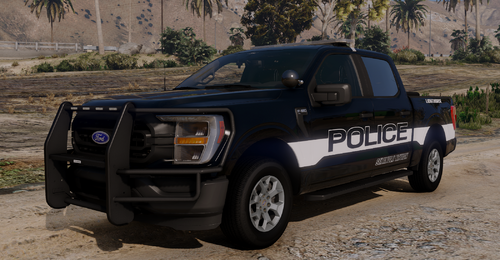
vysr's Liberty County, FL Livery Pack (2016 Impala, 2016 FPIU, 2018 Tahoe, 2019 F150, 2019 FPIU, 2020 FPIU, 2023 Tahoe). DO NOT Re upload or claim as your own.
Free use anywhere, please add link if using for videos/images.
Liveries work on GeorgieMoon's 2016-2019 FPIU, 2018-2020 Tahoe, 2018-2020 F150, and 2020 FPIU models. There is also a section for the Orange County DLC Pack that pairs perfect with this livery pack, that uses the2023 tahoe and 2016 impala.
Specifically This Pack:
How to navigate file: Liveries are separated between Lore (Los Santos County) and Non-Lore (Liberty County). In both of those files is extra files that says Orange DLC Fit (pairs with Orange County Sheriff Pack) and GeorgieMoon Fit (fits on all GeorgieMoon based models). In each, you will find the liveries that fit and match with what your using.
Additionally, there is a lore-friendly version for Los Santos County in the files.
Reference Image below
Constructive criticism is always appreciated. I try to make all my liveries as accurate as possible, including this one. If there are any mistakes, feel free to comment on it, helps me improve. There is not a lot of love for these smaller police departments on LSPDFR, especially for the not so known counties, so I plan to make more liveries for small cities/ liveries not on LSPDFR. I am staying Florida based because why not. Will gladly take requests! Thanks again.
-vysr
.thumb.png.dccf15f9df137bb165ef37b02778e125.png "Could contain: vehicle, land vehicle, sky, wheel, outdoor, transport, tire, auto part, road, truck, emergency service, emergency vehicle, cloud, car, emergency, tree, automotive exterior, ground, parked")
Edited by vysr
What's New in Version 1.1.0
Released
Added livery for the 2023 Tahoe in Orange 2.0, found in @Skys Development Discord server.
Short Description
AI disclosure
The author has disclosed that AI tools were used in creating the following aspects of this file:
- Images
templates by GeorgieMoon, Kane104, OfficerUnderwood




![[ELS] Thero's State Wide Services Pack (LEO, EMS, Fire, Plus More)](http://s3-screenshots.int-cdn.lcpdfrusercontent.com/monthly_2026_06/20260627183038_1.thumb.jpg.637012309d27c23370617cdae59974ca.jpg)
.thumb.png.987d590a4b6fb85cfcd7b327be51397d.png)




![NPCAI-Spolszczenie [v.1.0.0]](http://s3-screenshots.int-cdn.lcpdfrusercontent.com/resize/500/-/monthly_2026_07/spolszczenieNPCAI.thumb.png.bfcef8825ec8ce431d7ca350eb265fb9.png)

Recommended Comments
Create an account or sign in to comment